
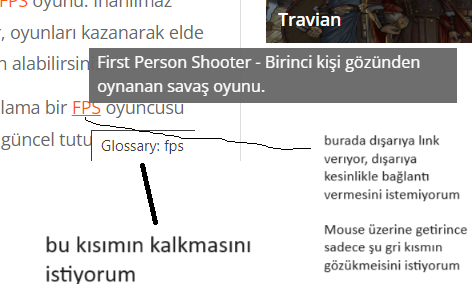
Sağ tıklayıp incele dediğimde burasını gösteriyor fakat inanın 1 saatir uğraştım yapamıyorum
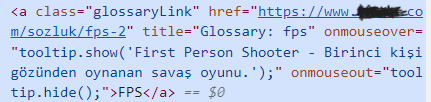
KOD
<?php
/*
Plugin Name: TooltipGlossary
Plugin URI: about:blank
Description: Parses posts for defined glossary terms and adds links to the static glossary page containing the definition and a tooltip with the definition.
Version: 1.2
Author: Jared Smith
*/

/*

    This program is free software; you can redistribute it and/or modify
    it under the terms of the GNU General Public License as published by
    the Free Software Foundation; either version 2 of the License, or
    (at your option) any later version.

    This program is distributed in the hope that it will be useful,
    but WITHOUT ANY WARRANTY; without even the implied warranty of
    MERCHANTABILITY or FITNESS FOR A PARTICULAR PURPOSE.  See the
    GNU General Public License for more details.

    You should have received a copy of the GNU General Public License
    along with this program; if not, write to the Free Software
    Foundation, Inc., 51 Franklin St, Fifth Floor, Boston, MA  02110-1301  USA
*/

//Add options needed for plugin
    add_option('red_glossaryOnlySingle', 0); //Show on Home and Category Pages or just single post pages?
    add_option('red_glossaryOnPages', 1); //Show on Pages or just posts?
    add_option('red_glossaryID', 0); //The ID of the main Glossary Page
    add_option('red_glossaryTooltip', 0); //Use tooltips on glossary items?
    add_option('red_glossaryDiffLinkClass', 0); //Use different class to style glossary list
    add_option('red_glossaryPermalink', 'glossary'); //Set permalink name
    add_option('red_glossaryFirstOnly', 0); //Search for all occurances in a post or only one?
// Register glossary custom post type
    function create_post_types(){
        $glossaryPermalink = get_option('red_glossaryPermalink');
        $args = array(
            'label' => 'Glossary',
            'description' => '',
            'public' => true,
            'show_ui' => true,
            '_builtin' => false,
            'capability_type' => 'post',
            'hierarchical' => false,
            'rewrite' => array('slug' => $glossaryPermalink),
            'query_var' => true,
            'supports' => array('title','editor','author',));
        register_post_type('glossary',$args);
        flush_rewrite_rules();
    }
    add_action( 'init', 'create_post_types');

//Function parses through post entries and replaces any found glossary terms with links to glossary term page.

    //Add tooltip stylesheet & javascript to page first
    function red_glossary_js () {
        $glossary_path = WP_PLUGIN_URL.'/'.str_replace(basename( __FILE__),"",plugin_basename(__FILE__));
        wp_enqueue_script('tooltip-js',$glossary_path.'tooltip.js');
    }
    add_action('wp_print_scripts', 'red_glossary_js');

    function red_glossary_css () {
        $glossary_path = WP_PLUGIN_URL.'/'.str_replace(basename( __FILE__),"",plugin_basename(__FILE__));
        wp_enqueue_style('tooltip-css',$glossary_path.'tooltip.css');
    }
    add_action('wp_print_styles', 'red_glossary_css');

function red_glossary_parse($content){

    //Run the glossary parser
    if (((!is_page() && get_option('red_glossaryOnlySingle') == 0) OR
    (!is_page() && get_option('red_glossaryOnlySingle') == 1 && is_single()) OR
    (is_page() && get_option('red_glossaryOnPages') == 1))){
        $glossary_index = get_children(array(
                                            'post_type'        => 'glossary',
                                            'post_status'    => 'publish',
                                            ));
        if ($glossary_index){
            $timestamp = time();
            foreach($glossary_index as $glossary_item){
                $timestamp++;
                $glossary_title = $glossary_item->post_title;
                $glossary_search = '/\b'.$glossary_title.'s*?\b(?=([^"]*"[^"]*")*[^"]*$)/i';
                $glossary_replace = '<a'.$timestamp.'>$0</a'.$timestamp.'>';
                if (get_option('red_glossaryFirstOnly') == 1) {
                    $content_temp = preg_replace($glossary_search, $glossary_replace, $content, 1);
                }
                else {
                    $content_temp = preg_replace($glossary_search, $glossary_replace, $content);
                }
                $content_temp = rtrim($content_temp);

                    $link_search = '/<a'.$timestamp.'>('.$glossary_item->post_title.'[A-Za-z]*?)<\/a'.$timestamp.'>/i';
                    if (get_option('red_glossaryTooltip') == 1) {
                        $link_replace = '<a class="glossaryLink" href="' . get_permalink($glossary_item) . '" title="Glossary: '. $glossary_title . '" onmouseover="tooltip.show(\'' . addslashes($glossary_item->post_content) . '\');" onmouseout="tooltip.hide();">$1</a>';
                    }
                    else {
                        $link_replace = '<a class="glossaryLink" href="' . get_permalink($glossary_item) . '" title="Glossary: '. $glossary_title . '">$1</a>';
                    }
                    $content_temp = preg_replace($link_search, $link_replace, $content_temp);
                    $content = $content_temp;
            }
        }
    }
    return $content;
}


//Make sure parser runs before the post or page content is outputted
add_filter('the_content', 'red_glossary_parse');

//create the actual glossary
function red_glossary_createList($content){
    $glossaryPageID = get_option('red_glossaryID');
    if (is_numeric($glossaryPageID) && is_page($glossaryPageID)){
        $glossary_index = get_children(array(
                                            'post_type'        => 'glossary',
                                            'post_status'    => 'publish',
                                            'orderby'        => 'title',
                                            'order'            => 'ASC',
                                            ));
        if ($glossary_index){
            $content .= '<div id="glossaryList">';
            //style links based on option
            if (get_option('red_glossaryDiffLinkClass') == 1) {
                $glossary_style = 'glossaryLinkMain';
            }
            else {
                $glossary_style = 'glossaryLink';
            }
            foreach($glossary_index as $glossary_item){
                //show tooltip based on user option
                if (get_option('red_glossaryTooltip') == 1) {
                    $content .= '<p><a class="' . $glossary_style . '" href="' . get_permalink($glossary_item) . '" onmouseover="tooltip.show(\'' . addslashes($glossary_item->post_content) . '\');" onmouseout="tooltip.hide();">'. $glossary_item->post_title . '</a></p>';
                }
                else {
                    $content .= '<p><a class="' . $glossary_style . '" href="' . get_permalink($glossary_item) . '">'. $glossary_item->post_title . '</a></p>';
                }
            }
            $content .= '</div>';
        }
    }
    return $content;
}

add_filter('the_content', 'red_glossary_createList');


//admin page user interface
add_action('admin_menu', 'glossary_menu');

function glossary_menu() {
  add_options_page('TooltipGlossary Options', 'TooltipGlossary', 8, __FILE__, 'glossary_options');
}

function glossary_options() {
    if (isset($_POST["red_glossarySave"])) {
        //update the page options
        update_option('red_glossaryID',$_POST["red_glossaryID"]);
        update_option('red_glossaryID',$_POST["red_glossaryPermalink"]);
        $options_names = array('red_glossaryOnlySingle', 'red_glossaryOnPages', 'red_glossaryTooltip', 'red_glossaryDiffLinkClass', 'red_glossaryFirstOnly');
        foreach($options_names as $option_name){
            if ($_POST[$option_name] == 1) {
                update_option($option_name,1);
            }
            else {
                update_option($option_name,0);
            }
        }
    }
    ?>

<div class="wrap">
  <h2>TooltipGlossary</h2>
  <form method="post" action="options.php">
    <?php wp_nonce_field('update-options');    ?>
    <table class="form-table">
      <tr valign="top">
        <th scope="row">Main Glossary Page</th>
        <td><input type="text" name="red_glossaryID" value="<?php echo get_option('red_glossaryID'); ?>" /></td>
        <td colspan="2">Enter the page ID of the page you would like to use as the glossary (list of terms).  The page will be generated automatically for you on the specified page (so you should leave the content blank).  This is optional - terms will still be highlighted in relevant posts/pages but there won't be a central list of terms if this is left blank.</td>
      </tr>
      <tr valign="top">
        <th scope="row">Only show terms on single pages?</th>
        <td><input type="checkbox" name="red_glossaryOnlySingle" <?php checked(true, get_option('red_glossaryOnlySingle')); ?> value="1" /></td>
        <td colspan="2">Select this option if you wish to only highlight glossary terms when viewing a single page/post.  This can be used so terms aren't highlighted on your homepage for example.</td>
      </tr>
      <tr valign="top">
        <th scope="row">Highlight terms on pages?</th>
        <td><input type="checkbox" name="red_glossaryOnPages" <?php checked(true, get_option('red_glossaryOnPages')); ?> value="1" /></td>
        <td colspan="2">Select this option if you wish for the glossary to highlight terms on pages as well as posts.  With this deselected, only posts will be searched for matching glossary terms.</td>
      </tr>
      <tr valign="top">
        <th scope="row">Use tooltip?</th>
        <td><input type="checkbox" name="red_glossaryTooltip" <?php checked(true, get_option('red_glossaryTooltip')); ?> value="1" /></td>
        <td colspan="2">Select this option if you wish for the definition to show in a tooltip when the user hovers over the term.  The tooltip can be style differently using the tooltip.css and tooltip.js files in the plugin folder.</td>
      </tr>
      <tr valign="top">
        <th scope="row">Style main glossary page differently?</th>
        <td><input type="checkbox" name="red_glossaryDiffLinkClass" <?php checked(true, get_option('red_glossaryDiffLinkClass')); ?> value="1" /></td>
        <td colspan="2">Select this option if you wish for the links in the main glossary listing to be styled differently than the term links.  By selecting this option you will be able to use the class 'glossaryLinkMain' to style only the links on the glossary page otherwise they will retain the class 'glossaryLink' and will be identical to the linked terms.</td>
      </tr>
      <tr valign="top">
        <th scope="row">Glossary Permalink</th>
        <td><input type="text" name="red_glossaryPermalink" value="<?php echo get_option('red_glossaryPermalink'); ?>" /></td>
        <td colspan="2">Enter the name you would like to use for the permalink to the glossary.  By default this is glossary, however you can update this if you wish. eg. http://mysite.com/<strong>glossary</strong>/term</td>
      </tr>
      <tr valign="top">
        <th scope="row">Highlight first occurance only?</th>
        <td><input type="checkbox" name="red_glossaryFirstOnly" <?php checked(true, get_option('red_glossaryFirstOnly')); ?> value="1" /></td>
        <td colspan="2">Select this option if you want to only highlight the first occurance of each term on a page/post.</td>
      </tr>
    </table>
    <input type="hidden" name="action" value="update" />
    <input type="hidden" name="page_options" value="red_glossaryID,red_glossaryOnlySingle,red_glossaryOnPages,red_glossaryTooltip,red_glossaryDiffLinkClass,red_glossaryPermalink,red_glossaryFirstOnly" />
    <p class="submit">
      <input type="submit" class="button-primary" value="<?php _e('Save Changes') ?>" name="red_glossarySave" />
    </p>
  </form>
</div>
<?php
}
?> 