• 17-08-2019, 17:59:31
    #10
    <?php
    $args = array(
        'post_type' => 'post',
        'posts_per_page' => -1,
    );
    if ( $wpost->have_posts() ) :
        while ( $wpost->have_posts() ) : $wpost->the_post();
        $update_params = array(
            'ID'           => get_the_ID(),
            'post_date'   => current_time('mysql'),
        );
        wp_update_post( $update_params );
    endwhile; wp_reset_postdata(); endif;
    ?>


    Test edemedim maalesef müsait bir sistemim yoktu test için. Bu kodu index.php sayfanıza ekleyin. Sayfayı bir kere yenilemeniz yeterli olacaktır. Tüm konuların tarihi o anki zamanınıza güncellenecek.

    Eğer temanız index.php yi kullanmıyorsa aşağıdaki kodu fonksiyon dosyanıza ekleyin. Herhangi bir sayfayı bir kere yenilemeniz yeterli olacaktır.

    function post_date_update(){
        $args = array(
            'post_type' => 'post',
            'posts_per_page' => -1,
        );
        if ( $wpost->have_posts() ) :
            while ( $wpost->have_posts() ) : $wpost->the_post();
            $update_params = array(
                'ID'           => get_the_ID(),
                'post_date'   => current_time('mysql'),
            );
            wp_update_post( $update_params );
        endwhile; wp_reset_postdata(); endif;
    }
    add_action( 'init', 'post_date_update' );
    Tabi bu işlemi yapmadan önce veri tabanı yedeğinizi alın muhakkak.
  • 17-08-2019, 18:00:14
    #11
    Kategori Moderatörü
    zego adlı üyeden alıntı: mesajı görüntüle
    wp_posts içerisinde post_date bölümünden toplu değişebiliriz kod ile.

    UPDATE wp_posts SET post_date = replace(post_date, '2017', '2018');

    Bu tarz alternatif kodları araştır bulabilirsin ama eklenti daha zahmetsiz
    Anladım hocam teşekkürler kod hakkında çok bilgim yok sadece bu dediğiniz alana kadar geldim devamı olmadı artık eklentiyi deneyeyim olmazsa saolun


    Ecancan adlı üyeden alıntı: mesajı görüntüle
    <?php
    $args = array(
        'post_type' => 'post',
        'posts_per_page' => -1,
    );
    if ( $wpost->have_posts() ) :
        while ( $wpost->have_posts() ) : $wpost->the_post();
        $update_params = array(
            'ID'           => get_the_ID(),
            'post_date'   => current_time('mysql'),
        );
        wp_update_post( $update_params );
    endwhile; wp_reset_postdata(); endif;
    ?>
    Test edemedim maalesef müsait bir sistemim yoktu test için. Bu kodu index.php sayfanıza ekleyin. Sayfayı bir kere yenilemeniz yeterli olacaktır. Tüm konuların tarihi o anki zamanınıza güncellenecek.

    Eğer temanız index.php yi kullanmıyorsa aşağıdaki kodu fonksiyon dosyanıza ekleyin. Herhangi bir sayfayı bir kere yenilemeniz yeterli olacaktır.

    function post_date_update(){
        $args = array(
            'post_type' => 'post',
            'posts_per_page' => -1,
        );
        if ( $wpost->have_posts() ) :
            while ( $wpost->have_posts() ) : $wpost->the_post();
            $update_params = array(
                'ID'           => get_the_ID(),
                'post_date'   => current_time('mysql'),
            );
            wp_update_post( $update_params );
        endwhile; wp_reset_postdata(); endif;
    }
    add_action( 'init', 'post_date_update' );
    Tabi bu işlemi yapmadan önce veri tabanı yedeğinizi alın muhakkak.
    Ana sayfaydaki index.php kodu dimi hocam en altına yapıştırdım ama olmadı
  • 17-08-2019, 18:06:50
    #12
    SrdL adlı üyeden alıntı: mesajı görüntüle
    Anladım hocam teşekkürler kod hakkında çok bilgim yok sadece bu dediğiniz alana kadar geldim devamı olmadı artık eklentiyi deneyeyim olmazsa saolun


    Ana sayfaydaki index.php kodu dimi hocam en altına yapıştırdım ama olmadı
    function post_date_update(){
        $args = array(
            'post_type' => 'post',
            'posts_per_page' => -1,
        );
        $wpost = new WP_Query($args);
        if ( $wpost->have_posts() ) :
            while ( $wpost->have_posts() ) : $wpost->the_post();
            $update_params = array(
                'ID'           => get_the_ID(),
                'post_date'   => current_time('mysql'),
            );
            wp_update_post( $update_params );
        endwhile; wp_reset_postdata(); endif;
    }
    add_action( 'init', 'post_date_update' );
    Bunu functions.php dosyasına yapıştırın. Dosyanız şifreli değil ise. Güncel hali budur.
  • 17-08-2019, 19:06:46
    #13
    Kategori Moderatörü
    Ecancan adlı üyeden alıntı: mesajı görüntüle
    function post_date_update(){
        $args = array(
            'post_type' => 'post',
            'posts_per_page' => -1,
        );
        $wpost = new WP_Query($args);
        if ( $wpost->have_posts() ) :
            while ( $wpost->have_posts() ) : $wpost->the_post();
            $update_params = array(
                'ID'           => get_the_ID(),
                'post_date'   => current_time('mysql'),
            );
            wp_update_post( $update_params );
        endwhile; wp_reset_postdata(); endif;
    }
    add_action( 'init', 'post_date_update' );
    Bunu functions.php dosyasına yapıştırın. Dosyanız şifreli değil ise. Güncel hali budur.
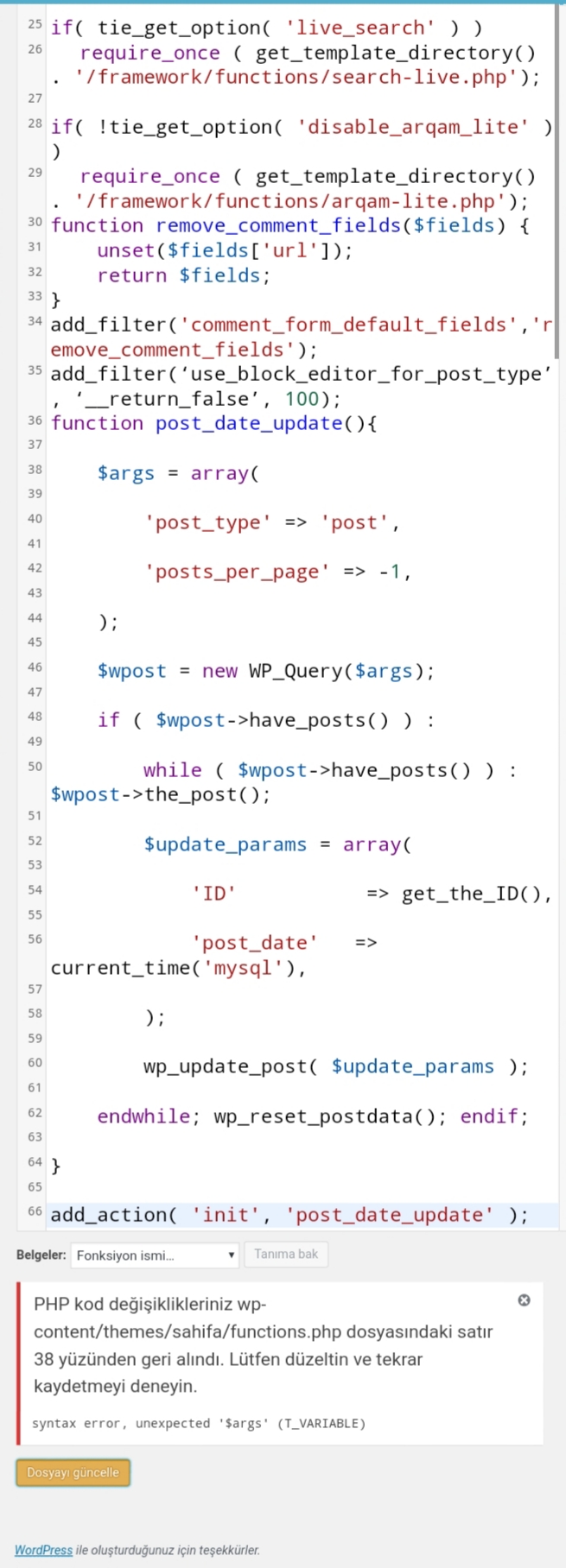
    syntax error, unexpected '$args' (T_VARIABLE)Bu hatayı aldım hocam
  • 17-08-2019, 19:22:42
    #14
    SrdL adlı üyeden alıntı: mesajı görüntüle
    syntax error, unexpected '$args' (T_VARIABLE)Bu hatayı aldım hocam
    Kodu test ettim kodda herhangi bir problem mevcut değil. Nereye ekleme yapıyorsunzu ekran görüntüsü ile konuya ekleyin.
  • 17-08-2019, 19:38:47
    #15
    Kategori Moderatörü
    Ecancan adlı üyeden alıntı: mesajı görüntüle
    Kodu test ettim kodda herhangi bir problem mevcut değil. Nereye ekleme yapıyorsunzu ekran görüntüsü ile konuya ekleyin.
    Functions.php kodlarin en altina hocam eklicem az sonra
  • 17-08-2019, 19:48:59
    #16
    zego adlı üyeden alıntı: mesajı görüntüle
    wp_posts içerisinde post_date bölümünden toplu değişebiliriz kod ile.

    UPDATE wp_posts SET post_date = replace(post_date, '2017', '2018');

    Bu tarz alternatif kodları araştır bulabilirsin ama eklenti daha zahmetsiz
    Sifirlamak yok mu mesela tum tarihler sifirlansin
  • 17-08-2019, 19:50:36
    #17
    Kategori Moderatörü
    Ecancan adlı üyeden alıntı: mesajı görüntüle
    Kodu test ettim kodda herhangi bir problem mevcut değil. Nereye ekleme yapıyorsunzu ekran görüntüsü ile konuya ekleyin.

    Mobilden ekliyorum hocam
  • 17-08-2019, 20:26:04
    #18
    MeMoLi adlı üyeden alıntı: mesajı görüntüle
    Sifirlamak yok mu mesela tum tarihler sifirlansin
    Valla DELETE komutunu mysql tabanında nasıl koda döküyoruz bilmiyorum. Etiket silme vs. var ama tarih silme olayını görmedim hiç hocam yalan olmasın.