
Woocommerce varyasyon hk.
2
●590
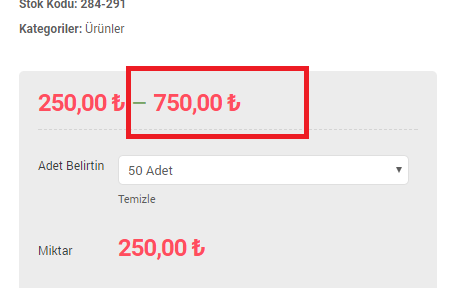
- 18-02-2018, 17:15:13Herkese iyi günler bir sorun olacaktı bilen arkadaşlar yardımcı olurlarsa sevinirim. 1 ürün için 5-10 çeşit seçenek ayarladıktan sonra aşağıdaki gibi en ucuz ve en pahalı fiyat görünüyor ürün menüsünde bunun resimde işaretlediğim en yüksek fiyat kısmını nasıl kaldırabiliriz.

- 18-02-2018, 17:33:04 Üyeliği durdurulduAşağıdaki kodu temanın functions.php dosyası içine ekle sorunun çözülür.
add_filter( 'woocommerce_variable_sale_price_html', 'wc_wc20_variation_price_format', 10, 2 ); add_filter( 'woocommerce_variable_price_html', 'wc_wc20_variation_price_format', 10, 2 ); function wc_wc20_variation_price_format( $price, $product ) { // Main Price $prices = array( $product->get_variation_price( 'min', true ), $product->get_variation_price( 'max', true ) ); $price = $prices[0] !== $prices[1] ? sprintf( __( '%1$s', 'woocommerce' ), wc_price( $prices[0] ) ) : wc_price( $prices[0] ); // Sale Price $prices = array( $product->get_variation_regular_price( 'min', true ), $product->get_variation_regular_price( 'max', true ) ); sort( $prices ); $saleprice = $prices[0] !== $prices[1] ? sprintf( __( '%1$s', 'woocommerce' ), wc_price( $prices[0] ) ) : wc_price( $prices[0] ); if ( $price !== $saleprice ) { $price = '<del>' . $saleprice . '</del> <ins>' . $price . '</ins>'; } return $price; } - 18-02-2018, 17:55:27Çok teşekkür ederim işime yaradı hocamDKA adlı üyeden alıntı: mesajı görüntüle


