• 31-10-2015, 00:37:50
    #1
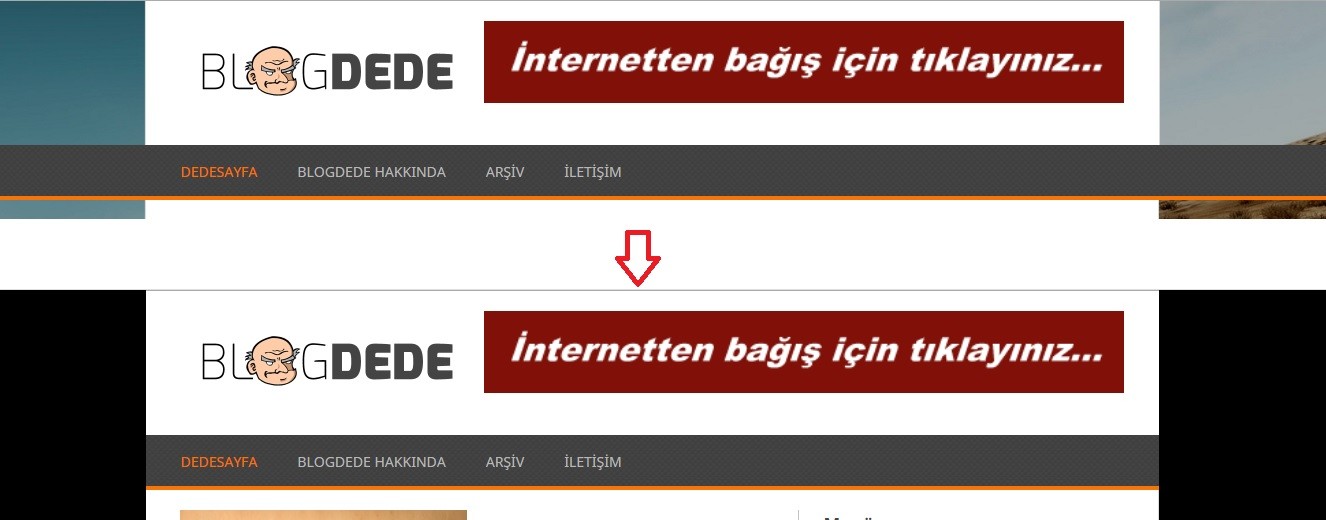
    Arkadaşlar menü'yü aşağıdaki gibi yapmak istiyorum. Şuan durum üstteki gibi ama alttakine çevirmek istiyorum. Yardımcı olursanız sevinirim. Yardımlar için şimdiden teşekkürler.


    /*-[ Navigation ]-----------------*/
    .secondary-navigation .children li .sf-sub-indicator { display: none }
    .secondary-navigation {
        display: block;
        float: left;
        width: 100%;
        background: url(images/bg1.jpg) 0 0 repeat;
    }
    .secondary-navigation a {
        font-size: 14px;
        line-height: 30px;
        color: #b8b8b8;
        text-align: left;
        text-decoration: none;
        margin: 0 30px 0 10px;
        text-transform: uppercase;
    }
    .secondary-navigation a .sub {
        font-size: 11px;
        font-weight: normal;
        color: #9B9B9B;
    }
    .sf-js-enabled li a.sf-with-ul { padding-right: 0 }
    .sf-js-enabled li  ul.sf-with-ul { padding-right: 20px }
    #navigation .sf-sub-indicator {
        display: block;
        width: 11px;
        overflow: hidden;
        position: absolute;
        right: 16px;
        top: -1px;
    }
    #navigation ul ul .sf-sub-indicator { top: 8px }
    #navigation {
        margin: 0 auto;
        font-size: 13px;
        width: 96%;
        max-width: 942px;
    }
    #navigation select { display: none }
    #navigation ul { margin: 0 auto }
    #navigation .menu {
        width: 100%;
        float: left;
        margin: 12px 0 9px;
    }
    #navigation ul li {
        float: left;
        position: relative;
    }
    #navigation ul li:first-child a { margin-left: 0 }
    #navigation ul .header-search { float: right }
    #navigation > ul > li:last-child {
        border-right: none;
    }
    #search-image {
        width: 32px;
        height: 29px;
        background: url(images/search2.png) center center;
        cursor: pointer;
        text-indent: -999px;
        -webkit-border-top-right-radius: 2px;
        -webkit-border-bottom-right-radius: 2px;
        -moz-border-radius-topright: 2px;
        -moz-border-radius-bottomright: 2px;
        border-top-right-radius: 2px;
        border-bottom-right-radius: 2px;
        border: 1px solid #777 !important;
        border-left: none !important;
    }
    #navigation ul li a, #navigation ul li a:link, #navigation ul li a:visited {
        overflow: hidden;
        display: block;
    }
    #navigation > ul > .current a {
        background: transparent;
        color: #5a5a5a !important;
    }
    #navigation ul li li {
        background: #3D3D3D;
        border: 1px solid #777;
        border-bottom: 0;
    }
    #navigation ul ul {
        position: absolute;
        width: 190px;
        padding: 20px 0 0 0;
        padding-top: 7px;
        z-index: 400;
        font-size: 12px;
        color: #798189;
        border-bottom: 1px solid #eee;
    }
    #navigation ul ul li { padding: 0 }
    #navigation ul ul a, #navigation ul ul a:link, #navigation ul ul a:visited {
        padding: 9px 20px;
        position: relative;
        width: 150px;
        border-left: 0;
        background: transparent;
        border-right: 0;
        -moz-border-radius: 0;
        -webkit-border-radius: 0;
        border-radius: 0;
        border-bottom: 1px solid   rgba(255, 255, 255, 0.05);
        margin: 0;
        line-height: 20px;
    }
    #navigation ul ul li:first-child a { }
    #navigation ul ul li:last-child a { border-bottom: none }
    #navigation ul ul {
        opacity: 0;
        left: -999em;
    }
    #navigation ul li:hover ul {
        left: auto;
        opacity: 1;
    }
    #navigation ul ul ul { top: -8px }
    #navigation li:hover ul ul, #navigation li:hover ul ul ul, #navigation li:hover ul ul ul ul {
        left: -999em;
        opacity: 0;
    }
    #navigation li:hover ul, #navigation li li:hover ul, #navigation li li li:hover ul, #navigation li li li li:hover ul {
        opacity: 1;
        left: 190px;
    }
  • 31-10-2015, 00:55:08
    #2
    Kimlik doğrulama veya yönetimden onay bekliyor.
    BydlL adlı üyeden alıntı: mesajı görüntüle
    Arkadaşlar menü'yü aşağıdaki gibi yapmak istiyorum. Şuan durum üstteki gibi ama alttakine çevirmek istiyorum. Yardımcı olursanız sevinirim. Yardımlar için şimdiden teşekkürler.


    /*-[ Navigation ]-----------------*/
    .secondary-navigation .children li .sf-sub-indicator { display: none }
    .secondary-navigation {
        display: block;
        float: left;
        width: 100%;
        background: url(images/bg1.jpg) 0 0 repeat;
    }
    .secondary-navigation a {
        font-size: 14px;
        line-height: 30px;
        color: #b8b8b8;
        text-align: left;
        text-decoration: none;
        margin: 0 30px 0 10px;
        text-transform: uppercase;
    }
    .secondary-navigation a .sub {
        font-size: 11px;
        font-weight: normal;
        color: #9B9B9B;
    }
    .sf-js-enabled li a.sf-with-ul { padding-right: 0 }
    .sf-js-enabled li  ul.sf-with-ul { padding-right: 20px }
    #navigation .sf-sub-indicator {
        display: block;
        width: 11px;
        overflow: hidden;
        position: absolute;
        right: 16px;
        top: -1px;
    }
    #navigation ul ul .sf-sub-indicator { top: 8px }
    #navigation {
        margin: 0 auto;
        font-size: 13px;
        width: 96%;
        max-width: 942px;
    }
    #navigation select { display: none }
    #navigation ul { margin: 0 auto }
    #navigation .menu {
        width: 100%;
        float: left;
        margin: 12px 0 9px;
    }
    #navigation ul li {
        float: left;
        position: relative;
    }
    #navigation ul li:first-child a { margin-left: 0 }
    #navigation ul .header-search { float: right }
    #navigation > ul > li:last-child {
        border-right: none;
    }
    #search-image {
        width: 32px;
        height: 29px;
        background: url(images/search2.png) center center;
        cursor: pointer;
        text-indent: -999px;
        -webkit-border-top-right-radius: 2px;
        -webkit-border-bottom-right-radius: 2px;
        -moz-border-radius-topright: 2px;
        -moz-border-radius-bottomright: 2px;
        border-top-right-radius: 2px;
        border-bottom-right-radius: 2px;
        border: 1px solid #777 !important;
        border-left: none !important;
    }
    #navigation ul li a, #navigation ul li a:link, #navigation ul li a:visited {
        overflow: hidden;
        display: block;
    }
    #navigation > ul > .current a {
        background: transparent;
        color: #5a5a5a !important;
    }
    #navigation ul li li {
        background: #3D3D3D;
        border: 1px solid #777;
        border-bottom: 0;
    }
    #navigation ul ul {
        position: absolute;
        width: 190px;
        padding: 20px 0 0 0;
        padding-top: 7px;
        z-index: 400;
        font-size: 12px;
        color: #798189;
        border-bottom: 1px solid #eee;
    }
    #navigation ul ul li { padding: 0 }
    #navigation ul ul a, #navigation ul ul a:link, #navigation ul ul a:visited {
        padding: 9px 20px;
        position: relative;
        width: 150px;
        border-left: 0;
        background: transparent;
        border-right: 0;
        -moz-border-radius: 0;
        -webkit-border-radius: 0;
        border-radius: 0;
        border-bottom: 1px solid   rgba(255, 255, 255, 0.05);
        margin: 0;
        line-height: 20px;
    }
    #navigation ul ul li:first-child a { }
    #navigation ul ul li:last-child a { border-bottom: none }
    #navigation ul ul {
        opacity: 0;
        left: -999em;
    }
    #navigation ul li:hover ul {
        left: auto;
        opacity: 1;
    }
    #navigation ul ul ul { top: -8px }
    #navigation li:hover ul ul, #navigation li:hover ul ul ul, #navigation li:hover ul ul ul ul {
        left: -999em;
        opacity: 0;
    }
    #navigation li:hover ul, #navigation li li:hover ul, #navigation li li li:hover ul, #navigation li li li li:hover ul {
        opacity: 1;
        left: 190px;
    }
    Site linkini yazsan daha faydalı olurdu.
  • 31-10-2015, 00:59:55
    #3
    buraqgo adlı üyeden alıntı: mesajı görüntüle
    Site linkini yazsan daha faydalı olurdu.
    blogdede --- com

    Ben biraz oynadım temayla ama baştan savma oldu gibi.