
baktığım zaman eklentilerden aşırı fazla kullanışlı oluyorlar ve yapıları çok basit
özellikle sziden kullandığınız snippetleri bekliyorum.
örneğin bir tane paylaşım ben yapmış olayım.
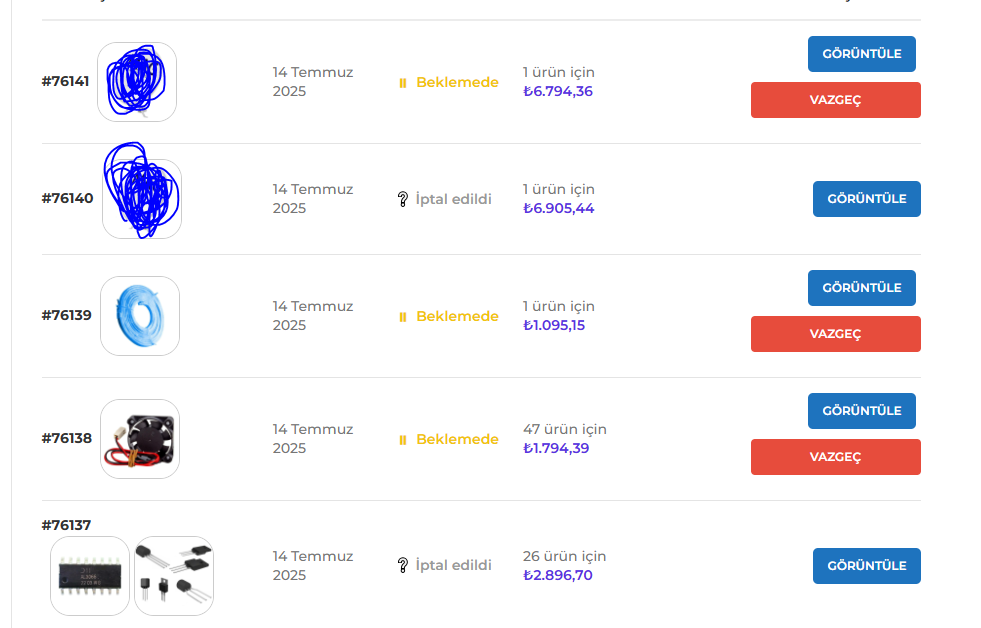
örneğin siparişlerim sayfasında ürün resimlerini gösteren snippet
add_action( 'woocommerce_my_account_my_orders_column_order-number', 'add_thumbnails_before_order_number', 20, 1 );
function add_thumbnails_before_order_number( $order ) {
    // Sipariş numarasını göster
    echo '<a href="' . esc_url( wc_get_endpoint_url( 'view-order', $order->get_id() ) ) . '">' . '#' . $order->get_order_number() . '</a>';

    // Ürün görselleri
    echo '<span style="margin-left:8px; display:inline-flex; align-items:center;">';

    $count = 0; // Sayaç

    foreach ( $order->get_items() as $item ) {
        if ( $count >= 2 ) break; // En fazla 3 resim

        $product = $item->get_product();
        if ( ! $product ) continue;

        $image_id = $product->get_image_id();
        if ( ! $image_id ) continue;

        $image_url = wp_get_attachment_url( $image_id );
        $image_alt = esc_attr( $product->get_name() );

        echo '<span style="display:inline-block; width:80px; height:80px; margin-right:4px;">';
        echo '<img src="' . esc_url( $image_url ) . '" alt="' . $image_alt . '" style="border-radius:20px;width:100%; height:100%; object-fit:cover; border:1px solid #ccc;" />';
        echo '</span>';

        $count++;
    }

    echo '</span>';
}
iptal butonu// Add "Cancel" button allowed statuses with 3 days delay (senin verdiğin kod)
add_filter( 'woocommerce_valid_order_statuses_for_cancel', 'wpsh_add_cancel_button', 20, 2 );
function wpsh_add_cancel_button( $statuses, $order = '' ){
// Butonun görüneceği durumlar
$custom_statuses = array( 'pending', 'processing', 'on-hold', 'failed' );
// Gün cinsinden iptal için süre (3 gün)
$duration = 3;
// Eğer $order nesnesi yoksa, GET ile almaya çalış
if ( ! is_object( $order ) && isset( $_GET['order_id'] ) ) {
$order = wc_get_order( absint( $_GET['order_id'] ) );
}
// Zaman hesaplamaları
$delay = $duration * 24 * 60 * 60;
$date_created_time = strtotime( $order->get_date_created() );
$now = time();
// Eğer oluşturulma zamanı + süre henüz geçmemişse, iptal edilebilir durumları döndür
if ( ( $date_created_time + $delay ) >= $now ) {
return $custom_statuses;
}
return $statuses;
}
// İptal butonuna stil eklemek için CSS'i sayfa head'ine ekle
add_action( 'wp_head', 'custom_cancel_button_styles' );
function custom_cancel_button_styles() {
if ( is_account_page() ) {
echo '<style>
/* İptal Et butonu kırmızı, ortalı, blok eleman */
.woocommerce-account .woocommerce-orders-table__cell-order-actions .button.cancel {
background-color: #e74c3c !important;
border-color: #e74c3c !important;
color: #fff !important;
text-align: center;
width: 170px;
font-weight: 600;
border-radius: 4px;
padding: 8px 12px;
box-sizing: border-box;
cursor: pointer;
margin-top: 10px; /* Üst boşluk */
margin-bottom: 10px; /* Alt boşluk */
}
/* Butonun bulunduğu hücrede ortalama */
.woocommerce-account .woocommerce-orders-table__cell-order-actions {
text-align: center;
}
</style>';
}
}tekrar al butonu// Add "Order again" button to Woocommerce my account page
add_filter( 'woocommerce_my_account_my_orders_actions', 'wpsh_order_again_button', 9999, 2 );
function wpsh_order_again_button( $actions, $order ) {
if ( $order->has_status( 'completed' ) ) {
$actions['order-again'] = array(
'url' => wp_nonce_url( add_query_arg( 'order_again', $order->get_id(), wc_get_cart_url() ), 'woocommerce-order_again' ),
'name' => __( 'Order again', 'woocommerce' ),
);
}
return $actions;
}renkli sipariş durumları add_filter( 'woocommerce_my_account_my_orders_columns', 'custom_replace_my_orders_columns' );
function custom_replace_my_orders_columns( $columns ) {
// Sadece istediğimiz sütunları tutup kendi "Durum" sütunumuzu ekliyoruz
return array(
'order-number' => __( 'Sipariş', 'woocommerce' ),
'order-date' => __( 'Tarih', 'woocommerce' ),
'status' => __( 'Durum', 'woocommerce' ), // Bizim özel sütun
'order-total' => __( 'Toplam', 'woocommerce' ),
'order-actions'=> __( 'İşlemler', 'woocommerce' ),
);
}
add_action( 'woocommerce_my_account_my_orders_column_status', 'custom_order_status_with_icon_and_color' );
function custom_order_status_with_icon_and_color( $order ) {
$status = $order->get_status();
$label = wc_get_order_status_name( $status );
$icons = [
'on-hold' => ['icon' => '⏸', 'color' => '#f1c40f'],
'completed' => ['icon' => '✅', 'color' => '#27ae60'],
'processing' => ['icon' => '🔄', 'color' => '#3498db'],
];
$icon = isset( $icons[ $status ] ) ? $icons[ $status ]['icon'] : '❔';
$color = isset( $icons[ $status ] ) ? $icons[ $status ]['color'] : '#999';
echo '<span style="color:' . esc_attr( $color ) . '; font-weight: 600; display: inline-flex; align-items: center;">'
. '<span style="margin-right: 6px;">' . esc_html( $icon ) . '</span>'
. esc_html( $label )
. '</span>';
} 
