• 03-11-2024, 13:31:54
    #1
    Merhaba,

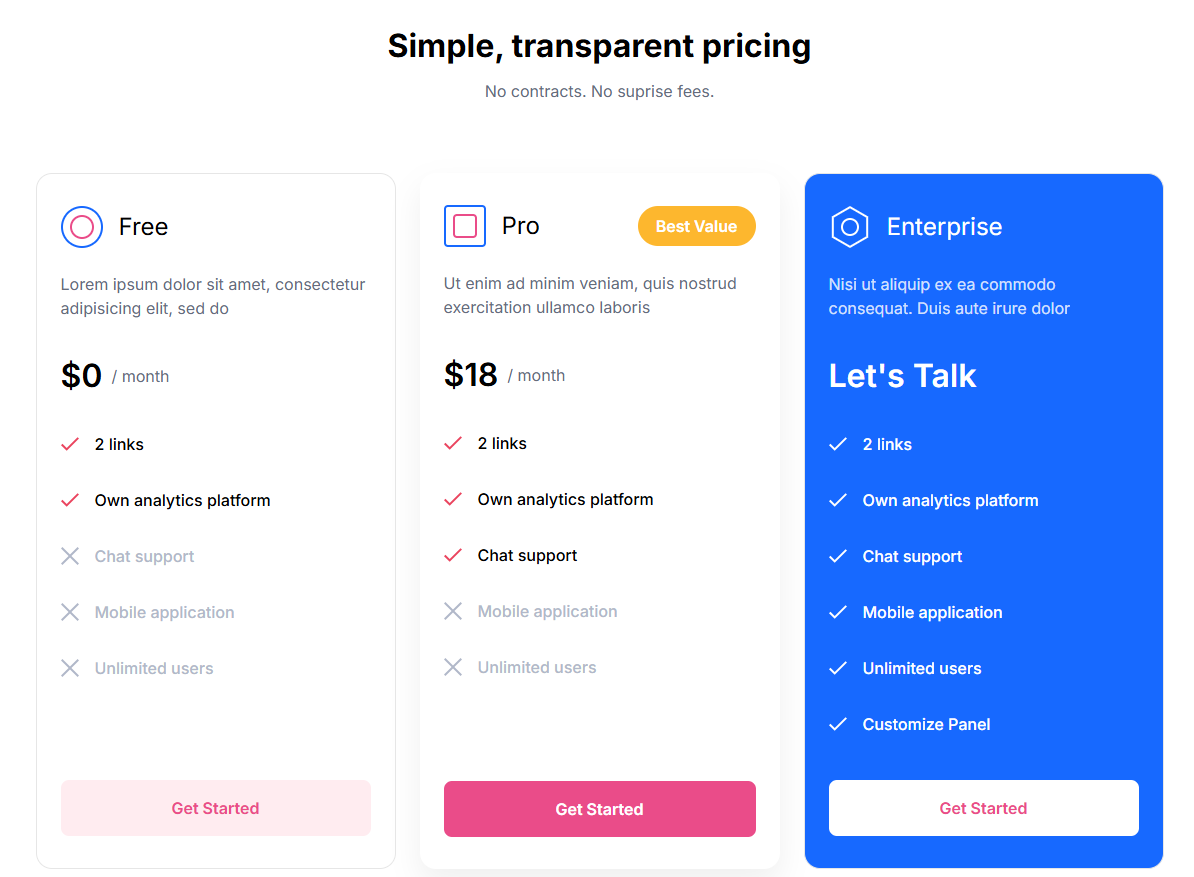
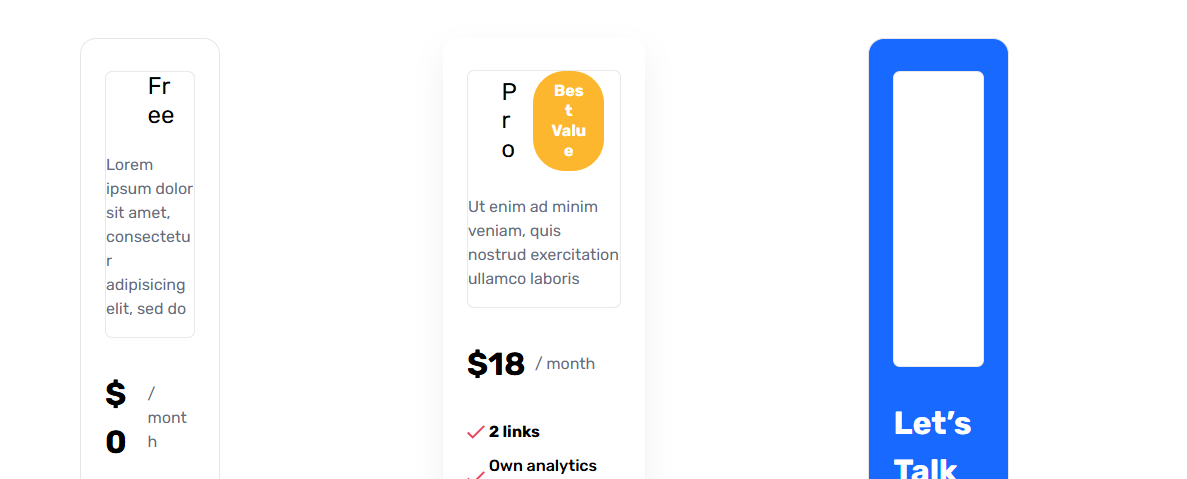
    Aşağıdaki kodu wordpress siteme eklemek istiyorum aslında kod çalışıyor sorun yok ama wordpress siteme eklediğimde bozuluyor.
    Kodu test edebilecek arkadaşlardan destek bekliyorum.

    https://www.w3schools.com/css/tryit....howto_internal

    Kod demo: https://codepen.io/chaoticpotato/pen/zYEPRYG
    <!DOCTYPE html>
    <html>
    <head>
    <style>
    @import url("https://fonts.googleapis.com/css2?family=Inter:wght@400;500;600;700&display=swap");
    :root {
      --baseColor: #656c7c;
      --baseSize: 16px;
      --baseLineHeight: 1.5;
      --fontFamily: Inter, sans-serif;
      --pink: #ea4c89;
      --pinkLight: #ffecf0;
      --blue: #1769ff;
      --redTick: url("data:image/svg+xml,%3Csvg width='18' height='14' fill='none' xmlns='http://www.w3.org/2000/svg'%3E%3Cpath d='M16.552.134 5.717 10.97 1.448 6.701 0 8.149l5.717 5.717L18 1.583 16.552.134Z' fill='%23EA455F'/%3E%3C/svg%3E%0A");
      --whiteTick: url("data:image/svg+xml,%3Csvg width='18' height='14' fill='none' xmlns='http://www.w3.org/2000/svg'%3E%3Cpath d='M16.552.134 5.717 10.97 1.448 6.701 0 8.149l5.717 5.717L18 1.583 16.552.134Z' fill='%23FFFFFF'/%3E%3C/svg%3E%0A");
      --close: url("data:image/svg+xml,%3Csvg width='18' height='18' fill='none' xmlns='http://www.w3.org/2000/svg'%3E%3Cpath d='M18 1.414 16.586 0 9 7.586 1.414 0 0 1.414 7.586 9 0 16.586 1.414 18 9 10.414 16.586 18 18 16.586 10.414 9 18 1.414Z' fill='%23B1B8C9'/%3E%3C/svg%3E");
      --entpIcon: url("data:image/svg+xml,%3Csvg width='42' height='42' fill='none' xmlns='http://www.w3.org/2000/svg'%3E%3Cpath d='M3.813 11.077 21 1.155l17.187 9.922v19.846L21 40.845 3.813 30.923V11.077Z' stroke='%23fff' stroke-width='2'/%3E%3Ccircle cx='21' cy='21' r='8' stroke='%23fff' stroke-width='2'/%3E%3C/svg%3E");
    }
    
    * {
      box-sizing: border-box;
    }
    
    html {
      color: var(--baseColor);
      font-family: var(--fontFamily);
      font-size: var(--baseSize);
      line-height: var(--baseLineHeight);
    }
    
    body {
      margin: 0;
    }
    
    .plans {
      width: 96%;
      max-width: 1128px;
      margin: 0 auto;
    }
    .plans__container {
      padding: 1rem 0 2rem;
    }
    
    .plansHero {
      text-align: center;
      padding: 5rem 0 4.5rem;
      line-height: 1.21;
    }
    .plansHero__title {
      font-weight: 700;
      font-size: 2rem;
      margin: 0 0 1rem 0;
      color: #000;
    }
    .plansHero__subtitle {
      margin: 0;
    }
    
    .planItem {
      --border: 1px solid #e6e6e6;
      --bgColor: #fff;
      --boxShadow: none;
      background-color: var(--bgColor);
      border: var(--border);
      border-radius: 1rem;
      box-shadow: var(--boxShadow);
      padding: 2rem 1.5rem;
      display: inline-flex;
      flex-direction: column;
    }
    .planItem__container {
      --direction: column;
      display: grid;
      grid-auto-flow: var(--direction);
      grid-auto-columns: 1fr;
      gap: 1.5rem;
    }
    .planItem .price {
      --priceMargin: 2rem 0;
    }
    .planItem--pro {
      --border: 0;
      --boxShadow: 0px 14px 30px rgba(204, 204, 204, 0.32);
    }
    .planItem--pro .label {
      --labelBg: #fdb72e;
      --labelColor: #fff;
    }
    .planItem--entp {
      --bgColor: var(--blue);
    }
    .planItem--entp .card {
      --titleColor: #fff;
      --descColor: rgb(255 255 255 / 80%);
    }
    .planItem--entp .card__icon {
      background-image: var(--entpIcon);
      background-size: cover;
    }
    .planItem--entp .price,
    .planItem--entp .featureList {
      --color: #fff;
    }
    .planItem--entp .featureList {
      --icon: var(--whiteTick);
    }
    .planItem .button {
      margin-top: auto;
    }
    
    .button {
      --bgColor: var(--pinkLight);
      --color: var(--pink);
      --shadowColor: rgb(234 76 137 / 30%);
      --outline: var(--pink);
      border-radius: 0.5rem;
      display: block;
      width: 100%;
      padding: 1rem 1.5rem;
      border: 0;
      line-height: inherit;
      font-family: inherit;
      font-size: 1rem;
      font-weight: 600;
      background-color: var(--bgColor);
      color: var(--color);
      cursor: pointer;
      transition: all 0.1s ease-in-out;
      -webkit-user-select: none;
         -moz-user-select: none;
          -ms-user-select: none;
              user-select: none;
    }
    .button--pink {
      --bgColor: var(--pink);
      --color: #fff;
      --shadowColor: rgb(234 76 137 / 50%);
    }
    .button--white {
      --bgColor: #fff;
      --shadowColor: rgb(255 255 255 / 30%);
      --outline: #fff;
    }
    .button:hover {
      transform: translateY(-2px);
      box-shadow: 0px 6px 10px var(--shadowColor);
    }
    .button:focus-visible {
      outline-offset: 2px;
      outline: 2px solid var(--outline);
    }
    
    .card {
      --titleColor: #000;
      --descColor: var(--baseColor);
    }
    .card__header {
      display: flex;
      gap: 1rem;
      align-items: center;
    }
    .card__icon {
      width: 2.625rem;
      height: 2.625rem;
    }
    .card h2 {
      color: var(--titleColor);
      font-size: 1.5rem;
      line-height: 1.2;
      font-weight: 400;
      margin: 0;
      flex-grow: 1;
    }
    .card__desc {
      margin: 1.5rem 0 0;
      color: var(--descColor);
    }
    
    .label {
      --labelColor: var(--baseColor);
      --labelBg: #e5e5e5;
      font-weight: 600;
      line-height: 1.25;
      font-size: 1rem;
      text-align: center;
      padding: 0.625rem 1.125rem;
      border-radius: 2rem;
      -webkit-user-select: none;
         -moz-user-select: none;
          -ms-user-select: none;
              user-select: none;
      background-color: var(--labelBg);
      color: var(--labelColor);
    }
    
    .price {
      --color: #000;
      --priceMargin: 0;
      display: flex;
      color: var(--color);
      align-items: center;
      gap: 0.5625rem;
      font-weight: 600;
      font-size: 2rem;
      margin: var(--priceMargin);
    }
    .price span {
      font-size: 1rem;
      font-weight: 400;
      color: var(--baseColor);
    }
    
    .featureList {
      --color: #000;
      --icon: var(--redTick);
      --height: 0.875rem;
      margin: 0 0 2.75rem;
      padding: 0;
      font-weight: 500;
    }
    .featureList li {
      color: var(--color);
      margin-bottom: 2rem;
      display: flex;
      align-items: center;
      gap: 1rem;
    }
    .featureList li:before {
      content: "";
      background-image: var(--icon);
      background-size: cover;
      display: block;
      width: 1.125rem;
      height: var(--height);
    }
    .featureList li:last-child {
      margin-bottom: 0;
    }
    .featureList li.disabled {
      --color: #b1b8c9;
      --height: 1.125rem;
      --icon: var(--close);
    }
    
    .symbol {
      --big: 2.625rem;
      --small: 1.5rem;
      --radius: 0.25rem;
      border: 2px solid var(--blue);
      width: var(--big);
      height: var(--big);
      border-radius: var(--radius);
      position: relative;
    }
    .symbol--rounded {
      --radius: 2rem;
    }
    .symbol:after {
      content: "";
      box-sizing: border-box;
      display: block;
      position: absolute;
      border: 2px solid var(--pink);
      width: var(--small);
      height: var(--small);
      border-radius: var(--radius);
      top: 50%;
      left: 50%;
      transform: translate(-50%, -50%);
    }
    
    @media screen and (max-width: 640px) {
      .plans {
        max-width: 480px;
        width: 90%;
      }
    
      .planItem__container {
        --direction: row;
      }
    }
    @media screen and (min-width: 641px) and (max-width: 768px) {
      :root {
        --baseSize: 12px;
      }
    }
    @media screen and (min-width: 769px) and (max-width: 1080px) {
      :root {
        --baseSize: 14px;
      }
    }
    </style>
    </head>
    <body>
    
    <!-- 
    
    INSTRUCTIONS:
    - Using html and css, create the design we shared with you on Figma.
    
    WHAT WE EXPECT FROM YOU:
    - Your code should be scalable and maintainable.
    - Your code should be component-based.
    - Your code should support all modern browsers.
    - You are completely free to use the new css features.
    -->
    
    <!-- YOUR HTML STARTS HERE -->
    
    <section class="plans__container">
      <div class="plans">
        <div class="plansHero">
          <h1 class="plansHero__title">Simple, transparent pricing</h1>
          <p class="plansHero__subtitle">No contracts. No suprise fees.</p>
        </div>
        <div class="planItem__container">
          <!--free plan starts -->
          <div class="planItem planItem--free">
    
            <div class="card">
              <div class="card__header">
                <div class="card__icon symbol symbol--rounded"></div>
                <h2>Free</h2>
              </div>
              <div class="card__desc">Lorem ipsum dolor sit amet, consectetur adipisicing elit, sed do</div>
            </div>
    
            <div class="price">$0<span>/ month</span></div>
    
            <ul class="featureList">
              <li>2 links</li>
              <li>Own analytics platform</li>
              <li class="disabled">Chat support</li>
              <li class="disabled">Mobile application</li>
              <li class="disabled">Unlimited users</li>
            </ul>
    
            <button class="button">Get Started</button>
          </div>
          <!--free plan ends -->
    
          <!--pro plan starts -->
          <div class="planItem planItem--pro">
            <div class="card">
              <div class="card__header">
                <div class="card__icon symbol"></div>
                <h2>Pro</h2>
                <div class="card__label label">Best Value</div>
              </div>
              <div class="card__desc">Ut enim ad minim veniam, quis nostrud exercitation ullamco laboris</div>
            </div>
    
            <div class="price">$18<span>/ month</span></div>
    
            <ul class="featureList">
              <li>2 links</li>
              <li>Own analytics platform</li>
              <li>Chat support</li>
              <li class="disabled">Mobile application</li>
              <li class="disabled">Unlimited users</li>
            </ul>
    
            <button class="button button--pink">Get Started</button>
          </div>
          <!--pro plan ends -->
    
          <!--entp plan starts -->
          <div class="planItem planItem--entp">
            <div class="card">
              <div class="card__header">
                <div class="card__icon"></div>
                <h2>Enterprise</h2>
              </div>
              <div class="card__desc">Nisi ut aliquip ex ea commodo consequat. Duis aute irure dolor</div>
            </div>
    
            <div class="price">Let's Talk</div>
    
            <ul class="featureList">
              <li>2 links</li>
              <li>Own analytics platform</li>
              <li>Chat support</li>
              <li>Mobile application</li>
              <li>Unlimited users</li>
              <li>Customize Panel</li>
            </ul>
    
            <button class="button button--white">Get Started</button>
          </div>
          <!--entp plan ends -->
    
        </div>
      </div>
    </section>
    
    </body>
    </html>
  • 03-11-2024, 13:37:50
    #2
    Üyeliği durduruldu
    Musadgn adlı üyeden alıntı: mesajı görüntüle
    Merhaba,

    Aşağıdaki kodu wordpress siteme eklemek istiyorum aslında kod çalışıyor sorun yok ama wordpress siteme eklediğimde bozuluyor.
    Kodu test edebilecek arkadaşlardan destek bekliyorum.

    https://www.w3schools.com/css/tryit....howto_internal

    Kod demo: https://codepen.io/chaoticpotato/pen/zYEPRYG
    <!DOCTYPE html>
    <html>
    <head>
    <style>
    @import url("https://fonts.googleapis.com/css2?family=Inter:wght@400;500;600;700&display=swap");
    :root {
      --baseColor: #656c7c;
      --baseSize: 16px;
      --baseLineHeight: 1.5;
      --fontFamily: Inter, sans-serif;
      --pink: #ea4c89;
      --pinkLight: #ffecf0;
      --blue: #1769ff;
      --redTick: url("data:image/svg+xml,%3Csvg width='18' height='14' fill='none' xmlns='http://www.w3.org/2000/svg'%3E%3Cpath d='M16.552.134 5.717 10.97 1.448 6.701 0 8.149l5.717 5.717L18 1.583 16.552.134Z' fill='%23EA455F'/%3E%3C/svg%3E%0A");
      --whiteTick: url("data:image/svg+xml,%3Csvg width='18' height='14' fill='none' xmlns='http://www.w3.org/2000/svg'%3E%3Cpath d='M16.552.134 5.717 10.97 1.448 6.701 0 8.149l5.717 5.717L18 1.583 16.552.134Z' fill='%23FFFFFF'/%3E%3C/svg%3E%0A");
      --close: url("data:image/svg+xml,%3Csvg width='18' height='18' fill='none' xmlns='http://www.w3.org/2000/svg'%3E%3Cpath d='M18 1.414 16.586 0 9 7.586 1.414 0 0 1.414 7.586 9 0 16.586 1.414 18 9 10.414 16.586 18 18 16.586 10.414 9 18 1.414Z' fill='%23B1B8C9'/%3E%3C/svg%3E");
      --entpIcon: url("data:image/svg+xml,%3Csvg width='42' height='42' fill='none' xmlns='http://www.w3.org/2000/svg'%3E%3Cpath d='M3.813 11.077 21 1.155l17.187 9.922v19.846L21 40.845 3.813 30.923V11.077Z' stroke='%23fff' stroke-width='2'/%3E%3Ccircle cx='21' cy='21' r='8' stroke='%23fff' stroke-width='2'/%3E%3C/svg%3E");
    }
    
    * {
      box-sizing: border-box;
    }
    
    html {
      color: var(--baseColor);
      font-family: var(--fontFamily);
      font-size: var(--baseSize);
      line-height: var(--baseLineHeight);
    }
    
    body {
      margin: 0;
    }
    
    .plans {
      width: 96%;
      max-width: 1128px;
      margin: 0 auto;
    }
    .plans__container {
      padding: 1rem 0 2rem;
    }
    
    .plansHero {
      text-align: center;
      padding: 5rem 0 4.5rem;
      line-height: 1.21;
    }
    .plansHero__title {
      font-weight: 700;
      font-size: 2rem;
      margin: 0 0 1rem 0;
      color: #000;
    }
    .plansHero__subtitle {
      margin: 0;
    }
    
    .planItem {
      --border: 1px solid #e6e6e6;
      --bgColor: #fff;
      --boxShadow: none;
      background-color: var(--bgColor);
      border: var(--border);
      border-radius: 1rem;
      box-shadow: var(--boxShadow);
      padding: 2rem 1.5rem;
      display: inline-flex;
      flex-direction: column;
    }
    .planItem__container {
      --direction: column;
      display: grid;
      grid-auto-flow: var(--direction);
      grid-auto-columns: 1fr;
      gap: 1.5rem;
    }
    .planItem .price {
      --priceMargin: 2rem 0;
    }
    .planItem--pro {
      --border: 0;
      --boxShadow: 0px 14px 30px rgba(204, 204, 204, 0.32);
    }
    .planItem--pro .label {
      --labelBg: #fdb72e;
      --labelColor: #fff;
    }
    .planItem--entp {
      --bgColor: var(--blue);
    }
    .planItem--entp .card {
      --titleColor: #fff;
      --descColor: rgb(255 255 255 / 80%);
    }
    .planItem--entp .card__icon {
      background-image: var(--entpIcon);
      background-size: cover;
    }
    .planItem--entp .price,
    .planItem--entp .featureList {
      --color: #fff;
    }
    .planItem--entp .featureList {
      --icon: var(--whiteTick);
    }
    .planItem .button {
      margin-top: auto;
    }
    
    .button {
      --bgColor: var(--pinkLight);
      --color: var(--pink);
      --shadowColor: rgb(234 76 137 / 30%);
      --outline: var(--pink);
      border-radius: 0.5rem;
      display: block;
      width: 100%;
      padding: 1rem 1.5rem;
      border: 0;
      line-height: inherit;
      font-family: inherit;
      font-size: 1rem;
      font-weight: 600;
      background-color: var(--bgColor);
      color: var(--color);
      cursor: pointer;
      transition: all 0.1s ease-in-out;
      -webkit-user-select: none;
         -moz-user-select: none;
          -ms-user-select: none;
              user-select: none;
    }
    .button--pink {
      --bgColor: var(--pink);
      --color: #fff;
      --shadowColor: rgb(234 76 137 / 50%);
    }
    .button--white {
      --bgColor: #fff;
      --shadowColor: rgb(255 255 255 / 30%);
      --outline: #fff;
    }
    .button:hover {
      transform: translateY(-2px);
      box-shadow: 0px 6px 10px var(--shadowColor);
    }
    .button:focus-visible {
      outline-offset: 2px;
      outline: 2px solid var(--outline);
    }
    
    .card {
      --titleColor: #000;
      --descColor: var(--baseColor);
    }
    .card__header {
      display: flex;
      gap: 1rem;
      align-items: center;
    }
    .card__icon {
      width: 2.625rem;
      height: 2.625rem;
    }
    .card h2 {
      color: var(--titleColor);
      font-size: 1.5rem;
      line-height: 1.2;
      font-weight: 400;
      margin: 0;
      flex-grow: 1;
    }
    .card__desc {
      margin: 1.5rem 0 0;
      color: var(--descColor);
    }
    
    .label {
      --labelColor: var(--baseColor);
      --labelBg: #e5e5e5;
      font-weight: 600;
      line-height: 1.25;
      font-size: 1rem;
      text-align: center;
      padding: 0.625rem 1.125rem;
      border-radius: 2rem;
      -webkit-user-select: none;
         -moz-user-select: none;
          -ms-user-select: none;
              user-select: none;
      background-color: var(--labelBg);
      color: var(--labelColor);
    }
    
    .price {
      --color: #000;
      --priceMargin: 0;
      display: flex;
      color: var(--color);
      align-items: center;
      gap: 0.5625rem;
      font-weight: 600;
      font-size: 2rem;
      margin: var(--priceMargin);
    }
    .price span {
      font-size: 1rem;
      font-weight: 400;
      color: var(--baseColor);
    }
    
    .featureList {
      --color: #000;
      --icon: var(--redTick);
      --height: 0.875rem;
      margin: 0 0 2.75rem;
      padding: 0;
      font-weight: 500;
    }
    .featureList li {
      color: var(--color);
      margin-bottom: 2rem;
      display: flex;
      align-items: center;
      gap: 1rem;
    }
    .featureList li:before {
      content: "";
      background-image: var(--icon);
      background-size: cover;
      display: block;
      width: 1.125rem;
      height: var(--height);
    }
    .featureList li:last-child {
      margin-bottom: 0;
    }
    .featureList li.disabled {
      --color: #b1b8c9;
      --height: 1.125rem;
      --icon: var(--close);
    }
    
    .symbol {
      --big: 2.625rem;
      --small: 1.5rem;
      --radius: 0.25rem;
      border: 2px solid var(--blue);
      width: var(--big);
      height: var(--big);
      border-radius: var(--radius);
      position: relative;
    }
    .symbol--rounded {
      --radius: 2rem;
    }
    .symbol:after {
      content: "";
      box-sizing: border-box;
      display: block;
      position: absolute;
      border: 2px solid var(--pink);
      width: var(--small);
      height: var(--small);
      border-radius: var(--radius);
      top: 50%;
      left: 50%;
      transform: translate(-50%, -50%);
    }
    
    @media screen and (max-width: 640px) {
      .plans {
        max-width: 480px;
        width: 90%;
      }
    
      .planItem__container {
        --direction: row;
      }
    }
    @media screen and (min-width: 641px) and (max-width: 768px) {
      :root {
        --baseSize: 12px;
      }
    }
    @media screen and (min-width: 769px) and (max-width: 1080px) {
      :root {
        --baseSize: 14px;
      }
    }
    </style>
    </head>
    <body>
    
    <!--
    
    INSTRUCTIONS:
    - Using html and css, create the design we shared with you on Figma.
    
    WHAT WE EXPECT FROM YOU:
    - Your code should be scalable and maintainable.
    - Your code should be component-based.
    - Your code should support all modern browsers.
    - You are completely free to use the new css features.
    -->
    
    <!-- YOUR HTML STARTS HERE -->
    
    <section class="plans__container">
      <div class="plans">
        <div class="plansHero">
          <h1 class="plansHero__title">Simple, transparent pricing</h1>
          <p class="plansHero__subtitle">No contracts. No suprise fees.</p>
        </div>
        <div class="planItem__container">
          <!--free plan starts -->
          <div class="planItem planItem--free">
    
            <div class="card">
              <div class="card__header">
                <div class="card__icon symbol symbol--rounded"></div>
                <h2>Free</h2>
              </div>
              <div class="card__desc">Lorem ipsum dolor sit amet, consectetur adipisicing elit, sed do</div>
            </div>
    
            <div class="price">$0<span>/ month</span></div>
    
            <ul class="featureList">
              <li>2 links</li>
              <li>Own analytics platform</li>
              <li class="disabled">Chat support</li>
              <li class="disabled">Mobile application</li>
              <li class="disabled">Unlimited users</li>
            </ul>
    
            <button class="button">Get Started</button>
          </div>
          <!--free plan ends -->
    
          <!--pro plan starts -->
          <div class="planItem planItem--pro">
            <div class="card">
              <div class="card__header">
                <div class="card__icon symbol"></div>
                <h2>Pro</h2>
                <div class="card__label label">Best Value</div>
              </div>
              <div class="card__desc">Ut enim ad minim veniam, quis nostrud exercitation ullamco laboris</div>
            </div>
    
            <div class="price">$18<span>/ month</span></div>
    
            <ul class="featureList">
              <li>2 links</li>
              <li>Own analytics platform</li>
              <li>Chat support</li>
              <li class="disabled">Mobile application</li>
              <li class="disabled">Unlimited users</li>
            </ul>
    
            <button class="button button--pink">Get Started</button>
          </div>
          <!--pro plan ends -->
    
          <!--entp plan starts -->
          <div class="planItem planItem--entp">
            <div class="card">
              <div class="card__header">
                <div class="card__icon"></div>
                <h2>Enterprise</h2>
              </div>
              <div class="card__desc">Nisi ut aliquip ex ea commodo consequat. Duis aute irure dolor</div>
            </div>
    
            <div class="price">Let's Talk</div>
    
            <ul class="featureList">
              <li>2 links</li>
              <li>Own analytics platform</li>
              <li>Chat support</li>
              <li>Mobile application</li>
              <li>Unlimited users</li>
              <li>Customize Panel</li>
            </ul>
    
            <button class="button button--white">Get Started</button>
          </div>
          <!--entp plan ends -->
    
        </div>
      </div>
    </section>
    
    </body>
    </html>

    • WordPress yönetici panelinde Görünüm > Özelleştir > Ek CSS bölümüne gidin.
    • Aşağıdaki CSS kodunu bu alana yapıştırın.
    @import url("https://fonts.googleapis.com/css2?family=Inter:wght@400;500;600;700&display=swap");
    
    :root {
      --baseColor: #656c7c;
      --baseSize: 16px;
      --baseLineHeight: 1.5;
      --fontFamily: Inter, sans-serif;
      --pink: #ea4c89;
      --pinkLight: #ffecf0;
      --blue: #1769ff;
      --redTick: url("data:image/svg+xml,%3Csvg width='18' height='14' fill='none' xmlns='http://www.w3.org/2000/svg'%3E%3Cpath d='M16.552.134 5.717 10.97 1.448 6.701 0 8.149l5.717 5.717L18 1.583 16.552.134Z' fill='%23EA455F'/%3E%3C/svg%3E%0A");
      --whiteTick: url("data:image/svg+xml,%3Csvg width='18' height='14' fill='none' xmlns='http://www.w3.org/2000/svg'%3E%3Cpath d='M16.552.134 5.717 10.97 1.448 6.701 0 8.149l5.717 5.717L18 1.583 16.552.134Z' fill='%23FFFFFF'/%3E%3C/svg%3E%0A");
      --close: url("data:image/svg+xml,%3Csvg width='18' height='18' fill='none' xmlns='http://www.w3.org/2000/svg'%3E%3Cpath d='M18 1.414 16.586 0 9 7.586 1.414 0 0 1.414 7.586 9 0 16.586 1.414 18 9 10.414 16.586 18 18 16.586 10.414 9 18 1.414Z' fill='%23B1B8C9'/%3E%3C/svg%3E");
      --entpIcon: url("data:image/svg+xml,%3Csvg width='42' height='42' fill='none' xmlns='http://www.w3.org/2000/svg'%3E%3Cpath d='M3.813 11.077 21 1.155l17.187 9.922v19.846L21 40.845 3.813 30.923V11.077Z' stroke='%23fff' stroke-width='2'/%3E%3Ccircle cx='21' cy='21' r='8' stroke='%23fff' stroke-width='2'/%3E%3C/svg%3E");
    }
    
    * {
      box-sizing: border-box;
    }
    
    html {
      color: var(--baseColor);
      font-family: var(--fontFamily);
      font-size: var(--baseSize);
      line-height: var(--baseLineHeight);
    }
    
    body {
      margin: 0;
    }
    
    .plans {
      width: 96%;
      max-width: 1128px;
      margin: 0 auto;
    }
    .plans__container {
      padding: 1rem 0 2rem;
    }
    
    .plansHero {
      text-align: center;
      padding: 5rem 0 4.5rem;
      line-height: 1.21;
    }
    .plansHero__title {
      font-weight: 700;
      font-size: 2rem;
      margin: 0 0 1rem 0;
      color: #000;
    }
    .plansHero__subtitle {
      margin: 0;
    }
    
    .planItem {
      --border: 1px solid #e6e6e6;
      --bgColor: #fff;
      --boxShadow: none;
      background-color: var(--bgColor);
      border: var(--border);
      border-radius: 1rem;
      box-shadow: var(--boxShadow);
      padding: 2rem 1.5rem;
      display: inline-flex;
      flex-direction: column;
    }
    .planItem__container {
      --direction: column;
      display: grid;
      grid-auto-flow: var(--direction);
      grid-auto-columns: 1fr;
      gap: 1.5rem;
    }
    .planItem .price {
      --priceMargin: 2rem 0;
    }
    .planItem--pro {
      --border: 0;
      --boxShadow: 0px 14px 30px rgba(204, 204, 204, 0.32);
    }
    .planItem--pro .label {
      --labelBg: #fdb72e;
      --labelColor: #fff;
    }
    .planItem--entp {
      --bgColor: var(--blue);
    }
    .planItem--entp .card {
      --titleColor: #fff;
      --descColor: rgb(255 255 255 / 80%);
    }
    .planItem--entp .card__icon {
      background-image: var(--entpIcon);
      background-size: cover;
    }
    .planItem--entp .price,
    .planItem--entp .featureList {
      --color: #fff;
    }
    .planItem--entp .featureList {
      --icon: var(--whiteTick);
    }
    .planItem .button {
      margin-top: auto;
    }
    
    .button {
      --bgColor: var(--pinkLight);
      --color: var(--pink);
      --shadowColor: rgb(234 76 137 / 30%);
      --outline: var(--pink);
      border-radius: 0.5rem;
      display: block;
      width: 100%;
      padding: 1rem 1.5rem;
      border: 0;
      line-height: inherit;
      font-family: inherit;
      font-size: 1rem;
      font-weight: 600;
      background-color: var(--bgColor);
      color: var(--color);
      cursor: pointer;
      transition: all 0.1s ease-in-out;
      -webkit-user-select: none;
         -moz-user-select: none;
          -ms-user-select: none;
              user-select: none;
    }
    .button--pink {
      --bgColor: var(--pink);
      --color: #fff;
      --shadowColor: rgb(234 76 137 / 50%);
    }
    .button--white {
      --bgColor: #fff;
      --shadowColor: rgb(255 255 255 / 30%);
      --outline: #fff;
    }
    .button:hover {
      transform: translateY(-2px);
      box-shadow: 0px 6px 10px var(--shadowColor);
    }
    .button:focus-visible {
      outline-offset: 2px;
      outline: 2px solid var(--outline);
    }
    
    .card {
      --titleColor: #000;
      --descColor: var(--baseColor);
    }
    .card__header {
      display: flex;
      gap: 1rem;
      align-items: center;
    }
    .card__icon {
      width: 2.625rem;
      height: 2.625rem;
    }
    .card h2 {
      color: var(--titleColor);
      font-size: 1.5rem;
      line-height: 1.2;
      font-weight: 400;
      margin: 0;
      flex-grow: 1;
    }
    .card__desc {
      margin: 1.5rem 0 0;
      color: var(--descColor);
    }
    
    .label {
      --labelColor: var(--baseColor);
      --labelBg: #e5e5e5;
      font-weight: 600;
      line-height: 1.25;
      font-size: 1rem;
      text-align: center;
      padding: 0.625rem 1.125rem;
      border-radius: 2rem;
      -webkit-user-select: none;
         -moz-user-select: none;
          -ms-user-select: none;
              user-select: none;
      background-color: var(--labelBg);
      color: var(--labelColor);
    }
    
    .price {
      --color: #000;
      --priceMargin: 0;
      display: flex;
      color: var(--color);
      align-items: center;
      gap: 0.5625rem;
      font-weight: 600;
      font-size: 2rem;
      margin: var(--priceMargin);
    }
    .price span {
      font-size: 1rem;
      font-weight: 400;
      color: var(--baseColor);
    }
    
    .featureList {
      --color: #000;
      --icon: var(--redTick);
      --height: 0.875rem;
      display: grid;
      row-gap: 0.625rem;
      padding: 0;
      margin: 0;
      list-style-type: none;
    }
    .featureList li {
      color: var(--color);
      padding-left: 1.375rem;
      font-weight: 500;
      font-size: 1rem;
      background-image: var(--icon);
      background-repeat: no-repeat;
      background-size: auto;
      background-position-y: 50%;
      background-position-x: 0;
    }
    .featureList li:first-child {
      font-weight: 600;
    }

    Adım 2: HTML Yapısını Eklemek


    Gutenberg veya Classic Editor kullanıyorsanız, HTML’yi sayfanıza doğrudan ekleyebilirsiniz. Gutenberg editöründe "HTML" bloğunu seçerek, aşağıdaki HTML kodunu yapıştırabilirsiniz.

    <div class="plans">
      <div class="plans__container">
        <section class="plansHero">
          <h1 class="plansHero__title">Planlarımız</h1>
          <p class="plansHero__subtitle">İhtiyaçlarınıza en uygun planı seçin</p>
        </section>
        <div class="planItem planItem--pro">
          <div class="planItem__container">
            <div class="card">
              <div class="card__header">
                <div class="card__icon"></div>
                <h2>Profesyonel Plan</h2>
              </div>
              <p class="card__desc">Profesyonel kullanıcılar için özel çözümler.</p>
            </div>
            <div class="price">₺149 <span>/ay</span></div>
            <ul class="featureList">
              <li>24/7 Destek</li>
              <li>Özel Raporlama</li>
              <li>Ekstra Güvenlik</li>
            </ul>
            <button class="button button--pink">Başla</button>
          </div>
        </div>
      </div>
    </div>
  • 03-11-2024, 13:41:27
    #3
    Kodunuz çalışıyor. Problem, -Wordpress kullandığınızı varsayarak- html editöründe hem CSS, hem de HTML kodlarını kullanıyor olmanızdan kaynaklı olabilir. O alana ait css ayarlarını css kısmına eklemelisiniz. Örneğin Elementor kullanıyorsanız, HTML widget'ının GELİŞMİŞ bölümünden Custom CSS kısmına CSS'leri ekleme yapmanız gerekir.

    Farklı bir alternatif olarak dizininizde bir css dosyası oluşturup, HTML'e bu css'i çağırmasını tanıtmanız gerekebilir.

  • 03-11-2024, 13:55:07
    #4
    GOKHANF4 adlı üyeden alıntı: mesajı görüntüle
    Kodunuz çalışıyor. Problem, -Wordpress kullandığınızı varsayarak- html editöründe hem CSS, hem de HTML kodlarını kullanıyor olmanızdan kaynaklı olabilir. O alana ait css ayarlarını css kısmına eklemelisiniz. Örneğin Elementor kullanıyorsanız, HTML widget'ının GELİŞMİŞ bölümünden Custom CSS kısmına CSS'leri ekleme yapmanız gerekir.

    Farklı bir alternatif olarak dizininizde bir css dosyası oluşturup, HTML'e bu css'i çağırmasını tanıtmanız gerekebilir.

    Merhaba,
    Dizine bir css ekledim ve çağırdım bu görüntü çıktı önceden hiç gözükmüyordu Nerde hata yapmış olabilirim.

        <link rel="stylesheet" href="https://www.domain.com/wp-includes/css/price.css"> <!-- CSS dosyasını ekledik -->
  • 03-11-2024, 14:11:27
    #5
    PM Gönderdim.
  • 03-11-2024, 14:40:01
    #6
    Musadgn adlı üyeden alıntı: mesajı görüntüle
    Merhaba,
    Dizine bir css ekledim ve çağırdım bu görüntü çıktı önceden hiç gözükmüyordu Nerde hata yapmış olabilirim.

        <link rel="stylesheet" href="https://www.domain.com/wp-includes/css/price.css"> <!-- CSS dosyasını ekledik -->
    Yerleşimle ilgili problem olabilir. Sayfa boyutunu (max width gibi) tekrar yapılandırın. <viewport> eklemeyi deneyin. İçeriğinizin boyutu spesifik olarak 1000px gibiyse, alana sığmadığı için böyle gözüküyor. px yerine % kullanmayı deneyin.