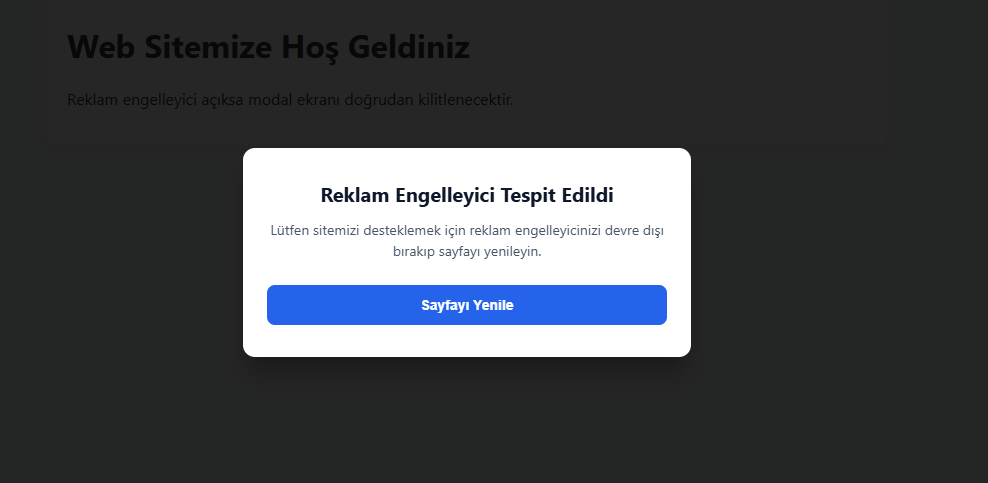
AdGuard reklam engelleyicisi eklentisi ile test edilmiştir.

<!DOCTYPE html>
<html lang="tr">
<head>
  <meta charset="UTF-8">
  <meta name="viewport" content="width=device-width, initial-scale=1.0">
  <title>Anti-AdBlock Test</title>
  <style>
    body {
      font-family: -apple-system, BlinkMacSystemFont, "Segoe UI", Roboto, sans-serif;
      margin: 0; background: #f4f6f8; color: #333;
    }
    .container {
      max-width: 800px; margin: 50px auto; padding: 20px;
      background: #fff; border-radius: 8px; box-shadow: 0 4px 12px rgba(0,0,0,0.05);
    }
    #adblock-overlay {
      display: none; position: fixed; top: 0; left: 0;
      width: 100%; height: 100%; background: rgba(0, 0, 0, 0.85);
      z-index: 999999; align-items: center; justify-content: center;
    }
    .adblock-box {
      background: #fff; padding: 32px 24px; border-radius: 12px;
      max-width: 400px; width: 90%; text-align: center;
      box-shadow: 0 20px 25px -5px rgba(0, 0, 0, 0.3);
    }
    .adblock-box h3 { margin: 0 0 12px; color: #0f172a; font-size: 20px; }
    .adblock-box p { color: #475569; font-size: 14px; line-height: 1.5; margin: 0 0 24px; }
    .adblock-btn {
      background: #2563eb; color: #fff; border: none; padding: 12px 20px;
      border-radius: 8px; cursor: pointer; font-weight: 600; font-size: 14px; width: 100%;
    }
    .adblock-btn:hover { background: #1d4ed8; }
  </style>
</head>
<body>

  <div class="container">
    <h1>Web Sitemize Hoş Geldiniz</h1>
    <p>Reklam engelleyici açıksa modal ekranı doğrudan kilitlenecektir.</p>
  </div>

  <div id="adblock-overlay">
    <div class="adblock-box">
      <h3>Reklam Engelleyici Tespit Edildi</h3>
      <p>Lütfen sitemizi desteklemek için reklam engelleyicinizi devre dışı bırakıp sayfayı yenileyin.</p>
      <button class="adblock-btn" onclick="location.reload()">Sayfayı Yenile</button>
    </div>
  </div>

  <!-- Gerçek AdSense script çağrısı: AdBlock bunu doğrudan bloklar ve onerror tetiklenir -->
  <script src="https://pagead2.googlesyndication.com/pagead/js/adsbygoogle.js?client=ca-pub-0000000000000000"
          crossorigin="anonymous"
          onerror="triggerAntiAdblock()"
          async></script>

  <script>
    function triggerAntiAdblock() {
      const overlay = document.getElementById('adblock-overlay');
      overlay.style.display = 'flex';
      document.body.style.overflow = 'hidden';
    }

    window.addEventListener('load', () => {
      // Yedek Kontrol: Eğer AdBlock script yüklenmesini engelledi ama onerror atmadıysa
      setTimeout(() => {
        // Yem element oluştur
        const bait = document.createElement('div');
        bait.className = 'adsbygoogle ad-zone ad-unit google-ad';
        bait.style.cssText = 'width: 1px !important; height: 1px !important; position: absolute !important; left: -9999px !important;';
        document.body.appendChild(bait);

        const isHidden = bait.offsetParent === null ||
                         bait.offsetHeight === 0 ||
                         bait.offsetWidth === 0 ||
                         window.getComputedStyle(bait).getPropertyValue('display') === 'none';

        if (isHidden || typeof window.adsbygoogle === 'undefined') {
          triggerAntiAdblock();
        }

        bait.remove();
      }, 500);
    });
  </script>
</body>
</html>