

İster slider da kullan ister konu içinde kafanıza göre..
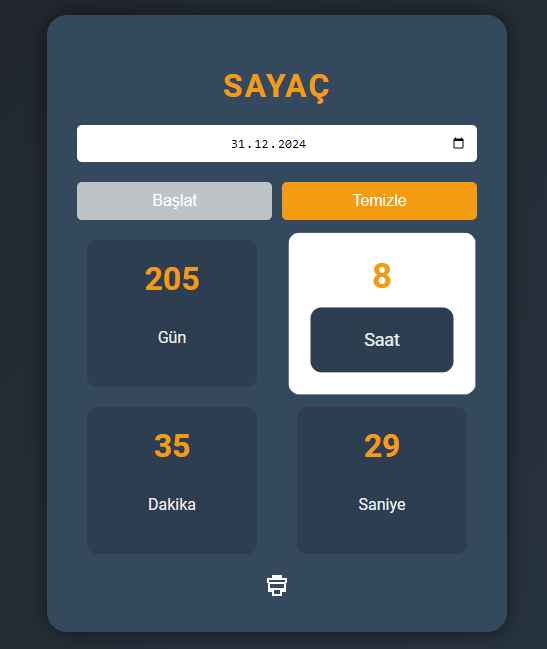
<!DOCTYPE html>
<html lang="tr">
<head>
    <meta charset="UTF-8">
    <meta name="viewport" content="width=device-width, initial-scale=1.0">
    <title>Geri Sayım Hesap Makinesi</title>
    <style>
        @import url('https://fonts.googleapis.com/css2?family=Roboto:wght@400;700&display=swap');

        body {
            display: flex;
            justify-content: center;
            align-items: center;
            height: 100vh;
            background: linear-gradient(135deg, #1c1c1c 0%, #2c3e50 100%);
            font-family: 'Roboto', sans-serif;
            margin: 0;
            color: #ecf0f1;
        }

        .calculator {
            background: #34495e;
            padding: 30px;
            border-radius: 20px;
            box-shadow: 0 0 20px rgba(0, 0, 0, 0.5);
            max-width: 400px;
            width: 90%;
            text-align: center;
        }

        .calculator h1 {
            font-size: 2em;
            margin-bottom: 20px;
            letter-spacing: 2px;
            text-transform: uppercase;
            color: #f39c12;
        }

        .input-field {
            margin-bottom: 20px;
        }

        .input-field input {
            width: calc(100% - 20px);
            padding: 10px;
            border: none;
            border-radius: 5px;
            font-size: 1em;
            text-align: center;
        }

        .buttons {
            display: flex;
            justify-content: space-around;
            gap: 10px;
            margin-bottom: 20px;
        }

        .button {
            display: inline-block;
            padding: 10px 20px;
            background: #f39c12;
            color: #fff;
            border: none;
            border-radius: 5px;
            cursor: pointer;
            font-size: 1em;
            transition: background-color 0.3s ease;
            flex: 1;
        }

        .button:hover {
            background-color: #e67e22;
        }

        .button:disabled {
            background-color: #bdc3c7;
            cursor: not-allowed;
        }

        .time {
            display: flex;
            justify-content: space-around;
            flex-wrap: wrap;
            gap: 20px;
        }

        .time div {
            background: #2c3e50;
            padding: 20px;
            border-radius: 10px;
            min-width: 90px;
            transition: transform 0.3s ease, background-color 0.3s ease;
        }

.time div:hover {
    transform: scale(1.1);
    background-color: #fff;
    color: #fff;
}

        .time span {
            display: block;
            font-size: 2em;
            font-weight: bold;
            color: #f39c12;
        }

        .label {
            font-size: 1em;
            margin-top: 10px;
            color: #ecf0f1;
        }

        .icon {
            width: 24px;
            height: 24px;
            fill: #fff;
            cursor: pointer;
            transition: fill 0.3s ease;
        }

        .icon:hover {
            fill: #e67e22;
        }

        @media (max-width: 768px) {
            .calculator h1 {
                font-size: 1.5em;
            }

            .time div {
                padding: 15px;
                min-width: 70px;
            }

            .time span {
                font-size: 1.5em;
            }

            .label {
                font-size: 0.8em;
            }
        }

    </style>
</head>
<body>

<div class="calculator" id="calculator">
    <h1>Sayaç</h1>
    <div class="input-field">
        <input type="date" id="date-input" />
    </div>
    <div class="buttons">
        <button class="button" id="start-button" onclick="startCountdown()">Başlat</button>
        <button class="button" id="reset-button" onclick="resetCountdown()" disabled>Temizle</button>
    </div>
    <div class="time" id="countdown">
        <div id="days"><span>0</span><div class="label">Gün</div></div>
        <div id="hours"><span>0</span><div class="label">Saat</div></div>
        <div id="minutes"><span>0</span><div class="label">Dakika</div></div>
        <div id="seconds"><span>0</span><div class="label">Saniye</div></div>
    </div>
    <div style="margin-top: 20px;">
        <svg class="icon" onclick="printCountdown()" xmlns="http://www.w3.org/2000/svg" viewBox="0 0 24 24">
            <path d="M19 8H5c-1.1 0-2 .9-2 2v8h4v4h10v-4h4v-8c0-1.1-.9-2-2-2zm-4 12H9v-4h6v4zm4-6H5v-4h14v4zM17 4V1H7v3H2v5h2V6h16v3h2V4h-5z"/>
        </svg>
    </div>
</div>

<script>
    let countdownInterval;

    function startCountdown() {
        const dateInput = document.getElementById('date-input').value;
        if (!dateInput) {
            alert("Lütfen bir tarih giriniz!");
            return;
        }

        const endTime = new Date(dateInput).getTime();
        if (isNaN(endTime)) {
            alert("Geçersiz tarih girdiniz!");
            return;
        }

        document.getElementById('reset-button').disabled = false;
        document.getElementById('start-button').disabled = true;

        countdownInterval = setInterval(() => {
            const now = new Date().getTime();
            const distance = endTime - now;

            if (distance < 0) {
                clearInterval(countdownInterval);
                document.getElementById("calculator").innerHTML = "<h1>Geri Sayım Sona Erdi!</h1>";
                return;
            }

            const days = Math.floor(distance / (1000 * 60 * 60 * 24));
            const hours = Math.floor((distance % (1000 * 60 * 60 * 24)) / (1000 * 60 * 60));
            const minutes = Math.floor((distance % (1000 * 60 * 60)) / (1000 * 60));
            const seconds = Math.floor((distance % (1000 * 60)) / 1000);

            document.getElementById("days").children[0].innerHTML = days;
            document.getElementById("hours").children[0].innerHTML = hours;
            document.getElementById("minutes").children[0].innerHTML = minutes;
            document.getElementById("seconds").children[0].innerHTML = seconds;
        }, 1000);
    }

    function resetCountdown() {
        clearInterval(countdownInterval);
        document.getElementById('date-input').value = '';
        document.getElementById('days').children[0].innerHTML = 0;
        document.getElementById('hours').children[0].innerHTML = 0;
        document.getElementById('minutes').children[0].innerHTML = 0;
        document.getElementById('seconds').children[0].innerHTML = 0;
        document.getElementById('reset-button').disabled = true;
        document.getElementById('start-button').disabled = false;
    }

    function printCountdown() {
        window.print();
    }
</script>

</body>
</html> 

