Merhaba, functions.php 'ye shortcode olarak burç hesaplama aracı yazdırmak istiyorum. Ücreti karşılığında
[burchesaplama] shortcode'unu istediğim sayfaya koyabilmeliyim
HTML Kısımda ise
Doğum Tarihi: [ GÜN ] [ AY ] [ YIL ] [GÖNDER]
şeklinde olacak
gönder'e bastığında
Aynı yer'de
Doğum Tarihi: 01 Ocak 1995
Burcunuz: Oğlak
diye çıktı verecek.
Tekliflerinizi bekliyorum
Wordpress Functions.php Shortcode Burç Hesaplama Aracı Yazdırılacak
2
●120
- 23-09-2023, 11:28:32
- 23-09-2023, 12:05:01
function burc_hesapla_shortcode() {
    ob_start();
    ?>
    <form method="post" id="burc-hesaplama-form">
        <label for="gun">Doğum Tarihi:</label>
        <select name="gun" id="gun">
            <?php for ($i = 1; $i <= 31; $i++) : ?>
                <option value="<?php echo $i; ?>"><?php echo sprintf('%02d', $i); ?></option>
            <?php endfor; ?>
        </select>
        <select name="ay" id="ay">
            <option value="01">Ocak</option>
            <option value="02">Şubat</option>
            <option value="03">Mart</option>
            <option value="04">Nisan</option>
            <option value="05">Mayıs</option>
            <option value="06">Haziran</option>
            <option value="07">Temmuz</option>
            <option value="08">Ağustos</option>
            <option value="09">Eylül</option>
            <option value="10">Ekim</option>
            <option value="11">Kasım</option>
            <option value="12">Aralık</option>
        </select>
        <input type="text" name="yil" id="yil" placeholder="YIL" required>
        <input type="submit" name="burc_hesapla" value="GÖNDER">
    </form>

    <div id="sonuc">
        <p>Doğum Tarihi:</p>
        <p>Burcunuz:</p>
    </div>

    <script>
        document.addEventListener('DOMContentLoaded', function () {
            var form = document.getElementById('burc-hesaplama-form');
            var sonucDiv = document.getElementById('sonuc');

            form.addEventListener('submit', function (e) {
                e.preventDefault();

                var gun = document.getElementById('gun').value;
                var ay = document.getElementById('ay').value;
                var yil = document.getElementById('yil').value;

                var tarih = gun + '/' + ay + '/' + yil;

                // Burç hesaplama mantığını burada ekleyin
                var burc = hesaplaBurc(ay, gun);

                sonucDiv.querySelector('p:nth-child(1)').textContent = 'Doğum Tarihi: ' + tarih;
                sonucDiv.querySelector('p:nth-child(2)').textContent = 'Burcunuz: ' + burc;
            });

            function hesaplaBurc(ay, gun) {
                // Burç hesaplama mantığını ekleyin ve burcu döndürün
                if ((ay == 3 && gun >= 21) || (ay == 4 && gun <= 19)) {
                    return 'Koç';
                } else if ((ay == 4 && gun >= 20) || (ay == 5 && gun <= 20)) {
                    return 'Boğa';
                } else if ((ay == 5 && gun >= 21) || (ay == 6 && gun <= 20)) {
                    return 'İkizler';
                } else if ((ay == 6 && gun >= 21) || (ay == 7 && gun <= 22)) {
                    return 'Yengeç';
                } else if ((ay == 7 && gun >= 23) || (ay == 8 && gun <= 22)) {
                    return 'Aslan';
                } else if ((ay == 8 && gun >= 23) || (ay == 9 && gun <= 22)) {
                    return 'Başak';
                } else if ((ay == 9 && gun >= 23) || (ay == 10 && gun <= 22)) {
                    return 'Terazi';
                } else if ((ay == 10 && gun >= 23) || (ay == 11 && gun <= 21)) {
                    return 'Akrep';
                } else if ((ay == 11 && gun >= 22) || (ay == 12 && gun <= 21)) {
                    return 'Yay';
                } else if ((ay == 12 && gun >= 22) || (ay == 1 && gun <= 19)) {
                    return 'Oğlak';
                } else if ((ay == 1 && gun >= 20) || (ay == 2 && gun <= 18)) {
                    return 'Kova';
                } else {
                    return 'Balık';
                }
            }
        });
    </script>
    <?php

    return ob_get_clean();
}
add_shortcode('burchesaplama', 'burc_hesapla_shortcode');
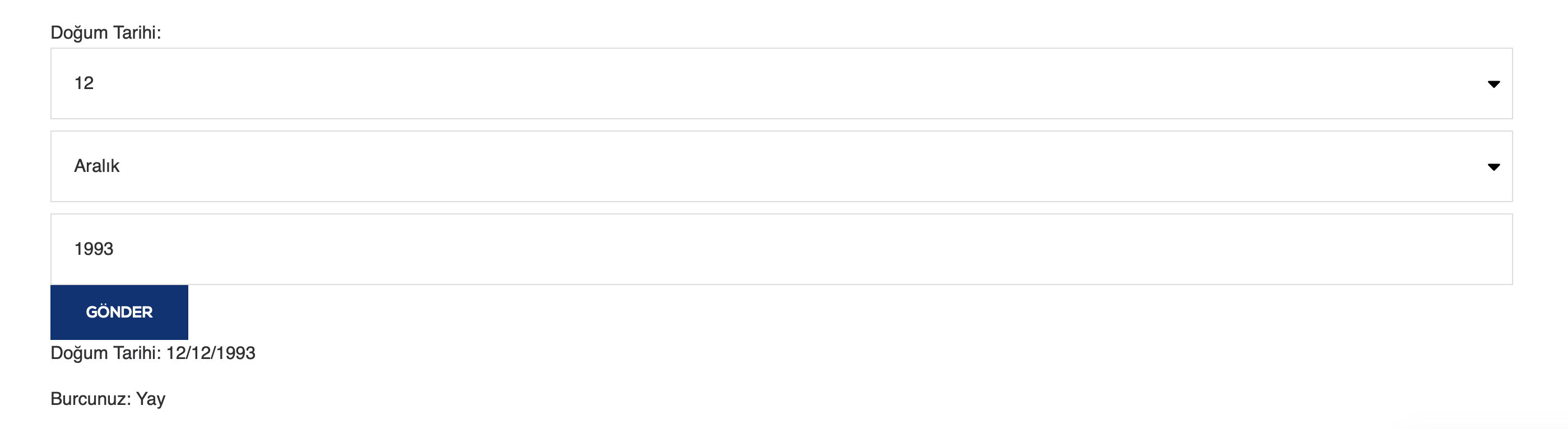
Şöyle bir sonuç veriyor kod. - 23-09-2023, 12:15:46Eğer yıl seçimini manuel giriş olarak değilde jq ile takvim modeli olarak isterseniz. Aşağıdaki kodu ekleyebilirsiniz.
function enqueue_datepicker() {
    wp_enqueue_script('jquery-ui-datepicker');
    wp_enqueue_style('jquery-style', 'https://ajax.googleapis.com/ajax/libs/jqueryui/1.12.1/themes/smoothness/jquery-ui.css');
}
add_action('wp_enqueue_scripts', 'enqueue_datepicker');

function burc_hesapla_shortcode() {
    ob_start();
    ?>
    <style>
        /* Datepicker stil düzenlemeleri */
        .ui-datepicker {
            background-color: #fff; /* Takvim arka plan rengi */
            border: 1px solid #ccc;
        }

        .ui-widget-header {
            background-color: #f5f5f5; /* Takvim başlığı rengi */
        }
    </style>

    <form method="post" id="burc-hesaplama-form">
        <label for="gun">Doğum Tarihi:</label>
        <input type="text" name="tarih" id="tarih" placeholder="GG/AA/YYYY" required>
        <input type="submit" name="burc_hesapla" value="GÖNDER">
    </form>

    <div id="sonuc">
        <p>Doğum Tarihi:</p>
        <p>Burcunuz:</p>
    </div>

    <script>
        jQuery(document).ready(function ($) {
            var form = $('#burc-hesaplama-form');
            var sonucDiv = $('#sonuc');

            // Tarih seçiciyi etkinleştir
            $('#tarih').datepicker({
                dateFormat: 'dd/mm/yy', // Tarih formatı
                changeMonth: true,
                changeYear: true
            });

            form.on('submit', function (e) {
                e.preventDefault();

                var tarihInput = $('#tarih');
                var tarih = tarihInput.val();

                // Burç hesaplama mantığını burada ekleyin
                var burc = hesaplaBurc(tarih);

                sonucDiv.find('p:nth-child(1)').text('Doğum Tarihi: ' + tarih);
                sonucDiv.find('p:nth-child(2)').text('Burcunuz: ' + burc);
            });

            function hesaplaBurc(tarih) {
                // Tarihi parçalara ayır
                var parcalar = tarih.split('/');
                var gun = parseInt(parcalar[0], 10);
                var ay = parseInt(parcalar[1], 10);

                // Burç hesaplama mantığını ekleyin ve burcu döndürün
                if ((ay == 3 && gun >= 21) || (ay == 4 && gun <= 19)) {
                    return 'Koç';
                } else if ((ay == 4 && gun >= 20) || (ay == 5 && gun <= 20)) {
                    return 'Boğa';
                } else if ((ay == 5 && gun >= 21) || (ay == 6 && gun <= 20)) {
                    return 'İkizler';
                } else if ((ay == 6 && gun >= 21) || (ay == 7 && gun <= 22)) {
                    return 'Yengeç';
                } else if ((ay == 7 && gun >= 23) || (ay == 8 && gun <= 22)) {
                    return 'Aslan';
                } else if ((ay == 8 && gun >= 23) || (ay == 9 && gun <= 22)) {
                    return 'Başak';
                } else if ((ay == 9 && gun >= 23) || (ay == 10 && gun <= 22)) {
                    return 'Terazi';
                } else if ((ay == 10 && gun >= 23) || (ay == 11 && gun <= 21)) {
                    return 'Akrep';
                } else if ((ay == 11 && gun >= 22) || (ay == 12 && gun <= 21)) {
                    return 'Yay';
                } else if ((ay == 12 && gun >= 22) || (ay == 1 && gun <= 19)) {
                    return 'Oğlak';
                } else if ((ay == 1 && gun >= 20) || (ay == 2 && gun <= 18)) {
                    return 'Kova';
                } else {
                    return 'Balık';
                }
            }
        });
    </script>
    <?php

    return ob_get_clean();
}
add_shortcode('burchesaplama', 'burc_hesapla_shortcode');
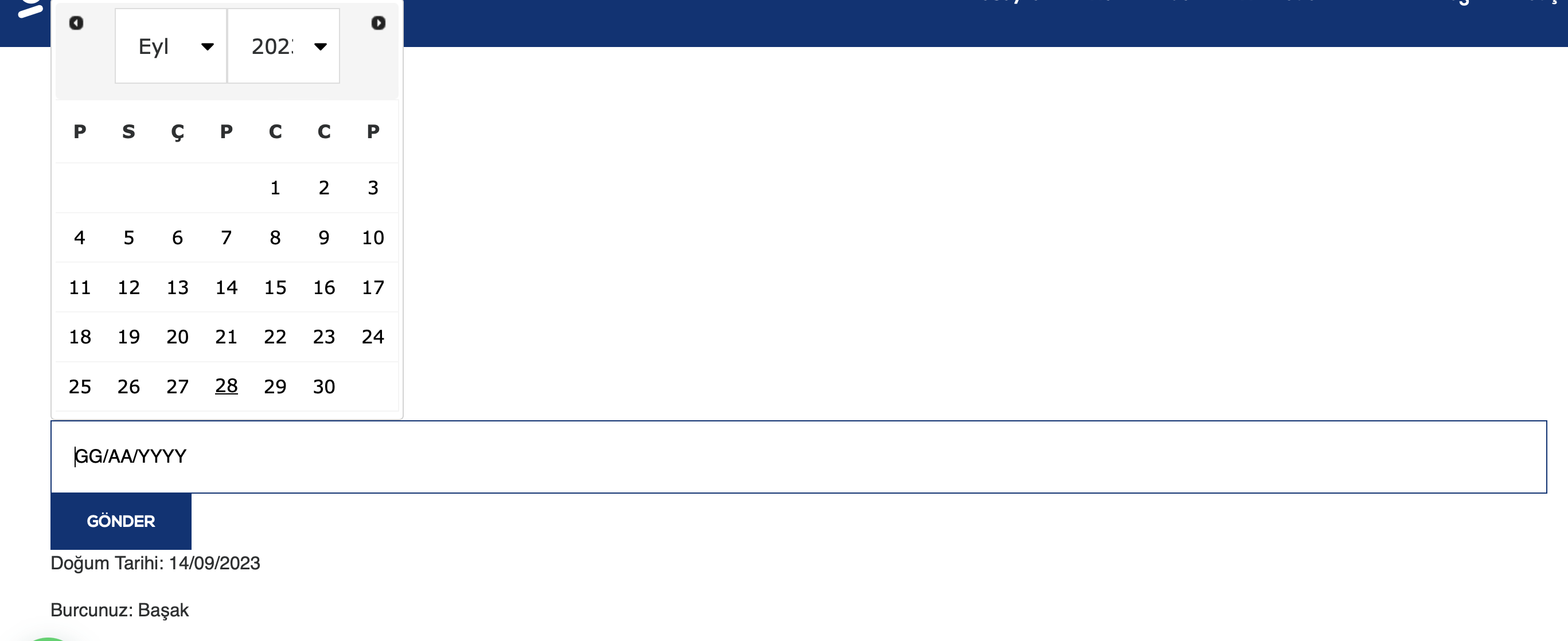
Şöyle bir görüntü verecektir.