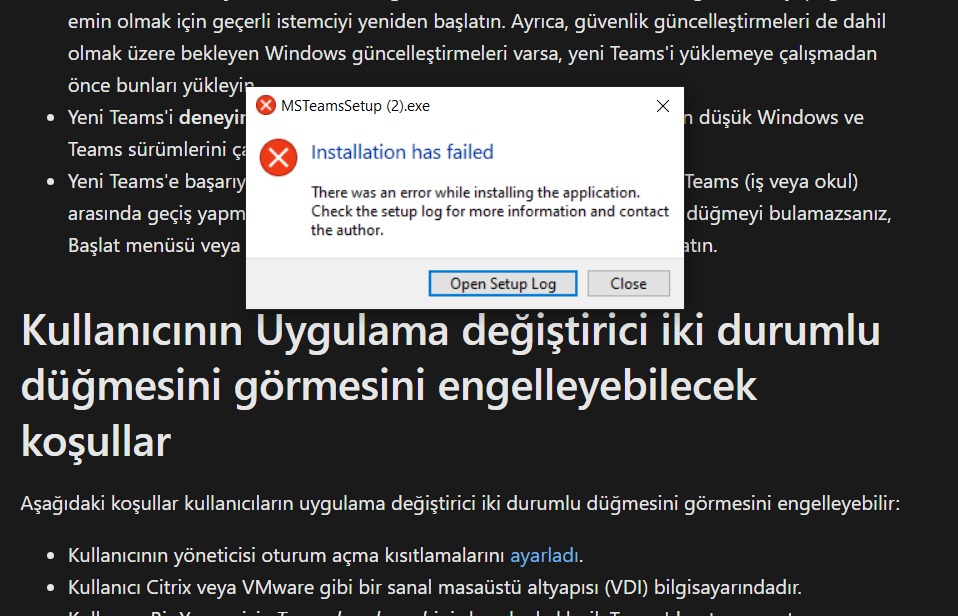
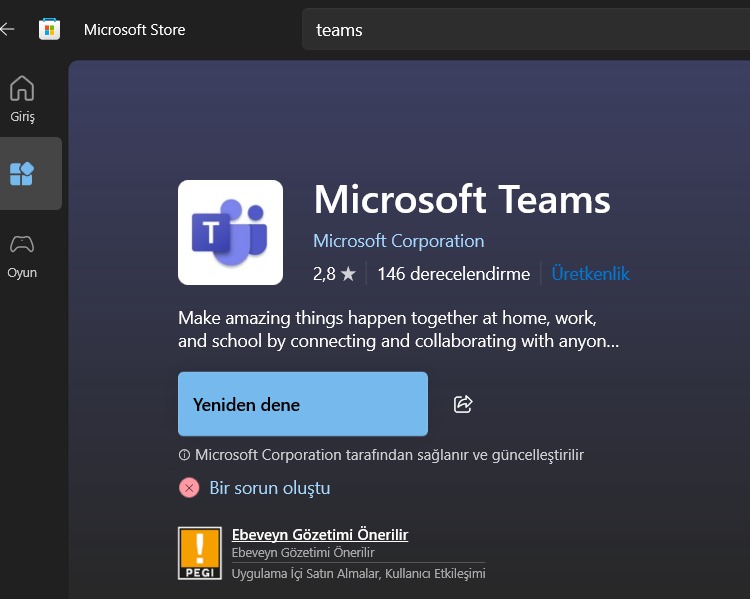
setup dosyasını yönetici olarak çalıştırmayı deneyebilir misin? olmazsa logları paylaş bakalım
2025-09-18 16:37:34> MeetingAddinInstaller: StagedAppDirectory does not exist. Using Current
2025-09-18 16:37:34> MeetingAddinInstaller: There is no version.txt. Falling back to getting version from folder name
2025-09-18 16:37:34> MeetingAddinInstaller: Version: 1.0.24022.3; addinPackageDirectory: 1.0.24022.3
2025-09-18 16:37:34> MeetingAddinInstaller: Version 1.0.24022.3 of the meeting add-in is already installed
2025-09-18 16:37:34> PresenceAddinInstaller: Installing Teams Presence addin for Outlook...
2025-09-18 16:37:34> PresenceAddinInstaller: check if UC TypeLib points to currentresourcesassetstlbUc.tlb
2025-09-18 16:37:34> PresenceAddinInstaller: UC Typelib WIN32 is registered under HKCU and file exists. Registration not needed!
2025-09-18 16:37:34> PresenceAddinInstaller: UC Typelib WIN64 is registered under HKCU and file exists. Registration not needed!
2025-09-18 16:37:34> PresenceAddinInstaller: IM Provider registry key already exists!
2025-09-18 16:37:34> ApplyReleasesImpl: cleanDeadVersions: for original version of and current version of 1.7.00.6058
2025-09-18 16:37:34> ApplyReleasesImpl: cleanDeadVersions: exclude current folder stage
2025-09-18 16:37:36> RegistryService: TryDeleteRegKey: HKEY_CURRENT_USERSoftwareMicrosoftOfficeTeamsPreve ntInstallationFromMsi not found
2025-09-18 16:47:32> Program: Starting Squirrel Updater: --install . --exeName=Microsoft_Teams_V24244.507.3118.4732.exe
2025-09-18 16:47:32> RegistryService: TryDeleteRegKey: HKEY_CURRENT_USERSoftwareMicrosoftOfficeTeamsAcqui reSource not found
2025-09-18 16:47:32> Program: Config already exists. Deleting first.
2025-09-18 16:47:32> Program: Starting install, writing to C:UsersNUZAAppDataLocalSquirrelTemp
2025-09-18 16:47:32> Program: File does not contain contextual info: Microsoft_Teams_V24244.507.3118.4732.exe
2025-09-18 16:47:32> UpdateManager: using rootAppDirectory: C:UsersNUZAAppDataLocalMicrosoftTeams
2025-09-18 16:47:32> Program: About to install to: C:UsersNUZAAppDataLocalMicrosoftTeams
2025-09-18 16:47:32> Program: Install path C:UsersNUZAAppDataLocalMicrosoftTeams already exists, burning it to the ground
2025-09-18 16:47:32> RegistryService: RegKeyExists: HKEY_LOCAL_MACHINESOFTWAREMicrosoftOfficeTeams does not exist
2025-09-18 16:47:34> Program: Setup.json exist, copying over
2025-09-18 16:47:34> RegistryService: RegKeyExists: HKEY_LOCAL_MACHINESoftwareMicrosoftWindowsCurrentV ersionRun does not have TeamsMachineInstaller
2025-09-18 16:47:34> Program: CheckMsiAndTryAddInstallSource: Not MSI, no need to add HKEY_CURRENT_USERSoftwareMicrosoftOfficeTeamsInsta llSource
2025-09-18 16:47:34> CheckForUpdateImpl: Couldn't write out staging user ID, this user probably shouldn't get beta anything: System.IO.DirectoryNotFoundException: 'C:UsersNUZAAppDataLocalMicrosoftTeamspackages.bet aId' yolunun bir parçası bulunamadı.
konum: System.IO.__Error.WinIOError(Int32 errorCode, String maybeFullPath)
konum: System.IO.FileStream.Init(String path, FileMode mode, FileAccess access, Int32 rights, Boolean useRights, FileShare share, Int32 bufferSize, FileOptions options, SECURITY_ATTRIBUTES secAttrs, String msgPath, Boolean bFromProxy, Boolean useLongPath, Boolean checkHost)
konum: System.IO.FileStream..ctor(String path, FileMode mode, FileAccess access, FileShare share, Int32 bufferSize, FileOptions options, String msgPath, Boolean bFromProxy, Boolean useLongPath, Boolean checkHost)
konum: System.IO.StreamWriter.CreateFile(String path, Boolean append, Boolean checkHost)
konum: System.IO.StreamWriter..ctor(String path, Boolean append, Encoding encoding, Int32 bufferSize, Boolean checkHost)
konum: System.IO.File.InternalWriteAllText(String path, String contents, Encoding encoding, Boolean checkHost)
konum: System.IO.File.WriteAllText(String path, String contents, Encoding encoding)
konum: Squirrel.UpdateManager.CheckForUpdateImpl.getOrCre ateStagedUserId()
2025-09-18 16:47:34> CheckForUpdateImpl: Failed to load local releases, starting from scratch: System.IO.DirectoryNotFoundException: 'C:UsersNUZAAppDataLocalMicrosoftTeamspackagesRELE ASES' yolunun bir parçası bulunamadı.
konum: System.IO.__Error.WinIOError(Int32 errorCode, String maybeFullPath)
konum: System.IO.FileStream.Init(String path, FileMode mode, FileAccess access, Int32 rights, Boolean useRights, FileShare share, Int32 bufferSize, FileOptions options, SECURITY_ATTRIBUTES secAttrs, String msgPath, Boolean bFromProxy, Boolean useLongPath, Boolean checkHost)
konum: System.IO.FileStream..ctor(String path, FileMode mode, FileAccess access, FileShare share)
konum: Squirrel.Utility.LoadLocalReleases(String localReleaseFile)
konum: Squirrel.UpdateManager.CheckForUpdateImpl.<CheckFo rUpdate>d__8.MoveNext()
2025-09-18 16:47:34> CheckForUpdateImpl: Reading RELEASES file from C:UsersNUZAAppDataLocalSquirrelTemp
2025-09-18 16:47:34> CheckForUpdateImpl: First run or local directory is corrupt, starting from scratch
2025-09-18 16:47:34> RegistryService: RegKeyExists: HKEY_LOCAL_MACHINESOFTWAREMicrosoftOfficeTeams does not exist
2025-09-18 16:47:34> ApplyReleasesImpl: No delta packages found. Applying current release package.
2025-09-18 16:47:34> ApplyReleasesImpl: getting squirrel aware apps failed with exception 'C:UsersNUZAAppDataLocalMicrosoftTeamscurrent' yolunun bir parçası bulunamadı.
2025-09-18 16:47:34> ApplyReleasesImpl: Writing files to app directory: C:UsersNUZAAppDataLocalMicrosoftTeamscurrent
2025-09-18 16:47:41> RegistryService: RegKeyExists: HKEY_LOCAL_MACHINESOFTWAREMicrosoftOfficeTeams does not exist
2025-09-18 16:47:45> ApplyReleasesImpl: Squirrel Enabled Apps: [C:UsersNUZAAppDataLocalMicrosoftTeamscurrentTeams. exe]
2025-09-18 16:47:50> ApplyReleasesImpl: About to RemoveOldShorcuts for Teams.exe, rootAppDir C:UsersNUZAAppDataLocalMicrosoftTeams
2025-09-18 16:47:50> RegistryService: TryGetRegKey: HKEY_LOCAL_MACHINESOFTWAREMicrosoftWindows NTCurrentVersionCurrentBuildNumber exists. Data - 18363
2025-09-18 16:47:50> ApplyReleasesImpl: ### PurgeShortcutDescription: shortcutDescription=Microsoft Teams
2025-09-18 16:47:50> ApplyReleasesImpl: ### PurgeShortcutDescription: shortcutDescription=Microsoft Teams
2025-09-18 16:47:50> ApplyReleasesImpl: ### TryToRemoveShortcutIfPresent: exist1=False, deleted=False, exist2=False, file="C:UsersNUZAAppDataRoamingMicrosoftWindowsSta rt MenuProgramsMicrosoft CorporationMicrosoft Teams.lnk"
2025-09-18 16:47:50> ApplyReleasesImpl: ### TryToRemoveShortcutIfPresent: exist1=False, deleted=False, exist2=False, file="C:UsersNUZAAppDataRoamingMicrosoftWindowsSta rt MenuProgramsMicrosoft CorporationMicrosoft Teams classic.lnk"
2025-09-18 16:47:50> ApplyReleasesImpl: ### TryToRemoveShortcutIfPresent: exist1=False, deleted=False, exist2=False, file="C:UsersNUZAAppDataRoamingMicrosoftWindowsSta rt MenuProgramsMicrosoft CorporationMicrosoft Teams classic.lnk"
2025-09-18 16:47:50> ApplyReleasesImpl: ### PurgeShortcutDescription: shortcutDescription=Microsoft Teams
2025-09-18 16:47:50> ApplyReleasesImpl: ### PurgeShortcutDescription: shortcutDescription=Microsoft Teams
2025-09-18 16:47:50> ApplyReleasesImpl: ### TryToRemoveShortcutIfPresent: exist1=False, deleted=False, exist2=False, file="C:ProgramDataMicrosoftWindowsStart MenuProgramsMicrosoft CorporationMicrosoft Teams.lnk"
2025-09-18 16:47:50> ApplyReleasesImpl: ### TryToRemoveShortcutIfPresent: exist1=False, deleted=False, exist2=False, file="C:ProgramDataMicrosoftWindowsStart MenuProgramsMicrosoft CorporationMicrosoft Teams classic.lnk"
2025-09-18 16:47:50> ApplyReleasesImpl: ### TryToRemoveShortcutIfPresent: exist1=False, deleted=False, exist2=False, file="C:ProgramDataMicrosoftWindowsStart MenuProgramsMicrosoft CorporationMicrosoft Teams classic.lnk"
2025-09-18 16:47:50> RegistryService: RegKeyExists: HKEY_CURRENT_USERSoftwarePoliciesMicrosoftCloudOff ice16.0Teams does not exist
2025-09-18 16:47:50> ApplyReleasesImpl: Registry value SoftwarePoliciesMicrosoftCloudOffice16.0TeamsPreve ntFirstLaunchAfterInstall does not exist
2025-09-18 16:47:50> RegistryService: RegKeyExists: HKEY_CURRENT_USERSoftwarePoliciesMicrosoftOffice16 .0Teams does not exist
2025-09-18 16:47:50> ApplyReleasesImpl: Registry value SoftwarePoliciesMicrosoftOffice16.0TeamsPreventFir stLaunchAfterInstall does not exist
2025-09-18 16:47:50> RegistryService: RegKeyExists: HKEY_CURRENT_USERSoftwareMicrosoftOffice16.0Teams does not exist
2025-09-18 16:47:50> ApplyReleasesImpl: Registry value SoftwareMicrosoftOffice16.0TeamsPreventFirstLaunch AfterInstall does not exist
2025-09-18 16:47:50> ApplyReleasesImpl: Registry flags are not set: proceed with default value NotConfigured
2025-09-18 16:47:50> ApplyReleasesImpl: Starting fixPinnedExecutables
2025-09-18 16:47:50> ApplyReleasesImpl: Examining Pin: File Explorer.lnk
2025-09-18 16:47:50> ApplyReleasesImpl: Examining Pin: Google Chrome.lnk
2025-09-18 16:47:50> ApplyReleasesImpl: Fixing up tray icons
2025-09-18 16:47:50> MeetingAddinInstaller: System.ArgumentException: Alt anahtar olmadığından alt anahtar ağacı silinemez.
konum: System.ThrowHelper.ThrowArgumentException(Exceptio nResource resource)
konum: Microsoft.Win32.RegistryKey.DeleteSubKeyTree(Strin g subkey, Boolean throwOnMissingSubKey)
konum: Microsoft.Win32.RegistryKey.DeleteSubKeyTree(Strin g subkey)
konum: Squirrel.MeetingAddinInstaller.<InstallMeetingAddi nAsync>d__15.MoveNext()
2025-09-18 16:47:50> MeetingAddinInstaller: StagedAppDirectory does not exist. Using Current
2025-09-18 16:47:50> MeetingAddinInstaller: There is no version.txt. Falling back to getting version from folder name
2025-09-18 16:47:50> MeetingAddinInstaller: Version: 1.0.24233.4; addinPackageDirectory: 1.0.24233.4
2025-09-18 16:47:50> MeetingAddinInstaller: .dead exists: False
2025-09-18 16:47:50> MeetingAddinInstaller: path to .dead: C:UsersNUZAAppDataLocalMicrosoftTeamsMeetingAddin1 .0.24233.4.dead
2025-09-18 16:47:50> MeetingAddinInstaller: before cleanup unused versions
2025-09-18 16:47:51> MeetingAddinInstaller: Addin directory exists. Copy was successful
2025-09-18 16:47:51> MeetingAddinInstaller: Version 1.0.24233.4 of the meeting add-in is now installed
2025-09-18 16:47:51> PresenceAddinInstaller: Installing Teams Presence addin for Outlook...
2025-09-18 16:47:51> PresenceAddinInstaller: check if UC TypeLib points to currentresourcesassetstlbUc.tlb
2025-09-18 16:47:51> PresenceAddinInstaller: UC Typelib WIN32 is registered under HKCU and file exists. Registration not needed!
2025-09-18 16:47:51> PresenceAddinInstaller: UC Typelib WIN64 is registered under HKCU and file exists. Registration not needed!
2025-09-18 16:47:51> PresenceAddinInstaller: IM Provider registry key already exists!
2025-09-18 16:47:51> ApplyReleasesImpl: cleanDeadVersions: for original version of and current version of 1.7.00.26062
2025-09-18 16:47:51> ApplyReleasesImpl: cleanDeadVersions: exclude current folder stage
2025-09-18 16:47:53> RegistryService: TryDeleteRegKey: HKEY_CURRENT_USERSoftwareMicrosoftOfficeTeamsPreve ntInstallationFromMsi not found
2025-09-18 17:25:22> Program: Starting Squirrel Updater: --install . --exeName=MSTeamsSetup.exe --bootstrapperMode
2025-09-18 17:25:22> RegistryService: TryDeleteRegKey: HKEY_CURRENT_USERSoftwareMicrosoftOfficeTeamsAcqui reSource not found
2025-09-18 17:25:22> RegistryService: RegKeyExists: HKEY_LOCAL_MACHINESOFTWAREMicrosoftOfficeTeams does not exist
2025-09-18 17:25:22> Program: bootStrapperModeSettings: pdsEndpoint:
https://teams.microsoft.com/desktopc...aller/windows/
2025-09-18 17:25:22> Program: bootStrapperModeSettings: fallbackNextGenAppPayloadUrlX64:
https://aka.ms/maglev-x64
2025-09-18 17:25:22> Program: bootStrapperModeSettings: fallbackNextGenAppPayloadUrlX86:
https://aka.ms/maglev-x86
2025-09-18 17:25:22> Program: bootStrapperModeSettings: fallbackNextGenAppPayloadUrlARM64:
https://aka.ms/maglev-arm64
2025-09-18 17:25:22> Program: bootStrapperModeSettings: getInstallerEndpointUrl:
https://teams.live.com/downloads/getinstaller
2025-09-18 17:25:22> Program: bootStrapperModeSettings: fallbackNextGenWorkAppPayloadUrlX64:
https://go.microsoft.com/fwlink/?linkid=2196106
2025-09-18 17:25:22> Program: bootStrapperModeSettings: fallbackNextGenWorkAppPayloadUrlX86:
https://go.microsoft.com/fwlink/?linkid=2196060
2025-09-18 17:25:22> Program: bootStrapperModeSettings: fallbackNextGenWorkAppPayloadUrlARM64:
https://go.microsoft.com/fwlink/?linkid=2196207
2025-09-18 17:25:22> RegistryService: TryGetRegKey: HKEY_LOCAL_MACHINESOFTWAREMicrosoftWindows NTCurrentVersionCurrentBuildNumber exists. Data - 18363
2025-09-18 17:25:22> RegistryService: TryGetRegKey: HKEY_LOCAL_MACHINESOFTWAREMicrosoftWindows NTCurrentVersionCurrentMajorVersionNumber exists. Data - 10
2025-09-18 17:25:22> RegistryService: TryGetRegKey: HKEY_LOCAL_MACHINESOFTWAREMicrosoftWindows NTCurrentVersionCurrentMinorVersionNumber exists. Data - 0
2025-09-18 17:25:22> RegistryService: TryGetRegKey: HKEY_LOCAL_MACHINESOFTWAREMicrosoftWindows NTCurrentVersionCurrentBuildNumber exists. Data - 18363
2025-09-18 17:25:22> FileDownloader: Downloading url:
https://teams.live.com/downloads/get...ion=10.0.18363
2025-09-18 17:25:22> BootstrapperInstallManager: getinstaller endpoint returned installer path
https://statics.teams.cdn.office.net.../1.7.00.19353/
2025-09-18 17:25:22> BootstrapperInstallManager: No decoded deep link is returned from get installer endpoint. Continue install without deep link
2025-09-18 17:25:22> BootstrapperInstallManager: Use next gen work app
2025-09-18 17:25:22> Program: Installing the Teams 2 client