
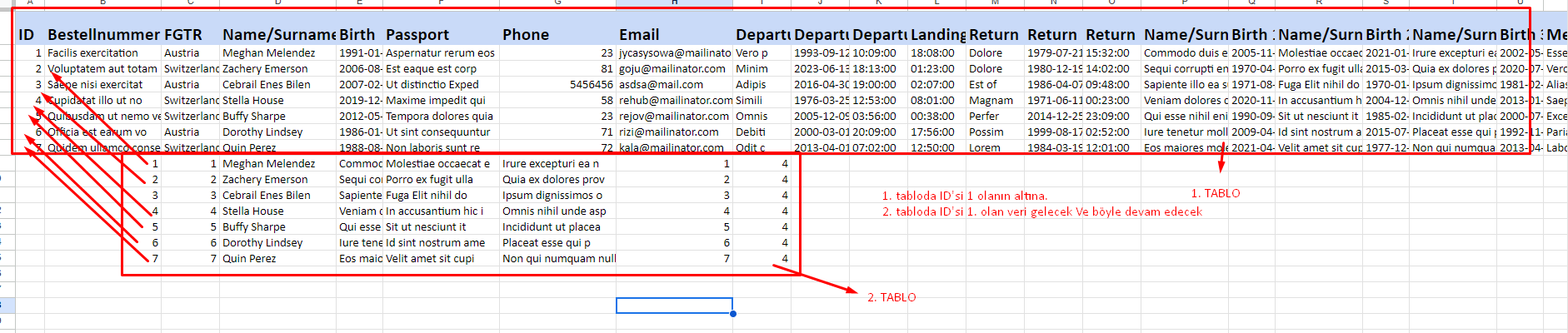
Yapmak istediğim şey 1. tabloda olan verinin ID'si 1 ise 2. tablonun da ID'si 1 olan gelsin. Yani
Tablo 1 : ID = 1;
Tablo 2 : ID = 1;
Tablo 1 : ID = 2;
Tablo 2 : ID = 2;
Tablo 1 : ID = 3;
Tablo 2 : ID = 3;
........
şeklinde ilerleyecek
Kodum Aşağıdaki gibidir.
$query = $db->prepare("SELECT * FROM form");
$query->execute();
$results = $query->fetchAll(PDO::FETCH_ASSOC);


$query2 = $db->prepare("SELECT * FROM toplam");
$query2->execute();
$results2 = $query2->fetchAll(PDO::FETCH_ASSOC);

$dateFormat = 'd.m.Y';

// Yeni bir PhpSpreadsheet objesi oluşturun
$spreadsheet = new Spreadsheet();
$sheet = $spreadsheet->getActiveSheet();


// Başlık satırını ekle
$columnTitles = [
'ID' => ['width' => 5, 'height' => 30, 'color' => 'c9daf8'],
    'Bestellnummer Ticket' => ['width' => 20, 'height' => 30, 'color' => 'c9daf8'],
    'FGTR' => ['width' => 10, 'height' => 30, 'color' => 'c9daf8'],
    'Name/Surname' => ['width' => 20, 'height' => 30, 'color' => 'c9daf8'],
    'Birth' => ['width' => 8, 'height' => 30, 'color' => 'c9daf8'],
    'Passport' => ['width' => 20, 'height' => 30, 'color' => 'c9daf8'],
    'Phone' => ['width' => 20, 'height' => 30, 'color' => 'c9daf8'],
    'Email' => ['width' => 20, 'height' => 30, 'color' => 'c9daf8'],
    'Departure Flight number' => ['width' => 10, 'height' => 30, 'color' => 'c9daf8'],
    'Departure Date' => ['width' => 10, 'height' => 30, 'color' => 'c9daf8'],
    'Departure Time' => ['width' => 10, 'height' => 30, 'color' => 'c9daf8'],
    'Landing Time' => ['width' => 10, 'height' => 30, 'color' => 'c9daf8'],
    'Return Flight number' => ['width' => 10, 'height' => 30, 'color' => 'c9daf8'],
    'Return Flight date' => ['width' => 10, 'height' => 30, 'color' => 'c9daf8'],
    'Return Flight departure time' => ['width' => 10, 'height' => 30, 'color' => 'c9daf8'],
    'Name/Surname 1' => ['width' => 15, 'height' => 30, 'color' => 'c9daf8'],
    'Birth 1' => ['width' => 8, 'height' => 30, 'color' => 'c9daf8'],
    'Name/Surname 2' => ['width' => 15, 'height' => 30, 'color' => 'c9daf8'],
    'Birth 2' => ['width' => 8, 'height' => 30, 'color' => 'c9daf8'],
    'Name/Surname 3' => ['width' => 15, 'height' => 30, 'color' => 'c9daf8'],
    'Birth 3' => ['width' => 8, 'height' => 30, 'color' => 'c9daf8'],
    'Message' => ['width' => 15, 'height' => 30, 'color' => 'c9daf8'],
];

$columnIndex = 1;
foreach ($columnTitles as $title => $styleOptions) {wha
    $sheet->setCellValueByColumnAndRow($columnIndex, 1, $title);

    // Sütun genişliği ayarla
    $sheet->getColumnDimensionByColumn($columnIndex)->setWidth($styleOptions['width']);

    // Sütun yüksekliği ayarla
    $sheet->getRowDimension(1)->setRowHeight($styleOptions['height']);

    // Sütun rengi ayarla
    $sheet->getStyleByColumnAndRow($columnIndex, 1)->getFill()->setFillType(Fill::FILL_SOLID)->getStartColor()->setARGB($styleOptions['color']);

    // Yazıyı kalın yap
    $sheet->getStyleByColumnAndRow($columnIndex, 1)->getFont()->setBold(true);

    // Font boyutunu ayarla
    $sheet->getStyleByColumnAndRow($columnIndex, 1)->getFont()->setSize(16);

    $columnIndex++;
}


// Verileri ekleyin
$rowIndex = 2;
foreach ($results as $data) {
$columnIndex = 1;
    foreach ($data as $value) {
$sheet->setCellValueByColumnAndRow($columnIndex, $rowIndex, $value);
        $columnIndex++;
    }
$rowIndex++;
}

foreach ($results2 as $data2) {
$columnIndex = 1;
    foreach ($data2 as $value2) {
$sheet->setCellValueByColumnAndRow($columnIndex, $rowIndex, $value2);
        $columnIndex++;
    }
$rowIndex++;
}

$excelFileName = 'exported_data.xlsx';
$klasorYolu = '/home/adaytntm/domains/adaytanitimsitesi.com.tr/public_html/wgt/output/';
$dosyaYolu = $klasorYolu . $excelFileName;

// Excel dosyasını oluşturun
$writer = new Xlsx($spreadsheet);
$writer->save($dosyaYolu);

// İndirme bağlantısını oluşturun
header('Content-Type: application/vnd.openxmlformats-officedocument.spreadsheetml.sheet');
header('Content-Disposition: attachment;filename="' . $excelFileName . '"');
header('Cache-Control: max-age=0');
$writer->save('php://output');
?> 

