
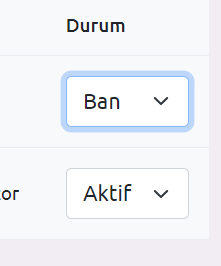
herhangibir option seçtiği gibi database güncellenmsini istiyorum ajax la denedim olmadı stacoverflow dan baktım denedim sadece ilk sütün çaloştı 2. sütün olmadı
7
●234
<select id="selectNesnesi">
<option value="deger1">Değer 1</option>
<option value="deger2">Değer 2</option>
<option value="deger3">Değer 3</option>
</select>
document.addEventListener("DOMContentLoaded", function() {
    const selectElement = document.getElementById("selectNesnesi");

    selectElement.addEventListener("change", function() {
        const selectedValue = selectElement.value;

        // Veriyi PHP'ye gönder
        sendDataToPHP(selectedValue);
    });
});

function sendDataToPHP(value) {
    fetch("post_handler.php", {
        method: "POST",
        headers: {
            "Content-Type": "application/x-www-form-urlencoded",
        },
        body: "selectedValue=" + encodeURIComponent(value),
    })
    .then(response => response.text())
    .then(data => {
        console.log(data);
    })
    .catch(error => {
        console.error("Hata oluştu:", error);
    });
}
Bu kodda post_handler.php dosyasına seçilen değeri POST türünde gönderiyoruz. $_POST globali ile PHP tarafında alıp veritabanında değişim yapabilirsiniz.
<?php
if (isset($_POST["selectedValue"]))
{
    $selectedValue = $_POST["selectedValue"];
    // Burada yapmak istediğiniz işlemleri gerçekleştirebilirsiniz
    // Örneğin veritabanına kaydetmek veya cevap oluşturmak
    // Örnek cevap:
    echo "Seçilen değer: " . $selectedValue;
}
else
{
    echo "Seçilen değer alınamadı.";
} <script>
document.addEventListener("DOMContentLoaded", function() {
const selectElement = document.getElementById("userStatus");
selectElement.addEventListener("change", function() {
const selectedValue = selectElement.value;
// Veriyi PHP'ye gönder
sendDataToPHP(selectedValue);
});
});
function sendDataToPHP(value) {
fetch("users.php", {
method: "POST",
headers: {
"Content-Type": "application/x-www-form-urlencoded",
},
body: "selectedValue=" + encodeURIComponent(value),
})
.then(response => response.text())
.then(data => {
console.log(data);
})
.catch(error => {
console.error("Hata oluştu:", error);
});
}
</script>
<select class="form-select" id="userStatus">
<option value="aktif" class="text-success">Aktif</option>
<option value="ban" class="text-success">Ban</option>
</select>
if (isset($_POST["selectedValue"])){
$selectedValue = $_POST["selectedValue"];
$updateUserStatus = $db->query("UPDATE `users` SET `status` = '$selectedValue' WHERE `users`.`id` = $userId");
$count = $updateUserStatus->rowCount();
if ($count > 0) {
echo "<script>
Swal.fire({
icon: 'success',
title: 'Başarılı',
text: 'Üye Durumu Değiştirildi'
})
setTimeout(()=>{
window.location = 'uyeler'
},2000)
</script>";
} else {
echo "<script>
Swal.fire({
icon: 'error',
title: 'Oops...',
text: 'Üye durumu değiştirilemedi'
})
setTimeout(()=>{
window.location = 'uyeler'
},2000)
</script>";
}
}
?> 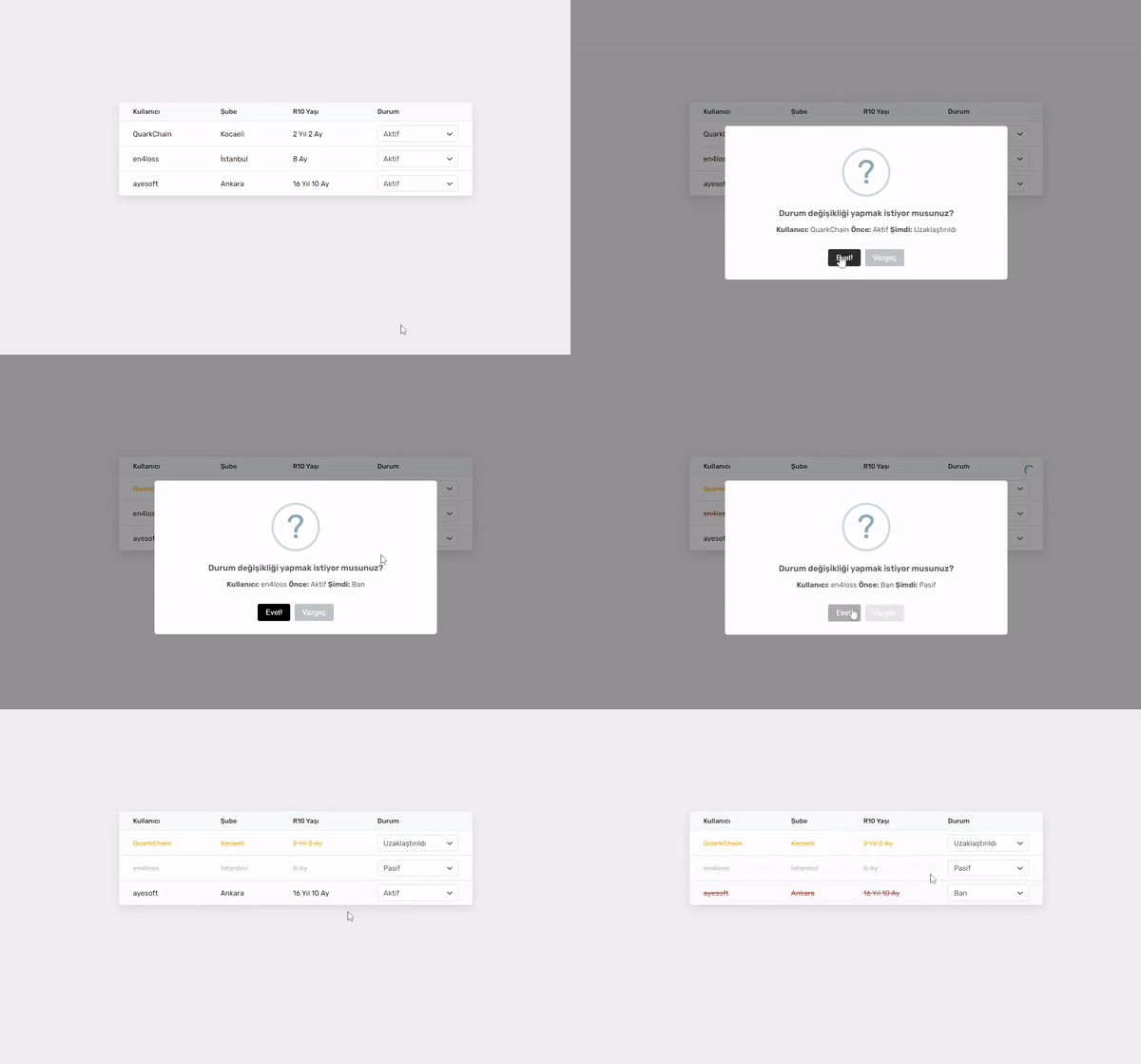
<?php
// Veritabanı bağlantısı oluşturma
$db = new mysqli('localhost', 'root', '', 'r10');
$db->query('SET NAMES utf8');

// Eğer durum değişikliği isteği alındıysa
if (isset($_POST['status'])) {
  header('Content-type: application/json');

  // Gelen verileri al
  $id = (int) $_POST['id'];
  $status = (int) $_POST['status'];

  // Veritabanında ilgili kullanıcının durumunu güncelle
  $db->query("UPDATE users SET status = {$status} WHERE id = {$id}");

  // İşlem sonucunu JSON olarak döndür
  exit(json_encode(array('status' => true)));
}

// Durum seçenekleri dizisi
$status_array = array(
  0 => 'Pasif',
  1 => 'Aktif',
  2 => 'Uzaklaştırıldı',
  3 => 'Ban'
);
?>
<!DOCTYPE html>
<html>
<head>
  <meta charset="utf-8">
  <meta name="viewport" content="width=device-width, initial-scale=1">
  <link rel="stylesheet" type="text/css" href="https://fonts.googleapis.com/css?family=Rubik:400,500,600,700,800&subset=latin-ext">
  <link rel="stylesheet" type="text/css" href="https://site-assets.fontawesome.com/releases/v6.4.0/css/all.css">
 <link rel="stylesheet" type="text/css" href="https://unpkg.com/nprogress@0.2.0/nprogress.css">
  <title>Kullanıcılar</title>
  <style>
   body{font-family:Rubik;font-size:13px;background-color:#f0f0f0;padding-top:265px}
   .box{box-shadow:rgba(0,0,0,.1) 0 6px 18px;border-radius:6px;background-color:#fff;overflow:hidden;max-width:640px;margin:0 auto}
   table{width:100%;border-collapse:collapse;border-spacing:0}
   table thead tr th{color:#111827;font-weight:500;text-align:left;font-size:12px;padding:10px 25px;background-color:#f9fafb;border-bottom:1px solid #edeff3}
   table tbody tr td{padding:7px 25px;transition:all 0.3s}
   table tbody tr td{border-bottom:1px solid #e5e7eb}
   table tbody tr:last-child td{border-bottom:0}
   table tbody tr:hover td{background-color:#f9f9f9}
   select{cursor:pointer;background-image:url(data:image/svg+xml;base64,PHN2ZyB3aWR0aD0iMTUwIiBoZWlnaHQ9IjE1MCIgdmlld0JveD0iMCAwIDE1MCAxNTAiIGZpbGw9Im5vbmUiIHhtbG5zPSJodHRwOi8vd3d3LnczLm9yZy8yMDAwL3N2ZyI+CjxwYXRoIGQ9Ik03NS4zNDggMTI3LjE5MkM3Mi40MzgxIDEyNy4xOTIgNjkuODUxNCAxMjYuMjIyIDY3LjkxMTUgMTI0LjI4Mkw1LjgzMjE1IDYyLjIwMjNDMS42Mjg4NyA1OC4zMjIzIDEuNjI4ODcgNTEuNTMyNCA1LjgzMjE1IDQ3LjY1MjVDOS43MTIxMSA0My40NDkyIDE2LjUwMiA0My40NDkyIDIwLjM4MiA0Ny42NTI1TDc1LjM0OCAxMDIuMjk1TDEyOS45OTEgNDcuNjUyNUMxMzMuODcxIDQzLjQ0OTIgMTQwLjY2MSA0My40NDkyIDE0NC41NDEgNDcuNjUyNUMxNDguNzQ0IDUxLjUzMjQgMTQ4Ljc0NCA1OC4zMjIzIDE0NC41NDEgNjIuMjAyM0w4Mi40NjEzIDEyNC4yODJDODAuNTIxMyAxMjYuMjIyIDc3LjkzNDcgMTI3LjE5MiA3NS4zNDggMTI3LjE5MloiIGZpbGw9IiMzMTM3NEEiLz4KPC9zdmc+Cg==);background-repeat:no-repeat;background-position:right 10px center;background-size:10px;font:inherit;-webkit-appearance:none;color:#495057;border-radius:4px;padding:0 10px;width:100%;box-sizing:border-box;height:30px;line-height:30px;border:1px solid #e1e5e9}
   select:focus{outline:none;border-color:#8dbbfd}
   tr[data-status="0"],tr[data-status="2"],tr[data-status="3"]{text-decoration:line-through;color:#CCC}
   tr[data-status="2"]{color:#F1C40F}
   tr[data-status="3"]{color:#C0392B}
   .swal2-title{font-size:15px!important}
   .swal2-styled.swal2-confirm{background-color:#000!important;font-size:13px!important}
   .swal2-styled.swal2-confirm:hover{background-color:#333!important}
   .swal2-styled.swal2-deny{background-color:#bdc3c7!important;font-size:13px!important}
   .swal2-styled.swal2-confirm:focus,.swal2-styled.swal2-deny:focus{box-shadow:none!important}
   .swal2-html-container{font-size:13px!important}.swal2-actions button{height:inherit;line-height:inherit}
  </style>
</head>
<body>
<div class="box">
  <table>
    <thead>
      <tr>
        <th>Kullanıcı</th>
        <th>Şube</th>
        <th>R10 Yaşı</th>
        <th>Durum</th>
      </tr>
    </thead>
    <tbody>
      <?php
      // Veritabanından kullanıcı bilgilerini sıralama
      $query = $db->query('SELECT * FROM users ORDER BY id ASC');
      while ($row = $query->fetch_object()):
      ?>
      <tr data-title="<?php echo $row->displayname; ?>" data-status="<?php echo $row->status; ?>" id="row_<?php echo $row->id; ?>">
        <td><?php echo $row->displayname; ?></td>
        <td><?php echo $row->location; ?></td>
        <td><?php echo $row->age; ?></td>
        <td>
          <select data-userid="<?php echo $row->id; ?>" data-previous="<?php echo $status_array[$row->status]; ?>" name="status">
            <?php
            // Durum seçeneklerini döngüyle oluşturma
            foreach ($status_array as $key => $value) {
              echo '<option value="' . $key . '"' . ($row->status == $key ? ' selected' : '') . '>' . $value . '</option>';
            }
            ?>
          </select>
        </td>
      </tr>
      <?php endwhile; ?>
    </tbody>
  </table>
</div>

<script src="https://code.jquery.com/jquery-3.7.0.js"></script>
<script src="https://unpkg.com/nprogress@0.2.0/nprogress.js"></script>
<script src="https://cdn.jsdelivr.net/npm/sweetalert2@11"></script>
<script>
  // NProgress ayarları
  NProgress.configure({ parent: ".box" });

  // Select değiştiğinde tetiklenecek fonksiyon
  $("table select").change(function(){
    var $select = $(this);
    var $current = $(this).find(":selected");
    var $tr = $select.parents("tr");

    // Kullanıcıya durum değişikliği sorusu gösterme
    Swal.fire({
      title: "Durum değişikliği yapmak istiyor musunuz?",
      html: "<b>Kullanıcı:</b> " + $tr.data("title") + " <b>Önce:</b> " + $select.data("previous") + " <b>Şimdi:</b> " + $current.text(),
      icon: "question",
      showDenyButton: true,
      confirmButtonText: "Evet!",
      denyButtonText: "Vazgeç"
    }).then((result) => {
      if (result.isConfirmed) {
        NProgress.start();
        $.ajax({
          url: "", // İstek atılacak URL'i buraya yazın
          type: "POST",
          dataType: "JSON",
          data: {id: $tr.attr("id").replace("row_", ""), status: $current.val()},
          success: function(json) {
            NProgress.done();

            if (json.status) {
              // Başarılı sonuç mesajı
              Swal.fire({
                icon: "success",
                html: "Başarıyla değiştirildi",
                confirmButtonText: "Tamam"
              });

              // Veriyi güncelleme
              $tr.attr("data-status", $current.val()).data("status", $current.val());
              $select.attr("data-previous", $current.text()).data("previous", $current.text());
            }
          }
        });
      }
    });
  });
</script>
</body>
</html>


