• 18-07-2021, 19:37:51
    #10
    Metaren adlı üyeden alıntı: mesajı görüntüle
    örnekleri var hocam
    https://www.serpito.com/php-dinamik-xml-sitemap/
    amerikayı bir daha keşfetmeye gerek yok.
    googleda youtube da bile yeterince video makale var.
    Verdiğiniz örnek hatalı çok eski güncelliği kalmamış. Ayrıca istediğim şey bu değil. Bu php ile dosya açma ve yazma örneği.

    Benim aradığım datatable özelliğinde sitemap
  • 18-07-2021, 21:14:04
    #11
    Yardımcı olabilecek var mı?
  • 19-07-2021, 01:51:22
    #12
    XML Stylesheet File denilen bir dosya türü var. Kısaca XSL.
    Sizin Wordpress'te bahsettiğiniz eklentilerde de çalışan sayfanın kaynak koduna bakarsanız
    <?xml-stylesheet type="text/xsl" href="//blablabla.com/sitemap.xsl"?>
    tarzında bir kod satırı göreceksiniz.
    bu dosya ile XML dosyaları bir görünüme kavuşturuluyor.
  • 19-07-2021, 01:52:43
    #13
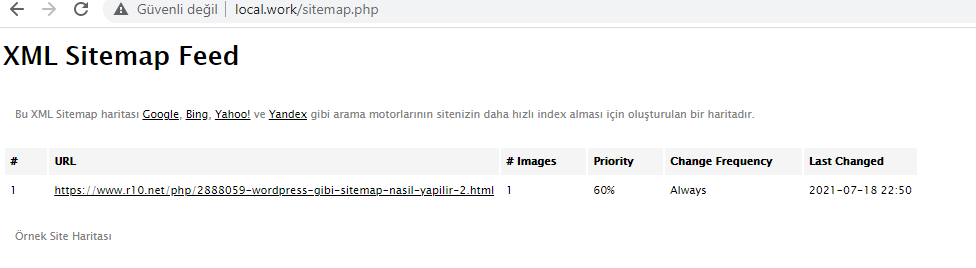
    Şöyle bir şey mi arıyorsunuz. İlk satırdaki sitemap.xsl dosyasını es geçmeyin, URL'sini düzgün vermesseniz doğru çalışmaz.


    <?php
    header('Content-Type: application/xml;');
    
    $rows = array(
        (object) array('url' => 'https://www.r10.net/php/2888059-wordpress-gibi-sitemap-nasil-yapilir-2.html', 'publish_at' => date('Y-m-d H:i:s'))
    );
    
    $out = '<?xml-stylesheet type="text/xsl" href="sitemap.xsl"?>
    <urlset xmlns="http://www.sitemaps.org/schemas/sitemap/0.9"
    xmlns:news="http://www.google.com/schemas/sitemap-news/0.9"
    xmlns:image="http://www.google.com/schemas/sitemap-image/1.1"
    xmlns:xsi="http://www.w3.org/2001/XMLSchema-instance"
    xsi:schemaLocation="http://www.sitemaps.org/schemas/sitemap/0.9
    http://www.sitemaps.org/schemas/sitemap/0.9/sitemap.xsd
    http://www.google.com/schemas/sitemap-news/0.9
    http://www.google.com/schemas/sitemap-news/0.9/sitemap-news.xsd
    http://www.google.com/schemas/sitemap-image/1.1
    http://www.google.com/schemas/sitemap-image/1.1/sitemap-image.xsd">' . "\n";
    foreach ($rows as $row) {
        $out .= '<url>' . "\n";
        $out .= '<loc>' . $row->url . '</loc>' . "\n";
        $out .= '<lastmod>' . date('Y-m-d\TH:i:s+00:00', strtotime($row->publish_at)) . '</lastmod>' . "\n";
        $out .= '<changefreq>always</changefreq>' . "\n";
        $out .= '<priority>0.6</priority>' . "\n";
        $out .= '<image:image>' . "\n";
        $out .= '<image:loc></image:loc>' . "\n";
        $out .= '<image:caption><![CDATA[Lorem ipsum dolor sit amet]]></image:caption>' . "\n";
        $out .= '</image:image>' . "\n";
        $out .= '</url>' . "\n";
    }
    
    $out .= '</urlset>';
    
    exit($out);
    sitemap.xsl

    <?xml version="1.0" encoding="UTF-8"?>
    <xsl:stylesheet version="2.0"
        xmlns:html="http://www.w3.org/TR/REC-html40"
        xmlns:sitemap="http://www.sitemaps.org/schemas/sitemap/0.9"
            xmlns:image="http://www.google.com/schemas/sitemap-image/1.1"
        xmlns:xsl="http://www.w3.org/1999/XSL/Transform">
    <xsl:output method="html" version="1.0" encoding="UTF-8" indent="yes"/>
    <xsl:template match="/">
    <html xmlns="http://www.w3.org/1999/xhtml">
    <head>
        <title>XML Sitemap Feed</title>
        <meta http-equiv="Content-Type" content="text/html; charset=utf-8" />
        <style type="text/css">body{font-family:"Lucida Grande","Lucida Sans Unicode",Tahoma,Verdana,sans-serif;font-size:13px}#header,#footer{padding:2px;margin:10px;font-size:8pt;color:gray}a{color:black}td{font-size:11px}th{text-align:left;padding-right:30px;font-size:11px}tr.high{background-color:whitesmoke}#footer img{vertical-align:bottom}</style>
    </head>
    <body>
        <h1>XML Sitemap Feed</h1>
        <div id="header">
            <p>Bu XML Sitemap haritası <a href="http://www.google.com">Google</a>, <a href="http://www.bing.com/">Bing</a>, <a href="http://www.yahoo.com">Yahoo!</a> ve <a href="http://www.yandex.com">Yandex</a> gibi arama motorlarının sitenizin daha hızlı index alması için oluşturulan bir haritadır.</p>
        </div>
    
        <div id="content">
            <table cellpadding="5">
                <tr class="high">
                    <th>#</th>
                    <th>URL</th>
                    <th># Images</th>
                    <th>Priority</th>
                    <th>Change Frequency</th>
                    <th>Last Changed</th>
                </tr>
    <xsl:variable name="lower" select="'abcdefghijklmnopqrstuvwxyz'"/>
    <xsl:variable name="upper" select="'ABCDEFGHIJKLMNOPQRSTUVWXYZ'"/>
    <xsl:for-each select="sitemap:urlset/sitemap:url">
                <tr><xsl:if test="position() mod 2 != 1"><xsl:attribute  name="class">high</xsl:attribute></xsl:if>
                    <td><xsl:value-of select="position()"/></td>
                    <td><xsl:variable name="itemURL"><xsl:value-of select="sitemap:loc"/></xsl:variable><a href="{$itemURL}"><xsl:value-of select="sitemap:loc"/></a></td>
                    <td><xsl:value-of select="count(image:image)"/></td>
                    <td><xsl:value-of select="concat(sitemap:priority*100,'%')"/></td>
                    <td><xsl:value-of select="concat(translate(substring(sitemap:changefreq, 1, 1),concat($lower, $upper),concat($upper, $lower)),substring(sitemap:changefreq, 2))"/></td>
                    <td><xsl:value-of select="concat(substring(sitemap:lastmod,0,11),concat(' ', substring(sitemap:lastmod,12,5)))"/></td>
                </tr>
    </xsl:for-each>
            </table>
        </div>
        <div id="footer">
            <p>Örnek Site Haritası</p>
        </div>
    </body>
    </html>
    </xsl:template>
    </xsl:stylesheet>
  • 19-07-2021, 14:28:29
    #14
    Çok teşekkür ederim.

    Hakan hocam konuyu sana yazmadan önce çok ingilizce kaynak aradım ama bulamadım bulduklarımda mantığını izah etmiyordu. Bu olay tıpkı css çağırmak gibi birşeymiş. Hayret ettim bir süre kendim kurcalarken, o dediğiniz kısımımı kendi sitemapime ekledim ve bir baktım istediğim gibi olmuş. Bu kadar basit birşey için bu saatlerce uğraştıktan sonra bir kod satırını ekleyince olmasına ne diyeceğimi bilemedim. İlgin için tekrar teşekkür ederim hocam.
    hakantapanyigit adlı üyeden alıntı: mesajı görüntüle
    XML Stylesheet File denilen bir dosya türü var. Kısaca XSL.
    Sizin Wordpress'te bahsettiğiniz eklentilerde de çalışan sayfanın kaynak koduna bakarsanız
    <?xml-stylesheet type="text/xsl" href="//blablabla.com/sitemap.xsl"?>
    tarzında bir kod satırı göreceksiniz.
    bu dosya ile XML dosyaları bir görünüme kavuşturuluyor.
    QuarkChain adlı üyeden alıntı: mesajı görüntüle
    Şöyle bir şey mi arıyorsunuz. İlk satırdaki sitemap.xsl dosyasını es geçmeyin, URL'sini düzgün vermesseniz doğru çalışmaz.


    <?php
    header('Content-Type: application/xml;');
    
    $rows = array(
        (object) array('url' => 'https://www.r10.net/php/2888059-wordpress-gibi-sitemap-nasil-yapilir-2.html', 'publish_at' => date('Y-m-d H:i:s'))
    );
    
    $out = '<?xml-stylesheet type="text/xsl" href="sitemap.xsl"?>
    <urlset xmlns="http://www.sitemaps.org/schemas/sitemap/0.9"
    xmlns:news="http://www.google.com/schemas/sitemap-news/0.9"
    xmlns:image="http://www.google.com/schemas/sitemap-image/1.1"
    xmlns:xsi="http://www.w3.org/2001/XMLSchema-instance"
    xsi:schemaLocation="http://www.sitemaps.org/schemas/sitemap/0.9
    http://www.sitemaps.org/schemas/sitemap/0.9/sitemap.xsd
    http://www.google.com/schemas/sitemap-news/0.9
    http://www.google.com/schemas/sitemap-news/0.9/sitemap-news.xsd
    http://www.google.com/schemas/sitemap-image/1.1
    http://www.google.com/schemas/sitemap-image/1.1/sitemap-image.xsd">' . "\n";
    foreach ($rows as $row) {
        $out .= '<url>' . "\n";
        $out .= '<loc>' . $row->url . '</loc>' . "\n";
        $out .= '<lastmod>' . date('Y-m-d\TH:i:s+00:00', strtotime($row->publish_at)) . '</lastmod>' . "\n";
        $out .= '<changefreq>always</changefreq>' . "\n";
        $out .= '<priority>0.6</priority>' . "\n";
        $out .= '<image:image>' . "\n";
        $out .= '<image:loc></image:loc>' . "\n";
        $out .= '<image:caption><![CDATA[Lorem ipsum dolor sit amet]]></image:caption>' . "\n";
        $out .= '</image:image>' . "\n";
        $out .= '</url>' . "\n";
    }
    
    $out .= '</urlset>';
    
    exit($out);
    sitemap.xsl

    <?xml version="1.0" encoding="UTF-8"?>
    <xsl:stylesheet version="2.0"
        xmlns:html="http://www.w3.org/TR/REC-html40"
        xmlns:sitemap="http://www.sitemaps.org/schemas/sitemap/0.9"
            xmlns:image="http://www.google.com/schemas/sitemap-image/1.1"
        xmlns:xsl="http://www.w3.org/1999/XSL/Transform">
    <xsl:output method="html" version="1.0" encoding="UTF-8" indent="yes"/>
    <xsl:template match="/">
    <html xmlns="http://www.w3.org/1999/xhtml">
    <head>
        <title>XML Sitemap Feed</title>
        <meta http-equiv="Content-Type" content="text/html; charset=utf-8" />
        <style type="text/css">body{font-family:"Lucida Grande","Lucida Sans Unicode",Tahoma,Verdana,sans-serif;font-size:13px}#header,#footer{padding:2px;margin:10px;font-size:8pt;color:gray}a{color:black}td{font-size:11px}th{text-align:left;padding-right:30px;font-size:11px}tr.high{background-color:whitesmoke}#footer img{vertical-align:bottom}</style>
    </head>
    <body>
        <h1>XML Sitemap Feed</h1>
        <div id="header">
            <p>Bu XML Sitemap haritası <a href="http://www.google.com">Google</a>, <a href="http://www.bing.com/">Bing</a>, <a href="http://www.yahoo.com">Yahoo!</a> ve <a href="http://www.yandex.com">Yandex</a> gibi arama motorlarının sitenizin daha hızlı index alması için oluşturulan bir haritadır.</p>
        </div>
    
        <div id="content">
            <table cellpadding="5">
                <tr class="high">
                    <th>#</th>
                    <th>URL</th>
                    <th># Images</th>
                    <th>Priority</th>
                    <th>Change Frequency</th>
                    <th>Last Changed</th>
                </tr>
    <xsl:variable name="lower" select="'abcdefghijklmnopqrstuvwxyz'"/>
    <xsl:variable name="upper" select="'ABCDEFGHIJKLMNOPQRSTUVWXYZ'"/>
    <xsl:for-each select="sitemap:urlset/sitemap:url">
                <tr><xsl:if test="position() mod 2 != 1"><xsl:attribute  name="class">high</xsl:attribute></xsl:if>
                    <td><xsl:value-of select="position()"/></td>
                    <td><xsl:variable name="itemURL"><xsl:value-of select="sitemap:loc"/></xsl:variable><a href="{$itemURL}"><xsl:value-of select="sitemap:loc"/></a></td>
                    <td><xsl:value-of select="count(image:image)"/></td>
                    <td><xsl:value-of select="concat(sitemap:priority*100,'%')"/></td>
                    <td><xsl:value-of select="concat(translate(substring(sitemap:changefreq, 1, 1),concat($lower, $upper),concat($upper, $lower)),substring(sitemap:changefreq, 2))"/></td>
                    <td><xsl:value-of select="concat(substring(sitemap:lastmod,0,11),concat(' ', substring(sitemap:lastmod,12,5)))"/></td>
                </tr>
    </xsl:for-each>
            </table>
        </div>
        <div id="footer">
            <p>Örnek Site Haritası</p>
        </div>
    </body>
    </html>
    </xsl:template>
    </xsl:stylesheet>
  • 19-07-2021, 14:48:52
    #15
    buddy adlı üyeden alıntı: mesajı görüntüle
    Çok teşekkür ederim.

    Hakan hocam konuyu sana yazmadan önce çok ingilizce kaynak aradım ama bulamadım bulduklarımda mantığını izah etmiyordu. Bu olay tıpkı css çağırmak gibi birşeymiş. Hayret ettim bir süre kendim kurcalarken, o dediğiniz kısımımı kendi sitemapime ekledim ve bir baktım istediğim gibi olmuş. Bu kadar basit birşey için bu saatlerce uğraştıktan sonra bir kod satırını ekleyince olmasına ne diyeceğimi bilemedim. İlgin için tekrar teşekkür ederim hocam.

    Rica ederim. Her zaman.