• 02-04-2019, 21:40:48
    #1
    Kimlik doğrulama veya yönetimden onay bekliyor.
    Öncelikle merhabalar r10 ailesi.

    Bir iletişim formu düşünün. Bu iletişim formunda aşağıdaki gibi metin giriş alanları mevcut.
    					<li><h6>Eczacının Adı Soyadı</h6><input type="text" class="form-control" name="isimsoyisim" placeholder="İsim Soyisim">	</li>
    					<li><h6>Eczanenin Adı		</h6><input type="text" class="form-control" name="eczaneadi" placeholder="Eczane Adı">	</li>
    Bu formlardan tüm değişken veriyi ($eczaneadi = $_POST['eczaneadi'] phpmailer sayesinde sayfadan çekip tarafıma mail olarak almaktayım. Buraya kadar hiç bir sıkıntı yok. Fakat bir sipariş formu entegre etmek istedim. Jquery ile desteklenen bu sipariş formundaki veriyi php dosyası ile nasıl çekip mailime alacağım hakkında bir fikrim yok. Pek fazlada php bilgim yok.
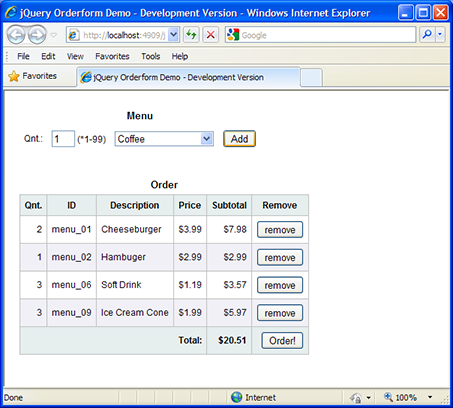
    Eklemek istediğim sipariş formu görüntüsü şu şekildedir.

    Bu sipariş formunun kaynak linki şöyledir:https://www.codeproject.com/Articles...he-Client-Side

    Rica etsem yardımcı olabilir misiniz? Şimdiden teşekkürler
  • 03-04-2019, 00:00:28
    #2
    @SteersMan; hocam geçen bana yardımcı olmuştunuz, bu konuda çok bilgisiniz. Eğer yardımcı olursanız bu kardeşimi 3 günlük uykusuna döndüreceksiniz
  • 03-04-2019, 00:13:01
    #3
    Tevfik adlı üyeden alıntı: mesajı görüntüle
    @SteersMan; hocam geçen bana yardımcı olmuştunuz, bu konuda çok bilgisiniz. Eğer yardımcı olursanız bu kardeşimi 3 günlük uykusuna döndüreceksiniz
    Etiketleme için teşekkürler. Fakat bilgim olan bir konu değil maalesef.
  • 03-04-2019, 00:41:35
    #4
    Hocam maalesef anlatmak istediğinizden hiç birşey anlamadım jquery ile mi almaya çalışıyorsunuz yoksa php ile mi ?
  • 03-04-2019, 00:50:04
    #5
    hasanbugra adlı üyeden alıntı: mesajı görüntüle
    Hocam maalesef anlatmak istediğinizden hiç birşey anlamadım jquery ile mi almaya çalışıyorsunuz yoksa php ile mi ?
    hocam durum şöyle verdiğim linkteki sipariş formu varya o forma yazılan siparişlerin çıktısını php alıp phpmailer aracılığıyla mailime çekicem. Saygılar
  • 03-04-2019, 00:54:47
    #6
    kodları iletirseniz yardımcı olabilirim.
  • 03-04-2019, 01:07:40
    #7
    hasanbugra adlı üyeden alıntı: mesajı görüntüle
    kodları iletirseniz yardımcı olabilirim.
    Merhaba ilginiz için teşekkür ederim sayın @hasanbugra sayfa içeriği aşağıdaki gibidir.
    <?php
     
    # mesaj sorunsuz bir şekilde giderse, formun altında bir yazı çıkaracağız.
     
    $gittiMesaji = " ";
     
    # ilk olarak submit diye bir POST değeri var mı diye bakılıyor.
    if (isset($_POST["submit"])) {
         
        # SMTP mail gönderimi yapacak olan sınıf.
        require("phpmailer/class.phpmailer.php");
    
        $isimsoyisim = $_POST['isimsoyisim'];
        $eczaneadi = $_POST['eczaneadi'];
        $adres = $_POST['adres'];
    	$vergidaire = $_POST['vergidaire'];
    	$tck = $_POST['tck'];
    	$telefon = $_POST['telefon'];
    	$mesaj = $_POST['mesaj'];
    	
    
        # bu isimle sınıfa erişilecek.
        $mail = new PHPMailer();
        $mail->IsSMTP();
        $mail->SMTPAuth = true;
        $mail->SMTPSecure = 'ssl';
        
        # port numaraları veriliyor.
        # tls için 587, ssl için 465
        $mail->Port = 465;
        $mail->Host = "xxx.com";
        $mail->Username = "xxx.com";
        $mail->Password = "musaxxx";
        $mail->FromName ="$isimsoyisim";
        $mail->SetFrom("siparis@xxx.com");
        $mail->AddAddress("siparis@xxxcom");
        $mail->Subject = "SİTE MESAJI -> $isimsoyisim";
    	$mail->isHTML(true);
        $mail->Body = "<p>Ad Soyad $isimsoyisim </p>
    					<p>Eczane Adı $eczaneadi </p>
    					<p>Adres: $adres </p>
    					<p>Vergi Daire: $vergidaire </p>
    					<p>Eczacı TCK: $tck </p>
    					<p>Telefon: $telefon </p>
    					<p>Mesaj: $mesaj </p>
    	
    	"; 
        
        if(!$mail->Send()){
    
            echo "Hata: ".$mail->ErrorInfo;
        } else {
            
            $gittiMesaji = "<br><p class='bg-success'>Sayın $isimsoyisim, 
    siparişiniz tarafımıza ulaşmıştır. En kısa sürede dönüş sağlanacaktır...</p>";
        }
    }
    ?>
    
    <!DOCTYPE html>
    <html lang="en">
      <head>
        <meta charset="utf-8">
        <meta http-equiv="X-UA-Compatible" content="IE=edge">
        <meta name="viewport" content="width=device-width, initial-scale=1.0">
        <meta name="description" content="">
        <meta name="author" content="">
        <link rel="shortcut icon" href="data/ico/favicon.png">
    
        <title>xxx </title>
        <link href="data/css/bootstrap.css" rel="stylesheet">
        <link href="data/css/font-awesome.min.css" rel="stylesheet">
        <link href="data/css/main.css" rel="stylesheet">
        <link href="styles/order.css" rel="stylesheet" type="text/css" />
    	<script type="text/javascript" src="data/js/jquery.js"></script>
    	<script type="text/javascript" src="data/js/jquery.ui.js"></script>
    	<script src="http://maxcdn.bootstrapcdn.com/bootstrap/3.3.5/js/bootstrap.min.js"></script>
    	 <script src="scripts/jquery-1.4.1.js" type="text/javascript"></script>
        <script src="scripts/jquery.formatCurrency-1.3.0.js" type="text/javascript"></script>
        <script type="text/javascript">
            //Retrieve XML document and loop for each item
            jQuery(function($) { //just like $(document).ready()
                $.ajax({
                    type: "GET",
                    url: "data/menu.xml",
                    dataType: "xml",
                    error: function() {
                        $("<p>Error loading XML file...</p>")
                        .replaceAll("#order_form")
                    },
                    success: function(xml) {
                        $(xml).find("item").each(fWriteXML); //must call function as var
                    }
                });
            });
    
            //Populate drop-down box with XML contents
            var fWriteXML = function writeXML() {
                var id = $(this).attr("id");
                var cost = $(this).attr("cost");
                var item = $(this).text();
                $("#select_item")
                    .append($("<option></option>")
                    .val(id) //same as .attr("value", id))
                    .html(item)
                    .attr("title", cost));
            };
    
            //Add selected item to order
            $(function() {
                $("#add_btn").click(function() {
                    var order_item_selected_quantity = $("#select_quantity").val()
                    var selected_item = $("#select_item option:selected");
                    var order_item_selected_id = selected_item.val();
                    var order_item_selected_name = selected_item.text();
                    var order_item_selected_cost = selected_item.attr("title");
    
                    var pattern = new RegExp("^[1-9][0-9]?$"); //Select between 1-99 items
                    //Do not proceed if input is incorrect
                    if (pattern.test(order_item_selected_quantity) &&
                        order_item_selected_cost != "") {
    
                        //Calculate subtotal
                        var order_item_selected_subtotal =
                            parseFloat(order_item_selected_cost) *
                            parseInt(order_item_selected_quantity);
    
                        $("<tr class='order_row'></tr>").html("<td>"
                            + order_item_selected_quantity + "</td><td>"
                            + order_item_selected_id + "</td><td class='order_item_name'>"
                            + order_item_selected_name + "</td><td class='order_item_cost'>"
                            + order_item_selected_cost + "</td><td class='order_item_subtotal'>"
                            + order_item_selected_subtotal + "</td><td>"
                            + "<input type='button' value='remove' /></td>")
                                .appendTo("#order_cart").hide();
    
                        $("#order_cart tr.order_row:last").fadeIn("medium", function() {
                            orderTotal(); //Callback once animation is complete
                        });
    
                        //Format new order item values to currency
                        $("#order_cart td.order_item_cost:last").formatCurrency();
                        $("#order_cart td.order_item_subtotal:last").formatCurrency();
    
                        clickRemove();
                        clearForm();
                    }
                });
            });
    
            //Bind a click event to the correct remove button
            function clickRemove() {
                $("#order_cart tr.order_row:last input").click(function() {
                    $(this).parent().parent().children().fadeOut("fast", function() {
                        $(this).parent().slideUp("slow", function() {   //the row (tr)
                            $(this).remove();   //the row (tr)
                            orderTotal();
                        });
                    });
                });
            };
    
            //Clear order input form and re-focus cursor
            function clearForm() {
                $("#select_quantity").val("");
                $("#select_item option:first-child").attr("selected", "selected");
                $("#select_quantity").focus();
            };
    
            //Calculate new order total
            function orderTotal() {
                var order_total = 0;
                $("#order_cart td.order_item_subtotal").each(function() {
                    var amount = ($(this).html()).replace("$", "");
                    order_total += parseFloat(amount);
                });
    
                $("#order_total").text(order_total).formatCurrency();
    
                //Create alternating colored rows in order table
                $("#order_cart tr.order_row:odd").css("background-color", "#F0F0F6");
                $("#order_cart tr.order_row:even").css("background-color", "#FFF");
            };
    
            //Pretend to place order if it contains items
            $(function() {
                $("#order_btn").click(function() {
                    if ($("#order_cart tr.order_row:last").length == 0) {
                        alert("No items selected...");
                    }
                    else {
                        alert("Order placed...");
                    }
                });
            });
        </script>
    	
    
        <!-- HTML5 shim and Respond.js IE8 support of HTML5 elements and media queries -->
        <!--[if lt IE 9]>
          <script src="https://oss.maxcdn.com/libs/html5shiv/3.7.0/html5shiv.js"></script>
          <script src="https://oss.maxcdn.com/libs/respond.js/1.3.0/respond.min.js"></script>
        <![endif]-->
      
    </head>
    <body>
        <!-- Fixed navbar -->
        <div class="navbar navbar-inverse navbar-fixed-top">
          <div class="container">
            <div class="navbar-header">
              <button type="button" class="navbar-toggle" data-toggle="collapse" data-target=".navbar-collapse">
                <span class="icon-bar"></span>
                <span class="icon-bar"></span>
                <span class="icon-bar"></span>
              </button>
               <a class="navbar-brand" href="#"><i class="fa fa-refresh"></i> SEVİMLİ HAMMADDE</a>
            </div>
            <div class="navbar-collapse collapse">
              <ul class="nav navbar-nav navbar-right">
                <li><a href="index.html">Anasayfa</a></li>
                <li><a href="hakkimizda.html">Hakkımızda</a></li>
                <li class="active"><a href="siparis-olustur.php">Sipariş Oluştur</a></li>
                <li><a href="urunler.html">Ürünlerimiz</a></li>
               <li><a data-toggle="modal" data-target="#myModal" href="index.html"><i class="fa fa-envelope-o"></i></a></li>
              </ul>
            </div><!--/.nav-collapse -->
          </div>
        </div>
    <div id="dg">
    
    	
    							<div class="siparis-left">
    								<h1><span> </span>Sipariş Formu</h1>
    								<p><h5>Lütfen Tüm Alanları doldurun ve Siparişinizi Göndermeden Önce Kontrol Ediniz!</h5></p>
    							<div class="siparis">
    							<form role="form" action="siparis-olustur.php" method="post">
    							
    				<ul>
    					<li><h6>Eczacının Adı Soyadı</h6><input type="text" class="form-control" name="isimsoyisim" placeholder="İsim Soyisim" required="required">	</li>
    					<li><h6>Eczanenin Adı		</h6><input type="text" class="form-control" name="eczaneadi" placeholder="Eczane Adı" required="required">	</li>
    					<li><h6>Adresiniz			</h6><input type="text" class="form-control" name="adres" placeholder="Adres" required="required">	</li>
    				</ul>
    				<ul>
    					<li><h6>Vergi Daireniz			</h6><input type="text" class="form-control" name="vergidaire" placeholder="Vergi Daireniz" required="required">	</li>
    					<li><h6>Eczaci TC Kimlik Numarası</h6><input type="text" class="form-control" name="tck" placeholder="TCKimlik Numaranız" required="required">	</li>
    					<li><h6>Telefon					</h6><input type="text" class="form-control" name="telefon" placeholder="Telefon" required="required">	</li>
    				</ul>
    			<textarea type="mesaj" class="form-control" name="mesaj" placeholder="Lütfen Siparişini vermek istediğiniz ürünleri buraya yazınız." required="required"></textarea>
    
        <table id="select">
            <caption>
                Menu</caption>
            <tr>
                <td>
                    Adet Yazınız
                </td>
                <td>
                    <input id="select_quantity" type="text" />&nbsp;(*1-99 arası)
                </td>
                <td>
                    <select id="select_item">
                        <option selected="selected">Select an Item...</option>
                    </select>
                </td>
                <td>
                    <input id="add_btn" type="button" value="Add" />
                </td>
            </tr>
        </table>
        <br />
        <br />
        <table id="order_cart">
            <caption>
                Sipariş</caption>
            <thead>
                <tr>
                    <th>
                        Adet veya Miktar
                    </th>
                    <th>
                        ÜrünNo:
                    </th>
                    <th>
                        Açıklama
                    </th>
                    <th>
                        Fiyat
                    </th>
                    <th>
                        Subtotal
                    </th>
                    <th>
                        Kaldır
                    </th>
                </tr>
            </thead>
            <tbody>
            </tbody>
            <tfoot>
                <tr>
                    <th colspan="4">
                        Toplam
                    </th>
                    <th id="order_total">
                        $0.00
                    </th>
                    <th>
                    </th>
                </tr>
            </tfoot>
        </table>
    									<button type="submit" name="submit" type="submit"
    class="btn btn-default">Gönder</button></br>
    								</form>
    								<?php echo "$gittiMesaji"; ?>  
    							</div>
    </div>
    
    <div id="f">
    		<div class="container">
    			<div class="row centered">
    				<a href="#"><i class="fa fa-h-square"></i></a><a href="#"><i class="fa fa-android"></i></a><a href="#"><i class="fa fa-apple"></i></a>
    		
    			</div><!-- row -->
    		</div><!-- container -->
    	</div><!-- Footer -->
    </body>
    benim çekmek istediğim veri <table id="select"> altındaki değişken tablo
     <table id="select">
            <caption>
                Menu</caption>
            <tr>
                <td>
                    Adet Yazınız
                </td>
                <td>
                    <input id="select_quantity" type="text" />&nbsp;(*1-99 arası)
                </td>
                <td>
                    <select id="select_item">
                        <option selected="selected">Select an Item...</option>
                    </select>
                </td>
                <td>
                    <input id="add_btn" type="button" value="Add" />
                </td>
            </tr>
        </table>
        <br />
        <br />
        <table id="order_cart">
            <caption>
                Sipariş</caption>
            <thead>
                <tr>
                    <th>
                        Adet veya Miktar
                    </th>
                    <th>
                        ÜrünNo:
                    </th>
                    <th>
                        Açıklama
                    </th>
                    <th>
                        Fiyat
                    </th>
                    <th>
                        Subtotal
                    </th>
                    <th>
                        Kaldır
                    </th>
                </tr>
            </thead>
            <tbody>
            </tbody>
            <tfoot>
                <tr>
                    <th colspan="4">
                        Toplam
                    </th>
                    <th id="order_total">
                        $0.00
                    </th>
                    <th>
                        <input id="order_btn" type="button" value="Order!" />
                    </th>
                </tr>
            </tfoot>
        </table>
  • 03-04-2019, 11:03:04
    #8
    Hocam anladığım kadarıyla şöyle yapmak istiyorsunuz. Sipariş formu geldiğinde oluşan çıktıyı kendi mail adresinize gelecek.

    Ajax kullanılacağı için önce formdan gelen veriyi serialize fonksiyonu ile almanız gerek. Daha sonra gelen bu veriyi bir php dosyasında post veya get ile alıp belirli değişkenlere atarsınız. Daha sonra if sorgusu ile gelen veride eksik ya da yanlışlık yok ise phpmailer sınıfıyla kendinize mail gönderirsiniz. Ama öncelikle html kısmında form oluşturmanız gerek.
  • 03-04-2019, 13:05:23
    #9
    Maybe1Dante adlı üyeden alıntı: mesajı görüntüle
    Hocam anladığım kadarıyla şöyle yapmak istiyorsunuz. Sipariş formu geldiğinde oluşan çıktıyı kendi mail adresinize gelecek.

    Ajax kullanılacağı için önce formdan gelen veriyi serialize fonksiyonu ile almanız gerek. Daha sonra gelen bu veriyi bir php dosyasında post veya get ile alıp belirli değişkenlere atarsınız. Daha sonra if sorgusu ile gelen veride eksik ya da yanlışlık yok ise phpmailer sınıfıyla kendinize mail gönderirsiniz. Ama öncelikle html kısmında form oluşturmanız gerek.
    Hocam merhaba öncelikle saygılarımı iletiyorum. yukarıda yazdığım herşeyi boşverin. beni şu konuda aydınlatın kafi efendim.

    Aşağıda oluşturulan formun php çıktısını phpmailer ile göndermek için nasıl alabilirim. Bunu açıklarsanız yeterli.
    <html>
    <head>
    <script src="https://ajax.googleapis.com/ajax/libs/jquery/2.1.3/jquery.min.js"></script>
    <script src="https://ajax.googleapis.com/ajax/libs/angularjs/1.3.15/angular.min.js"></script>
    <script src="https://maxcdn.bootstrapcdn.com/bootstrap/3.3.4/js/bootstrap.min.js"></script>
    <link rel="stylesheet" href="https://maxcdn.bootstrapcdn.com/bootstrap/3.3.4/css/bootstrap.min.css">
    </head>
    <body ng-app="TestApp" ng-controller="testController">
    <h1>Simple Example with Angular List with crude features</h1>
      <table class="table table-striped table-bordered">
        <thead>
          <tr><th>Sr</th><th>Name</th><th>Age</th><th>Action</th></tr>
        </thead>
        <tbody>
          <tr ng-repeat="user in userList track by $index">
            <td>{{$index + 1}}</td>
            <td>
              {{user.Name}}
            </td>
            <td>{{user.Age}}</td>
                                    <td><div class="btn-group">
                    <button type="button" class="btn btn-default btn" ng-click="edit($index);"><i class="glyphicon glyphicon-pencil"></i></button>
                    <button type="button" class="btn btn-default btn" ng-click="delete();"><i class="glyphicon glyphicon-trash"></i></button>
                    </div></td>
          </tr>
        </tbody>
      </table>
      <div class="">
      <form class="form-horizontal">
       <div class="form-group col-sm-4">
        <label for="name" class="col-sm-2 control-label">Name</label>
        <div class="col-sm-10">
          <input type="test" class="form-control" id="name" placeholder="Name" ng-model="userObject.Name"/>
        </div>
      </div>
      <div class="form-group col-sm-4">
        <label for="age" class="col-sm-2 control-label">Age</label>
        <div class="col-sm-10">
          <input type="test" class="form-control" id="age" placeholder="Age" ng-model="userObject.Age"/>
        </div>
      </div>
       <input type="hidden" ng-model="$scope.objectIndex" class="ng-valid">
      <div class="btn-group col-sm-2">
                    <button type="button" class="btn btn-primary btn" ng-click="save()"><i class="glyphicon glyphicon glyphicon-ok-circle"></i>Save</button>
                    </div>
    </form>
    </div>
    </body>
    </html>
    <script>
    angular.module('TestApp', ['TestApp.controllers']);
    
                    angular.module('TestApp.controllers', []).controller('testController', function($scope) {
                                    $scope.objectIndex = '';
                                    $scope.userList = [
                                                      {
    
                                                                      Name: 'Parvez Alam',
                                                                      Age: '28'
                                                      },
    
                                                     {
                                                                    Name: 'Sameer',
                                                                    Age: '13'
                                                      },
                                                      {
                                                                    Name: 'Rakesh',
                                                                    Age: '55'
                                                      },
                                                      {
                                                                    Name: 'Ramesh',
                                                                    Age: '44'
                                                      },
                                                      {
                                                                    Name: 'Aman',
                                                                    Age: '34'
                                                      },
                                                      {
                                                                    Name: 'John',
                                                                    Age: '23'
                                                      }
                                      ];
    
                                     $scope.edit = function(id) {
                                    //search user and update it
                                        $scope.objectIndex = id;
                                                    $scope.userObject = angular.copy($scope.userList[id]);
                                                    console.log($scope.objectIndex);
                                    }
    
                                    $scope.save = function() {
                                                    console.log($scope.objectIndex);
                                                    if($scope.userList[$scope.objectIndex] == null) {
                                                                    //if this is new record, add it in users array
                                                                    $scope.userList.push($scope.userObject);
                                                    } else {
                                                                    //for existing record, find this record using id
                                                                    //and update it.
                                                                                    $scope.userList[$scope.objectIndex] = $scope.userObject;
                                                    }
    
                                                    //clear the add record form
                                                    $scope.userObject = {};
                                                    $scope.objectIndex = '';
                                    }
    
                                    $scope.delete = function(id) {
                                                    //search record with given id and delete it
                                                    for(i in $scope.userList) {
                                                                    if($scope.userList[i].id == id) {
                                                                                    $scope.userList.splice(i,1);
                                                                                    $scope.userList = {};
                                                                    }
                                                    }
    
                                    }
                    });
    </script>