
• 21-02-2025, 00:01:31
    #1

    Yapay zekayla ne denediysem bir türlü yapamadım istediğim şeyi.
    Her bir satıra ait Türkçe ve İngilizce içerikler bazen bu şekilde kayma yapıyor. Ben ise tasarım yüksekliğinin aynı olmasını istiyorum.
    Teşekkürler
    <table class="table table-striped">
                    <colgroup>
                        <col>
                        <col>
                        <col>
                        <col style="width: 60px;">
                        <col style="width: 60px;">
                    </colgroup>
                    <thead>
                        <tr>
                            <th>id</th>
                            <th>Türkçe</th>
                            <th>İngilizce</th>
                            <th>Kaydet</th>
                            <th>Sil</th>
                        </tr>
                    </thead>
                    <tbody>
                        <?php foreach ($list as $item): ?>
                            <tr>
                                <td><?php echo htmlspecialchars($item['id']); ?></td>
                                <td><div contenteditable="true" class="form-control"><?php echo htmlspecialchars($item['tr']); ?></div></td>
                                <td><div contenteditable="true" class="form-control"><?php echo htmlspecialchars($item['en']); ?></div></td>
                                <td><button class="btn btn-sm btn-success tahmin-up-button"><i class="fa fa-save" title="Kaydet" style="cursor:pointer"></i></button></td>
                                <td><button class="btn btn-sm btn-danger tahmin-del-button"><i class="fa fa-trash" title="Sil" style="cursor:pointer"></i></button></td>
                            </tr>
                        <?php endforeach; ?>
                    </tbody>
                </table>
  • 21-02-2025, 00:05:26
    #2
    height vermediğiniz için olabilirmi?
  • 21-02-2025, 00:06:30
    #3
    FronzShop adlı üyeden alıntı: mesajı görüntüle
    height vermediğiniz için olabilirmi?
    Sabit bir yükseklik veremem. daha uzun metinler de var ve bu şekilde aşağı doğru uzaması gerekiyor.
  • 21-02-2025, 00:07:39
    #4
    R10 En Hızlı Yazılımcı 🚀
    <table class="table table-striped">
        <colgroup>
            <col>
            <col>
            <col>
            <col style="width: 60px;">
            <col style="width: 60px;">
        </colgroup>
        <thead>
            <tr>
                <th>id</th>
                <th>Türkçe</th>
                <th>İngilizce</th>
                <th>Kaydet</th>
                <th>Sil</th>
            </tr>
        </thead>
        <tbody>
            <?php foreach ($list as $item): ?>
                <tr>
                    <td><?php echo htmlspecialchars($item['id']); ?></td>
                    <td><div contenteditable="true" class="form-control editable-cell"><?php echo htmlspecialchars($item['tr']); ?></div></td>
                    <td><div contenteditable="true" class="form-control editable-cell"><?php echo htmlspecialchars($item['en']); ?></div></td>
                    <td><button class="btn btn-sm btn-success tahmin-up-button"><i class="fa fa-save" title="Kaydet" style="cursor:pointer"></i></button></td>
                    <td><button class="btn btn-sm btn-danger tahmin-del-button"><i class="fa fa-trash" title="Sil" style="cursor:pointer"></i></button></td>
                </tr>
            <?php endforeach; ?>
        </tbody>
    </table>
    
    <style>
    .editable-cell {
        min-height: 38px;
        max-height: 38px;
        overflow-y: auto;
        line-height: 1.5;
        padding: 6px 12px;
    }
    </style>
    dener misin
  • 21-02-2025, 00:12:18
    #5
    Lufi adlı üyeden alıntı: mesajı görüntüle
    <table class="table table-striped">
        <colgroup>
            <col>
            <col>
            <col>
            <col style="width: 60px;">
            <col style="width: 60px;">
        </colgroup>
        <thead>
            <tr>
                <th>id</th>
                <th>Türkçe</th>
                <th>İngilizce</th>
                <th>Kaydet</th>
                <th>Sil</th>
            </tr>
        </thead>
        <tbody>
            <?php foreach ($list as $item): ?>
                <tr>
                    <td><?php echo htmlspecialchars($item['id']); ?></td>
                    <td><div contenteditable="true" class="form-control editable-cell"><?php echo htmlspecialchars($item['tr']); ?></div></td>
                    <td><div contenteditable="true" class="form-control editable-cell"><?php echo htmlspecialchars($item['en']); ?></div></td>
                    <td><button class="btn btn-sm btn-success tahmin-up-button"><i class="fa fa-save" title="Kaydet" style="cursor:pointer"></i></button></td>
                    <td><button class="btn btn-sm btn-danger tahmin-del-button"><i class="fa fa-trash" title="Sil" style="cursor:pointer"></i></button></td>
                </tr>
            <?php endforeach; ?>
        </tbody>
    </table>
    
    <style>
    .editable-cell {
        min-height: 38px;
        max-height: 38px;
        overflow-y: auto;
        line-height: 1.5;
        padding: 6px 12px;
    }
    </style>
    dener misin


    Maalesef olmadı
  • 21-02-2025, 00:14:25
    #6
    Yaparsın, ben yaptırıyorum sürekli. Denemeye devam. Ama tablo artık öldü. display:flex yapıları kullanın sitelerde.
  • 21-02-2025, 00:16:22
    #7
    1. İçeriği düzenlemek için kullanılan div'in yüksekliğini sabitleyelim.
    2. Contenteditable minimum ve maksimum yükseklik değerleri ekleyelim.
    3. Satırların her zaman eşit yükseklikte olmasını sağlamak için satır yüksekliğini de sabitleyelim.


    <table class="table table-striped">
        <colgroup>
            <col>
            <col>
            <col>
            <col style="width: 60px;">
            <col style="width: 60px;">
        </colgroup>
        <thead>
            <tr>
                <th>id</th>
                <th>Türkçe</th>
                <th>İngilizce</th>
                <th>Kaydet</th>
                <th>Sil</th>
            </tr>
        </thead>
        <tbody>
            <?php foreach ($list as $item): ?>
                <tr>
                    <td><?php echo htmlspecialchars($item['id']); ?></td>
                    <td><div contenteditable="true" class="form-control fixed-height"><?php echo htmlspecialchars($item['tr']); ?></div></td>
                    <td><div contenteditable="true" class="form-control fixed-height"><?php echo htmlspecialchars($item['en']); ?></div></td>
                    <td><button class="btn btn-sm btn-success tahmin-up-button"><i class="fa fa-save" title="Kaydet" style="cursor:pointer"></i></button></td>
                    <td><button class="btn btn-sm btn-danger tahmin-del-button"><i class="fa fa-trash" title="Sil" style="cursor:pointer"></i></button></td>
                </tr>
            <?php endforeach; ?>
        </tbody>
    </table>
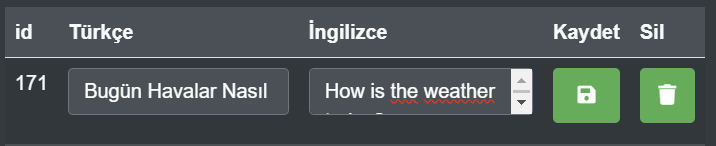
    Bu da CSS;

    .table tbody tr {
        height: 50px; /* Satır yüksekliğini sabitle */
    }
    
    .fixed-height {
        min-height: 30px; /* İçeriğin minimum yüksekliği */
        max-height: 60px; /* İçeriğin maksimum yüksekliği */
        overflow-y: auto; /* İçeriğin taşması durumunda kaydırma ekle */
    }
  • 21-02-2025, 00:44:34
    #8
    Lawliet adlı üyeden alıntı: mesajı görüntüle
    1. İçeriği düzenlemek için kullanılan div'in yüksekliğini sabitleyelim.
    2. Contenteditable minimum ve maksimum yükseklik değerleri ekleyelim.
    3. Satırların her zaman eşit yükseklikte olmasını sağlamak için satır yüksekliğini de sabitleyelim.


    <table class="table table-striped">
        <colgroup>
            <col>
            <col>
            <col>
            <col style="width: 60px;">
            <col style="width: 60px;">
        </colgroup>
        <thead>
            <tr>
                <th>id</th>
                <th>Türkçe</th>
                <th>İngilizce</th>
                <th>Kaydet</th>
                <th>Sil</th>
            </tr>
        </thead>
        <tbody>
            <?php foreach ($list as $item): ?>
                <tr>
                    <td><?php echo htmlspecialchars($item['id']); ?></td>
                    <td><div contenteditable="true" class="form-control fixed-height"><?php echo htmlspecialchars($item['tr']); ?></div></td>
                    <td><div contenteditable="true" class="form-control fixed-height"><?php echo htmlspecialchars($item['en']); ?></div></td>
                    <td><button class="btn btn-sm btn-success tahmin-up-button"><i class="fa fa-save" title="Kaydet" style="cursor:pointer"></i></button></td>
                    <td><button class="btn btn-sm btn-danger tahmin-del-button"><i class="fa fa-trash" title="Sil" style="cursor:pointer"></i></button></td>
                </tr>
            <?php endforeach; ?>
        </tbody>
    </table>
    Bu da CSS;

    .table tbody tr {
        height: 50px; /* Satır yüksekliğini sabitle */
    }
    
    .fixed-height {
        min-height: 30px; /* İçeriğin minimum yüksekliği */
        max-height: 60px; /* İçeriğin maksimum yüksekliği */
        overflow-y: auto; /* İçeriğin taşması durumunda kaydırma ekle */
    }
    maalesef hocam. sabit yükseklik vermeden dinamik olarak aynı yüksekliğe sahip olamıyorlar. Javascript ile falan denerim artık. css ile mümkün değil gibi
  • 21-02-2025, 02:03:34
    #9
    Senin kodda, td ler içerisindeki <div> lerde, display:inline; gibi otomatik bir kod tanımlı anladığım kadarıyla. Onun css'ini sil çözülür. Ya da divleri, display: inline-table; yap, çözülmesi gerekir.
    Yapamazsan yarın haber edersen birlikte de bakabiliriz. Telefon numaram imzamda var.