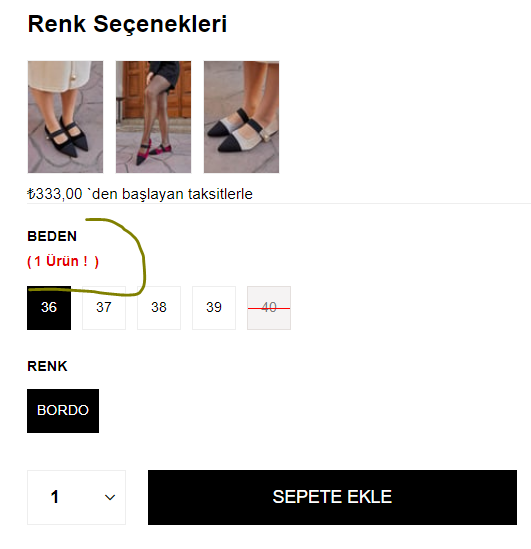
HTML ve CSS'in yanı sıra JavaScript kullanmanız gerek.
HTML <div class="product-options">
<div class="sizes">
<button class="size-btn" data-stock="1 Ürün!">36</button>
<button class="size-btn" data-stock="5 Ürün!">37</button>
<button class="size-btn" data-stock="2 Ürün!">38</button>
<button class="size-btn" data-stock="0 Ürün!">39</button>
<button class="size-btn" data-stock="Tükendi" disabled>40</button>
</div>
<div id="stock-info"></div>
</div> CSS .size-btn {
margin: 5px;
padding: 10px;
border: 1px solid #000;
background-color: #fff;
cursor: pointer;
}
.size-btn:disabled {
background-color: #ccc;
cursor: not-allowed;
}
#stock-info {
margin-top: 20px;
font-weight: bold;
color: red;
} JAVASCRIPT document.addEventListener('DOMContentLoaded', function() {
const buttons = document.querySelectorAll('.size-btn');
const stockInfo = document.getElementById('stock-info');
buttons.forEach(button => {
button.addEventListener('click', function() {
const stock = this.getAttribute('data-stock');
stockInfo.textContent = `Beden: ${this.textContent} - Stok Durumu: ${stock}`;
});
});
}); Mantığını kavramak için alttaki kodları
bu sitede ilgili yerlere yapıştırabilirsiniz.
Spoiler Göster
HTML <!DOCTYPE html>
<html lang="tr">
<head>
<meta charset="UTF-8">
<meta name="viewport" content="width=device-width, initial-scale=1.0">
<title>Ayakkabı Stok Durumu</title>
<link rel="stylesheet" href="styles.css">
<link rel="preconnect" href="https://fonts.googleapis.com">
<link rel="preconnect" href="https://fonts.gstatic.com" crossorigin>
<link href="https://fonts.googleapis.com/css2?family=Roboto:wght@400;500;700&display=swap" rel="stylesheet">
</head>
<body>
<div class="container">
<div class="product">
<div class="product-images">
<img src="https://via.placeholder.com/300x300" alt="Shoe 1" class="product-image">
<img src="https://via.placeholder.com/300x300" alt="Shoe 2" class="product-image">
<img src="https://via.placeholder.com/300x300" alt="Shoe 3" class="product-image">
</div>
<div class="product-info">
<h1>Ayakkabı Modeli</h1>
<p class="price">₺333,00 'den başlayan fiyatlarla</p>
<div class="sizes">
<h2>Beden Seçenekleri</h2>
<button class="size-btn" data-stock="1 Ürün!">36</button>
<button class="size-btn" data-stock="5 Ürün!">37</button>
<button class="size-btn" data-stock="2 Ürün!">38</button>
<button class="size-btn" data-stock="0 Ürün!">39</button>
<button class="size-btn" data-stock="Tükendi" disabled>40</button>
</div>
<div id="stock-info">Stok Durumunu Görmek İçin Beden Seçin</div>
<div class="color-options">
<h2>Renk</h2>
<button class="color-btn" style="background-color: #FFFFFF;">Bordo</button>
<button class="color-btn" style="background-color: #FFFFFF;">Siyah</button>
<button class="color-btn" style="background-color: #FFFFFF;">Beyaz</button>
</div>
<div class="add-to-cart">
<label for="quantity">Adet:</label>
<input type="number" id="quantity" name="quantity" min="1" value="1">
<button id="add-to-cart-btn">Sepete Ekle</button>
</div>
</div>
</div>
</div>
<script src="scripts.js"></script>
</body>
</html> CSS body {
font-family: 'Roboto', sans-serif;
background-color: #f4f4f4;
display: flex;
justify-content: center;
align-items: center;
height: 100vh;
margin: 0;
}
.container {
background-color: #fff;
padding: 30px;
border-radius: 12px;
box-shadow: 0 0 15px rgba(0, 0, 0, 0.1);
max-width: 800px;
width: 100%;
display: flex;
flex-direction: column;
align-items: center;
text-align: center;
}
.product {
width: 100%;
}
.product-images {
display: flex;
justify-content: center;
gap: 15px;
margin-bottom: 20px;
}
.product-image {
width: 100px;
height: 100px;
object-fit: cover;
border-radius: 8px;
border: 1px solid #ddd;
transition: transform 0.3s;
}
.product-image:hover {
transform: scale(1.1);
}
.product-info h1 {
font-size: 24px;
margin-bottom: 10px;
}
.product-info .price {
font-size: 20px;
color: #888;
margin-bottom: 20px;
}
.sizes, .color-options {
margin: 20px 0;
}
.size-btn, .color-btn {
margin: 5px;
padding: 10px 20px;
border: 1px solid #000;
border-radius: 5px;
cursor: pointer;
transition: background-color 0.3s, color 0.3s;
}
.size-btn:hover, .color-btn:hover {
background-color: #ddd;
}
.size-btn:disabled {
background-color: #ccc;
cursor: not-allowed;
}
#stock-info {
margin-top: 20px;
font-weight: bold;
color: red;
}
.add-to-cart {
display: flex;
justify-content: center;
align-items: center;
gap: 10px;
margin-top: 20px;
}
#quantity {
width: 60px;
padding: 8px;
border: 1px solid #ddd;
border-radius: 5px;
text-align: center;
}
#add-to-cart-btn {
padding: 10px 20px;
background-color: #000;
color: #fff;
border: none;
border-radius: 5px;
cursor: pointer;
transition: background-color 0.3s;
}
#add-to-cart-btn:hover {
background-color: #444;
} document.addEventListener('DOMContentLoaded', function() {
const sizeButtons = document.querySelectorAll('.size-btn');
const stockInfo = document.getElementById('stock-info');
const addToCartBtn = document.getElementById('add-to-cart-btn');
const quantityInput = document.getElementById('quantity');
sizeButtons.forEach(button => {
button.addEventListener('click', function() {
const stock = this.getAttribute('data-stock');
stockInfo.textContent = `Beden: ${this.textContent} - Stok Durumu: ${stock}`;
sizeButtons.forEach(btn => btn.classList.remove('selected'));
this.classList.add('selected');
});
});
addToCartBtn.addEventListener('click', function() {
const selectedSize = document.querySelector('.size-btn.selected');
if (selectedSize) {
const size = selectedSize.textContent;
const quantity = quantityInput.value;
alert(`${quantity} adet ${size} numara ayakkabı sepete eklendi!`);
} else {
alert('Lütfen bir beden seçin.');
}
});
});