• 20-02-2021, 02:23:55
    #1
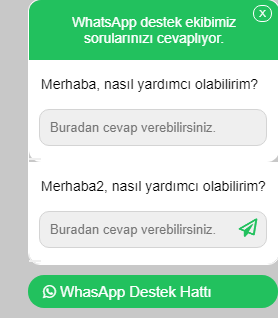
    Merhabalar, https://codepen.io/trwpcom/pen/KJWaBz buradaki kodları 2 farklı numaraya link çıkmak istiyorum fakat birinde buton gözükmüyor nerede hata yapıyorum? Teşekkürler.
    Kullandığım kodlar bunlar: Js aynı.
    <!-- TR-WP.COM -->
    
    
    <script src="https://code.jquery.com/jquery-3.3.1.slim.min.js"></script>
    
    <div class="trwpwhatsappall">
    <div class="trwpwhatsappballon">
     <span id="kapatac" class="kapat">X</span>
      <div class="trwpwhatsapptitle">
         WhatsApp destek ekibimiz sorularınızı cevaplıyor.
      </div>
      <div class="trwpwhatsappmessage1">
         Merhaba, nasıl yardımcı olabilirim?
      </div>
      <div class="trwpwhatsappinput1">
        <form action="https://web.whatsapp.com/send?" method="get" target="_blank">
          <input type="text" name="phone" value="905313818338" hidden>
            <input type="text" name="text" placeholder="Buradan cevap verebilirsiniz." autocomplete="off">
          <button class="trwpwhatsappsendbutton1" type="submit">
          <i class="fa fa-paper-plane-o"></i>
            
          </button>
        </form>
        </div>
      <div class="trwpwhatsappmessage">
         Merhaba2, nasıl yardımcı olabilirim?
      </div>
      <div class="trwpwhatsappinput">
        <form action="https://web.whatsapp.com/send?" method="get" target="_blank">
          <input type="text" name="phone" value="905313818338" hidden>
            <input type="text" name="text" placeholder="Buradan cevap verebilirsiniz." autocomplete="off">
          <button class="trwpwhatsappsendbutton" type="submit">
          <i class="fa fa-paper-plane-o"></i>
            
          </button>
        </form>
      </div>
    </div>
    <div id="ackapa" class="trwpwhatsappbutton">
    <i class="fa fa-whatsapp"></i> <span>WhasApp Destek Hattı</span>
    </div>
    /* TR-WP.COM */
    
    @import url('https://stackpath.bootstrapcdn.com/font-awesome/4.7.0/css/font-awesome.min.css');
    
    @import url('https://fonts.googleapis.com/css?family=Lato:100,300,400|Raleway:100,300,400,500,600,700|Open+Sans:100,300,400,500,600');
    
    body {
    background-color: #c8c8c8;
    height: 1200px;
    }
    
    .trwpwhatsappballon {
    font-size: 14px;
    border-radius: 12px;
    border: 1px solid #fff;
    max-width: 250px;
    }
    
    .trwpwhatsapptitle {
    background-color: #22c15e;
    color: white;
    padding: 14px;
    border-radius: 12px 12px 0px 0px;
    text-align: center;
    }
    
    .trwpwhatsappmessage {
    padding: 16px 12px;
    background-color: white;
    }
    .trwpwhatsappmessage1 {
    padding: 16px 12px;
    background-color: white;
    }
    
    .trwpwhatsappinput {
    background-color: white;
    border-radius: 0px 0px 12px 12px;
    }
    .trwpwhatsappinput1 {
    background-color: white;
    border-radius: 0px 0px 12px 12px;
    }
    
    .trwpwhatsappinput input {
    width: 206px;
    border-radius: 10px;
    margin: 1px 1px 0px 10px;
    padding:10px;
    font-family: "Raleway", Arial, sans-serif;
    font-weight: 300;
    font-size: 13px;
    background-color: #efefef;
    border: 1px solid #d4d4d4;
    }
    .trwpwhatsappinput1 input {
    width: 206px;
    border-radius: 10px;
    margin: 1px 1px 0px 10px;
    padding:10px;
    font-family: "Raleway", Arial, sans-serif;
    font-weight: 300;
    font-size: 13px;
    background-color: #efefef;
    border: 1px solid #d4d4d4;
    }
    .trwpwhatsappbutton {
    background-color: #22c15e;
    border-radius: 20px;
    padding: 8px 15px;
    cursor: pointer;
    color: #fff;
    max-width: 220px;
    margin-top: 10px;
    margin-bottom: 10px;
    -webkit-touch-callout: none;
    -webkit-user-select: none;
    -khtml-user-select: none;
    -moz-user-select: none;
    -ms-user-select: none;
    user-select: none;
    }
    
    .trwpwhatsappall {
    position: fixed;
    z-index: 9999999999999999999;
    bottom: 0;
    right: 10px;
    font-family: "Raleway", Arial, sans-serif;
    font-weight: 300;
    font-size: 15px;
    }
    
    .trwpwhatsappsendbutton {
      color: #22c15e;
      cursor:pointer;
    }
    .trwpwhatsappsendbutton1 {
      color: #1111111;
      cursor:pointer;
    }
    
    button {border: none;}
    button i {
    float: right;
    position: absolute;
    z-index: 999999999999;
    right: 23px;
    top: 11;
    bottom: 81px;
    font-size: 18px !important;
    }
    
    
    .kapat {
    position: absolute;
    right: 8px;
    top: 6px;
    font-size: 13px;
    border: 1px solid #fff;
    border-radius: 99px;
    padding: 2px 5px 2px 5px;
    color: white;
    font-size: 10px;
    cursor: pointer;
    }
  • 20-02-2021, 02:25:39
    #2
    Kimlik doğrulama veya yönetimden onay bekliyor.
    Button2 yapın 2.sini
  • 20-02-2021, 02:30:30
    #3
    RichSoft adlı üyeden alıntı: mesajı görüntüle
    Button2 yapın 2.sini
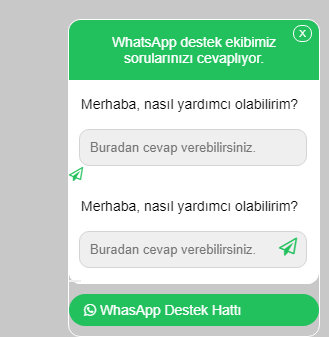
    Teşekkür ederim, fakat bu sefer şu şekilde oldu:
  • 20-02-2021, 02:39:24
    #4
    [COLOR=#D9DAE9][FONT=consolas]button {border: none;}[/FONT][/COLOR]
    [COLOR=#D9DAE9][FONT=consolas]button i {[/FONT][/COLOR]
    [COLOR=#D9DAE9][FONT=consolas]float: right;[/FONT][/COLOR]
    [COLOR=#D9DAE9][FONT=consolas]position: absolute;[/FONT][/COLOR]
    [COLOR=#D9DAE9][FONT=consolas]z-index: 999999999999;[/FONT][/COLOR]
    [COLOR=#D9DAE9][FONT=consolas]right: 23px;[/FONT][/COLOR]
    [COLOR=#D9DAE9][FONT=consolas]top: 11;[/FONT][/COLOR]
    [COLOR=#D9DAE9][FONT=consolas]bottom: 81px;[/FONT][/COLOR]
    [COLOR=#D9DAE9][FONT=consolas]font-size: 18px !important;[/FONT][/COLOR]
    [COLOR=#D9DAE9][FONT=consolas]}[/FONT][/COLOR]
    [COLOR=#D9DAE9][FONT=consolas] [/FONT][/COLOR]
    css uygulamasını button2 içinde yapın.
  • 20-02-2021, 02:44:20
    #5
    css dende buton1. İn kodlarını kopyalayıp 2 ye göre uyarlayın bu kadar
    rockmeyh adlı üyeden alıntı: mesajı görüntüle
    Teşekkür ederim, fakat bu sefer şu şekilde oldu:
  • 20-02-2021, 02:44:27
    #6
    EmreARICI adlı üyeden alıntı: mesajı görüntüle
    [COLOR=#D9DAE9][FONT=consolas]button {border: none;}[/FONT][/COLOR]
    [COLOR=#D9DAE9][FONT=consolas]button i {[/FONT][/COLOR]
    [COLOR=#D9DAE9][FONT=consolas]float: right;[/FONT][/COLOR]
    [COLOR=#D9DAE9][FONT=consolas]position: absolute;[/FONT][/COLOR]
    [COLOR=#D9DAE9][FONT=consolas]z-index: 999999999999;[/FONT][/COLOR]
    [COLOR=#D9DAE9][FONT=consolas]right: 23px;[/FONT][/COLOR]
    [COLOR=#D9DAE9][FONT=consolas]top: 11;[/FONT][/COLOR]
    [COLOR=#D9DAE9][FONT=consolas]bottom: 81px;[/FONT][/COLOR]
    [COLOR=#D9DAE9][FONT=consolas]font-size: 18px !important;[/FONT][/COLOR]
    [COLOR=#D9DAE9][FONT=consolas]}[/FONT][/COLOR]
    [COLOR=#D9DAE9][FONT=consolas] [/FONT][/COLOR]
    css uygulamasını button2 içinde yapın.
    Çok teşekkürler sorun çözüldü.
  • 20-02-2021, 02:50:52
    #7
    RichSoft adlı üyeden alıntı: mesajı görüntüle
    css dende buton1. İn kodlarını kopyalayıp 2 ye göre uyarlayın bu kadar
    Bu seferde butona tıklayınca sadece buton1 gidiyor.

    <p>Güncel kodlar bu şekilde:</p>
    <!-- TR-WP.COM -->
    
    <script src="https://code.jquery.com/jquery-3.3.1.slim.min.js"></script>
    
    <div class="trwpwhatsappall">
    <div class="trwpwhatsappballon">
     <span id="kapatac" class="kapat">X</span>
      <div class="trwpwhatsapptitle">
         WhatsApp destek ekibimiz sorularınızı cevaplıyor.
      </div>
      <div class="trwpwhatsappmessage1">
         Merhaba1, nasıl yardımcı olabilirim?
      </div>
      <div class="trwpwhatsappinput1">
        <form action="https://web.whatsapp.com/send?" method="get" target="_blank">
          <input type="text" name="phone" value="905542979032" hidden>
            <input type="text" name="text" placeholder="Buradan cevap verebilirsiniz." autocomplete="off">
          <button2 class="trwpwhatsappsendbutton1" type="submit">
          <i class="fa fa-paper-plane-o"></i>
          </button2>
        </form>
     </div>
    
     <div class="trwpwhatsappmessage">
         Merhaba, nasıl yardımcı olabilirim?
      </div>
      <div class="trwpwhatsappinput">
        <form action="https://web.whatsapp.com/send?" method="get" target="_blank">
          <input type="text" name="phone" value="905549996498" hidden>
            <input type="text" name="text" placeholder="Buradan cevap verebilirsiniz." autocomplete="off">
          <button class="trwpwhatsappsendbutton" type="submit">
          <i class="fa fa-paper-plane-o"></i>
          </button>
        </form>
      </div>
    </div>
    
    <div id="ackapa" class="trwpwhatsappbutton">
    <i class="fa fa-whatsapp"></i> <span>WhasApp Destek Hattı</span>
    </div>
    /* TR-WP.COM */
    
    @import url('https://stackpath.bootstrapcdn.com/font-awesome/4.7.0/css/font-awesome.min.css');
    
    @import url('https://fonts.googleapis.com/css?family=Lato:100,300,400|Raleway:100,300,400,500,600,700|Open+Sans:100,300,400,500,600');
    
    body {
    background-color: #c8c8c8;
    height: 1200px;
    }
    
    .trwpwhatsappballon {
    font-size: 14px;
    border-radius: 12px;
    border: 1px solid #fff;
    max-width: 250px;
    }
    
    .trwpwhatsapptitle {
    background-color: #22c15e;
    color: white;
    padding: 14px;
    border-radius: 12px 12px 0px 0px;
    text-align: center;
    }
    
    .trwpwhatsappmessage {
    padding: 16px 12px;
    background-color: white;
    }
    .trwpwhatsappmessage1 {
    padding: 16px 12px;
    background-color: white;
    }
    
    .trwpwhatsappinput {
    background-color: white;
    border-radius: 0px 0px 12px 12px;
    }
    .trwpwhatsappinput1 {
    background-color: white;
    border-radius: 0px 0px 12px 12px;
    }
    .trwpwhatsappinput input {
    width: 206px;
    border-radius: 10px;
    margin: 1px 1px 0px 10px;
    padding:10px;
    font-family: "Raleway", Arial, sans-serif;
    font-weight: 300;
    font-size: 13px;
    background-color: #efefef;
    border: 1px solid #d4d4d4;
    }
    .trwpwhatsappinput1 input {
    width: 206px;
    border-radius: 10px;
    margin: 1px 1px 0px 10px;
    padding:10px;
    font-family: "Raleway", Arial, sans-serif;
    font-weight: 300;
    font-size: 13px;
    background-color: #efefef;
    border: 1px solid #d4d4d4;
    }
    .trwpwhatsappbutton {
    background-color: #22c15e;
    border-radius: 20px;
    padding: 8px 15px;
    cursor: pointer;
    color: #fff;
    max-width: 220px;
    margin-top: 10px;
    margin-bottom: 10px;
    -webkit-touch-callout: none;
    -webkit-user-select: none;
    -khtml-user-select: none;
    -moz-user-select: none;
    -ms-user-select: none;
    user-select: none;
    }
    
    .trwpwhatsappall {
    position: fixed;
    z-index: 9999999999999999999;
    bottom: 0;
    right: 10px;
    font-family: "Raleway", Arial, sans-serif;
    font-weight: 300;
    font-size: 15px;
    }
    
    .trwpwhatsappsendbutton {
      color: #22c15e;
      cursor:pointer;
    }
    .trwpwhatsappsendbutton1 {
      color: #22c15e;
      cursor:pointer;
    }
    button {border: none;}
    button i {
    float: right;
    position: absolute;
    z-index: 999999999999;
    right: 23px;
    top: 11;
    bottom: 81px;
    font-size: 18px !important;
    }
    button2 {border: none;}
    button2 i {
    float: right;
    position: absolute;
    z-index: 999999999999;
    right: 23px;
    top: 11;
    bottom: 162px;
    font-size: 18px !important;
    }
    .kapat {
    position: absolute;
    right: 8px;
    top: 6px;
    font-size: 13px;
    border: 1px solid #fff;
    border-radius: 99px;
    padding: 2px 5px 2px 5px;
    color: white;
    font-size: 10px;
    cursor: pointer;
    }
    // TR-WP.COM
    
    $(document).ready(function() {
    $("#ackapa").click(function() {
    $(".trwpwhatsappballon").toggle(1000);
    });
    $("#kapatac").click(function() {
    $(".trwpwhatsappballon").toggle(1000);
    });
    });
  • 20-02-2021, 16:25:41
    #8


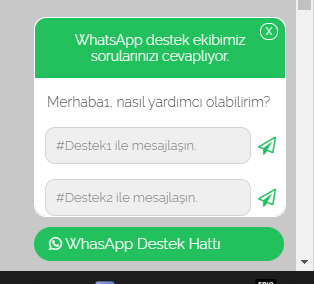
    Görünüm açısından sizin yapınıza göre bir düzenleme yaptım hepsini tek bir sayfada topladım ama ihtiyacınıza göre kısımları parçalayıp css kısmını css e html kısmınıda htmle aktarırsınız. Umarım işinizi görür.


    <html>
    <!-- TR-WP.COM -->
     <head>
     <style type="text/css">
    /* TR-WP.COM */
     
    @import url('https://stackpath.bootstrapcdn.com/font-awesome/4.7.0/css/font-awesome.min.css');
     
    @import url('https://fonts.googleapis.com/css?family=Lato:100,300,400|Raleway:100,300,400,500,600,700|Open+Sans:100,300,400,500,600');
     
    body {
    background-color: #c8c8c8;
    height: 1200px;
    }
     
    .trwpwhatsappballon {
    font-size: 14px;
    border-radius: 12px;
    border: 1px solid #fff;
    max-width: 250px;    
    height: 198px;
    }
     
    .trwpwhatsapptitle {
    background-color: #22c15e;
    color: white;
    padding: 14px;
    border-radius: 12px 12px 0px 0px;
    text-align: center;
    }
     
    .trwpwhatsappmessage {
    padding: 16px 12px;
    background-color: white;
    }
    .trwpwhatsappmessage1 {
    padding: 16px 12px;
    background-color: white;
    }
     
    .trwpwhatsappinput {
    background-color: white;
    border-radius: 0px 0px 12px 12px;
    }
    .trwpwhatsappinput1 {
    background-color: white;
    border-radius: 0px 0px 12px 12px;
    }
    .trwpwhatsappinput input {
    width: 206px;
    border-radius: 10px;
    margin: 1px 1px 0px 10px;
    padding:10px;
    font-family: "Raleway", Arial, sans-serif;
    font-weight: 300;
    font-size: 13px;
    background-color: #efefef;
    border: 1px solid #d4d4d4;
    }
    .trwpwhatsappinput1 input {
    width: 206px;
    border-radius: 10px;
    margin: 1px 1px 0px 10px;
    padding:10px;
    font-family: "Raleway", Arial, sans-serif;
    font-weight: 300;
    font-size: 13px;
    background-color: #efefef;
    border: 1px solid #d4d4d4;
    }
    .trwpwhatsappbutton {
    background-color: #22c15e;
    border-radius: 20px;
    padding: 8px 15px;
    cursor: pointer;
    color: #fff;
    max-width: 220px;
    margin-top: 10px;
    margin-bottom: 10px;
    -webkit-touch-callout: none;
    -webkit-user-select: none;
    -khtml-user-select: none;
    -moz-user-select: none;
    -ms-user-select: none;
    user-select: none;
    }
     
    .trwpwhatsappall {
    position: fixed;
    z-index: 9999999999999999999;
    bottom: 0;
    right: 10px;
    font-family: "Raleway", Arial, sans-serif;
    font-weight: 300;
    font-size: 15px;
    }
     
    .trwpwhatsappsendbutton {
      color: #22c15e;
      cursor:pointer;
    }
    .trwpwhatsappsendbutton1 {
      color: #22c15e;
      cursor:pointer;
    }
    button {border: none;float:right;position:absolute;padding:15px;right:5px; background:transparent;}
    button i {
    position: absolute;
    z-index: 999999999999;
    right: 5px;
    top: 11;
    bottom: 81px;
    font-size: 18px !important;
    }
    
    .kapat {
    position: absolute;
    right: 8px;
    top: 6px;
    font-size: 13px;
    border: 1px solid #fff;
    border-radius: 99px;
    padding: 2px 5px 2px 5px;
    color: white;
    font-size: 10px;
    cursor: pointer;
    }
    </style>
    <script src="https://code.jquery.com/jquery-3.3.1.slim.min.js"></script>
    </head>
     
    <div class="trwpwhatsappall">
    <div class="trwpwhatsappballon">
     <span id="kapatac" class="kapat">X</span>
      <div class="trwpwhatsapptitle">
         WhatsApp destek ekibimiz sorularınızı cevaplıyor.
      </div>
      <div class="trwpwhatsappmessage1">
         Merhaba1, nasıl yardımcı olabilirim?
      </div>
      <div class="trwpwhatsappinput1">
      
        <form action="https://web.whatsapp.com/send?" method="get" target="_blank">
          <input type="text" name="phone" value="905549996498" hidden>
            <input type="text" name="text" placeholder="#Destek1 ile mesajlaşın." autocomplete="off">
          <button class="trwpwhatsappsendbutton1" type="submit">
          <i class="fa fa-paper-plane-o"></i>
          </button>
        </form>
        
        <form action="https://web.whatsapp.com/send?" method="get" target="_blank">
          <input type="text" name="phone" value="905542979032" hidden>
          <input type="text" name="text" placeholder="#Destek2 ile mesajlaşın." autocomplete="off">
          <button class="trwpwhatsappsendbutton1" type="submit">
          <i class="fa fa-paper-plane-o"></i>
          </button>
        </form>
     </div>
     
    </div>
     
    <div id="ackapa" class="trwpwhatsappbutton">
    <i class="fa fa-whatsapp"></i> <span>WhasApp Destek Hattı</span>
    </div>
    
    <script>
    // TR-WP.COM
     
    $(document).ready(function() {
    $("#ackapa").click(function() {
    $(".trwpwhatsappballon").toggle(1000);
    });
    $("#kapatac").click(function() {
    $(".trwpwhatsappballon").toggle(1000);
    });
    });
    </script>
    </html>