
Çok basit bir sistem. Sadece <Select> <Option> yani ComboBox yapısını kullanarak 5 - 6 tane seçenek çıkmasını istiyorum. Son seçimden sonra tıklanıldığında bir sayfaya gitmesi gerekiyor.
Yani basit anlamda anlatmam gerekirse: Bir yere kayıt olurken karşımıza çıkan İl Seçimi Açılır Menüden Seçince İlçe Seçimi o bölümden de seçince Semt Seçimi gibi alt alta seçilen değere göre diğerini açma.
Örn:
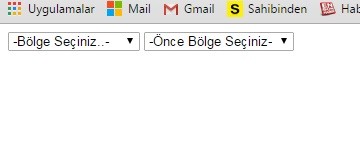
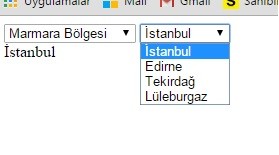
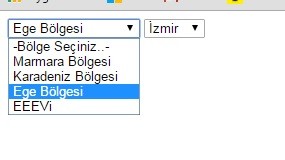
Bu şekilde 2 tane dışında devam edemedim. Bu menüden 5 tane olacak bir önceki menüde seçilene göre diğer combobox taki değerler çıkacak.
Buraya kadar eklediğim kodlar..
<!DOCTYPE html PUBLIC "-//W3C//DTD XHTML 1.0 Transitional//EN" "http://www.w3.org/TR/xhtml1/DTD/xhtml1-transitional.dtd">
<html xmlns="http://www.w3.org/1999/xhtml">
<head>
<meta http-equiv="Content-Type" content="text/html; charset=utf-8" />
<title>Başlıksız Belge</title>


 <script>
    function byId(e) {return document.getElementById(e);}

    function stateComboChange()
    {
        var combo1 = byId('stateCombo');
        var combo2 = byId('cityCombo');
//      alert(combo1.value);

        emptyCombo(combo2);
        switch(combo1.value)
        {
            case '-1':  addOption(combo2, -1, '- Şehir Seçiniz -');
                        break;
            case '0':   addOption(combo2, 0, 'İstanbul');
                        addOption(combo2, 1, 'Edirne');
						addOption(combo2, 2, 'Tekirdağ');
						addOption(combo2, 3, 'Lüleburgaz');
                        break;
            case '1':   addOption(combo2, 0, 'Trabzon');
                        addOption(combo2, 1, 'Rize');
						addOption(combo2, 2, 'Samsun');
                        break;
            case '2':   addOption(combo2, 0, 'İzmir');
                        addOption(combo2, 1, 'Aydın');
                        break;
			case '3':   addOption(combo2, 0, 'Vd');
                        addOption(combo2, 1, 'CC');
                        break;
        }
        cityComboChange();
    }

    function cityComboChange()
    {
        var combo2, tgt;
        combo2 = byId('cityCombo');
        tgt = byId('tgt');

        tgt.innerHTML = combo2.options[combo2.options.selectedIndex].title;
    }

    function emptyCombo(e)
    {
        e.innerHTML = '';
    }

    function addOption(combo, val, txt)
    {
        var option = document.createElement('option');
        option.value = val;
        option.title = txt;
        option.appendChild(document.createTextNode(txt));
        combo.appendChild(option);
    }

  </script>
</head>

<body>


  <select id='stateCombo' onchange='stateComboChange();'>
        <option value='-1' title='-select one-'>-Bölge Seçiniz..-</option>
        <option value='0' title='Vic'>Marmara Bölgesi</option>
        <option value='1' title='Nsw'>Karadeniz Bölgesi</option>
        <option value='2' title='Tas'>Ege Bölgesi</option>
        <option value='3' title='Tas'>EEEVi</option>
    </select>

    <select id='cityCombo' onchange='cityComboChange();'>
        <option value='-1' title='-select state first-'>-Önce Bölge Seçiniz-</option>
    </select>

    <div id='tgt'></div>

</body>
</html>
- DİĞER BİR KOD YAPISINDA DA AYNI 2.MENÜDEN SONRA EKLEME YAPAMADIM. İSTEDİĞİM 5 YADA 6 TANE BU ŞEKİLDE MENÜ EKLEMEK.<?xml version="1.0" encoding="UTF-8"?>
<!DOCTYPE html PUBLIC "-//W3C//DTD XHTML 1.0 Transitional//EN"
"http://www.w3.org/TR/xhtml1/DTD/xhtml1-transitional.dtd">
<html xmlns="http://www.w3.org/1999/xhtml" xml:lang="en" lang="en">
<head>
<meta http-equiv="content-type" content="text/xhtml; charset=utf-8" />
<title>Dynamic Select Statements</title>
<script type="text/javascript">
//<![CDATA[
// array of possible countries in the same order as they appear in the country selection list
var countryLists = new Array(4)
countryLists["empty"] = ["Bölge Seçin"];
countryLists["Marmara Bölgesi"] = ["İstanbul", "Edirne", "Tekirdağ"];
countryLists["Ege Bölgesi"] = ["Çanakkale", "İzmir", "Aydın"];
countryLists["Karadeniz Bölgesi"] = ["Trabzon", "Ordu", "Rize","Sinop"];
/* CountryChange() is called from the onchange event of a select element.
* param selectObj - the select object which fired the on change event.
*/
function countryChange(selectObj) {
// get the index of the selected option
var idx = selectObj.selectedIndex;
// get the value of the selected option
var which = selectObj.options[idx].value;
// use the selected option value to retrieve the list of items from the countryLists array
cList = countryLists[which];
// get the country select element via its known id
var cSelect = document.getElementById("country");
// remove the current options from the country select
var len=cSelect.options.length;
while (cSelect.options.length > 0) {
cSelect.remove(0);
}
var newOption;
// create new options
for (var i=0; i<cList.length; i++) {
newOption = document.createElement("option");
newOption.value = cList[i]; // assumes option string and value are the same
newOption.text=cList[i];
// add the new option
try {
cSelect.add(newOption); // this will fail in DOM browsers but is needed for IE
}
catch (e) {
cSelect.appendChild(newOption);
}
}
}
//]]>
</script>
</head>
<body>
<noscript>This page requires JavaScript be available and enabled to function properly</noscript>
<h1>Dynamic Select Statements</h1>
<label for="continent">Seç</label>
<select id="continent" onchange="countryChange(this);">
<option value="empty">Bölge Seçin</option>
<option value="Marmara Bölgesi">Marmara Bölgesi</option>
<option value="Ege Bölgesi">Ege Bölgesi</option>
<option value="Karadeniz Bölgesi">Karadeniz Bölgesi</option>
</select>
<br/>
<label for="country">Seçin</label>
<select id="country">
<option value="0">Şehir Seçin</option>
</select>
</body>
</html>