dertliA adlı üyeden alıntı:
mesajı görüntüle
öyle bir iki demeyle yazmıyor hocam. canından bezdirdim 
aşağıdaki kodu sitenizde ftp den bir klasör oluşturun indexle diye sonra içine bu kodu indexle.php diye kaydedin.
tabi bu arada yukarda arkadaşın anlattığı gibi indexing api kurulumu yapmanız onun verdiği mail adresini webmaster toolsa eklemeniz lazım

aşağıdaki kodu sitenizde ftp den bir klasör oluşturun indexle diye sonra içine bu kodu indexle.php diye kaydedin.
<?php
// Hata raporlamayı aç
ini_set('display_errors', 1);
error_reporting(E_ALL);

// Google Service Account JSON dosyasını yükle
$serviceAccountFile = 'service-account.json';

// Google OAuth 2.0 Token almak için cURL ile kimlik doğrulaması
function getAccessToken($serviceAccountFile) {
    // JSON dosyasını oku
    $credentials = json_decode(file_get_contents($serviceAccountFile), true);

    // OAuth 2.0 Token almak için gerekli parametreler
    $postData = [
        'grant_type' => 'urn:ietf:params:oauth:grant-type:jwt-bearer',
        'assertion' => generateJWT($credentials)
    ];

    $ch = curl_init();
    curl_setopt($ch, CURLOPT_URL, 'https://oauth2.googleapis.com/token');
    curl_setopt($ch, CURLOPT_RETURNTRANSFER, 1);
    curl_setopt($ch, CURLOPT_POST, 1);
    curl_setopt($ch, CURLOPT_POSTFIELDS, http_build_query($postData));
    $response = curl_exec($ch);
    curl_close($ch);

    $responseData = json_decode($response, true);
    return $responseData['access_token'];  // Erişim token'ı
}

// JWT oluşturma fonksiyonu
function generateJWT($credentials) {
    $header = json_encode(['alg' => 'RS256', 'typ' => 'JWT']);
    $claimSet = json_encode([
        'iss' => $credentials['client_email'],
        'scope' => 'https://www.googleapis.com/auth/indexing',
        'aud' => 'https://oauth2.googleapis.com/token',
        'iat' => time(),
        'exp' => time() + 3600,
    ]);

    // JWT şifresini imzalamak için özel anahtarı kullan
    $privateKey = $credentials['private_key'];
    $jwtHeader = base64_encode($header);
    $jwtClaimSet = base64_encode($claimSet);
    $unsignedToken = $jwtHeader . '.' . $jwtClaimSet;

    $signature = '';
    openssl_sign($unsignedToken, $signature, $privateKey, OPENSSL_ALGO_SHA256);
    $jwtSignature = base64_encode($signature);

    return $unsignedToken . '.' . $jwtSignature;  // Tam JWT
}

// URL indeksleme isteğini gönder
function indexUrl($accessToken, $url) {
    $apiUrl = 'https://indexing.googleapis.com/v3/urlNotifications:publish';
    $data = [
        'url' => $url,
        'type' => 'URL_UPDATED'
    ];

    $headers = [
        'Content-Type: application/json',
        'Authorization: Bearer ' . $accessToken
    ];

    $ch = curl_init();
    curl_setopt($ch, CURLOPT_URL, $apiUrl);
    curl_setopt($ch, CURLOPT_RETURNTRANSFER, 1);
    curl_setopt($ch, CURLOPT_POST, 1);
    curl_setopt($ch, CURLOPT_POSTFIELDS, json_encode($data));
    curl_setopt($ch, CURLOPT_HTTPHEADER, $headers);
    $response = curl_exec($ch);
    curl_close($ch);

    return $response;
}

// Formdan gelen URL'leri işleme
if ($_SERVER['REQUEST_METHOD'] === 'POST') {
    $urls = explode("\n", trim($_POST['urls']));  // URL'leri ayır

    $accessToken = getAccessToken($serviceAccountFile);  // Access Token al

    // Her URL için Google Indexing API'ye indeksleme isteği gönder
    foreach ($urls as $url) {
        $url = trim($url);
        if (!empty($url)) {
            $response = indexUrl($accessToken, $url);  // URL'yi indeksle
            echo "URL: $url <br> Yanıt: $response <br><br>";
        }
    }
} else {
    echo "Lütfen URL'leri girin ve formu gönderin.";
}
?>
sonra aynı klasöre form.php diye dosya oluşturup içine aşağıdakini yapıştırın.<!DOCTYPE html>
<html lang="tr">
<head>
<meta charset="UTF-8">
<meta name="viewport" content="width=device-width, initial-scale=1.0">
<title>URL İndeksleme</title>
</head>
<body>
<h2>Google'a URL İndeksleme</h2>
<form action="indexle.php" method="POST">
<label for="urls">URL'leri girin (her satıra bir URL):</label><br>
<textarea name="urls" id="urls" rows="10" cols="50" placeholder="URL'leri buraya girin, her birini yeni satıra yazın..."></textarea><br><br>
<input type="submit" value="İndeksle">
</form>
</body>
</html>aynı klasörün içine googlenin verdiği indexing api dosyasının adını service-account.json yaparak koyun. hepsi butabi bu arada yukarda arkadaşın anlattığı gibi indexing api kurulumu yapmanız onun verdiği mail adresini webmaster toolsa eklemeniz lazım
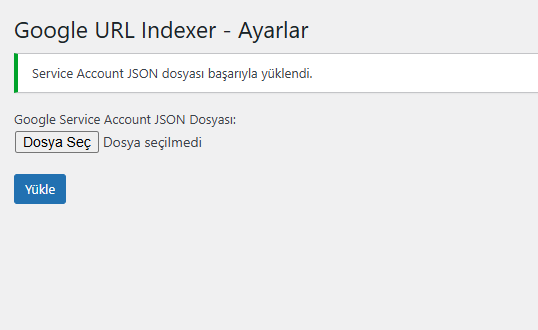
Sol menüden Google URL Indexer > Ayarlar'dan service_account.json dosyanızı yükleyin.
Yine aynı menüden Google URL Indexer bölümüne her satıra bir link olacak şekilde 200 adet ekleyin. Ve gönderin.
Not: Birden fazla servis account dosyasını kullanarak günde 1000 adet url gönderebilirsiniz.
Çıkan sonuç urlNotificationMetadata ise başarılı demektir.
Sevgiler.
Eklenti Dosyası: İNDİR