

efektinizi doldurun:
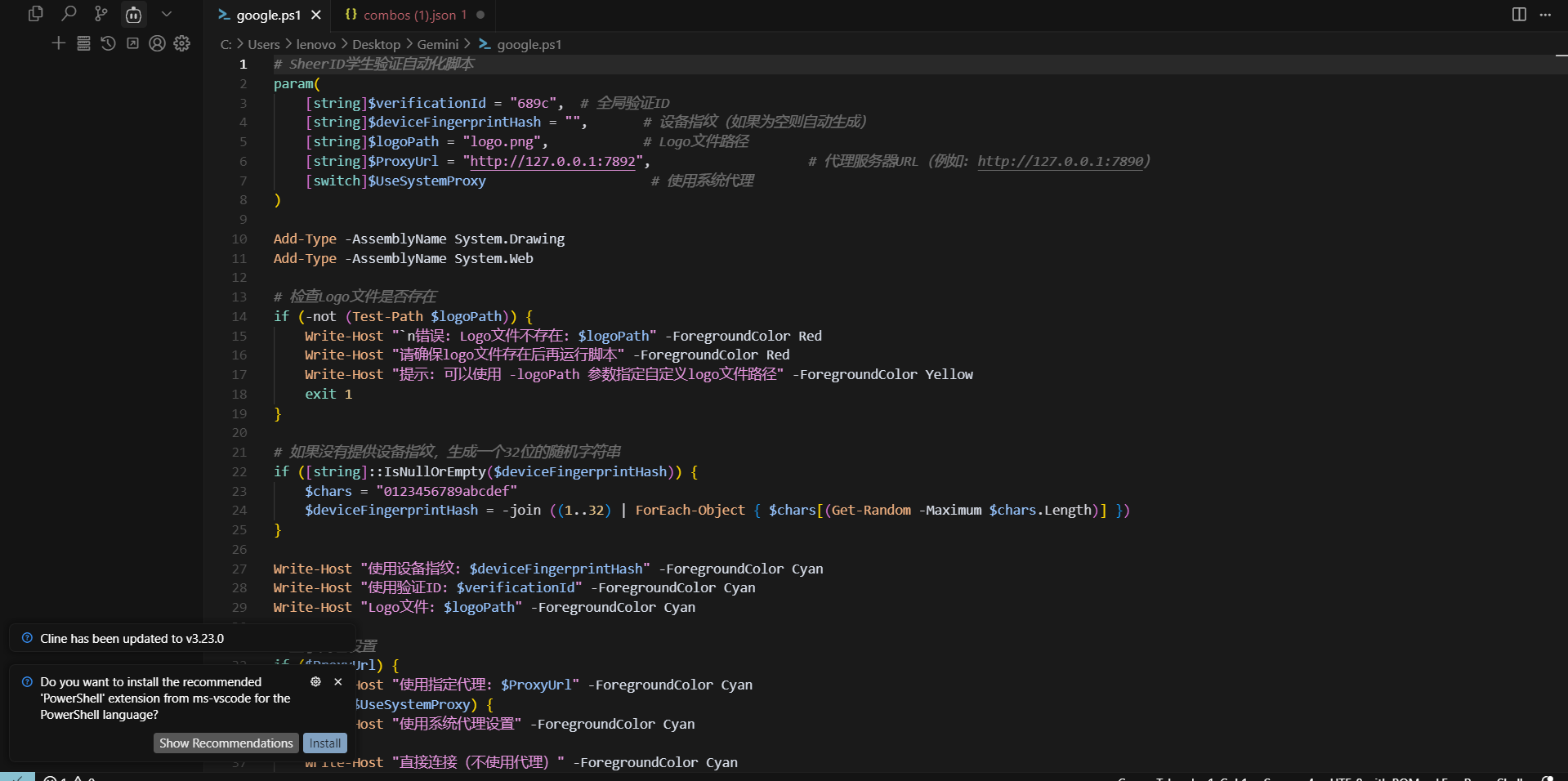
Kod: google.ps1 diye kaydedin.
# SheerID学生验证自动化脚本
param(
    [string]$verificationId = "689c",  # 全局验证ID
    [string]$deviceFingerprintHash = "",       # 设备指纹(如果为空则自动生成)
    [string]$logoPath = "logo.png",            # Logo文件路径
    [string]$ProxyUrl = "http://127.0.0.1:7892",                    # 代理服务器URL(例如: http://127.0.0.1:7890)
    [switch]$UseSystemProxy                     # 使用系统代理
)
Add-Type -AssemblyName System.Drawing
Add-Type -AssemblyName System.Web
# 检查Logo文件是否存在
if (-not (Test-Path $logoPath)) {
    Write-Host "`n错误: Logo文件不存在: $logoPath" -ForegroundColor Red
    Write-Host "请确保logo文件存在后再运行脚本" -ForegroundColor Red
    Write-Host "提示: 可以使用 -logoPath 参数指定自定义logo文件路径" -ForegroundColor Yellow
    exit 1
}
# 如果没有提供设备指纹,生成一个32位的随机字符串
if ([string]::IsNullOrEmpty($deviceFingerprintHash)) {
    $chars = "0123456789abcdef"
    $deviceFingerprintHash = -join ((1..32) | ForEach-Object { $chars[(Get-Random -Maximum $chars.Length)] })
}
Write-Host "使用设备指纹: $deviceFingerprintHash" -ForegroundColor Cyan
Write-Host "使用验证ID: $verificationId" -ForegroundColor Cyan
Write-Host "Logo文件: $logoPath" -ForegroundColor Cyan
# 显示代理设置
if ($ProxyUrl) {
    Write-Host "使用指定代理: $ProxyUrl" -ForegroundColor Cyan
} elseif ($UseSystemProxy) {
    Write-Host "使用系统代理设置" -ForegroundColor Cyan
} else {
    Write-Host "直接连接(不使用代理)" -ForegroundColor Cyan
}
# ========== 随机姓名生成器 ==========
function Get-RandomName {
    $random = New-Object System.Random

    # 姓氏词根组合
    $lastNamePrefixes = @(
        "Van", "De", "Von", "Mac", "Mc", "O'", "La", "Le", "Di", "Da",
        "Al", "El", "San", "Del", "Dos", "Fitz", "Ben", "Bar", "Bat", "Abu"
    )

    $lastNameRoots = @(
        "John", "Smith", "Brown", "Will", "Davis", "Mill", "Wil", "Jack", "Thomp",
        "White", "Martin", "Ander", "Clark", "Robin", "Lewis", "Walk", "Hall",
        "Allen", "Young", "King", "Wright", "Lopez", "Hill", "Scott", "Green",
        "Adam", "Baker", "Nelson", "Carter", "Mitch", "Peter", "Rob", "Rich",
        "Wood", "Stone", "Field", "River", "Mount", "Lake", "Forest", "Ocean"
    )

    $lastNameSuffixes = @(
        "son", "sen", "sson", "ton", "don", "ron", "man", "mann", "stein",
        "berg", "burg", "field", "ford", "worth", "wood", "ward", "land",
        "ley", "ly", "er", "en", "in", "ing", "ell", "ett", "ott", "at",
        "sky", "ski", "ov", "ova", "ev", "eva", "ich", "ovich", "ez", "az"
    )

    # 名字词根组合
    $firstNamePrefixes = @(
        "Alex", "Sam", "Chris", "Pat", "Jor", "Cam", "Ash", "Kel", "Mor", "Cas",
        "Ari", "Eli", "Max", "Leo", "Nat", "Gab", "Mic", "Dan", "Ben", "Zac",
        "Kar", "Mar", "Sar", "Jen", "Em", "Ol", "Soph", "Lil", "Mad", "Av"
    )

    $firstNameMiddles = @(
        "an", "en", "in", "on", "ar", "er", "or", "el", "al", "il",
        "ath", "eth", "ith", "and", "end", "ind", "ast", "est", "ist"
    )

    $firstNameSuffixes = @(
        "der", "ley", "ton", "son", "ian", "ian", "an", "en", "in", "on",
        "a", "e", "i", "o", "y", "ie", "ey", "ay", "lyn", "line",
        "elle", "ette", "ina", "ana", "enna", "issa", "essa", "ica"
    )

    # 生成姓氏
    $lastNameType = $random.Next(0, 4)
    switch ($lastNameType) {
        0 {
            $lastName = $lastNamePrefixes[$random.Next($lastNamePrefixes.Count)] +
                       $lastNameRoots[$random.Next($lastNameRoots.Count)].ToLower()
        }
        1 {
            $lastName = $lastNameRoots[$random.Next($lastNameRoots.Count)] +
                       $lastNameSuffixes[$random.Next($lastNameSuffixes.Count)]
        }
        2 {
            $lastName = $lastNamePrefixes[$random.Next($lastNamePrefixes.Count)] +
                       $lastNameRoots[$random.Next($lastNameRoots.Count)].ToLower() +
                       $lastNameSuffixes[$random.Next($lastNameSuffixes.Count)]
        }
        default {
            $lastName = $lastNameRoots[$random.Next($lastNameRoots.Count)]
        }
    }

    # 生成名字
    $firstNameType = $random.Next(0, 4)
    switch ($firstNameType) {
        0 {
            $firstName = $firstNamePrefixes[$random.Next($firstNamePrefixes.Count)] +
                        $firstNameSuffixes[$random.Next($firstNameSuffixes.Count)]
        }
        1 {
            $firstName = $firstNamePrefixes[$random.Next($firstNamePrefixes.Count)] +
                        $firstNameMiddles[$random.Next($firstNameMiddles.Count)] +
                        $firstNameSuffixes[$random.Next($firstNameSuffixes.Count)]
        }
        2 {
            $firstName = $firstNamePrefixes[$random.Next($firstNamePrefixes.Count)]
        }
        default {
            $prefix = $firstNamePrefixes[$random.Next($firstNamePrefixes.Count)]
            $suffix = $firstNameSuffixes[$random.Next($firstNameSuffixes.Count)]
            $firstName = $prefix + $suffix
        }
    }

    return @{
        FirstName = $firstName
        LastName = $lastName
    }
}
# ========== 生成随机邮箱 ==========
function Get-RandomEmail {
    $domains = @("MIT.EDU", "HARVARD.EDU", "STANFORD.EDU", "YALE.EDU", "PRINCETON.EDU")
    $chars = "ABCDEFGHIJKLMNOPQRSTUVWXYZ0123456789"
    $username = -join ((1..8) | ForEach-Object { $chars[(Get-Random -Maximum $chars.Length)] })
    $domain = $domains[(Get-Random -Maximum $domains.Count)]
    return "$username@$domain"
}
# ========== 生成学生证图片 ==========
function New-StudentCard {
    param(
        [string]$StudentName,
        [string]$LogoPath,
        [string]$OutputPath = "student_card.png"
    )

    # 检查Logo文件是否存在
    if (-not (Test-Path $LogoPath)) {
        Write-Host "错误: Logo文件不存在: $LogoPath" -ForegroundColor Red
        Write-Host "请确保logo文件存在后再运行脚本" -ForegroundColor Red
        exit 1
    }

    # 设置参数
    $cardWidth = 856
    $cardHeight = 540
    $margin = 40
    # 创建位图和图形对象
    $bitmap = New-Object System.Drawing.Bitmap($cardWidth, $cardHeight)
    $graphics = [System.Drawing.Graphics]::FromImage($bitmap)
    # 设置高质量渲染
    $graphics.SmoothingMode = [System.Drawing.Drawing2D.SmoothingMode]::HighQuality
    $graphics.TextRenderingHint = [System.Drawing.Text.TextRenderingHint]::ClearTypeGridFit
    $graphics.InterpolationMode = [System.Drawing.Drawing2D.InterpolationMode]::HighQualityBicubic
    # 定义颜色
    $woodColor1 = [System.Drawing.Color]::FromArgb(139, 90, 43)
    $woodColor2 = [System.Drawing.Color]::FromArgb(160, 110, 60)
    $woodColor3 = [System.Drawing.Color]::FromArgb(185, 135, 85)
    $cardColor = [System.Drawing.Color]::White
    $borderColor = [System.Drawing.Color]::FromArgb(50, 50, 50)
    $textColor = [System.Drawing.Color]::Black
    $headerColor = [System.Drawing.Color]::FromArgb(0, 50, 120)
    # 创建木纹背景
    $woodBrush1 = New-Object System.Drawing.SolidBrush($woodColor1)
    $graphics.FillRectangle($woodBrush1, 0, 0, $cardWidth, $cardHeight)
    # 添加木纹纹理
    $woodPen2 = New-Object System.Drawing.Pen($woodColor2, 2)
    $woodPen3 = New-Object System.Drawing.Pen($woodColor3, 1)
    $random = New-Object System.Random
    # 绘制水平木纹
    for ($i = 0; $i -lt $cardHeight; $i += $random.Next(3, 8)) {
        $penChoice = $random.Next(2)
        if ($penChoice -eq 0) {
            $graphics.DrawLine($woodPen2, 0, $i, $cardWidth, $i)
        } else {
            $graphics.DrawLine($woodPen3, 0, $i, $cardWidth, $i)
        }
    }
    # 绘制卡片主体(带圆角)
    $cardRect = New-Object System.Drawing.Rectangle(20, 20, ($cardWidth - 40), ($cardHeight - 40))
    $cardPath = New-Object System.Drawing.Drawing2D.GraphicsPath
    # 创建圆角矩形
    $radius = 15
    $cardPath.AddArc($cardRect.X, $cardRect.Y, ($radius * 2), ($radius * 2), 180, 90)
    $cardPath.AddLine(($cardRect.X + $radius), $cardRect.Y, ($cardRect.Right - $radius * 2), $cardRect.Y)
    $cardPath.AddArc(($cardRect.X + $cardRect.Width - $radius * 2), $cardRect.Y, ($radius * 2), ($radius * 2), 270, 90)
    $cardPath.AddLine($cardRect.Right, ($cardRect.Y + $radius), $cardRect.Right, ($cardRect.Y + $cardRect.Height - $radius * 2))
    $cardPath.AddArc(($cardRect.X + $cardRect.Width - $radius * 2), ($cardRect.Y + $cardRect.Height - $radius * 2), ($radius * 2), ($radius * 2), 0, 90)
    $cardPath.AddLine(($cardRect.Right - $radius), $cardRect.Bottom, ($cardRect.X + $radius), $cardRect.Bottom)
    $cardPath.AddArc($cardRect.X, ($cardRect.Y + $cardRect.Height - $radius * 2), ($radius * 2), ($radius * 2), 90, 90)
    $cardPath.CloseFigure()
    # 填充卡片
    $cardBrush = New-Object System.Drawing.SolidBrush($cardColor)
    $graphics.FillPath($cardBrush, $cardPath)
    # 绘制边框
    $borderPen = New-Object System.Drawing.Pen($borderColor, 3)
    $graphics.DrawPath($borderPen, $cardPath)
    # 创建字体
    $titleFont = New-Object System.Drawing.Font("Arial", 32, [System.Drawing.FontStyle]::Bold)
    $labelFont = New-Object System.Drawing.Font("Arial", 18, [System.Drawing.FontStyle]::Bold)
    $contentFont = New-Object System.Drawing.Font("Arial", 24, [System.Drawing.FontStyle]::Bold)
    # 创建文字画刷
    $titleBrush = New-Object System.Drawing.SolidBrush($headerColor)
    $textBrush = New-Object System.Drawing.SolidBrush($textColor)
    # 绘制标题
    $titleText = "STUDENT CARD"
    $titleSize = $graphics.MeasureString($titleText, $titleFont)
    $titleX = ($cardWidth - $titleSize.Width) / 2
    $titleY = 60
    $graphics.DrawString($titleText, $titleFont, $titleBrush, $titleX, $titleY)
    # 加载并绘制Logo
    $logoMaxWidth = ($cardWidth - 40) * 0.6
    $logoMaxHeight = ($cardHeight - 40 - 120) * 0.6
    $logoY = 150
    try {
        $logo = [System.Drawing.Image]::FromFile((Resolve-Path $LogoPath).Path)

        # 计算logo缩放比例以适应指定大小
        $ratio = [Math]::Min($logoMaxWidth / $logo.Width, $logoMaxHeight / $logo.Height)
        $newWidth = [int]($logo.Width * $ratio)
        $newHeight = [int]($logo.Height * $ratio)

        # 居中显示logo
        $logoRect = New-Object System.Drawing.Rectangle(
            [int](($cardWidth - $newWidth) / 2),
            [int]$logoY,
            [int]$newWidth,
            [int]$newHeight
        )

        $graphics.DrawImage($logo, $logoRect)
        $logo.Dispose()

        # 调整信息显示位置(在logo下方)
        $infoStartY = $logoY + $newHeight + 30
        Write-Host "Logo已加载: $LogoPath (${newWidth}x${newHeight}像素)" -ForegroundColor Gray
    }
    catch {
        Write-Host "错误: 无法加载Logo图片 - $_" -ForegroundColor Red
        exit 1
    }
    # 学生信息
    $infoY = $infoStartY
    # 绘制姓名
    $nameLabel = "NAME:"
    $nameContent = $StudentName.ToUpper()
    $nameFullText = "$nameLabel $nameContent"
    $nameFullSize = $graphics.MeasureString($nameFullText, $contentFont)
    $nameX = ($cardWidth - $nameFullSize.Width) / 2
    $graphics.DrawString($nameLabel, $labelFont, $textBrush, $nameX, $infoY)
    $nameLabelSize = $graphics.MeasureString($nameLabel, $labelFont)
    $graphics.DrawString($nameContent, $contentFont, $textBrush, ($nameX + $nameLabelSize.Width + 10), ($infoY - 3))
    # 绘制有效期
    $validLabel = "VALID BEFORE:"
    $validContent = "2027/06"
    $validFullText = "$validLabel $validContent"
    $validFullSize = $graphics.MeasureString($validFullText, $contentFont)
    $validX = ($cardWidth - $validFullSize.Width) / 2
    $validY = $infoY + 50
    $graphics.DrawString($validLabel, $labelFont, $textBrush, $validX, $validY)
    $validLabelSize = $graphics.MeasureString($validLabel, $labelFont)
    $graphics.DrawString($validContent, $contentFont, $textBrush, ($validX + $validLabelSize.Width + 10), ($validY - 3))
    # 保存图片
    $bitmap.Save($OutputPath, [System.Drawing.Imaging.ImageFormat]::Png)
    # 清理资源
    $graphics.Dispose()
    $bitmap.Dispose()
    $woodBrush1.Dispose()
    $woodPen2.Dispose()
    $woodPen3.Dispose()
    $cardBrush.Dispose()
    $titleBrush.Dispose()
    $textBrush.Dispose()
    $borderPen.Dispose()
    $titleFont.Dispose()
    $labelFont.Dispose()
    $contentFont.Dispose()
    Write-Host "学生证已生成: $OutputPath" -ForegroundColor Green

    return $OutputPath
}
# ========== HTTP请求函数 ==========
function Invoke-SheerIDRequest {
    param(
        [string]$Method,
        [string]$Url,
        [hashtable]$Headers = @{},
        [object]$Body = $null,
        [byte[]]$BinaryBody = $null
    )

    try {
        $params = @{
            Method = $Method
            Uri = $Url
            Headers = $Headers
            ContentType = if ($Headers.ContainsKey("Content-Type")) { $Headers["Content-Type"] } else { "application/json" }
        }

        # 添加代理设置
        if ($script:ProxyUrl) {
            $params.Proxy = $script:ProxyUrl
            $params.ProxyUseDefaultCredentials = $true
        } elseif ($script:UseSystemProxy) {
            # 使用系统默认代理
            $proxy = [System.Net.WebRequest]::GetSystemWebProxy()
            $params.Proxy = $proxy
            $params.ProxyUseDefaultCredentials = $true
        }

        if ($BinaryBody) {
            $params.Body = $BinaryBody
        } elseif ($Body) {
            $params.Body = ($Body | ConvertTo-Json -Depth 10)
        }

        $response = Invoke-RestMethod @params
        return $response
    }
    catch {
        Write-Host "请求失败: $_" -ForegroundColor Red
        throw
    }
}
# ========== 主流程 ==========
Write-Host "`n========== 开始SheerID学生验证流程 ==========" -ForegroundColor Yellow
# 生成随机学生信息
$nameInfo = Get-RandomName
$firstName = $nameInfo.FirstName.ToUpper()
$lastName = $nameInfo.LastName.ToUpper()
$fullName = "$firstName $lastName"
$email = Get-RandomEmail
$birthDate = "2000-10-02"
Write-Host "`n生成的学生信息:" -ForegroundColor Cyan
Write-Host "  姓名: $fullName" -ForegroundColor Gray
Write-Host "  邮箱: $email" -ForegroundColor Gray
Write-Host "  生日: $birthDate" -ForegroundColor Gray
# 生成学生证
Write-Host "`n正在生成学生证..." -ForegroundColor Yellow
$cardPath = New-StudentCard -StudentName $fullName -LogoPath $logoPath
# 读取学生证图片为字节数组
$imageBytes = [System.IO.File]::ReadAllBytes($cardPath)
Write-Host "学生证大小: $($imageBytes.Length) 字节" -ForegroundColor Gray
# Step 1: 创建验证会话
Write-Host "`n[1/7] 创建验证会话..." -ForegroundColor Yellow
$step1Body = @{
    programId = "67c8c14f5f17a83b745e3f82"
    installPageUrl = "https://services.sheerid.com/verify/67c8c14f5f17a83b745e3f82/?verificationId=$verificationId"
}
$step1Response = Invoke-SheerIDRequest -Method "POST" -Url "https://my.sheerid.com/rest/v2/verification/" -Body $step1Body
$actualVerificationId = $step1Response.verificationId
Write-Host "验证ID: $actualVerificationId" -ForegroundColor Green
# Step 2: 提交学生个人信息
Write-Host "`n[2/7] 提交学生信息..." -ForegroundColor Yellow
$step2Body = @{
    firstName = $firstName
    lastName = $lastName
    birthDate = $birthDate
    email = $email
    phoneNumber = ""
    organization = @{
        id = 1953
        idExtended = "1953"
        name = "Massachusetts Institute of Technology (Cambridge, MA)"
    }
    deviceFingerprintHash = $deviceFingerprintHash
    locale = "en-US"
    metadata = @{
        marketConsentValue = $false
        refererUrl = "https://services.sheerid.com/verify/67c8c14f5f17a83b745e3f82/?verificationId=$verificationId"
        verificationId = $verificationId
        flags = "{`"collect-info-step-email-first`":`"default`",`"doc-upload-considerations`":`"default`",`"doc-upload-may24`":`"default`",`"doc-upload-redesign-use-legacy-message-keys`":false,`"docUpload-assertion-checklist`":`"default`",`"font-size`":`"default`",`"include-cvec-field-france-student`":`"not-labeled-optional`"}"
        submissionOptIn = "By submitting the personal information above, I acknowledge that my personal information is being collected under the privacy policy of the business from which I am seeking a discount"
    }
}
$step2Response = Invoke-SheerIDRequest -Method "POST" `
    -Url "https://services.sheerid.com/rest/v2/verification/$actualVerificationId/step/collectStudentPersonalInfo" `
    -Body $step2Body
Write-Host "当前步骤: $($step2Response.currentStep)" -ForegroundColor Green
# Step 3: 跳过SSO步骤
Write-Host "`n[3/7] 跳过SSO验证..." -ForegroundColor Yellow
$step3Response = Invoke-SheerIDRequest -Method "DELETE" `
    -Url "https://services.sheerid.com/rest/v2/verification/$actualVerificationId/step/sso"
Write-Host "当前步骤: $($step3Response.currentStep)" -ForegroundColor Green
# Step 4: 请求文档上传URL
Write-Host "`n[4/7] 获取上传URL..." -ForegroundColor Yellow
$step4Body = @{
    files = @(
        @{
            fileName = "student_card.png"
            mimeType = "image/png"
            fileSize = $imageBytes.Length
        }
    )
}
$step4Response = Invoke-SheerIDRequest -Method "POST" `
    -Url "https://services.sheerid.com/rest/v2/verification/$actualVerificationId/step/docUpload" `
    -Body $step4Body
$uploadUrl = $step4Response.documents[0].uploadUrl
Write-Host "获取到S3上传URL" -ForegroundColor Green
# Step 5: 上传学生证到S3
Write-Host "`n[5/7] 上传学生证图片..." -ForegroundColor Yellow
$uploadHeaders = @{
    "Content-Type" = "image/png"
}
# 构建上传参数
$uploadParams = @{
    Method = "PUT"
    Uri = $uploadUrl
    Body = $imageBytes
    Headers = $uploadHeaders
}
# 添加代理设置
if ($ProxyUrl) {
    $uploadParams.Proxy = $ProxyUrl
    $uploadParams.ProxyUseDefaultCredentials = $true
} elseif ($UseSystemProxy) {
    $proxy = [System.Net.WebRequest]::GetSystemWebProxy()
    $uploadParams.Proxy = $proxy
    $uploadParams.ProxyUseDefaultCredentials = $true
}
$uploadResponse = Invoke-WebRequest @uploadParams
if ($uploadResponse.StatusCode -eq 200) {
    Write-Host "图片上传成功" -ForegroundColor Green
} else {
    Write-Host "图片上传失败: $($uploadResponse.StatusCode)" -ForegroundColor Red
    exit 1
}
# Step 6: 完成文档上传
Write-Host "`n[6/7] 完成文档上传..." -ForegroundColor Yellow
$step6Response = Invoke-SheerIDRequest -Method "POST" `
    -Url "https://services.sheerid.com/rest/v2/verification/$actualVerificationId/step/completeDocUpload"
Write-Host "当前步骤: $($step6Response.currentStep)" -ForegroundColor Green
# Step 7: 检查验证状态
Write-Host "`n[7/7] 检查验证状态..." -ForegroundColor Yellow
$maxAttempts = 10
$attempt = 0
$success = $false
while ($attempt -lt $maxAttempts -and -not $success) {
    Start-Sleep -Seconds 3
    $statusResponse = Invoke-SheerIDRequest -Method "GET" `
        -Url "https://my.sheerid.com/rest/v2/verification/$actualVerificationId"

    Write-Host "状态: $($statusResponse.currentStep)" -ForegroundColor Cyan

    if ($statusResponse.currentStep -eq "success") {
        $success = $true
        Write-Host "`n验证成功!" -ForegroundColor Green
        if ($statusResponse.redirectUrl) {
            Write-Host "重定向URL: $($statusResponse.redirectUrl)" -ForegroundColor Green
        }
    } elseif ($statusResponse.currentStep -eq "rejected" -or $statusResponse.currentStep -eq "error") {
        Write-Host "`n验证失败: $($statusResponse.currentStep)" -ForegroundColor Red
        break
    }

    $attempt++
}
if (-not $success -and $attempt -eq $maxAttempts) {
    Write-Host "`n验证超时,请手动检查状态" -ForegroundColor Yellow
}
Write-Host "`n========== 流程完成 ==========" -ForegroundColor Yellow
Write-Host "验证ID: $actualVerificationId" -ForegroundColor Cyan
Write-Host "学生姓名: $fullName" -ForegroundColor Cyan
Write-Host "学生邮箱: $email" -ForegroundColor Cyan
<#
使用示例:
1. 默认运行(需要logo.png存在):
   .\script.ps1
2. 指定自定义logo文件:
   .\script.ps1 -logoPath "university_logo.png"
3. 使用系统代理:
   .\script.ps1 -UseSystemProxy
4. 使用指定的HTTP代理:
   .\script.ps1 -ProxyUrl "http://127.0.0.1:7890"
5. 完整参数示例:
   .\script.ps1 -verificationId "custom_id" -logoPath "mit_logo.png" -ProxyUrl "http://127.0.0.1:7890"
注意:Logo文件必须存在,否则脚本会报错退出
#>
Değişecek bilgiler$birthDate = "2000-10-02"logo.png

İpucu
Lütfen logo.png ve google.ps1 dosyalarını aynı klasörde tutun. Bir hatayla karşılaşırsanız, aşağıdaki komutu yönetici olarak çalıştırın:
Set-ExecutionPolicy RemoteSignedAyrıca, lütfen IPQ'larınızı kontrol edin. Azure kullanmanızı öneririm.
Doğum günü kodu neden kodda sabit?
Kendiniz değiştirebilirsiniz.
VerificationId, SheerID URL'sindeki parametrelerden elde edilir:
https://services.sheerid.com/verify/67c8c14f5f17a83b745e3f82/?verificationId=689c96eexxxxxxxxKodu doğruladıktan sonra aboneliğiniz geçerli olmazsa, kodun 394. satırına $actualVerificationId = $verificationId ifadesini manuel olarak tanımlayın. Ardından sayfaya normal şekilde devam edebilir ve yine de indirimden yararlanabilirsiniz.
Bazı kullanıcılar, gerçek doğrulama kimliğinin girdikleri verificationId'den farklı olduğunu ve bu nedenle doğrulama tamamlandıktan ve sayfa One'a yönlendirildikten sonra indirim uygulanmadığını bildirdi.


