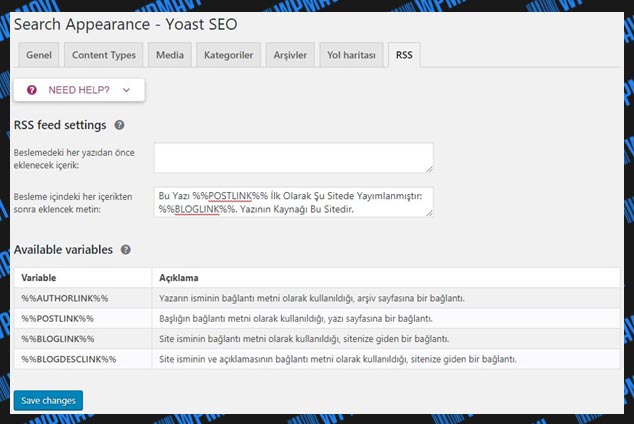
Merhaba arkadaslar bu konuyu aslında geçen senede sormuştum bilen çıkmadı. Bir siteden copy paste yaparken yapıstırdığınız metinin sonuna xxx siteden alınmıştır yazısını nasıl yapabiliriz. Büyük ihtimal javascript ama nasıl?
Örnek:
Anlamayanlar için Yani bu konudan girin konu içinde bi kelime kopyalayıp baska biyere yapıstırın ne demek istediğimi anlayacaksınız
Bunu nasıl yapıyorlar
14
●252
- 16-05-2020, 01:09:30Cok basit. yoast seo nun boyle bir ozelligi mevcut. Ayarlardan bulabilirsin. Yada googledan yoast seo ayarlarini inceleyin.
- 16-05-2020, 01:11:15

function addCopy() { var body_element = document.getElementsByTagName('body')[0]; var selection = window.getSelection(); var pagelink = "<br></br> ...Copyright (C) Gerçek Bilim kaynağını göstermeden paylaşmak ve yayınlamak yasaktır, <a href='" + document.location.href + "'>" + document.location.href + "</a>" + " ."; var copytext = selection + pagelink; var newdiv = document.createElement('div'); newdiv.style.position = 'absolute'; newdiv.style.left = '-99999px'; body_element.appendChild(newdiv); newdiv.innerHTML = copytext; selection.selectAllChildren(newdiv); window.setTimeout(function() { body_element.removeChild(newdiv); },0); } document.oncopy = addCopy; - 16-05-2020, 01:14:58hocam bu kodu <head> kısmına mı yapıştırıyoruz?Noroc adlı üyeden alıntı: mesajı görüntüle
- 16-05-2020, 01:15:20
function addCopyrightInfo() {
//Get the selected text and append the extra info
var selection, selectedNode, html;
if (window.getSelection) {
var selection = window.getSelection();
if (selection.rangeCount) {
selectedNode = selection.getRangeAt(0).startContainer.parentNode;
var container = document.createElement("div");
container.appendChild(selection.getRangeAt(0).cloneContents());
html = container.innerHTML;
}
}
else {
console.debug("The text [selection] not found.")
return;
}

// Save current selection to resore it back later.
var range = selection.getRangeAt(0);

if (!html)
html = '' + selection;

html += "<br/><br/><small><span>Bu içerik </span><a target='_blank' title='" + document.title + "' href='" + document.location.href + "'>" + document.title + "</a> sitesinden alınmıştır.</small><br/>";
var newdiv = document.createElement('div');

//hide the newly created container
newdiv.style.position = 'absolute';
newdiv.style.left = '-99999px';

// Insert the container, fill it with the extended text, and define the new selection.
selectedNode.appendChild(newdiv); // *For the Microsoft Edge browser so that the page wouldn't scroll to the bottom.

newdiv.innerHTML = html;
selection.selectAllChildren(newdiv);

window.setTimeout(function () {
selectedNode.removeChild(newdiv);
selection.removeAllRanges();
selection.addRange(range); // Restore original selection.
}, 5); // Timeout is reduced to 10 msc for Microsoft Edge's sake so that it does not blink very noticeably.
}

document.addEventListener('copy', addCopyrightInfo);
Bu kodu kaynak kodunuza javascript olarak yapıştırmanız yeterlidir.