Merhaba Arkadaşlar,
Persist ASPMail aktif olan hostingde SMTP ile mail gönderimini nasıl gerçekleştirebiliriz? Elinde bu konu ile ilgili kodu olanlar paylaşabilir mi?
Yardımlarınız için şimdiden teşekkür ederim.
SMTP ile mail gönderimi
8
●352
- 04-08-2018, 13:51:03<%
islem=Request.Querystring("islem")
if islem="gonder" Then
call gonder
end if
if islem="adbos" Then
hata="<font color=#8E1A23>Lütfen Adınızı Soyadınızı Yazınız</font>"
end if
if islem="telbos" Then
hata="<font color=#8E1A23>Lütfen Telefon Numaranızı Yazınız.</font>"
end if
if islem="emailbos" Then
hata="<font color=#8E1A23>Lütfen Email Adresinizi Yazınız</font>"
end if
if islem="aciklamabos" Then
hata="<font color=#8E1A23>Lütfen Mesajınızı Yazınız.</font>"
end if
if islem="tamam" Then
hata="<font color=#8E1A23>Mailiniz için teşekkür ederiz.</font>"
end if
%>
<%
sub gonder
ad=request.form("ad")
tel=request.form("tel")
email=request.form("email")
mesaj=request.form("mesaj")
if ad="" or ad="adınız soyadınız" then
response.redirect "?islem=adbos"
end if
if tel="" or tel="telefon numaranız" then
response.redirect "?islem=telbos"
end if
if email="" or email="email adresiniz" then
response.redirect "?islem=emailbos"
end if
if mesaj="" or mesaj="açıklamanız" then
response.redirect "?islem=aciklamabos"
end if
On Error Resume Next
zaman=Now()
Set myMail=CreateObject("CDO.Message")
myMail.Configuration.Fields.Item("http://schemas.microsoft.com/cdo/configuration/sendusing") = 2
myMail.Configuration.Fields.Item("http://schemas.microsoft.com/cdo/configuration/smtpserver") = "mail.websiteadresi.com"
myMail.Configuration.Fields.Item("http://schemas.microsoft.com/cdo/configuration/smtpserverport") = "25"
myMail.Configuration.Fields.Item("http://schemas.microsoft.com/cdo/configuration/smtpauthenticate") = "0"
myMail.Configuration.Fields.Item("http://schemas.microsoft.com/cdo/configuration/sendusername") = "info@websiteadresi.com"
myMail.Configuration.Fields.Item("http://schemas.microsoft.com/cdo/configuration/sendpassword") = "websiteadresi şifresi"
myMail.Configuration.Fields.Update
myMail.Subject= "websiteadresi.com iletişim formu" 'This is the subject of the e-mail
myMail.To="info@websiteadresi.com" 'This is the e-mail address the e-mail will be delivered to
myMail.From=Request.Form("email")
myMail.TextBody="İsim Soyisim: " & Request.Form("ad") & vbnewline & "E-Mail Address: " & Request.Form("email") & vbnewline & "Telefon: " & Request.Form("tel") & vbnewline & "Mesaj: " & Request.Form("mesaj")
myMail.Send
set myMail=nothing
Response.redirect "?islem=tamam"
end sub
%> - 05-08-2018, 13:36:00<%
' change to address of your own SMTP server
strHost = "mail.elinkisp.com"
If Request("Send") <> "" Then
Set Mail = Server.CreateObject("Persits.MailSender")
' enter valid SMTP host
Mail.Host = strHost
Mail.From = Request("From") ' From address
Mail.FromName = Request("FromName") ' optional
Mail.AddAddress Request("To")
' message subject
Mail.Subject = Request("Subject")
' message body
Mail.Body = Request("Body")
strErr = ""
bSuccess = False
On Error Resume Next ' catch errors
Mail.Send ' send message
If Err <> 0 Then ' error occurred
strErr = Err.Description
else
bSuccess = True
End If
End If
%>
örnek kodlar bunlar hoca.
http://www.aspemail.com/manual_02.html
kendi web sitelerinde yeterince kaynak ve örnek var CDO ile uğraşmayaın aspmail iyidir. yapamazsanız yardımcı olurum - 05-08-2018, 14:54:46oktayman Hocam,
Yardımın için çok teşekkür ederim.
Yalnız http://www.aspemail.com/manual_02.html linke göre gerekli düzenlemeyi yaptım.
"Microsoft VBScript çalýþma hatasý hata '800a01ad'
ActiveX bileþeni nesne oluþturamýyor" hatasını verdi.
bSuccess = False satırının altına
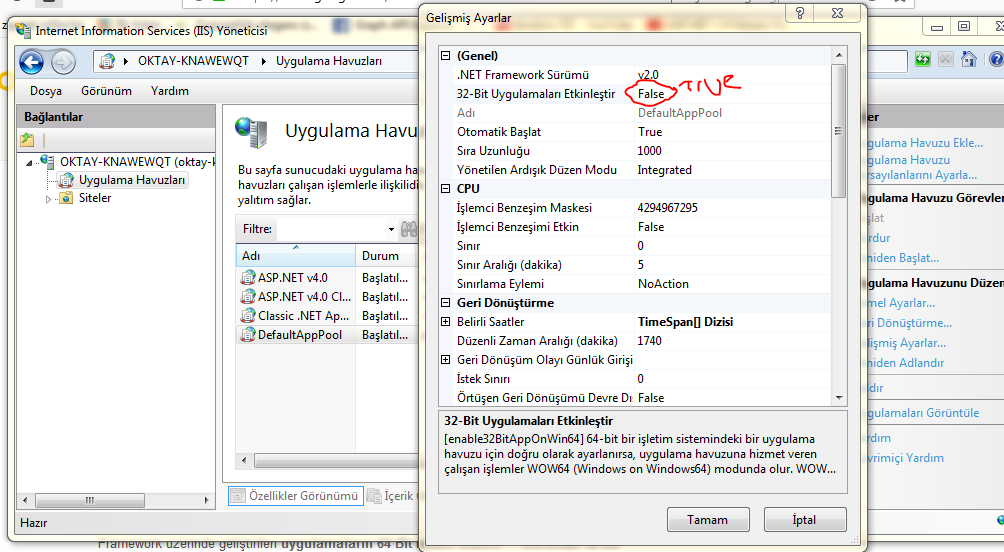
SSL = True ve SSL = False olarak ayrı ayrı denedim yine aynı hatayı verdi. - 06-08-2018, 23:49:34localhostta mı çalıştırdınız eğer localde çalışıyorsanız aspmail yazılımını indirmeniz lazım 1 aylık deneme sürümü o sitede üçretsiz bulunuyor. 32 bit olanı indirirseniz iis ten 32 bit uygulama desteğini açmanız gerekebilir.(önce indirip bi pcyi yeniden başlatıp deneyin olmazsa bakarız)steppe adlı üyeden alıntı: mesajı görüntüle
bu hatayı direkt sunucuda aldıysanız persist bileşeni yok demektir. - 07-08-2018, 21:16:16boş bir asp sayafasına sadecesteppe adlı üyeden alıntı: mesajı görüntüle
<%
 Set Mail = Server.CreateObject("Persits.MailSender")
%>
ve
<%
 Set Mail = Server.CreateObject("Persits.MailSender.1")
%>
bu iki kodu da ayrı ayrı yazıp çalıştırmayı dener misiniz. eğer ikisinde de hata alıyorsanız. dosyanın linkini guzel hostinge atarsanız yardımcı olacaklardır. yazdığınız hata persistin sistemde bulunmamasından kaynaklı bazen oluyor böyle şeyler. belki reseller olduğu için ekstra ayarı filan var mı onuda bilmiyorum. eğer uzak masaüstü bağlantınız varsa iis ayarlarından 32 bit uygulamaları etkinleştirmeniz gerekiyor da olabilir.

uğraşmak istemezseniz guzel hosting ilgili bir firmadır yardımcı olurlar.
Ha olurda verdiğim kodlar hata vermiyorsa mesaj atın size çalışan bir örnek hazırlarım