
Adımları dikkatli bir şekilde uygularsanız kesin sonuç alırsınız.
1.Adım
https://console.developers.google.com/project
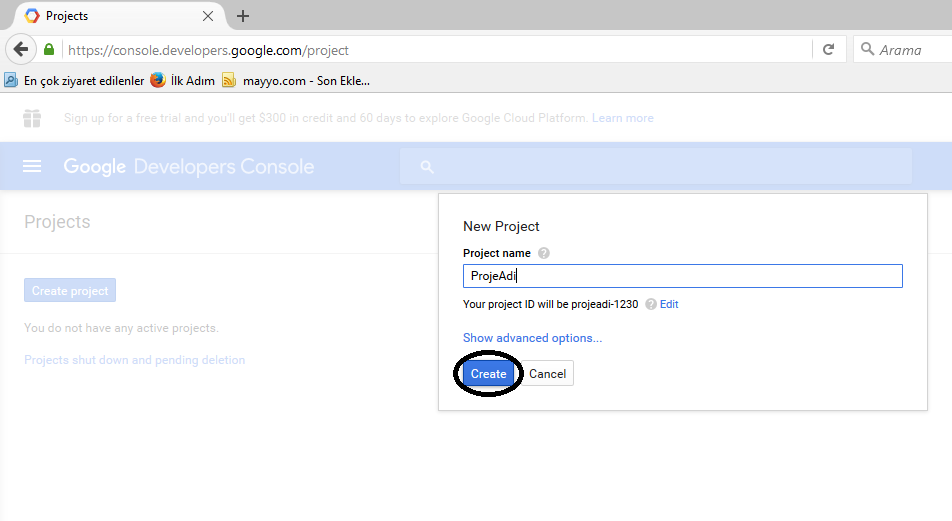
Adresine gidip Create New Project den yeni bir proje oluşturuyoruz.

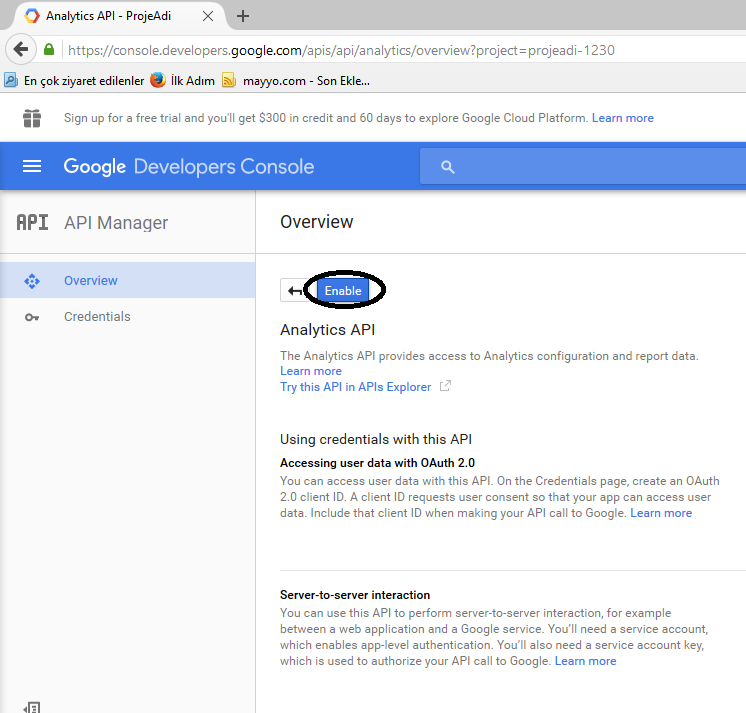
daha sonra analistiki bulup

kullanıma açıyoruz
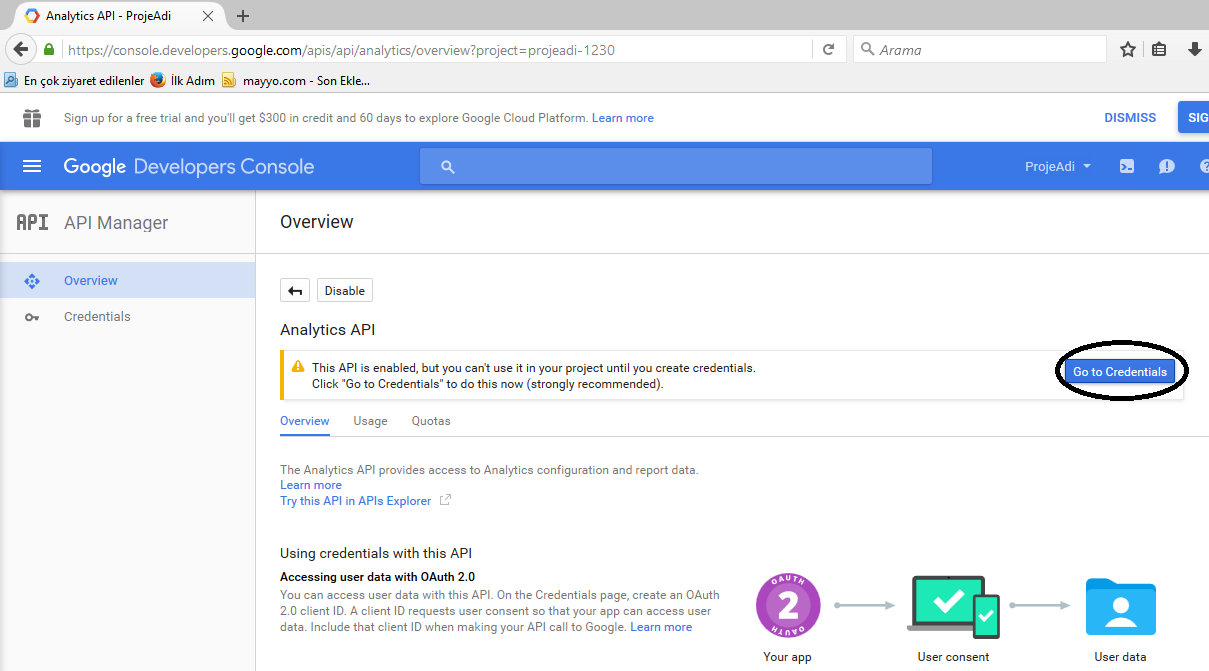
açıldıktan sonra, buna bir yetkili oluşturmamız lazım
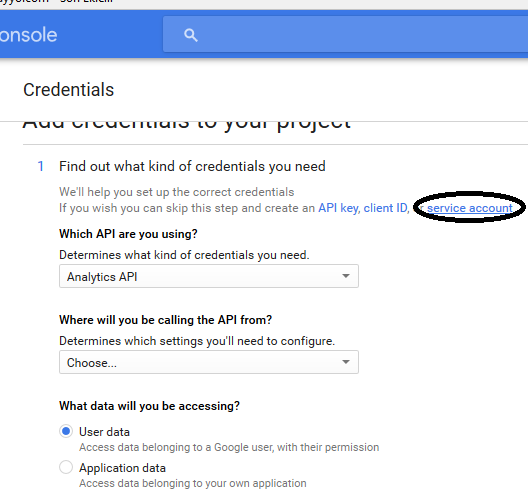
resimdeki gibi tıkları yapıp
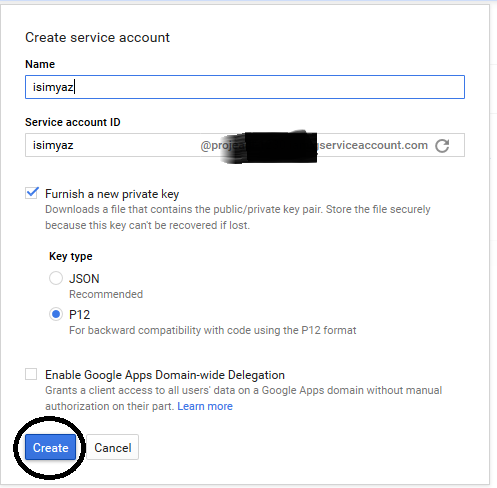
biraz bekliyoruz bize .p12 uzantılı bir dosya verecek bu dosyayı bilgisayarımıza kayıt ediyoruz.
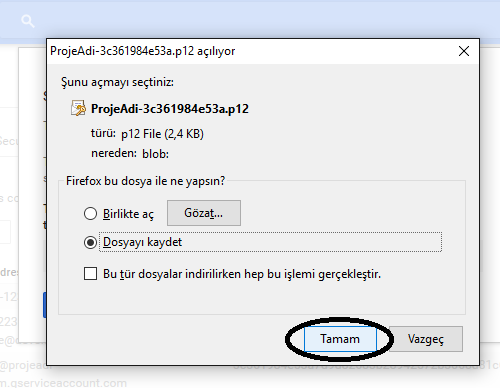
oluşturulan email adresini bi kenera not edin lazım olacak

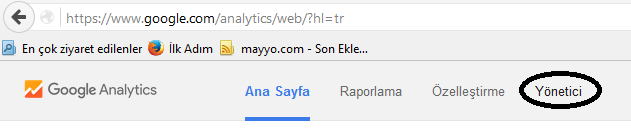
şimdi analistik yönetim sayfamıza gidiyoruz ve yönetici kısmından
hangi site için kullanmak istiyorsak onun kullanıcı yönetiminden
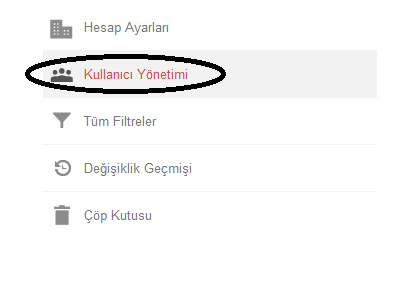
yukarda oluşturulan email adresini tam yetkili olarak ekliyoruz.
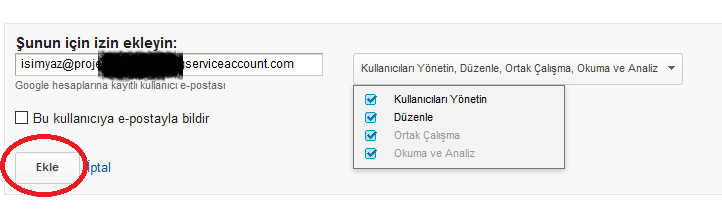
buraya kadar işlemler tamamsa,
asp.net projemizde Nuget Paket yöneticisinden Google Analytics i bulup son sürümünü projemize yüklüyoruz.
hangi asp.net sayfanızda kullanmak istiyorsanız. kodlarımız aşağıda
Tasarım KODLARI :
<script src="//code.jquery.com/jquery-1.11.3.min.js"></script>
  <script src="//code.jquery.com/jquery-migrate-1.2.1.min.js"></script>
<script type="text/javascript" src="http://code.highcharts.com/highcharts.js"></script>
<script type="text/javascript" src="http://code.highcharts.com/modules/exporting.js"></script><script type="text/javascript">
$(function () {
        $('#container').highcharts({
            chart: {
                type: 'area'
            },
            title: {
                text: 'Örnek Veri'
            },
            subtitle: {
                text: 'Kaynak: '+
                    'ga: 147851144 </a> Tarih  Son 30 Gün'
            },
            xAxis: {
                tickInterval:1
            },
            yAxis: {
                title: {
                    text: 'Ziyaretçi Bilgileri'
                },
                labels: {
                    formatter: function() {
                        return this.value / 1 +'';
                    }
                }
            },
            tooltip: {
                pointFormat: '{series.name}   <b>{point.y:,.0f}</b> '
            },
            plotOptions: {
                area: {
                    pointStart: 1,
                    marker: {
                        enabled: false,
                        symbol: 'circle',
                        radius: 2,
                        states: {
                            hover: {
                                enabled: true
                            }
                        }
                    }
                }
            },
            series: [{
                name: 'Sayfa Gösterimi',
                data: [<%=SayfaGosterim%>]
            },{
                name: 'Tekil Ziyaretçi',
                data: [<%=TekilZiyaretci%>]
            }]

        });
    });
</script>
<div id="container" style="min-width: 400px; max-width: 768px; height: 400px; margin: 0 auto;"></div>
Uygulama KODLARI :
Imports System.IO
Imports Google.Apis.Analytics.v3
Imports Google.Apis.Analytics.v3.Data
Imports Google.Apis.Auth.OAuth2
Imports Google.Apis.Services
Imports System.Security.Cryptography.X509Certificates

Public Class DefaultWebForm
    Inherits System.Web.UI.Page

    Public Function AuthenticateServiceAccount(serviceAccountEmail As String, keyFilePath As String) As AnalyticsService

        If Not File.Exists(keyFilePath) Then
            Response.Write("Key dosyası okunamadı")
            Return Nothing
        End If

        Dim scopes As String() = New String() {AnalyticsService.Scope.Analytics, AnalyticsService.Scope.AnalyticsEdit, AnalyticsService.Scope.AnalyticsManageUsers, AnalyticsService.Scope.AnalyticsReadonly}
        Dim certificate = New X509Certificate2(keyFilePath, "notasecret", X509KeyStorageFlags.Exportable)
        Try
            Dim credential As New ServiceAccountCredential(New ServiceAccountCredential.Initializer(serviceAccountEmail) With {
            .Scopes = scopes
        }.FromCertificate(certificate))

            Dim service As New AnalyticsService(New BaseClientService.Initializer() With {
            .HttpClientInitializer = credential,
            .ApplicationName = "Analytics API Projemiz"
        })
            Return service
        Catch ex As Exception

            Response.Write(ex.ToString)

            Return Nothing
        End Try
    End Function


    Protected SayfaGosterim As String
    Protected TekilZiyaretci As String

    Protected Sub Page_Load(ByVal sender As Object, ByVal e As System.EventArgs) Handles Me.Load

		'indirdiğiniz xxxxxxxxx.p12 dosyasını FTP nize atmayı unutmayın
        Dim service As AnalyticsService = AuthenticateServiceAccount("api consolda oluşturulan email @ buraya.com", Server.MapPath("indirdigimiz key dosyası .p12"))

		'analistik uygulama numarası nı , kullanmak istediğiniz analistik i açınca tarayıcı URL kısmında p14551515 gibi bir sayı vardır
		'p  den sonra gelen sayıyı alıyoruz.
		'idnumarasi  yazan yere yapıştırıyoruz ( ga:  değerini silmeyin )

        Dim request = service.Data.Ga.[Get]("ga:idnumarasi", "29daysAgo", "today", "ga:visitors,ga:pageviews")
        request.Dimensions = "ga:date"
        request.Sort = "ga:date"
        request.StartIndex = 1
        request.MaxResults = 500
        Dim results As GaData = request.Execute()

        For i As Integer = 0 To results.Rows.Count - 1
            TekilZiyaretci &= String.Format("{0},", results.Rows(i)(1).Trim())
            SayfaGosterim &= String.Format("{0},", results.Rows(i)(2).Trim())
        Next
        TekilZiyaretci = TekilZiyaretci.Remove(TekilZiyaretci.Length - 1, 1)
        SayfaGosterim = SayfaGosterim.Remove(SayfaGosterim.Length - 1, 1)

    End Sub

End Class 