
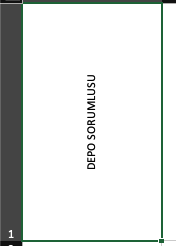
excelde yatay yaptıgmda böyle gorukuyor bunu html css kodları ile nasıl yapabilirim tabloda
10
●164
<!doctype html>
<html>
<head>
<meta charset="utf-8">
<style>
.vertical {
writing-mode: vertical-rl; /* vertical-rl veya vertical-lr */
text-orientation: upright; /* harfler dik durur (Latin harfler için) */
font-size: 20px;
border: 1px solid #ccc;
padding: 8px;
width: 2.5em; /* genişlik metin yoğunluğuna göre ayarlanır */
}
</style>
</head>
<body>
<div class="vertical">Merhaba Dünya</div>
</body>
</html> <style>.my-table {
border-collapse: collapse;
width: 200px;
height: 400px; /* Hücre yüksekliği */
}
.my-table td {
border: 1px solid #000;
width: 50px;
text-align: center;
vertical-align: middle;
position: relative;
}
.vertical-text {
writing-mode: vertical-rl;
transform: rotate(180deg);
font-weight: bold;
}
</style>
<table class="my-table">
<tr>
<td class="vertical-text">DEPO SORUMLUSU</td>
</tr>
</table> 

