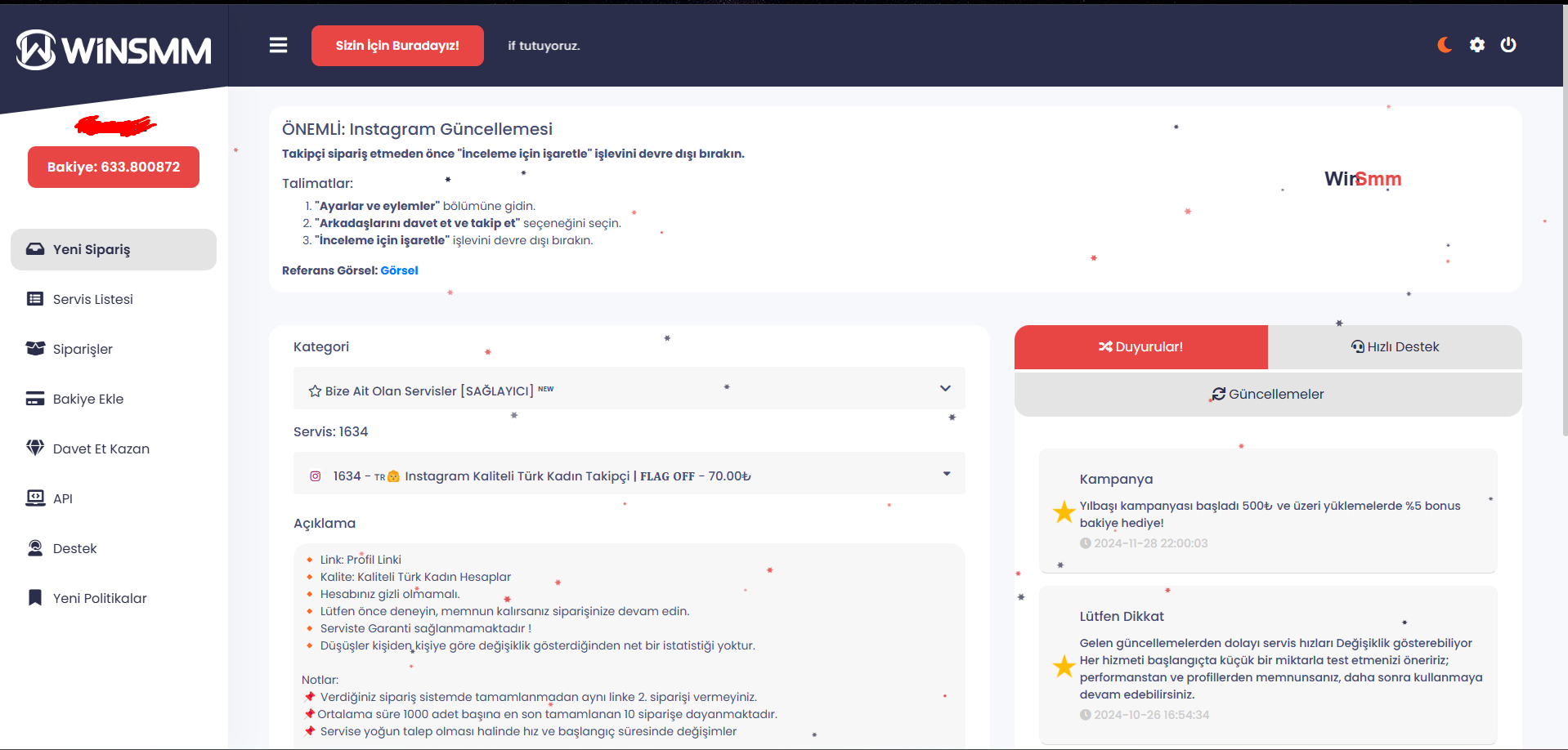
Kullandığım kod :
<script>
document.addEventListener('DOMContentLoaded', function () {
const snowCanvas = document.createElement('canvas');
snowCanvas.id = 'snowCanvas';
snowCanvas.style.position = 'fixed';
snowCanvas.style.top = '0';
snowCanvas.style.left = '0';
snowCanvas.style.width = '100%';
snowCanvas.style.height = '100%';
snowCanvas.style.pointerEvents = 'none';
document.body.appendChild(snowCanvas);
const ctx = snowCanvas.getContext('2d');
let width, height, snowflakes, textElement;
const windEffect = 1; // Hafif rüzgar etkisi
// Kar tanesi oluşturma
function createSnowflake() {
const radius = Math.random() * 3 + 2;
const points = [];
for (let i = 0; i < 6; i++) {
const angle = (Math.PI * 2 * i) / 6;
const innerRadius = radius * 0.5;
points.push({ x: Math.cos(angle) * radius, y: Math.sin(angle) * radius });
points.push({ x: Math.cos(angle + Math.PI / 6) * innerRadius, y: Math.sin(angle + Math.PI / 6) * innerRadius });
}
return points;
}
// Yazı oluşturma
function createTextElement() {
return {
x: Math.random() * width,
y: -50,
speed: Math.random() * 0.7 + 0.3,
opacity: 1,
active: true,
};
}
// Kar tanesini çizme
function drawSnowflake(flake) {
ctx.beginPath();
flake.shape.forEach(({ x, y }, index) => {
if (index === 0) {
ctx.moveTo(flake.x + x, flake.y + y);
} else {
ctx.lineTo(flake.x + x, flake.y + y);
}
});
ctx.closePath();
ctx.fillStyle = flake.color;
ctx.globalAlpha = flake.opacity;
ctx.fill();
}
// Yazıyı çizme
function drawText(text) {
if (!text.active) return;
ctx.globalAlpha = text.opacity;
ctx.font = 'bold 24px Arial';
ctx.textAlign = 'center';
// "WinSmm" yazısını düzgün birleştirerek çiz
const fullText = ['Win', 'Smm'];
const colors = ['#2B2E4A', '#E84545'];
let offsetX = 0; // X pozisyonları arası geçiş
fullText.forEach((part, i) => {
ctx.fillStyle = colors[i];
ctx.fillText(part, text.x + offsetX, text.y);
offsetX += ctx.measureText(part).width; // Metin genişliğine göre hareket
});
}
function init() {
width = snowCanvas.width = window.innerWidth;
height = snowCanvas.height = window.innerHeight;
snowflakes = Array.from({ length: 50 }, () => ({
x: Math.random() * width,
y: Math.random() * height,
speed: Math.random() * 1 + 0.5,
opacity: Math.random() * 0.5 + 0.5,
shape: createSnowflake(),
color: Math.random() > 0.5 ? '#2B2E4A' : '#E84545',
}));
textElement = createTextElement();
}
function update() {
snowflakes.forEach(flake => {
flake.y += flake.speed;
flake.x += windEffect * Math.sin(flake.y / 100);
if (flake.y > height) flake.y = 0;
if (flake.x > width) flake.x = 0;
if (flake.x < 0) flake.x = width;
});
if (textElement.active) {
textElement.y += textElement.speed;
textElement.x += windEffect * Math.sin(textElement.y / 100);
if (textElement.y > height + 50) {
textElement.active = false; // Yazı ekrandan çıkınca inaktif yap
}
} else {
setTimeout(() => {
textElement = createTextElement(); // Yeni bir yazıyı 10 saniye sonra başlat
}, 10000);
}
}
function draw() {
ctx.clearRect(0, 0, width, height);
snowflakes.forEach(drawSnowflake);
drawText(textElement);
}
function loop() {
update();
draw();
requestAnimationFrame(loop);
}
init();
loop();
window.addEventListener('resize', init);
});
</script>
document.addEventListener('DOMContentLoaded', function () {
const snowCanvas = document.createElement('canvas');
snowCanvas.id = 'snowCanvas';
snowCanvas.style.position = 'fixed';
snowCanvas.style.top = '0';
snowCanvas.style.left = '0';
snowCanvas.style.width = '100%';
snowCanvas.style.height = '100%';
snowCanvas.style.pointerEvents = 'none';
document.body.appendChild(snowCanvas);
const ctx = snowCanvas.getContext('2d');
let width, height, snowflakes, textElement;
const windEffect = 1; // Hafif rüzgar etkisi
// Kar tanesi oluşturma
function createSnowflake() {
const radius = Math.random() * 3 + 2;
const points = [];
for (let i = 0; i < 6; i++) {
const angle = (Math.PI * 2 * i) / 6;
const innerRadius = radius * 0.5;
points.push({ x: Math.cos(angle) * radius, y: Math.sin(angle) * radius });
points.push({ x: Math.cos(angle + Math.PI / 6) * innerRadius, y: Math.sin(angle + Math.PI / 6) * innerRadius });
}
return points;
}
// Yazı oluşturma
function createTextElement() {
return {
x: Math.random() * width,
y: -50,
speed: Math.random() * 0.7 + 0.3,
opacity: 1,
active: true,
};
}
// Kar tanesini çizme
function drawSnowflake(flake) {
ctx.beginPath();
flake.shape.forEach(({ x, y }, index) => {
if (index === 0) {
ctx.moveTo(flake.x + x, flake.y + y);
} else {
ctx.lineTo(flake.x + x, flake.y + y);
}
});
ctx.closePath();
ctx.fillStyle = flake.color;
ctx.globalAlpha = flake.opacity;
ctx.fill();
}
// Yazıyı çizme
function drawText(text) {
if (!text.active) return;
ctx.globalAlpha = text.opacity;
ctx.font = 'bold 24px Arial';
ctx.textAlign = 'center';
// "WinSmm" yazısını düzgün birleştirerek çiz
const fullText = ['Win', 'Smm'];
const colors = ['#2B2E4A', '#E84545'];
let offsetX = 0; // X pozisyonları arası geçiş
fullText.forEach((part, i) => {
ctx.fillStyle = colors[i];
ctx.fillText(part, text.x + offsetX, text.y);
offsetX += ctx.measureText(part).width; // Metin genişliğine göre hareket
});
}
function init() {
width = snowCanvas.width = window.innerWidth;
height = snowCanvas.height = window.innerHeight;
snowflakes = Array.from({ length: 50 }, () => ({
x: Math.random() * width,
y: Math.random() * height,
speed: Math.random() * 1 + 0.5,
opacity: Math.random() * 0.5 + 0.5,
shape: createSnowflake(),
color: Math.random() > 0.5 ? '#2B2E4A' : '#E84545',
}));
textElement = createTextElement();
}
function update() {
snowflakes.forEach(flake => {
flake.y += flake.speed;
flake.x += windEffect * Math.sin(flake.y / 100);
if (flake.y > height) flake.y = 0;
if (flake.x > width) flake.x = 0;
if (flake.x < 0) flake.x = width;
});
if (textElement.active) {
textElement.y += textElement.speed;
textElement.x += windEffect * Math.sin(textElement.y / 100);
if (textElement.y > height + 50) {
textElement.active = false; // Yazı ekrandan çıkınca inaktif yap
}
} else {
setTimeout(() => {
textElement = createTextElement(); // Yeni bir yazıyı 10 saniye sonra başlat
}, 10000);
}
}
function draw() {
ctx.clearRect(0, 0, width, height);
snowflakes.forEach(drawSnowflake);
drawText(textElement);
}
function loop() {
update();
draw();
requestAnimationFrame(loop);
}
init();
loop();
window.addEventListener('resize', init);
});
</script>