• 23-06-2024, 23:57:44
    #1
    Merhaba,
    4-5 defa app yüklemeye çalıştım ama hep
    Thanks for contacting the Google Play team.
    
    Status: App not available on Google Play
    
    We’ve reviewed your appeal request and found that your app, BitQuiz (com.tolgahanbora.BitQuizMobile) still violates Google Play Policy. We’ve included details below about the specific issue with your app and what you can do to get your app back on Google Play.
    
    Step 1: Fix the policy violation with your app
    
    During review, we found that your app violates the Broken Functionality policy. We don’t allow apps that crash, force close, freeze, or otherwise function abnormally. Read through the Broken Functionality policy and Device compatibility overview for more information.
    
    For example, your app contains a button that is not responsive or leads to a blank page. You can refer to the attached screenshot for additional information.
    Kindly note that the above example may not be exhaustive of all problematic listings. Please review your app thoroughly to ensure it provides a stable, engaging, and responsive user experience.
    
    Please update your app to fix this issue.
    
    You may also want to double check that your app complies with all other policies listed in the Developer Policy Center as additional enforcement could occur if there are further policy violations.
    
    Step 2: Submit an update to your app
    
    To submit an update to your app’s store listing information:
    
    Sign in to your Play Console account.
    Select the app with the policy issue.
    Select Store presence > Main store listing.
    Make changes to bring your app into compliance.
    Click Save.
    To submit an updated app bundle or APK:
    
    Prepare your updates.
    Create a new release using the compliant app bundle or APK. Be sure to create the new release on the same track(s) as the noncompliant app bundle or APK, increment the version number, and set the release to 100% rollout.
    Follow the on-screen instructions to add APKs or app bundles, then review and roll out your release.
    Kindly note that your changes aren't sent for review automatically. You must go to the Publishing overview page and click Send for review to submit your changes.
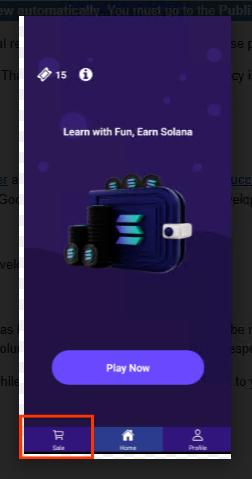
    Gibi feedbackler iletildi. Ama ben expo ile kendi cihazlarımda denediğimde problem olmuyor. dolayısıyla error nerde nerde hata oluyor nereyi eksik yapıyorum bir türlü anlamıyorum. Sizce problemi nasıl düzeltirim? EXPO react native ile kodladığım için androidin kendi test toollarını kullanamıyorum. Şimdiden değerli fikirleriniz için teşekkürler.
  • 24-06-2024, 00:49:26
    #2
    Google'ın görselle işaretlemiş olduğu button çalışmıyor sanırım. Eğer işlevsel olarak aktif değilse görüntü olarak da devre dışı bırakman gerekiyor. Aktif ve hatalı çalışıyor da olabilir. Play Console üzerinde Google botlarının uygulama üzerindeki hareketlerini video kaydı olarak gösterdiği bir alan vardı. O kısımdan inceleme videolarını görebilirsin.
  • 24-06-2024, 02:16:54
    #3
    Ideathon adlı üyeden alıntı: mesajı görüntüle
    Merhaba,
    4-5 defa app yüklemeye çalıştım ama hep
    Thanks for contacting the Google Play team.
    
    Status: App not available on Google Play
    
    We’ve reviewed your appeal request and found that your app, BitQuiz (com.tolgahanbora.BitQuizMobile) still violates Google Play Policy. We’ve included details below about the specific issue with your app and what you can do to get your app back on Google Play.
    
    Step 1: Fix the policy violation with your app
    
    During review, we found that your app violates the Broken Functionality policy. We don’t allow apps that crash, force close, freeze, or otherwise function abnormally. Read through the Broken Functionality policy and Device compatibility overview for more information.
    
    For example, your app contains a button that is not responsive or leads to a blank page. You can refer to the attached screenshot for additional information.
    Kindly note that the above example may not be exhaustive of all problematic listings. Please review your app thoroughly to ensure it provides a stable, engaging, and responsive user experience.
    
    Please update your app to fix this issue.
    
    You may also want to double check that your app complies with all other policies listed in the Developer Policy Center as additional enforcement could occur if there are further policy violations.
    
    Step 2: Submit an update to your app
    
    To submit an update to your app’s store listing information:
    
    Sign in to your Play Console account.
    Select the app with the policy issue.
    Select Store presence > Main store listing.
    Make changes to bring your app into compliance.
    Click Save.
    To submit an updated app bundle or APK:
    
    Prepare your updates.
    Create a new release using the compliant app bundle or APK. Be sure to create the new release on the same track(s) as the noncompliant app bundle or APK, increment the version number, and set the release to 100% rollout.
    Follow the on-screen instructions to add APKs or app bundles, then review and roll out your release.
    Kindly note that your changes aren't sent for review automatically. You must go to the Publishing overview page and click Send for review to submit your changes.
    Gibi feedbackler iletildi. Ama ben expo ile kendi cihazlarımda denediğimde problem olmuyor. dolayısıyla error nerde nerde hata oluyor nereyi eksik yapıyorum bir türlü anlamıyorum. Sizce problemi nasıl düzeltirim? EXPO react native ile kodladığım için androidin kendi test toollarını kullanamıyorum. Şimdiden değerli fikirleriniz için teşekkürler.
    Öncelikle geçmiş olsun Bozuk İşlevsellik sorunu aynı zamanda bir bug oluşabiliyor.
    Eğer işaretlenen butonun bir işlevi varsa ve siz test yaptığınızda çalışıyorsa sakın tekrar apk göndermeyin. Hemen itiraz formu doldurun. Botlar değil modlar incelesinler. Çünkü botlar bu politikada bug var. 8 ya da 9. Redden sonra tamamen hesabı kapatıyor botlar aman dikkat
  • 24-06-2024, 10:07:51
    #4
    By_GRaYWoLF adlı üyeden alıntı: mesajı görüntüle
    Öncelikle geçmiş olsun Bozuk İşlevsellik sorunu aynı zamanda bir bug oluşabiliyor.
    Eğer işaretlenen butonun bir işlevi varsa ve siz test yaptığınızda çalışıyorsa sakın tekrar apk göndermeyin. Hemen itiraz formu doldurun. Botlar değil modlar incelesinler. Çünkü botlar bu politikada bug var. 8 ya da 9. Redden sonra tamamen hesabı kapatıyor botlar aman dikkat
    Çok teşekkürler hocam