Merhaba Visual Studio 'da bir python kodu çalıştırmaya çalışıyorum, Kod aşağıda, işlevi ise bir Youtube giriş butonu ile "Login with YouTube " youtube 'da yaptığı canlı yayını kendi sitende yayınlama aracı olurşturmak .Local'de çalıştığı için Google Console daki ayarları "http://localhost:5000/oauth2callback" olarak düzenledim ama "Missing required parameter: redirect_uri " hatasını alıyorum ve bunu aşamadım yardımcı olabilecek bir babayiğit var mı ?
Kod :
from flask import Flask, redirect, url_for, session, Response, request
from authlib.integrations.flask_client import OAuth
import os
import cv2
from google_auth_oauthlib.flow import Flow # Flow sınıfını içe aktar
app = Flask(__name__)
app.secret_key = os.urandom(24)
oauth = OAuth(app)
# Google OAuth 2.0 istemcisini oluştur
CLIENT_SECRETS_FILE = "client_secret.json"
SCOPES = ['https://www.googleapis.com/auth/youtube.readonly']
flow = Flow.from_client_secrets_file(CLIENT_SECRETS_FILE, scopes=SCOPES)
# Yetkilendirme URL'sini al
auth_url, _ = flow.authorization_url(access_type='offline', include_granted_scopes='true')
# YouTube ile OAuth 2.0 kimlik doğrulama sağlayıcısı oluştur
youtube = oauth.register(
name='youtube',
client_id='431111917939-j2l2kf0dihd3trq4bbi5eqbc0eom6ii6.apps.googleuserco ntent.com',
client_secret='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',
authorize_url='https://accounts.google.com/o/oauth2/auth',
authorize_params={'scope': 'https://www.googleapis.com/auth/youtube.readonly'},
access_token_url='https://accounts.google.com/o/oauth2/token',
access_token_params=None,
refresh_token_url=None,
refresh_token_params=None,
redirect_uri='http://localhost:5000/oauth2callback',
client_kwargs={'access_type': 'offline'}
)
@app.route('/')
def index():
return f'<a href="{auth_url}">Login with YouTube</a>'
@app.route('/oauth2callback')
def oauth2callback():
flow.fetch_token(authorization_response=request.ur l)
credentials = flow.credentials
session['credentials'] = {
'token': credentials.token,
'refresh_token': credentials.refresh_token,
'token_uri': credentials.token_uri,
'client_id': credentials.client_id,
'client_secret': credentials.client_secret,
'scopes': credentials.scopes
}
return redirect(url_for('video_feed'))
@app.route('/video_feed')
def video_feed():
credentials = session.get('credentials')
if credentials is None:
return redirect(url_for('index'))
# Kullanıcının giriş yaptığı URL'yi alın
youtube_url = request.url
# Kullanıcının giriş yaptığı URL'yi kullanarak gerçek YouTube canlı yayın URL'sini oluşturun
youtube_url_with_token = youtube_url # Eğer 'append_access_token_to_url' fonksiyonunu tanımlamadıysanız
return Response(generate_frames(youtube_url_with_token),
mimetype='multipart/x-mixed-replace; boundary=frame')
# YouTube canlı yayınını web'e yayınla
def generate_frames(youtube_url):
video = cv2.VideoCapture(youtube_url)
while True:
success, frame = video.read()
if not success:
break
else:
ret, buffer = cv2.imencode('.jpg', frame)
frame = buffer.tobytes()
yield (b'--framern'
b'Content-Type: image/jpegrnrn' + frame + b'rn')
if __name__ == '__main__':
app.run(debug=True, use_reloader=False)
PYTHON Yardım +R10 çözene çok çok teşekkür edeceğim ,Günlerdir uğraşıyorum
3
●148
- 24-03-2024, 02:50:07
- Kabul Edilen Cevap
- 0 Beğeni
-
- 24-03-2024, 02:58:34Bu cevap, konu sahibi tarafından kabul edilebilir bir cevap olarak işaretlendi.from flask import Flask, redirect, url_for, session, request
from authlib.integrations.flask_client import OAuth
import os
from google_auth_oauthlib.flow import Flow
app = Flask(__name__)
app.secret_key = os.urandom(24)
# Google OAuth 2.0 istemcisini oluştur
CLIENT_SECRETS_FILE = "client_secret.json"
SCOPES = ['https://www.googleapis.com/auth/youtube.readonly']
oauth = OAuth(app)
flow = Flow.from_client_secrets_file(
CLIENT_SECRETS_FILE,
scopes=SCOPES,
redirect_uri='http://localhost:5000/oauth2callback'
)
# Yetkilendirme URL'sini al
auth_url, _ = flow.authorization_url(
access_type='offline',
include_granted_scopes='true'
)
# YouTube ile OAuth 2.0 kimlik doğrulama sağlayıcısı oluştur
youtube = oauth.register(
name='youtube',
client_id='YOUR_CLIENT_ID',
client_secret='YOUR_CLIENT_SECRET',
authorize_url='https://accounts.google.com/o/oauth2/auth',
authorize_params={'scope': 'https://www.googleapis.com/auth/youtube.readonly'},
access_token_url='https://accounts.google.com/o/oauth2/token',
access_token_params=None,
refresh_token_url=None,
refresh_token_params=None,
redirect_uri='http://localhost:5000/oauth2callback',
client_kwargs={'access_type': 'offline'}
)
@app.route('/')
def index():
return f'<a href="{auth_url}">Login with YouTube</a>'
@app.route('/oauth2callback')
def oauth2callback():
flow.fetch_token(authorization_response=request.ur l)
credentials = flow.credentials
session['credentials'] = {
'token': credentials.token,
'refresh_token': credentials.refresh_token,
'token_uri': credentials.token_uri,
'client_id': credentials.client_id,
'client_secret': credentials.client_secret,
'scopes': credentials.scopes
}
return redirect(url_for('video_feed'))
@app.route('/video_feed')
def video_feed():
credentials = session.get('credentials')
if credentials is None:
return redirect(url_for('index'))
# Kullanıcının giriş yaptığı URL'yi alın
youtube_url = request.url
# Kullanıcının giriş yaptığı URL'yi kullanarak gerçek YouTube canlı yayın URL'sini oluşturun
# Burada eksik olan 'append_access_token_to_url' fonksiyonunuzu tanımlamanız gerekiyor.
# Örnek olarak:
def append_access_token_to_url(url, token):
return f"{url}?access_token={token}"
youtube_url_with_token = append_access_token_to_url(youtube_url, session['credentials']['token'])
# Geri kalan işlemleriniz için youtube_url_with_token kullanılabilir.
# ... - 24-03-2024, 03:15:05Eksik bir fonksiyonu doldurduktan sonra kodunuz şu şekilde çalıştı
 ALLAH Razı olsun kardeşim benim sen melek misin bu saatte nereden çıktın böyle karşıma )
from flask import Flask, redirect, url_for, session, request
from authlib.integrations.flask_client import OAuth
import os
from google_auth_oauthlib.flow import Flow
app = Flask(__name__)
app.secret_key = os.urandom(24)
# Google OAuth 2.0 istemcisini oluştur
CLIENT_SECRETS_FILE = "client_secret.json"
SCOPES = ['https://www.googleapis.com/auth/youtube.readonly']
oauth = OAuth(app)
flow = Flow.from_client_secrets_file(
CLIENT_SECRETS_FILE,
scopes=SCOPES,
redirect_uri='http://localhost:5000/oauth2callback'
)
# Yetkilendirme URL'sini al
auth_url, _ = flow.authorization_url(
access_type='offline',
include_granted_scopes='true'
)
# YouTube ile OAuth 2.0 kimlik doğrulama sağlayıcısı oluştur
youtube = oauth.register(
name='youtube',
client_id='YOUR_CLIENT_ID',
client_secret='YOUR_CLIENT_SECRET',
authorize_url='https://accounts.google.com/o/oauth2/auth',
authorize_params={'scope': 'https://www.googleapis.com/auth/youtube.readonly'},
access_token_url='https://accounts.google.com/o/oauth2/token',
access_token_params=None,
refresh_token_url=None,
refresh_token_params=None,
redirect_uri='http://localhost:5000/oauth2callback',
client_kwargs={'access_type': 'offline'}
)
@app.route('/')
def index():
return f'<a href="{auth_url}">Login with YouTube</a>'
@app.route('/oauth2callback')
def oauth2callback():
flow.fetch_token(authorization_response=request.ur l)
credentials = flow.credentials
session['credentials'] = {
'token': credentials.token,
'refresh_token': credentials.refresh_token,
'token_uri': credentials.token_uri,
'client_id': credentials.client_id,
'client_secret': credentials.client_secret,
'scopes': credentials.scopes
}
return redirect(url_for('video_feed'))
@app.route('/video_feed')
def video_feed():
credentials = session.get('credentials')
if credentials is None:
return redirect(url_for('index'))
# Kullanıcının giriş yaptığı URL'yi alın
youtube_url = request.url
# Kullanıcının giriş yaptığı URL'yi kullanarak gerçek YouTube canlı yayın URL'sini oluşturun
youtube_url_with_token = append_access_token_to_url(youtube_url, session['credentials']['token'])
# Geri kalan işlemleriniz için youtube_url_with_token kullanılabilir.
return "YouTube URL with token: " + youtube_url_with_token
# Eksik fonksiyon tanımını ekleyelim
def append_access_token_to_url(url, token):
return f"{url}?access_token={token}"
if __name__ == '__main__':
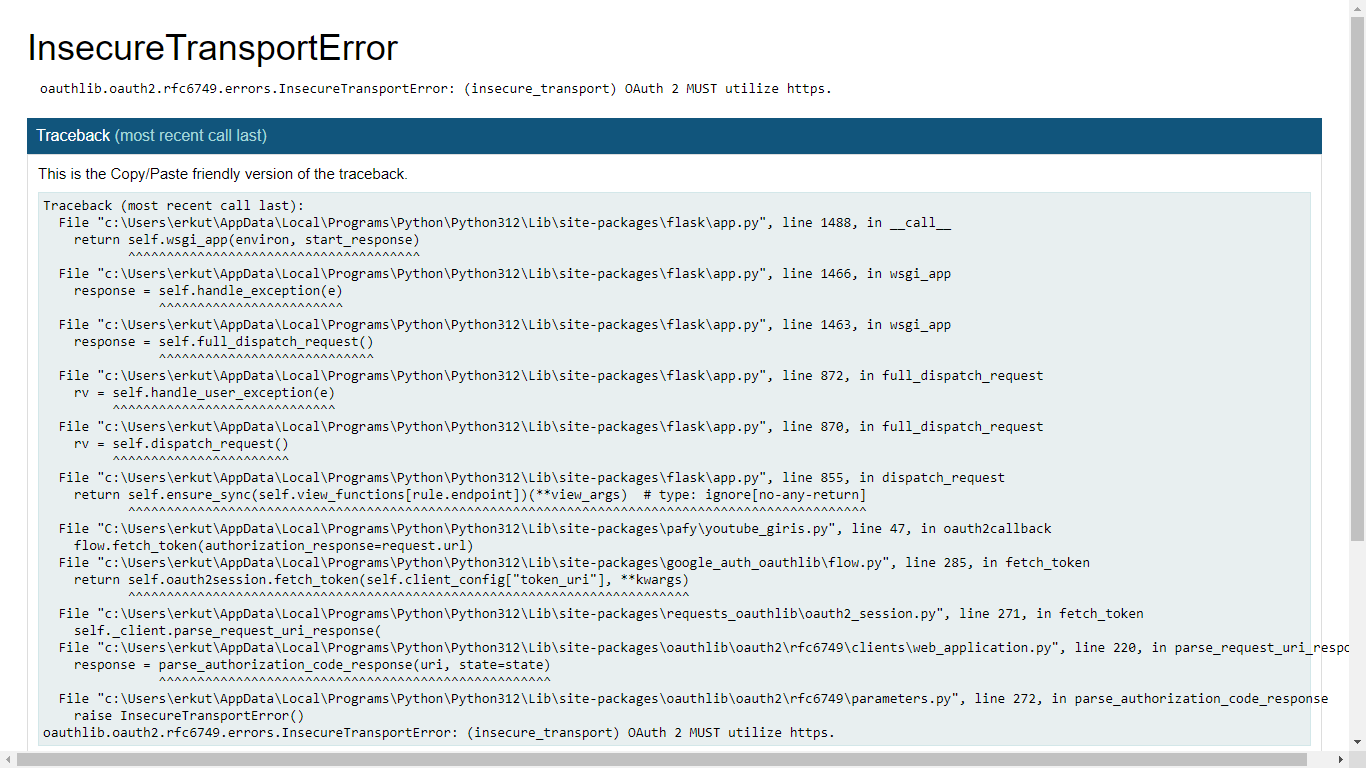
app.run(debug=True, use_reloader=False) - 24-03-2024, 04:24:24Gerçi şimdi de Bu hatayı alıyorum , URL adreslerini Https: olarak değiştirdim ama bu sefer de bir önceki hatayı alıyorum.



 ALLAH Razı olsun kardeşim benim sen melek misin bu saatte nereden çıktın böyle karşıma