• 06-06-2023, 22:06:36
    #1
    Başabaş noktası hesabı için bir hesap makinesi formu yazdım.

    Formül: Başabaş Noktası = Sabit Giderler / (Birim Satış Fiyatı - Değişken Maliyet)

    ben bir türlü çalıştıramadım bu kodu anlamadım gitti bir el atın çözelim sorunu

    <!DOCTYPE html>
    <html>
    <head>
    
    <meta name="viewport" content="width=device-width, initial-scale=1">
    <style>
    .row {
      display: flex;
      flex-wrap: wrap;
      padding: 0 4px;
    }
    
    /* Create two equal columns that sits next to each other */
    .column {
      flex: 50%;
      padding: 0 4px;
    }
    
    /* Responsive layout - makes the two columns stack on top of each other */
    @media (max-width: 767px) {
      .column {
        flex: 100%;
        padding: 0;
      }
    }
    </style>
    </head>
    <body>
    
    <form onsubmit="calculate(); return false;">
            <div class="column" style="background-color:#f2f2f2;">
             
        <h3>Başabaş Noktası Hesapla</h3>
            <label for="fixed_expenses">Fixed Expenses:</label><br>
            <input type="number" id="fixed_expenses" name="fixed_expenses"><br>
            <label for="unit_sales_price">Unit Sales Price:</label><br>
            <input type="number" id="unit_sales_price" name="unit_sales_price"><br>
            <label for="variable_cost">Variable Cost:</label><br>
            <input type="number" id="variable_cost" name="variable_cost"><br><br>
            <label for="result">Result:</label><br>
            <output id="result"></output><br><br>
            <button type="submit">Calculate</button>
        </form>
    
        <script>
            function calculate() {
                var fixedExpenses = document.getElementById('fixed_expenses').value;
                var unitSalesPrice = document.getElementById('unit_sales_price').value;
                var variableCost = document.getElementById('variable_cost').value;
                var result = fixedExpenses / (unitSalesPrice - variableCost);
                document.getElementById('result').innerHTML = result;
            }
    
            document.addEventListener("DOMContentLoaded", function() {
                calculate();
            });
        </script>
    
        </div>
    
    </body>
    </html>
  • Kabul Edilen Cevap
    • Hocam sizi doğru anladıysam aşağıdaki gibi dener misiniz?
      <!DOCTYPE html>
      <html>
      <head>
       
      <meta name="viewport" content="width=device-width, initial-scale=1">
      <style>
      .row {
        display: flex;
        flex-wrap: wrap;
        padding: 0 4px;
      }
       
      /* Create two equal columns that sits next to each other */
      .column {
        flex: 50%;
        padding: 0 4px;
      }
       
      /* Responsive layout - makes the two columns stack on top of each other */
      @media (max-width: 767px) {
        .column {
          flex: 100%;
          padding: 0;
        }
      }
      </style>
      </head>
      <body>
          <form onsubmit="calculate(); return false;">
          <div class="column" style="background-color:#f2f2f2;">
              <h3>Başabaş Noktası Hesapla</h3>
              <label for="fixed_expenses">Average Order Value (AOV):</label><br>
              <input type="number" id="fixed_expenses" name="fixed_expenses"><br>
              <label for="unit_sales_price">Cost:</label><br>
              <input type="number" id="unit_sales_price" name="unit_sales_price"><br>
              <label for="credit_card_commission_rate">Credit card commission rate:</label><br>
              <input type="text" id="credit_card_commission_rate" name="credit_card_commission_rate"><br><br>
              <label for="commission">Commission:</label><br>
              <output id="commission"></output><br><br>
              <label for="pay_processing_fee">Pay transaction fee:</label><br>
              <input type="number" id="pay_processing_fee" name="pay_processing_fee"><br>
              <label for="shipping_fee">Shipping fee:</label><br>
              <input type="number" id="shipping_fee" name="shipping_fee"><br>
              <label for="advertising_management_cost">Advertising management cost:</label><br>
              <input type="number" id="advertising_management_cost" name="advertising_management_cost"><br><br>
              <label for="total_cost_of_product">Total cost of the product:</label><br>
              <output id="total_cost_of_product"></output><br><br>
              <label for="percentage_of_cost">Percent:</label><br>
              <output id="percentage_of_cost"></output><br><br>
              <label for="gross_profit_margin">Gross profit margin:</label><br>
              <output id="gross_profit_margin"></output><br><br>
              <label for="cost_per_purchase_for_breakeven">Cost Per Purchase For Breakeven (without marketing costs):</label><br>
              <output id="cost_per_purchase_for_breakeven"></output><br><br>
              <label for="breakeven_point">Breakeven point:</label><br>
              <output id="breakeven_point"></output><br><br>
       
              <button type="submit">Calculate</button>
       
          </form>
       
          <script>
       
              function calculate() {
                  var fixedExpenses = document.getElementById('fixed_expenses').value;
                  var unitSalesPrice = document.getElementById('unit_sales_price').value;
                  var creditCardCommissionRate = document.getElementById('credit_card_commission_rate').value / 100;
                  var commission = fixedExpenses * creditCardCommissionRate;
                  document.getElementById('commission').innerHTML = commission.toFixed(2);
                  var payProcessingFee = document.getElementById('pay_processing_fee').value;
                  var shippingFee = document.getElementById('shipping_fee').value;
                  var advertisingManagementCost = document.getElementById('advertising_management_cost').value;
       
                  var totalCostOfProduct = parseFloat(unitSalesPrice) + parseFloat(commission) + parseFloat(payProcessingFee) + parseFloat(shippingFee) + parseFloat(advertisingManagementCost);
                  document.getElementById('total_cost_of_product').innerHTML = totalCostOfProduct.toFixed(2);
       
                  var percentageOfCost = (totalCostOfProduct / fixedExpenses) * 100;
                  document.getElementById('percentage_of_cost').innerHTML = percentageOfCost.toFixed(2);
       
                  var grossProfitMargin = ((fixedExpenses - totalCostOfProduct) / fixedExpenses) * 100;
                  document.getElementById('gross_profit_margin').innerHTML = grossProfitMargin.toFixed(2);
       
                  var costPerPurchaseForBreakeven = totalCostOfProduct - fixedExpenses;
                  document.getElementById('cost_per_purchase_for_breakeven').innerHTML = costPerPurchaseForBreakeven.toFixed(2);
       
                  var breakevenPoint = fixedExpenses / costPerPurchaseForBreakeven;
                  document.getElementById('breakeven_point').innerHTML = breakevenPoint.toFixed(2);
              }
       
          </script>
          </div>
       
      </body>
      </html>

  • 06-06-2023, 22:09:50
    #2
    <!DOCTYPE html>
    <html>
    <head>
     
    <meta name="viewport" content="width=device-width, initial-scale=1">
    <style>
    .row {
      display: flex;
      flex-wrap: wrap;
      padding: 0 4px;
    }
     
    /* Create two equal columns that sits next to each other */
    .column {
      flex: 50%;
      padding: 0 4px;
    }
     
    /* Responsive layout - makes the two columns stack on top of each other */
    @media (max-width: 767px) {
      .column {
        flex: 100%;
        padding: 0;
      }
    }
    </style>
    </head>
    <body>
     
    <form onsubmit="calculate(); return false;">
        <div class="column" style="background-color:#f2f2f2;">
            <h3>Başabaş Noktası Hesapla</h3>
            <label for="fixed_expenses">Fixed Expenses:</label><br>
            <input type="number" id="fixed_expenses" name="fixed_expenses"><br>
            <label for="unit_sales_price">Unit Sales Price:</label><br>
            <input type="number" id="unit_sales_price" name="unit_sales_price"><br>
            <label for="variable_cost">Variable Cost:</label><br>
            <input type="number" id="variable_cost" name="variable_cost"><br><br>
            <label for="result">Result:</label><br>
            <output id="result"></output><br><br>
            <button type="submit">Calculate</button>
        </div>
    </form>
    
    <script>
        function calculate() {
            var fixedExpenses = parseFloat(document.getElementById('fixed_expenses').value);
            var unitSalesPrice = parseFloat(document.getElementById('unit_sales_price').value);
            var variableCost = parseFloat(document.getElementById('variable_cost').value);
            
            if (isNaN(fixedExpenses) || isNaN(unitSalesPrice) || isNaN(variableCost)) {
                document.getElementById('result').innerHTML = "Please enter valid numbers.";
            } else {
                var result = fixedExpenses / (unitSalesPrice - variableCost);
                document.getElementById('result').innerHTML = result;
            }
        }
    
        document.addEventListener("DOMContentLoaded", function() {
            calculate();
        });
    </script>
    
     
        </div>
     
    </body>
    </html>
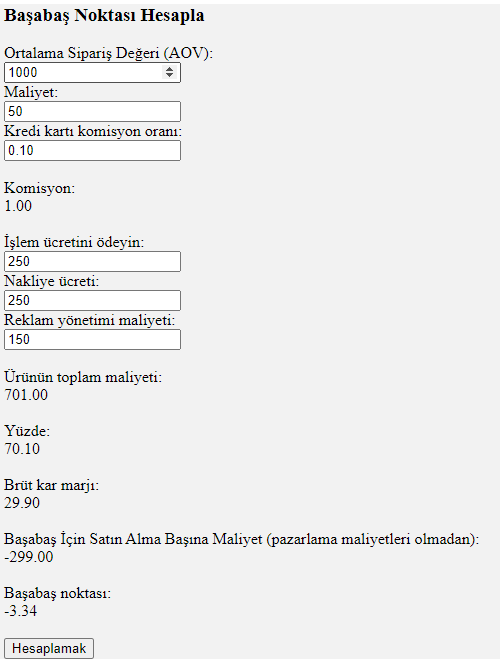
    şu şekilde deneyin hocam.

  • 06-06-2023, 22:54:21
    #3
    StyleWaR adlı üyeden alıntı: mesajı görüntüle
    <!DOCTYPE html>
    <html>
    <head>
     
    <meta name="viewport" content="width=device-width, initial-scale=1">
    <style>
    .row {
      display: flex;
      flex-wrap: wrap;
      padding: 0 4px;
    }
     
    /* Create two equal columns that sits next to each other */
    .column {
      flex: 50%;
      padding: 0 4px;
    }
     
    /* Responsive layout - makes the two columns stack on top of each other */
    @media (max-width: 767px) {
      .column {
        flex: 100%;
        padding: 0;
      }
    }
    </style>
    </head>
    <body>
     
    <form onsubmit="calculate(); return false;">
        <div class="column" style="background-color:#f2f2f2;">
            <h3>Başabaş Noktası Hesapla</h3>
            <label for="fixed_expenses">Fixed Expenses:</label><br>
            <input type="number" id="fixed_expenses" name="fixed_expenses"><br>
            <label for="unit_sales_price">Unit Sales Price:</label><br>
            <input type="number" id="unit_sales_price" name="unit_sales_price"><br>
            <label for="variable_cost">Variable Cost:</label><br>
            <input type="number" id="variable_cost" name="variable_cost"><br><br>
            <label for="result">Result:</label><br>
            <output id="result"></output><br><br>
            <button type="submit">Calculate</button>
        </div>
    </form>
    
    <script>
        function calculate() {
            var fixedExpenses = parseFloat(document.getElementById('fixed_expenses').value);
            var unitSalesPrice = parseFloat(document.getElementById('unit_sales_price').value);
            var variableCost = parseFloat(document.getElementById('variable_cost').value);
            
            if (isNaN(fixedExpenses) || isNaN(unitSalesPrice) || isNaN(variableCost)) {
                document.getElementById('result').innerHTML = "Please enter valid numbers.";
            } else {
                var result = fixedExpenses / (unitSalesPrice - variableCost);
                document.getElementById('result').innerHTML = result;
            }
        }
    
        document.addEventListener("DOMContentLoaded", function() {
            calculate();
        });
    </script>
    
     
        </div>
     
    </body>
    </html>
    şu şekilde deneyin hocam.

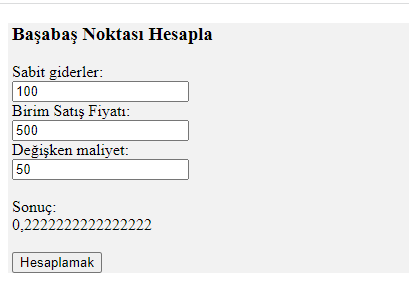
    Hocam çok teşekkür ederim ancak kodu genişletme kararı aldım ve yeni bir kod dizini yazdım. Şimdi ise formun bazı yerlerinde yüzdelik bazı yerlerinde küsüratlı sayılar yazmam gerekiyor ancak değer kümesi sayılar olduğu için izin vermiyor bunu düzenlemenin bir yolu var mıdır?

    <!DOCTYPE html>
    <html>
    <head>
    
    <meta name="viewport" content="width=device-width, initial-scale=1">
    <style>
    .row {
      display: flex;
      flex-wrap: wrap;
      padding: 0 4px;
    }
    
    /* Create two equal columns that sits next to each other */
    .column {
      flex: 50%;
      padding: 0 4px;
    }
    
    /* Responsive layout - makes the two columns stack on top of each other */
    @media (max-width: 767px) {
      .column {
        flex: 100%;
        padding: 0;
      }
    }
    </style>
    </head>
    <body>
        <form onsubmit="calculate(); return false;">
        <div class="column" style="background-color:#f2f2f2;">
            <h3>Başabaş Noktası Hesapla</h3>
            <label for="fixed_expenses">Average Order Value (AOV):</label><br>
            <input type="number" id="fixed_expenses" name="fixed_expenses"><br>
            <label for="unit_sales_price">Cost:</label><br>
            <input type="number" id="unit_sales_price" name="unit_sales_price"><br>
            <label for="credit_card_commission_rate">Credit card commission rate:</label><br>
            <input type="number" id="credit_card_commission_rate" name="credit_card_commission_rate"><br><br>
            <label for="commission">Commission:</label><br>
            <output id="commission"></output><br><br>
            <label for="pay_processing_fee">Pay transaction fee:</label><br>
            <input type="number" id="pay_processing_fee" name="pay_processing_fee"><br>
            <label for="shipping_fee">Shipping fee:</label><br>
            <input type="number" id="shipping_fee" name="shipping_fee"><br>
            <label for="advertising_management_cost">Advertising management cost:</label><br>
            <input type="number" id="advertising_management_cost" name="advertising_management_cost"><br><br>
            <label for="total_cost_of_product">Total cost of the product:</label><br>
            <output id="total_cost_of_product"></output><br><br>
            <label for="percentage_of_cost">Percent:</label><br>
            <output id="percentage_of_cost"></output><br><br>
            <label for="gross_profit_margin">Gross profit margin:</label><br>
            <output id="gross_profit_margin"></output><br><br>
            <label for="cost_per_purchase_for_breakeven">Cost Per Purchase For Breakeven (without marketing costs):</label><br>
            <output id="cost_per_purchase_for_breakeven"></output><br><br>
            <label for="breakeven_point">Breakeven point:</label><br>
            <output id="breakeven_point"></output><br><br>
    
            <button type="submit">Calculate</button>
    
        </form>
    
        <script>
    
            function calculate() {
                var fixedExpenses = document.getElementById('fixed_expenses').value;
                var unitSalesPrice = document.getElementById('unit_sales_price').value;
                var creditCardCommissionRate = document.getElementById('credit_card_commission_rate').value;
                var commission = fixedExpenses * creditCardCommissionRate;
                document.getElementById('commission').innerHTML = commission.toFixed(2);
                var payProcessingFee = document.getElementById('pay_processing_fee').value;
                var shippingFee = document.getElementById('shipping_fee').value;
                var advertisingManagementCost = document.getElementById('advertising_management_cost').value;
    
                var totalCostOfProduct = parseFloat(unitSalesPrice) + parseFloat(commission) + parseFloat(payProcessingFee) + parseFloat(shippingFee) + parseFloat(advertisingManagementCost);
                document.getElementById('total_cost_of_product').innerHTML = totalCostOfProduct.toFixed(2);
    
                var percentageOfCost = (totalCostOfProduct / fixedExpenses) * 100;
                document.getElementById('percentage_of_cost').innerHTML = percentageOfCost.toFixed(2);
    
                var grossProfitMargin = ((fixedExpenses - totalCostOfProduct) / fixedExpenses) * 100;
                document.getElementById('gross_profit_margin').innerHTML = grossProfitMargin.toFixed(2);
    
                var costPerPurchaseForBreakeven = totalCostOfProduct - fixedExpenses;
                document.getElementById('cost_per_purchase_for_breakeven').innerHTML = costPerPurchaseForBreakeven.toFixed(2);
    
                var breakevenPoint = fixedExpenses / costPerPurchaseForBreakeven;
                document.getElementById('breakeven_point').innerHTML = breakevenPoint.toFixed(2);
            }
    
        </script>
        </div>
    
    </body>
    </html>
  • 06-06-2023, 23:02:43
    #4
    Bu cevap, konu sahibi tarafından kabul edilebilir bir cevap olarak işaretlendi.
    Hocam sizi doğru anladıysam aşağıdaki gibi dener misiniz?
    <!DOCTYPE html>
    <html>
    <head>
     
    <meta name="viewport" content="width=device-width, initial-scale=1">
    <style>
    .row {
      display: flex;
      flex-wrap: wrap;
      padding: 0 4px;
    }
     
    /* Create two equal columns that sits next to each other */
    .column {
      flex: 50%;
      padding: 0 4px;
    }
     
    /* Responsive layout - makes the two columns stack on top of each other */
    @media (max-width: 767px) {
      .column {
        flex: 100%;
        padding: 0;
      }
    }
    </style>
    </head>
    <body>
        <form onsubmit="calculate(); return false;">
        <div class="column" style="background-color:#f2f2f2;">
            <h3>Başabaş Noktası Hesapla</h3>
            <label for="fixed_expenses">Average Order Value (AOV):</label><br>
            <input type="number" id="fixed_expenses" name="fixed_expenses"><br>
            <label for="unit_sales_price">Cost:</label><br>
            <input type="number" id="unit_sales_price" name="unit_sales_price"><br>
            <label for="credit_card_commission_rate">Credit card commission rate:</label><br>
            <input type="text" id="credit_card_commission_rate" name="credit_card_commission_rate"><br><br>
            <label for="commission">Commission:</label><br>
            <output id="commission"></output><br><br>
            <label for="pay_processing_fee">Pay transaction fee:</label><br>
            <input type="number" id="pay_processing_fee" name="pay_processing_fee"><br>
            <label for="shipping_fee">Shipping fee:</label><br>
            <input type="number" id="shipping_fee" name="shipping_fee"><br>
            <label for="advertising_management_cost">Advertising management cost:</label><br>
            <input type="number" id="advertising_management_cost" name="advertising_management_cost"><br><br>
            <label for="total_cost_of_product">Total cost of the product:</label><br>
            <output id="total_cost_of_product"></output><br><br>
            <label for="percentage_of_cost">Percent:</label><br>
            <output id="percentage_of_cost"></output><br><br>
            <label for="gross_profit_margin">Gross profit margin:</label><br>
            <output id="gross_profit_margin"></output><br><br>
            <label for="cost_per_purchase_for_breakeven">Cost Per Purchase For Breakeven (without marketing costs):</label><br>
            <output id="cost_per_purchase_for_breakeven"></output><br><br>
            <label for="breakeven_point">Breakeven point:</label><br>
            <output id="breakeven_point"></output><br><br>
     
            <button type="submit">Calculate</button>
     
        </form>
     
        <script>
     
            function calculate() {
                var fixedExpenses = document.getElementById('fixed_expenses').value;
                var unitSalesPrice = document.getElementById('unit_sales_price').value;
                var creditCardCommissionRate = document.getElementById('credit_card_commission_rate').value / 100;
                var commission = fixedExpenses * creditCardCommissionRate;
                document.getElementById('commission').innerHTML = commission.toFixed(2);
                var payProcessingFee = document.getElementById('pay_processing_fee').value;
                var shippingFee = document.getElementById('shipping_fee').value;
                var advertisingManagementCost = document.getElementById('advertising_management_cost').value;
     
                var totalCostOfProduct = parseFloat(unitSalesPrice) + parseFloat(commission) + parseFloat(payProcessingFee) + parseFloat(shippingFee) + parseFloat(advertisingManagementCost);
                document.getElementById('total_cost_of_product').innerHTML = totalCostOfProduct.toFixed(2);
     
                var percentageOfCost = (totalCostOfProduct / fixedExpenses) * 100;
                document.getElementById('percentage_of_cost').innerHTML = percentageOfCost.toFixed(2);
     
                var grossProfitMargin = ((fixedExpenses - totalCostOfProduct) / fixedExpenses) * 100;
                document.getElementById('gross_profit_margin').innerHTML = grossProfitMargin.toFixed(2);
     
                var costPerPurchaseForBreakeven = totalCostOfProduct - fixedExpenses;
                document.getElementById('cost_per_purchase_for_breakeven').innerHTML = costPerPurchaseForBreakeven.toFixed(2);
     
                var breakevenPoint = fixedExpenses / costPerPurchaseForBreakeven;
                document.getElementById('breakeven_point').innerHTML = breakevenPoint.toFixed(2);
            }
     
        </script>
        </div>
     
    </body>
    </html>

  • 06-06-2023, 23:52:01
    #5
    StyleWaR adlı üyeden alıntı: mesajı görüntüle
    Hocam sizi doğru anladıysam aşağıdaki gibi dener misiniz?
    <!DOCTYPE html>
    <html>
    <head>
     
    <meta name="viewport" content="width=device-width, initial-scale=1">
    <style>
    .row {
      display: flex;
      flex-wrap: wrap;
      padding: 0 4px;
    }
     
    /* Create two equal columns that sits next to each other */
    .column {
      flex: 50%;
      padding: 0 4px;
    }
     
    /* Responsive layout - makes the two columns stack on top of each other */
    @media (max-width: 767px) {
      .column {
        flex: 100%;
        padding: 0;
      }
    }
    </style>
    </head>
    <body>
        <form onsubmit="calculate(); return false;">
        <div class="column" style="background-color:#f2f2f2;">
            <h3>Başabaş Noktası Hesapla</h3>
            <label for="fixed_expenses">Average Order Value (AOV):</label><br>
            <input type="number" id="fixed_expenses" name="fixed_expenses"><br>
            <label for="unit_sales_price">Cost:</label><br>
            <input type="number" id="unit_sales_price" name="unit_sales_price"><br>
            <label for="credit_card_commission_rate">Credit card commission rate:</label><br>
            <input type="text" id="credit_card_commission_rate" name="credit_card_commission_rate"><br><br>
            <label for="commission">Commission:</label><br>
            <output id="commission"></output><br><br>
            <label for="pay_processing_fee">Pay transaction fee:</label><br>
            <input type="number" id="pay_processing_fee" name="pay_processing_fee"><br>
            <label for="shipping_fee">Shipping fee:</label><br>
            <input type="number" id="shipping_fee" name="shipping_fee"><br>
            <label for="advertising_management_cost">Advertising management cost:</label><br>
            <input type="number" id="advertising_management_cost" name="advertising_management_cost"><br><br>
            <label for="total_cost_of_product">Total cost of the product:</label><br>
            <output id="total_cost_of_product"></output><br><br>
            <label for="percentage_of_cost">Percent:</label><br>
            <output id="percentage_of_cost"></output><br><br>
            <label for="gross_profit_margin">Gross profit margin:</label><br>
            <output id="gross_profit_margin"></output><br><br>
            <label for="cost_per_purchase_for_breakeven">Cost Per Purchase For Breakeven (without marketing costs):</label><br>
            <output id="cost_per_purchase_for_breakeven"></output><br><br>
            <label for="breakeven_point">Breakeven point:</label><br>
            <output id="breakeven_point"></output><br><br>
     
            <button type="submit">Calculate</button>
     
        </form>
     
        <script>
     
            function calculate() {
                var fixedExpenses = document.getElementById('fixed_expenses').value;
                var unitSalesPrice = document.getElementById('unit_sales_price').value;
                var creditCardCommissionRate = document.getElementById('credit_card_commission_rate').value / 100;
                var commission = fixedExpenses * creditCardCommissionRate;
                document.getElementById('commission').innerHTML = commission.toFixed(2);
                var payProcessingFee = document.getElementById('pay_processing_fee').value;
                var shippingFee = document.getElementById('shipping_fee').value;
                var advertisingManagementCost = document.getElementById('advertising_management_cost').value;
     
                var totalCostOfProduct = parseFloat(unitSalesPrice) + parseFloat(commission) + parseFloat(payProcessingFee) + parseFloat(shippingFee) + parseFloat(advertisingManagementCost);
                document.getElementById('total_cost_of_product').innerHTML = totalCostOfProduct.toFixed(2);
     
                var percentageOfCost = (totalCostOfProduct / fixedExpenses) * 100;
                document.getElementById('percentage_of_cost').innerHTML = percentageOfCost.toFixed(2);
     
                var grossProfitMargin = ((fixedExpenses - totalCostOfProduct) / fixedExpenses) * 100;
                document.getElementById('gross_profit_margin').innerHTML = grossProfitMargin.toFixed(2);
     
                var costPerPurchaseForBreakeven = totalCostOfProduct - fixedExpenses;
                document.getElementById('cost_per_purchase_for_breakeven').innerHTML = costPerPurchaseForBreakeven.toFixed(2);
     
                var breakevenPoint = fixedExpenses / costPerPurchaseForBreakeven;
                document.getElementById('breakeven_point').innerHTML = breakevenPoint.toFixed(2);
            }
     
        </script>
        </div>
     
    </body>
    </html>
    Teşekkür ederim hocam çözdüm ben sayı olarak girdim değeri hesaplasın diye ama yazı da girsek değeri alıyor sonuçta eywAllah 🙏