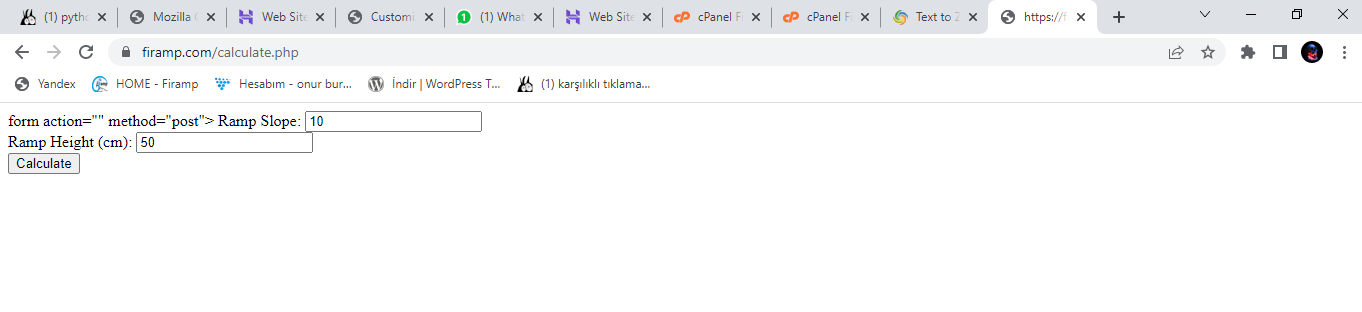
bunu siteme atmak istiyorum engelli rampası açısını hesaplıyor.
bunu nasıl yapabilirim kodlar hazır , butona bastığında işliyor.
python ile yazılmış bir kod var elimde
11
●178
- 28-01-2023, 18:22:47
 Merhabalar hocam, Python kodları web sitelerinde at-çalıştır mantığı ile çalışmıyor maalesef.
Flask yada benzeri bir uygulamaya entegre edebilirseniz çalışır ancak. Yada sunucunuz python destekliyorsa, PHP vb. bir script ile shell üzerinden sonuçları alacak şekilde geliştirme yapabilirsiniz. - 28-01-2023, 18:25:16 Üyeliği durdurulduhocam php ye çevirdim kodları sonra ki adımda ne yapmalıyım.Draco adlı üyeden alıntı: mesajı görüntüle
- 28-01-2023, 18:29:43 Üyeliği durdurulduEski kodDraco adlı üyeden alıntı: mesajı görüntüle
import tkinter as tk

def calculate_run(slope, height):
    return height / slope

def on_button_click():
    slope = float(slope_entry.get())
    height = float(height_entry.get())
    run = calculate_run(slope, height)
    run_label.config(text=f"Rampa Uzunluğu: {run:.2f} cm")

root = tk.Tk()
root.title("ramp slope calculator")

slope_label = tk.Label(root, text="Ramp Slope")
slope_label.pack()

slope_entry = tk.Entry(root)
slope_entry.pack()

height_label = tk.Label(root, text="Rampa height (cm)")
height_label.pack()

height_entry = tk.Entry(root)
height_entry.pack()

calculate_button = tk.Button(root, text="Calculate", command=on_button_click)
calculate_button.pack()

run_label = tk.Label(root, text="")
run_label.pack()

root.mainloop()
Yeni kod
form action="" method="post"> Ramp Slope: <input type="text" name="slope"><br> Ramp Height (cm): <input type="text" name="height"><br> <input type="submit" name="submit" value="Calculate"> </form> <?php if (isset($_POST['submit'])) { $slope = floatval($_POST['slope']); $height = floatval($_POST['height']); $run = $height / $slope; echo "Rampa Uzunluğu: " . number_format($run, 2) . " cm"; } ?> - 28-01-2023, 18:39:45 Tamam hocam çevirmişsiniz zaten, bunu sunucunuza atın (PHP destekli bir sunucu), ilgili adrese gidince çalışacaktır.
https://www.hostinger.web.tr/rehberl...-dosya-yukleme - 28-01-2023, 18:43:24 Üyeliği durdurulduhocam public html kısmına ne olarak atmam gerek not defterinde kayıtlı şuan .Draco adlı üyeden alıntı: mesajı görüntüle
- 28-01-2023, 18:46:40 Emirkirax adlı üyeden alıntı: mesajı görüntüle
Dosyayı hesapla.php ismi ile kaydedin ve sunucuya (public html) olarak gönderdin.
Daha sonra siteadresiniz.com/hesapla.php
diyerek erişebilirsiniz. - 28-01-2023, 18:52:13 Üyeliği durduruldu