
Kodları aşağıya ekliyorum eminim birleştirip sunucuda çalıştırır hale getirebilirsiniz, sadece nasıl yapıldığını bana da anlatırsanız öğrenmek istiyorum, yanlışım veya hatalı olduğum nokta varsa lütfen doğru ile birlikte bana anlatın. kendimi düzelteyim. Ayrı olarak veritabanı bağlantısı için kendimi geliştire
https://prnt.sc/HgxUU93qcg48
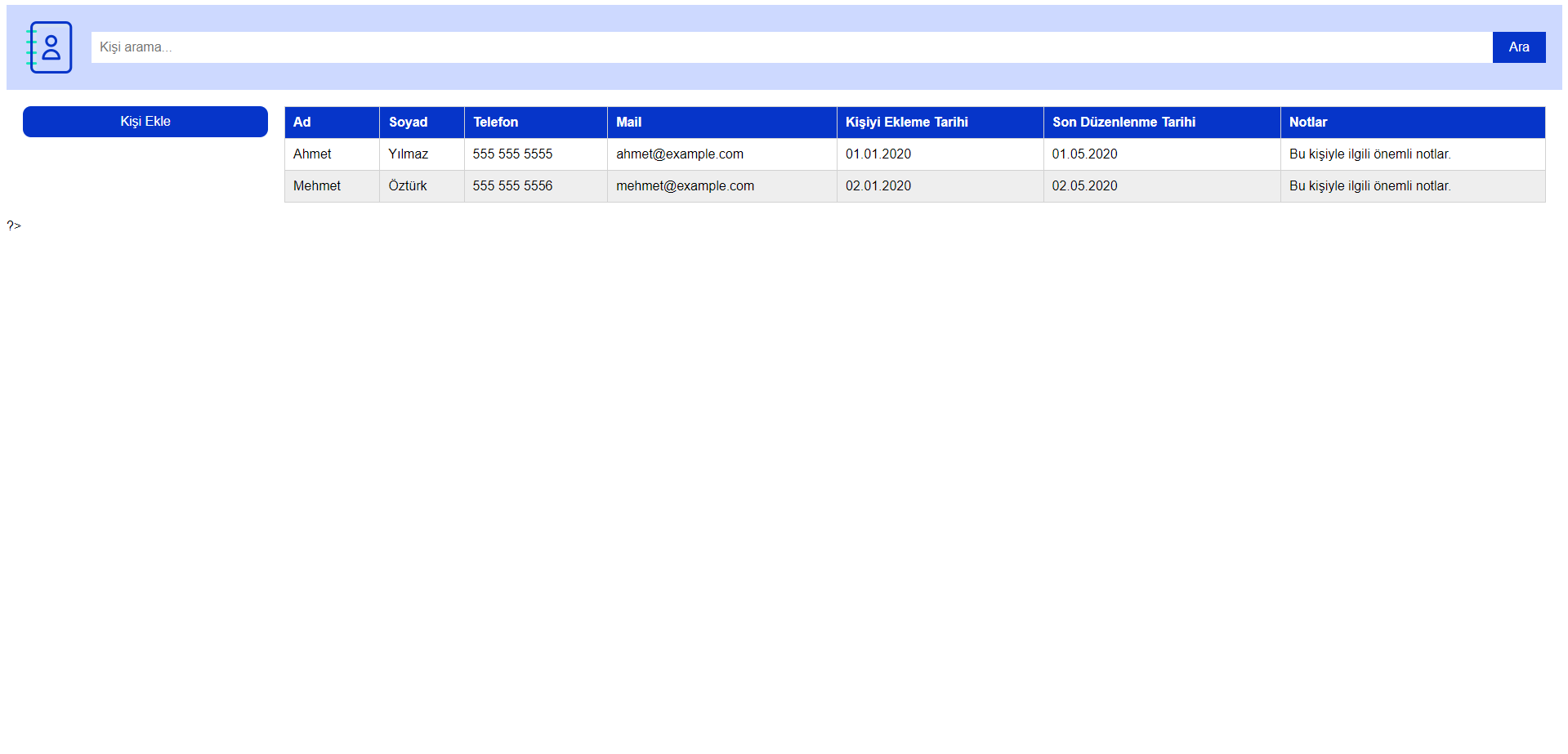
Arayüz tasarımını bu şekilde oluşturdum.
Yeni Kişi Ekle butonuna tıklayınca popup açılıyor:
https://prnt.sc/fCYPdfNHSt2B
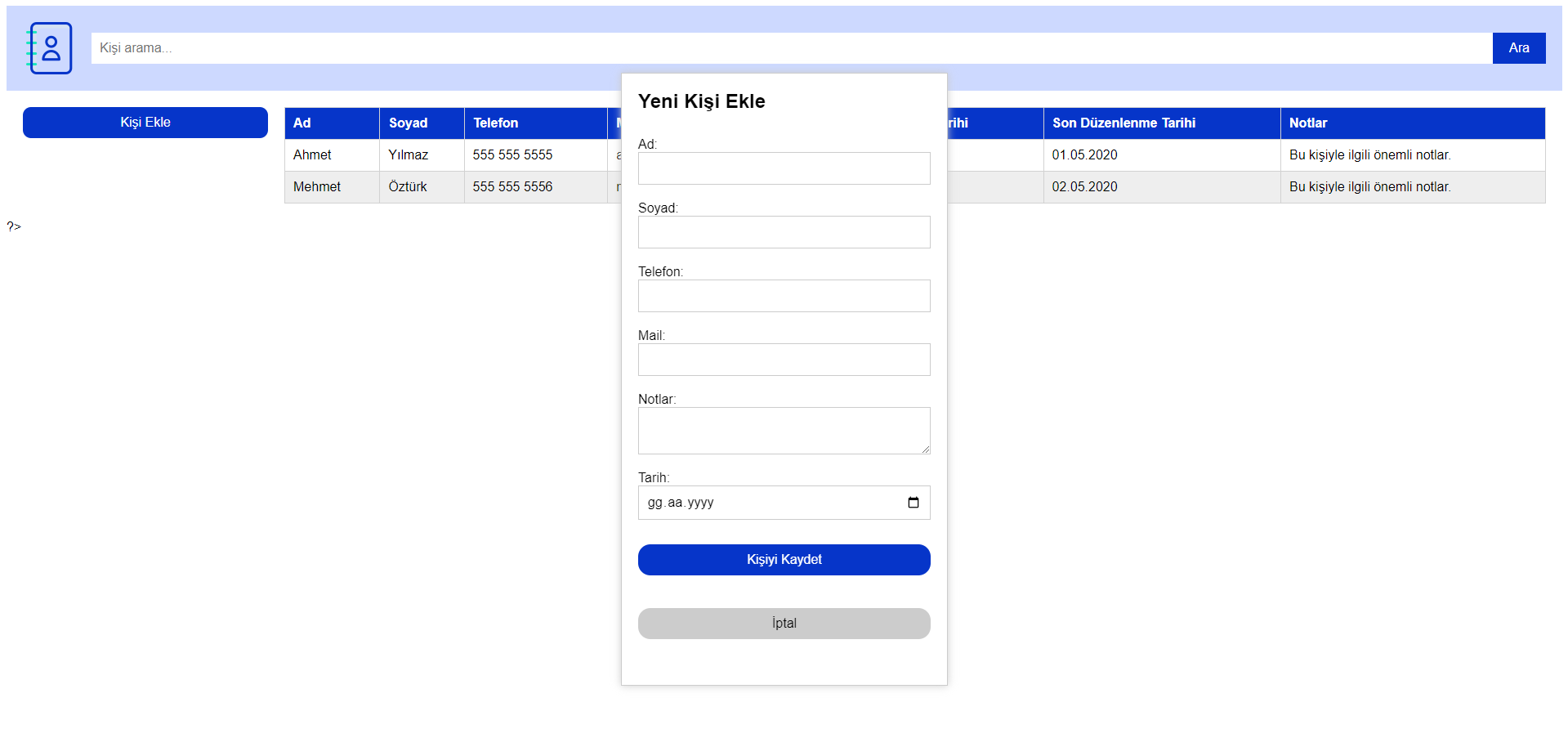
İlgili kayıtlı kişinin herhangi bir sütünuna tıklayınca düzenleme ekranı açılıyor:
https://prnt.sc/dgWfHuYp-FZ_
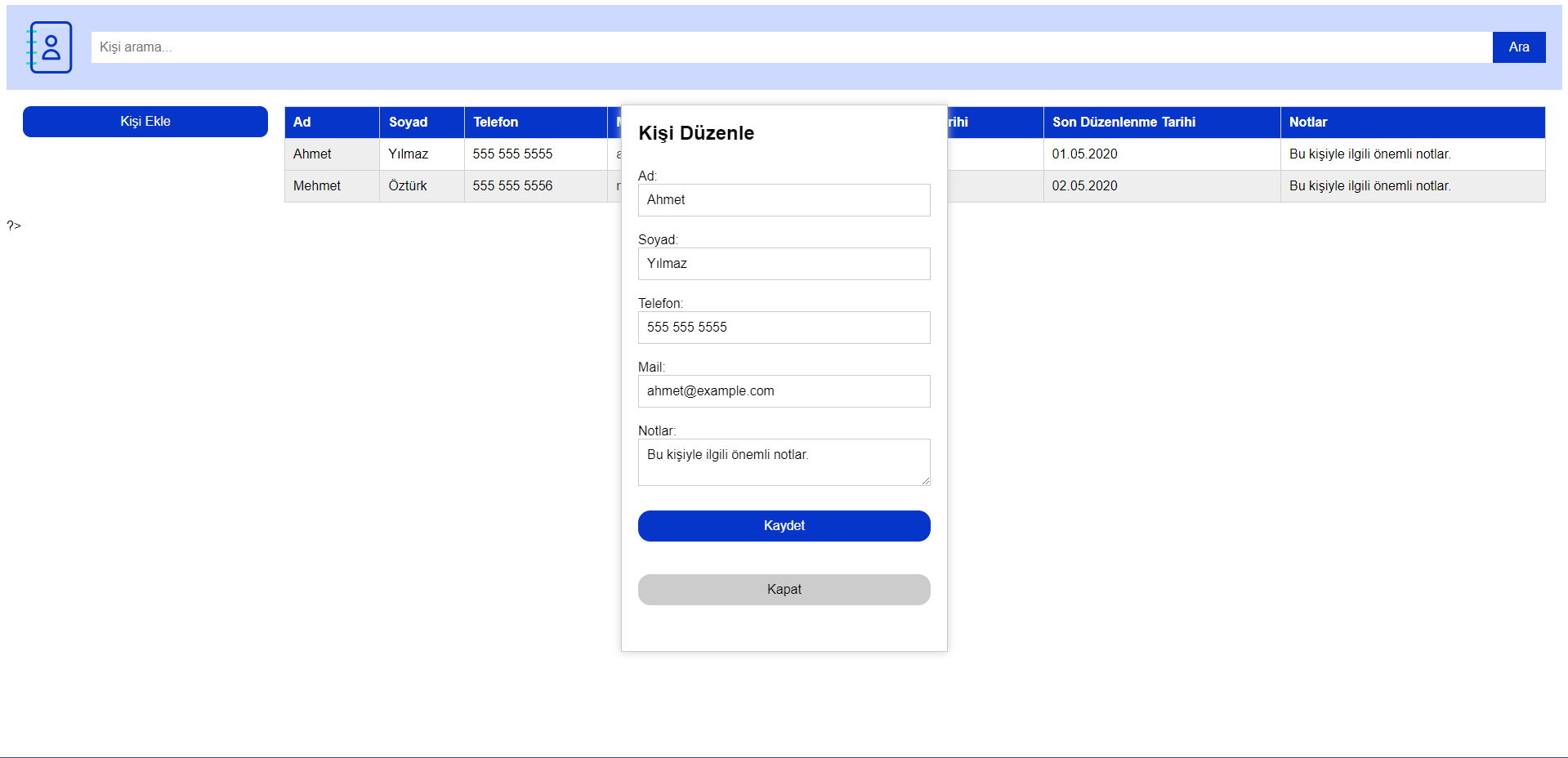
Şimdi HTML CSS JS olarak işlem tamam ama veritabanı konusunda takıldım. Kodlar:
index.php:
<!DOCTYPE html>
<html>
  <head>
    <meta charset="utf-8">
    <title>İletişim Listesi</title>
     <link rel="stylesheet" href="style.css">
  </head>
  <body>
    <!-- Üst Kısım -->
    <div id="header">
      <!-- Logo alanı -->
      <div id="logo">
        <img src="logo.png" alt="Logo">
      </div>
      <!-- Kişi arama alanı ve butonu -->
      <div id="search">
        <input type="text" placeholder="Kişi arama...">
        <button type="button">Ara</button>
      </div>
      <!-- Bildirim alanı -->
      <div id="notifications">
        <!-- Bildirimler buraya yerleştirilecek -->
      </div>
    </div>
    <!-- Body Kısım -->
    <div id="body">
      <!-- Sol Kısım -->
      <div id="left-section">
        <!-- "Kişi Ekle" butonu -->
        <button type="button" id="add-person-button">Kişi Ekle</button>
        <!-- Tarih alanı -->
        <div id="date">
          <!-- Tarih seçim elemanı buraya yerleştirilecek -->
        </div>
      </div>
      <!-- Sağ Kısım -->
      <div id="right-section">


<!-- Kişi listesi tablosu -->
<table>
  <tr>
    <th>Ad</th>
    <th>Soyad</th>
    <th>Telefon</th>
    <th>Mail</th>
    <th>Kişiyi Ekleme Tarihi</th>
    <th>Son Düzenlenme Tarihi</th>
    <th>Notlar</th>
  </tr>
  <tr class="person" id="person-1">
    <td>Ahmet</td>
    <td>Yılmaz</td>
    <td>555 555 5555</td>
    <td>ahmet@example.com</td>
    <td>01.01.2020</td>
    <td>01.05.2020</td>
    <td>Bu kişiyle ilgili önemli notlar.</td>
  </tr>
  <tr class="person" id="person-2">
    <td>Mehmet</td>
    <td>Öztürk</td>
    <td>555 555 5556</td>
    <td>mehmet@example.com</td>
    <td>02.01.2020</td>
    <td>02.05.2020</td>
    <td>Bu kişiyle ilgili önemli notlar.</td>
  </tr>
</table>

<!-- Popup penceresi -->
<div id="popup" style="display:none">
  <h1>Kişi Düzenle</h1>
  <form>
    <label>
      Ad:
      <input type="text" id="first-name" value="Ahmet">
    </label>
    <label>
      Soyad:
      <input type="text" id="last-name" value="Yılmaz">
    </label>
    <label>
      Telefon:
      <input type="tel" id="phone" value="555 555 5555">
    </label>
    <label>
      Mail:
      <input type="email" id="email" value="ahmet@example.com">
    </label>
    <label>
      Notlar:
      <textarea id="notes">Bu kişiyle ilgili önemli notlar.</textarea>
    </label>
    <button type="submit">Kaydet</button>
    <button type="button" id="close-popup">Kapat</button>
  </form>
</div>


      </div>
    </div>
    <script>

// Popup formunun gösterilmesi
document.getElementById("add-person-button").addEventListener("click", function() {
  // Popup içeriğini oluşturalım
  var popupContent = `
    <h1>Yeni Kişi Ekle</h1>
    <form>
      <label>
        Ad:
        <input type="text" required>
      </label>

      <label>
        Soyad:
        <input type="text" required>
      </label>

      <label>
        Telefon:
        <input type="tel" required>
      </label>

      <label>
        Mail:
        <input type="email" required>
      </label>

      <label>
        Notlar:
        <textarea></textarea>
      </label>

      <label>
        Tarih:
        <input type="date" required>
      </label>

      <button type="submit">Kişiyi Kaydet</button>
      <button type="button" id="cancel-button">İptal</button>
    </form>
  `;
  // Popup penceresini oluşturalım
  var popupWindow = document.createElement("div");
  popupWindow.innerHTML = popupContent;
  popupWindow.id = "popup";
  document.body.appendChild(popupWindow);
  // "İptal" butonuna tıklandığında popup penceresini kapatalım
  document.getElementById("cancel-button").addEventListener("click", function() {
    document.body.removeChild(popupWindow);
  });
});

// Popup penceresini göster/gizle
function togglePopup(id) {
  var popup = document.getElementById(id);
  if (popup.style.display === "none") {
    popup.style.display = "block";
  } else {
    popup.style.display = "none";
  }
}

// Popup penceresini doldur
function fillPopup(id) {
  var person = document.getElementById(id);
  var firstName = person.children[0].textContent;
  var lastName = person.children[1].textContent;
  var phone = person.children[2].textContent;
  var email = person.children[3].textContent;
  var addedDate = person.children[4].textContent;
  var modifiedDate = person.children[5].textContent;
  var notes = person.children[6].textContent;
  document.getElementById("first-name").value = firstName;
  document.getElementById("last-name").value = lastName;
  document.getElementById("phone").value = phone;
  document.getElementById("email").value = email;
  document.getElementById("notes").value = notes;
}

// Kişi listesi tablosu hücrelerine click olayı ekle
var tableCells = document.getElementsByClassName("person");
for (var i = 0; i < tableCells.length; i++) {
  tableCells[i].addEventListener("click", function() {
    fillPopup(this.id);
    togglePopup("popup");
  });
}

// Popup penceresinde "Kapat" butonuna click olayı ekle
document.getElementById("close-popup").addEventListener("click", function() {
  togglePopup("popup");
});

    </script>

  </body>
</html>
<?
include("config.php");
?>style.css/* Genel stil ayarları */
* {
box-sizing: border-box;
font-family: sans-serif;
}
/* Üst Kısım */
#header {
display: flex;
align-items: center;
background-color: #cdd9ff;
color: #fff;
padding: 20px;
}
/* Logo alanı */
#logo {
flex: 0 0 auto;
margin-right: 20px;
}
/* Kişi arama alanı */
#search {
display: flex;
align-items: center;
flex: 1 1 auto;
}
#search input {
flex: 1 1 auto;
padding: 10px;
border: none;
font-size: 16px;
}
#search button {
flex: 0 0 auto;
padding: 10px 20px;
border: none;
background-color: #0635c9;
color: #fff;
font-size: 16px;
cursor: pointer;
}
/* Bildirim alanı */
#notifications {
flex: 0 0 auto;
margin-left: auto;
font-size: 14px;
}
/* Body Kısım */
#body {
display: flex;
margin: 20px;
}
/* Sol Kısım */
#left-section {
flex: 0 0 auto;
width: 300px;
margin-right: 20px;
}
/* "Kişi Ekle" butonu */
#add-person-button {
display: block;
width: 100%;
padding: 10px;
border: none;
background-color: #0635c9;
color: #fff;
font-size: 16px;
cursor: pointer;
border-radius:10px;
}
/* Tarih alanı */
#date {
margin-top: 20px;
font-size: 14px;
}
/* Sağ Kısım */
#right-section {
flex: 1 1 auto;
}
/* Kişilerin listesi */
table {
width: 100%;
border-collapse: collapse;
}
table th,
table td {
padding: 10px;
border: 1px solid #d2d2d2;
text-align: left;
vertical-align: top;
}
table th {
background-color: #0635c9;
color: #fff;
}
table tr:nth-child(odd) {
background-color: #eee;
}
/* Popup penceresi */
#popup {
position: fixed;
top: 50%;
left: 50%;
transform: translate(-50%, -50%);
width: 400px;
padding: 20px;
background-color: #fff;
border: 1px solid #ccc;
box-shadow: 0 0 10px #ccc;
}
#popup h1 {
margin: 0 0 20px 0;
font-size: 24px;
}
#popup form {
display: flex;
flex-direction: column;
}
#popup form label {
margin: 10px 0;
font-size: 16px;
}
#popup form input[type="text"],
#popup form input[type="email"],
#popup form input[type="tel"],
#popup form input[type="date"],
#popup form textarea {
width: 100%;
padding: 10px;
border: 1px solid #ccc;
font-size: 16px;
}
#popup form button[type="submit"],
#popup form button[type="button"] {
margin: 20px 0;
padding: 10px 20px;
border: none;
font-size: 16px;
cursor: pointer;
border-radius: 15px;
}
#popup form button[type="submit"] {
background-color: #0635c9;
color: #fff;
}
#popup form button[type="button"] {
background-color: #ccc;
}
/* Hover etkisi */
table td:hover {
background-color: #eee;
cursor: pointer;
}config.php<?php
$servername = "localhost";
$username = "dbusername";
$password = "123123";
$dbname = "dbname";
// Veritabanına bağlantı oluşturma
$conn = mysqli_connect($servername, $username, $password, $dbname);
// Bağlantı kontrolü
if (!$conn) {
die("Bağlantı hatası: " . mysqli_connect_error());
}
echo "Bağlantı başarılı.";
$sql = "CREATE TABLE contact (
person INT(6) UNSIGNED AUTO_INCREMENT PRIMARY KEY,
firstName VARCHAR(30) NOT NULL,
lastName VARCHAR(30) NOT NULL,
phone VARCHAR(30) NOT NULL,
email VARCHAR(50) NOT NULL
addedDate VARCHAR(50) NOT NULL
modifiedDate VARCHAR(50) NOT NULL
notes VARCHAR(250) NOT NULL
)";
if (mysqli_query($conn, $sql)) {
echo "Tablo oluşturuldu.";
} else {
echo "Tablo oluşturulurken hata: " . mysqli_error($conn);
}
mysqli_close($conn);
?>Veritabanı bağlantısı sağlamak ile beraber html içine verileri güncellemek için hangi php kod düzenlemelerini yapmam gerektiğini bilmiyorum, Verilerin eklenmesi, güncellenmesi durumu henüz onu öğrenemedim. Bu konuda bitirmemde yardımcı olmanızı isteyecektim.