• 09-08-2021, 11:37:40
    #1
    Arkadaşlar selamlar,
    Erp programının sql çalıştırırken 17113 hatası alıyorum.
    Konu hakkında bilgisi olan yardımcı olabilirse çok sevinirim.
    Not: Local account ve this account olarak ikisini de denedim.
    Saygılar
  • Kabul Edilen Cevap
    • 0 Beğeni
      bySonsuzluk adlı üyeden alıntı: mesajı görüntüle
      Evet ilk oraya bende baktm ama master dosyası yok orda.
      Olması gerekirken yok.
      Başka bir yere taşımış olabilir misiniz. veya örnek default bir yerden bulup atın klasör içine mutlaka çalışacaktır.
  • 09-08-2021, 11:57:54
    #2
    System Event Log ve ErrorLog bölümünde ki hatayı iletebilir misiniz.
  • 09-08-2021, 12:07:48
    #3
    TUROTTO adlı üyeden alıntı: mesajı görüntüle
    System Event Log ve ErrorLog bölümünde ki hatayı iletebilir misiniz.

    The description for Event ID 7024 from source Service Control Manager cannot be found. Either the component that raises this event is not installed on your local computer or the installation is corrupted. You can install or repair the component on the local computer.

    If the event originated on another computer, the display information had to be saved with the event.

    The following information was included with the event:

    SQL Server (MSSQLSERVER)
    %%17113

    The locale specific resource for the desired message is not present
  • 09-08-2021, 12:31:07
    #4
    bySonsuzluk adlı üyeden alıntı: mesajı görüntüle
    The description for Event ID 7024 from source Service Control Manager cannot be found. Either the component that raises this event is not installed on your local computer or the installation is corrupted. You can install or repair the component on the local computer.

    If the event originated on another computer, the display information had to be saved with the event.

    The following information was included with the event:

    SQL Server (MSSQLSERVER)
    %%17113

    The locale specific resource for the desired message is not present
    Burası değil daha ayrıntılı bilgi veren event log veya app log olması gerekiyor onun dışında errorlog bölümünde bulabilirsiniz.
    Örnek dizin olarak C:Program FilesMicrosoft SQL ServerMSSQL12.MSSQLSERVERMSSQLLog dizinine bakıp dosyayı iletirseniz bakalım.
  • 09-08-2021, 12:47:05
    #5
    TUROTTO adlı üyeden alıntı: mesajı görüntüle
    Burası değil daha ayrıntılı bilgi veren event log veya app log olması gerekiyor onun dışında errorlog bölümünde bulabilirsiniz.
    Örnek dizin olarak C:Program FilesMicrosoft SQL ServerMSSQL12.MSSQLSERVERMSSQLLog dizinine bakıp dosyayı iletirseniz bakalım.
    2021-08-09 11:59:34.12 Server UTC adjustment: 3:00
    2021-08-09 11:59:34.12 Server (c) Microsoft Corporation.
    2021-08-09 11:59:34.12 Server All rights reserved.
    2021-08-09 11:59:34.12 Server Server process ID is 8292.
    2021-08-09 11:59:34.12 Server System Manufacturer: 'Dell Inc.', System Model: 'PowerEdge R730'.
    2021-08-09 11:59:34.12 Server Authentication mode is MIXED.
    2021-08-09 11:59:34.12 Server Logging SQL Server messages in file 'C:Program FilesMicrosoft SQL ServerMSSQL12.MSSQLSERVERMSSQLLogERRORLOG'.
    2021-08-09 11:59:34.12 Server The service account is '***ERP$'. This is an informational message; no user action is required.
    2021-08-09 11:59:34.12 Server Registry startup parameters:
    -d C:Program FilesMicrosoft SQL ServerMSSQL12.MSSQLSERVERMSSQLDATAmaster.mdf
    -e C:Program FilesMicrosoft SQL ServerMSSQL12.MSSQLSERVERMSSQLLogERRORLOG
    -l C:Program FilesMicrosoft SQL ServerMSSQL12.MSSQLSERVERMSSQLDATAmastlog.ldf
    2021-08-09 11:59:34.12 Server Command Line Startup Parameters:
    -s "MSSQLSERVER"
    2021-08-09 11:59:34.61 Server Error: 17113, Severity: 16, State: 1.
    2021-08-09 11:59:34.61 Server Error 2(The system cannot find the file specified.) occurred while opening file 'C:Program FilesMicrosoft SQL ServerMSSQL12.MSSQLSERVERMSSQLDATAmaster.mdf' to obtain configuration information at startup. An invalid startup option might have caused the error. Verify your startup options, and correct or remove them if necessary.
    2021-08-09 11:59:34.61 Server SQL Server shutdown has been initiated
  • 09-08-2021, 12:50:43
    #6
    bySonsuzluk adlı üyeden alıntı: mesajı görüntüle
    2021-08-09 11:59:34.12 Server UTC adjustment: 3:00
    2021-08-09 11:59:34.12 Server (c) Microsoft Corporation.
    2021-08-09 11:59:34.12 Server All rights reserved.
    2021-08-09 11:59:34.12 Server Server process ID is 8292.
    2021-08-09 11:59:34.12 Server System Manufacturer: 'Dell Inc.', System Model: 'PowerEdge R730'.
    2021-08-09 11:59:34.12 Server Authentication mode is MIXED.
    2021-08-09 11:59:34.12 Server Logging SQL Server messages in file 'C:Program FilesMicrosoft SQL ServerMSSQL12.MSSQLSERVERMSSQLLogERRORLOG'.
    2021-08-09 11:59:34.12 Server The service account is '***ERP$'. This is an informational message; no user action is required.
    2021-08-09 11:59:34.12 Server Registry startup parameters:
    -d C:Program FilesMicrosoft SQL ServerMSSQL12.MSSQLSERVERMSSQLDATAmaster.mdf
    -e C:Program FilesMicrosoft SQL ServerMSSQL12.MSSQLSERVERMSSQLLogERRORLOG
    -l C:Program FilesMicrosoft SQL ServerMSSQL12.MSSQLSERVERMSSQLDATAmastlog.ldf
    2021-08-09 11:59:34.12 Server Command Line Startup Parameters:
    -s "MSSQLSERVER"
    2021-08-09 11:59:34.61 Server Error: 17113, Severity: 16, State: 1.
    2021-08-09 11:59:34.61 Server Error 2(The system cannot find the file specified.) occurred while opening file 'C:Program FilesMicrosoft SQL ServerMSSQL12.MSSQLSERVERMSSQLDATAmaster.mdf' to obtain configuration information at startup. An invalid startup option might have caused the error. Verify your startup options, and correct or remove them if necessary.
    2021-08-09 11:59:34.61 Server SQL Server shutdown has been initiated
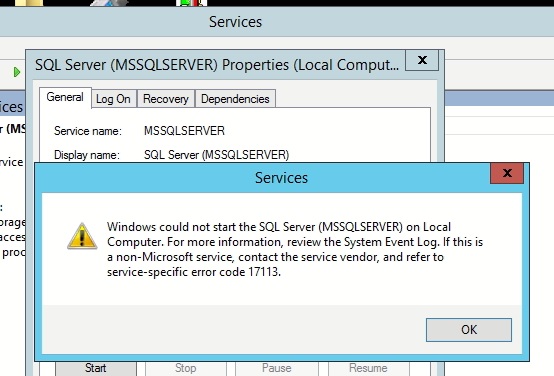
    C:Program FilesMicrosoft SQL ServerMSSQL12.MSSQLSERVERMSSQLDATAmaster.mdf Dosyasını bulamıyor veya açamıyor. Dosyanın var olduğunu kontrol edip var ise DATA klasörüne mssql server için security bölümünden tam yetki verip tekrar açmayı deneyin.
  • 09-08-2021, 12:51:55
    #7
    TUROTTO adlı üyeden alıntı: mesajı görüntüle
    C:Program FilesMicrosoft SQL ServerMSSQL12.MSSQLSERVERMSSQLDATAmaster.mdf Dosyasını bulamıyor veya açamıyor. Dosyanın var olduğunu kontrol edip var ise DATA klasörüne mssql server için security bölümünden tam yetki verip tekrar açmayı deneyin.
    Evet ilk oraya bende baktm ama master dosyası yok orda.
    Olması gerekirken yok.
  • 09-08-2021, 12:53:27
    #8
    Bu cevap, konu sahibi tarafından kabul edilebilir bir cevap olarak işaretlendi.
    bySonsuzluk adlı üyeden alıntı: mesajı görüntüle
    Evet ilk oraya bende baktm ama master dosyası yok orda.
    Olması gerekirken yok.
    Başka bir yere taşımış olabilir misiniz. veya örnek default bir yerden bulup atın klasör içine mutlaka çalışacaktır.
  • 09-08-2021, 13:06:21
    #9
    TUROTTO adlı üyeden alıntı: mesajı görüntüle
    Başka bir yere taşımış olabilir misiniz. veya örnek default bir yerden bulup atın klasör içine mutlaka çalışacaktır.
    Sorun çözülmedi/çözüldü
    Sanırım birileri bütün veritabanlarını almış.
    Saldırı olmuş yada şifresi olan birileri bişeyin peşinde.
    Yakında belli olur.

    Teşekkürler yardımın i.çin