

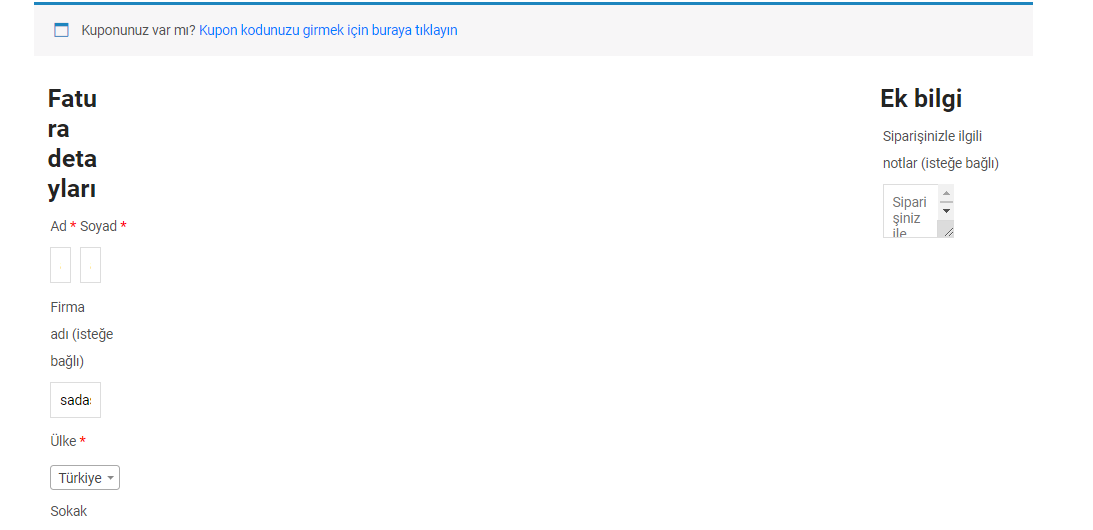
woocommerce ödeme sayfam böyle gözüküyor nasıl düzeltebilirim?
3
●166
- 08-10-2019, 23:31:09Dostum bu eklentiyi kurup dene teman ile uyuşmamış ; Checkout Field Editor (Checkout Manager) for WooCommerce
- 08-10-2019, 23:33:47
 hemen deniyorumgazaloglu adlı üyeden alıntı: mesajı görüntüle
olmadı maalesefgazaloglu adlı üyeden alıntı: mesajı görüntüle - 08-10-2019, 23:58:52Şöyle yap; gizli sekmede açıp ödeme formu sayfasına geç hocam. Sağ tıklayıp incele yap, oradaki css ayarlarını değiştirmeyi dene ve olduğunda kodu tema özelleştirme sayfasının en altında ek css ayarı var oraya ekle. Bende de aynı hata olmuştu sabahlara kadar aşağıdaki kodu yazdım. İstersen onu atayım "Ek css" ayarına ekle öyle dene ilk. Kod:
---------------------------------------------------------------------------------------
.woocommerce #content div.product div.summary, .woocommerce div.product div.summary, .woocommerce-page #content div.product div.summary, .woocommerce-page div.product div.summary {
float: none;
width: 100%;
clear: none;
}
.woocommerce #content div.product div.images, .woocommerce div.product div.images, .woocommerce-page #content div.product div.images, .woocommerce-page div.product div.images {
float: none;
width: 100%;
}
.woocommerce .col2-set, .woocommerce-page .col2-set {
width: 180%;
}
.woocommerce div.product form.cart .group_table td:first-child {
width: 13em;
text-align: left;
}
.woocommerce #respond input#submit.alt, .woocommerce a.button.alt, .woocommerce button.button.alt, .woocommerce input.button.alt {
background-color: #b70e2d;
color: #fff;
-webkit-font-smoothing: antialiased;
}
.woocommerce #respond input#submit, .woocommerce a.button, .woocommerce button.button, .woocommerce input.button {
font-size: 150%;
margin: 0;
line-height: 1;
cursor: pointer;
position: relative;
text-decoration: none;
overflow: visible;
padding: .618em 1em;
font-weight: 700;
border-radius: 3px;
left: auto;
color: #515151;
background-color: #ebe9eb;
border: 0;
display: inline-block;
background-image: none;
box-shadow: none;
text-shadow: none;
}
.single span.entry-date{ display: none; }
.entry:after { width: 0px; }
.entry {
padding-left: 1px;
}
.woocommerce .cart-collaterals, .woocommerce-page .cart-collaterals {
width: 98%;
}
---------------------------------------------------------------------------------------------------------------------------------
Kopyalayıp Ek Css yerine yapıştır bir de öyle dene.
