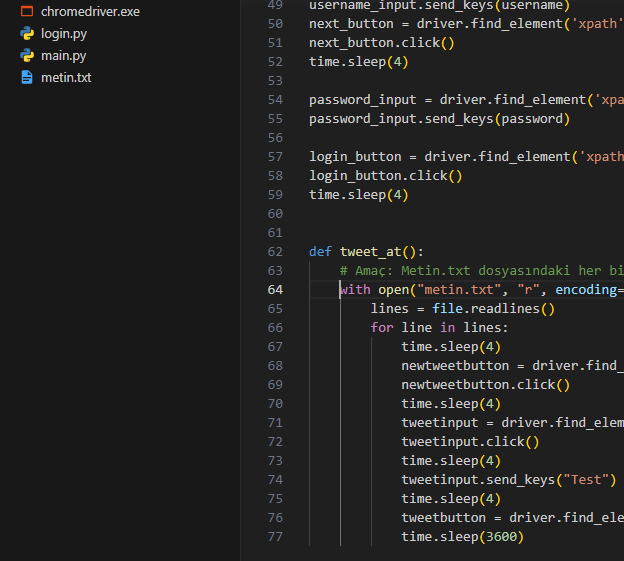
from selenium import webdriver
import time
import requests
from selenium.webdriver.common.keys import Keys
from selenium.webdriver.chrome.service import Service as ChromeService
from webdriver_manager.chrome import ChromeDriverManager
from selenium.webdriver.support.ui import WebDriverWait
username = "user"
password = "pass"
options = webdriver.ChromeOptions()
options.add_argument("--start-maximized")
options.add_argument("--disable-notifications")
options.add_argument("--disable-infobars")
options.add_argument("--disable-extensions")
options.add_argument("--disable-gpu")
options.add_argument("--no-sandbox")
options.add_argument("--disable-dev-shm-usage")
options.add_argument("--headless")
driver_path = "chromedriver.exe" # chromedriver.exe dosyasının bulunduğu dizin
driver = webdriver.Chrome(service=ChromeService(ChromeDriverManager().install()))
#driver = webdriver.Chrome(executable_path=driver_path)
driver.get("https://twitter.com/")
giris_yap = driver.find_element('xpath','//*[@id="react-root"]/div/div/div[2]/main/div/div/div[1]/div[1]/div/div[3]/div[5]/a/div/span/span')
giris_yap.click()
time.sleep(4)
username_input = driver.find_element('xpath','//*[@id="layers"]/div[2]/div/div/div/div/div/div[2]/div[2]/div/div/div[2]/div[2]/div/div/div/div[5]/label/div/div[2]/div/input')
username_input.send_keys(username)
next_button = driver.find_element('xpath','//*[@id="layers"]/div[2]/div/div/div/div/div/div[2]/div[2]/div/div/div[2]/div[2]/div/div/div/div[6]/div')
next_button.click()
time.sleep(4)
password_input = driver.find_element('xpath','//*[@id="layers"]/div[2]/div/div/div/div/div/div[2]/div[2]/div/div/div[2]/div[2]/div[1]/div/div/div[3]/div/label/div/div[2]/div[1]/input')
password_input.send_keys(password)
login_button = driver.find_element('xpath','//*[@id="layers"]/div[2]/div/div/div/div/div/div[2]/div[2]/div/div/div[2]/div[2]/div[2]/div/div[1]/div/div/div/div')
login_button.click()
time.sleep(4)

def tweet_at():
    # Amaç: Metin.txt dosyasındaki her bir cümleyi tweet olarak atmak.
    with open("metin.txt", "r", encoding="utf-8") as file:
        lines = file.readlines()
        for line in lines:
            time.sleep(4)
            newtweetbutton = driver.find_element('xpath','//*[@id="react-root"]/div/div/div[2]/header/div/div/div/div[1]/div[3]/a')
            newtweetbutton.click()
            time.sleep(4)
            tweetinput = driver.find_element('xpath', '//*[@id="react-root"]/div/div/div[2]/main/div/div/div[3]/div/div[2]/div[1]/div/div/div/div[1]/div[2]/div/div/div/div/div/div/div[2]/div/div/div/div/label/div[1]/div/div/div/div/div/div[2]/div/div/div/div')
            tweetinput.click()
            time.sleep(4)
            tweetinput.send_keys("Test")
            time.sleep(4)
            tweetbutton = driver.find_element('xpath', '//*[@id="layers"]/div[2]/div/div/div/div/div/div[2]/div[2]/div/div/div/div[3]/div[2]/div[1]/div/div/div/div[2]/div[2]/div/div/div[2]/div[4]/div/span')
            time.sleep(3600)
giriş yapma aşamasında ana sayfada kalıyor ancak o şamadan sonra [29136:9828:0827/215408.051:ERROR:device_event_log_impl.cc(222)] [21:54:08.050] USB: usb_service_win.cc:415 Could not read device interface GUIDs: Sistem belirtilen dosyay² bulam²yor. (0x2) hatası verip kendini durduruyor. Nasıl çözebilirim.
python hakkında yardım lazım (selenium)
9
●260
- 27-08-2023, 21:59:40
- 27-08-2023, 22:11:59mmaalesef aynı klasör içerisinde metin.txt varunqown adlı üyeden alıntı: mesajı görüntüle

- 27-08-2023, 22:13:05harflerin hepsi küçük mü?Misafir adlı üyeden alıntı: mesajı görüntüle
- 27-08-2023, 22:14:08Hocam kodu denediğimde username olarak otomatik user girince hesapta olağandışı hareket saptadık diyip mail doğrulama istiyor diğer girişlerden farklı olarak sanırım problem o olabilir
Edit: Giriş yapabildiniz mi? Mesajdan yapamadınız anasayfada kaldı gibi anladım benim hatam da olabilir - 27-08-2023, 22:14:25evet hocam login.py test için kullanıyorum. bi amacı yok yani.unqown adlı üyeden alıntı: mesajı görüntüle

- 27-08-2023, 22:14:52AnyDesk verir misiniz bakalım (Pmden)Misafir adlı üyeden alıntı: mesajı görüntüle
- 27-08-2023, 22:15:07bende sadece hesaba yeni giriş diye attı henüz sınırlama vermedi.celikali adlı üyeden alıntı: mesajı görüntüle