• 05-02-2021, 15:37:04
    #1
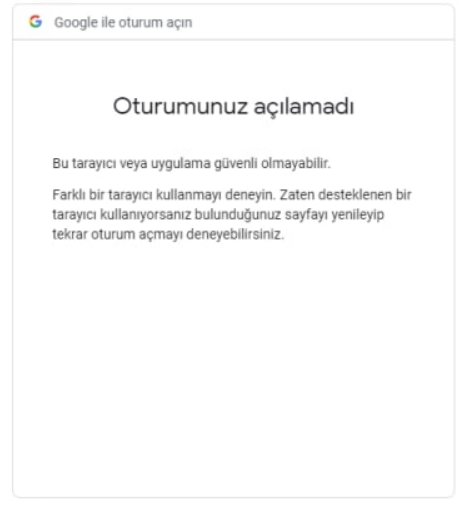
    Merhaba, görsel de görmüş olduğunuz bir hata almaktayım. Sebebi nedir ve nasıl çözebilirim acaba?

  • 05-02-2021, 15:41:01
    #2
    AOK
    Google Haritalar Uzmanı
    Bu problemi bende çözememiştim. tüm browserları denememe rağmen google hizmetlerinde bu uyarını veriyor.
  • 05-02-2021, 19:52:14
    #3
    Prens55 adlı üyeden alıntı: mesajı görüntüle
    Bu problemi bende çözememiştim. tüm browserları denememe rağmen google hizmetlerinde bu uyarını veriyor.
    Ne kadar araştırsam da hiç bir çözüm bulamadım ya, garip bir hata.
  • 06-02-2021, 22:35:07
    #4
    https://myaccount.google.com/lesssecureapps buradan ızın vermenız gerekıyor sanırım
  • 07-02-2021, 13:58:41
    #5
    Hasario adlı üyeden alıntı: mesajı görüntüle
    https://myaccount.google.com/lesssecureapps buradan ızın vermenız gerekıyor sanırım
    Denedim hocam bunu, aynı hatayı vermeye devam ediyor.
  • 11-02-2021, 01:34:27
    #6
    tkinter vb. kütüphane ile bir web işlemi otomatizasyonu mu yapıyorsunuz? chrome'u şuradaki chromedriver'ları açarak mı çalıştırıyorsunuz:
    https://chromedriver.chromium.org/downloads
  • 11-02-2021, 14:26:49
    #7
    Dealxa adlı üyeden alıntı: mesajı görüntüle
    tkinter vb. kütüphane ile bir web işlemi otomatizasyonu mu yapıyorsunuz? chrome'u şuradaki chromedriver'ları açarak mı çalıştırıyorsunuz:
    https://chromedriver.chromium.org/downloads
    Merhaba hocam.
    Tkinter kullanmıyoruz, driverları kullanıyoruz.
  • 11-02-2021, 18:50:20
    #8
    şu çalışıyor mu sizde:

    from selenium import webdriver 
    from selenium.webdriver.common.keys import Keys
    from easygui import passwordbox
    from selenium import webdriver
    from selenium.webdriver.support.wait import WebDriverWait
    from selenium.webdriver.common.by import By
    from selenium.webdriver.support import expected_conditions as EC
    from selenium.webdriver.common.action_chains import ActionChains
    from webdriver_manager.chrome import ChromeDriverManager 
    
      
    print('Enter the gmailid and password') 
    gmailId, passWord = map(str, input().split()) 
    try: 
        driver = webdriver.Chrome(ChromeDriverManager().install()) 
        driver.get(r'https://accounts.google.com/signin/v2/identifier?continue='+\ 
        'https%3A%2F%2Fmail.google.com%2Fmail%2F&service=mail&sacu=1&rip=1'+\ 
        '&flowName=GlifWebSignIn&flowEntry = ServiceLogin') 
        driver.implicitly_wait(15) 
      
        loginBox = driver.find_element_by_xpath('//*[@id ="identifierId"]') 
        loginBox.send_keys(gmailId) 
      
        nextButton = driver.find_elements_by_xpath('//*[@id ="identifierNext"]') 
        nextButton[0].click() 
      
        passWordBox = driver.find_element_by_xpath( 
            '//*[@id ="password"]/div[1]/div / div[1]/input') 
        passWordBox.send_keys(passWord) 
      
        nextButton = driver.find_elements_by_xpath('//*[@id ="passwordNext"]') 
        nextButton[0].click() 
      
        print('Login Başarılı') 
    except: 
        print('Login Başarısız')
    eğer pc'de admin değilseniz:

    şu satırı:

        driver = webdriver.Chrome(ChromeDriverManager().install())
    alttaki ile değiştirin:

    driver = webdriver.Chrome(chrome_options=chromeOptions, desired_capabilities=chromeOptions.to_capabilities())
  • 11-02-2021, 19:16:10
    #9
    Dealxa adlı üyeden alıntı: mesajı görüntüle
    şu çalışıyor mu sizde:

    from selenium import webdriver
    from selenium.webdriver.common.keys import Keys
    from easygui import passwordbox
    from selenium import webdriver
    from selenium.webdriver.support.wait import WebDriverWait
    from selenium.webdriver.common.by import By
    from selenium.webdriver.support import expected_conditions as EC
    from selenium.webdriver.common.action_chains import ActionChains
    from webdriver_manager.chrome import ChromeDriverManager
    
      
    print('Enter the gmailid and password')
    gmailId, passWord = map(str, input().split())
    try:
        driver = webdriver.Chrome(ChromeDriverManager().install())
        driver.get(r'https://accounts.google.com/signin/v2/identifier?continue='+\
        'https%3A%2F%2Fmail.google.com%2Fmail%2F&service=mail&sacu=1&rip=1'+\
        '&flowName=GlifWebSignIn&flowEntry = ServiceLogin')
        driver.implicitly_wait(15)
      
        loginBox = driver.find_element_by_xpath('//*[@id ="identifierId"]')
        loginBox.send_keys(gmailId)
      
        nextButton = driver.find_elements_by_xpath('//*[@id ="identifierNext"]')
        nextButton[0].click()
      
        passWordBox = driver.find_element_by_xpath(
            '//*[@id ="password"]/div[1]/div / div[1]/input')
        passWordBox.send_keys(passWord)
      
        nextButton = driver.find_elements_by_xpath('//*[@id ="passwordNext"]')
        nextButton[0].click()
      
        print('Login Başarılı')
    except:
        print('Login Başarısız')
    eğer pc'de admin değilseniz:

    şu satırı:

        driver = webdriver.Chrome(ChromeDriverManager().install())
    alttaki ile değiştirin:

    driver = webdriver.Chrome(chrome_options=chromeOptions, desired_capabilities=chromeOptions.to_capabilities())
    Merhaba. Görsel de ki gibi başarısız hatası veriyor.

    https://prnt.sc/z41i0i