• 19-05-2022, 23:08:10
    #1
    Kimlik doğrulama veya yönetimden onay bekliyor.
    herkese merhaba,
    bu işlerden çok anlamamakla beraber meraklıyımdır
    ufak bir HTML site yaptım ve bize ulaşın formu ekledim ancak PHP Mailer tüm dosyalarını eklememe rağmen contact-form.php içini ne yaptıysam çalıştıramıyorum
    contact-form.php dosyasının içeriği aşağıdaki gibidir
    ben sadece xxxxxxxxxxxxxxx yazan yerlere bilgilerimi giriyorum
    hata;
    Hata! Mesajınız gönderilemei.Could not instantiate mail function.

    <?php
    /*
    Name:             Contact Form
    Written by:     Okler Themes - (http://www.okler.net)
    Version:         4.9.2
    */
    
    session_cache_limiter('nocache');
    header('Expires: ' . gmdate('r', 0));
    
    header('Content-type: application/json');
    
    require_once('php-mailer/PHPMailerAutoload.php');
    
    // Step 1 - Enter your email address below.
    $email = 'you@domain.com';
    
    // If the e-mail is not working, change the debug option to 2 | $debug = 2;
    $debug = 0;
    
    $subject = $_POST['subject'];
    
    $fields = array(
        0 => array(
            'text' => 'Name',
            'val' => $_POST['name']
        ),
        1 => array(
            'text' => 'Email address',
            'val' => $_POST['email']
        ),
        2 => array(
            'text' => 'Message',
            'val' => $_POST['message']
        )
    );
    
    $message = '';
    
    foreach($fields as $field) {
        $message .= $field['text'].": " . htmlspecialchars($field['val'], ENT_QUOTES) . "<br>\n";
    }
    
    $mail = new PHPMailer(true);
    
    try {
    
        $mail->SMTPDebug = $debug;                                 // Debug Mode
    
        // Step 2 (Optional) - If you don't receive the email, try to configure the parameters below:
    
        //$mail->IsSMTP();                                         // Set mailer to use SMTP
        //$mail->Host = 'xxxxxxxxxxxx';                       // Specify main and backup server
        //$mail->SMTPAuth = true;                                  // Enable SMTP authentication
        //$mail->Username = 'xxxxxxxxx';                    // SMTP username
        //$mail->Password = 'xxxxxx';                              // SMTP password
        //$mail->SMTPSecure = 'tls';                               // Enable encryption, 'ssl' also accepted
        //$mail->Port = 587;                                          // TCP port to connect to
    
        $mail->AddAddress($email);                                    // Add another recipient
    
        //$mail->AddAddress('xxxxxxxxxx', 'noreply');     // Add a secondary recipient
        //$mail->AddCC('person3@domain.com', 'Person 3');          // Add a "Cc" address.
        //$mail->AddBCC('person4@domain.com', 'Person 4');         // Add a "Bcc" address.
    
        $mail->SetFrom($email, $_POST['name']);
        $mail->AddReplyTo($_POST['email'], $_POST['name']);
    
        $mail->IsHTML(true);                                  // Set email format to HTML
    
        $mail->CharSet = 'UTF-8';
    
        $mail->Subject = $subject;
        $mail->Body    = $message;
    
        $mail->Send();
        $arrResult = array ('response'=>'success');
    
    } catch (phpmailerException $e) {
        $arrResult = array ('response'=>'error','errorMessage'=>$e->errorMessage());
    } catch (Exception $e) {
        $arrResult = array ('response'=>'error','errorMessage'=>$e->getMessage());
    }
    
    if ($debug == 0) {
        echo json_encode($arrResult);
    }
  • 19-05-2022, 23:12:04
    #2
    Çoğu firmada phpmail kapalı oluyor onu bir servera sor istersen
  • 19-05-2022, 23:48:08
    #3
    Sunucuda mail(); kapalı
    Gmail üzerinden deneyin.
    • LordMayros
    LordMayros bunu beğendi.
    1 kişi bunu beğendi.
  • 20-05-2022, 00:08:28
    #4
    use PHPMailerPHPMailerPHPMailer;
    use PHPMailerPHPMailerException;


    require 'PHPMailer/src/Exception.php';
    require 'PHPMailer/src/PHPMailer.php';
    require 'PHPMailer/src/SMTP.php';

    benim kullanımım bu şekilde. Belki işine yarar
  • 20-05-2022, 00:58:59
    #5
    @LordMayros; mail fonksiyonu hosting firmalarında kapalıdır, bu sebepten dolayı smtp ile mail göndermeniz gerekiyor. Ayrıca xxx yazdığınız kısımlar ise kodda comment durumunda yani pasif, başlarındaki // ı silerek aktif edebilirsiniz.

    örnek:
    <?php
    /*
    Name:             Contact Form
    Written by:     Okler Themes - (http://www.okler.net)
    Version:         4.9.2
    */
     
    session_cache_limiter('nocache');
    header('Expires: ' . gmdate('r', 0));
     
    header('Content-type: application/json');
     
    require_once('php-mailer/PHPMailerAutoload.php');
     
    // Step 1 - Enter your email address below.
    $email = 'you@domain.com';
     
    // If the e-mail is not working, change the debug option to 2 | $debug = 2;
    $debug = 0;
     
    $subject = $_POST['subject'];
     
    $fields = array(
        0 => array(
            'text' => 'Name',
            'val' => $_POST['name']
        ),
        1 => array(
            'text' => 'Email address',
            'val' => $_POST['email']
        ),
        2 => array(
            'text' => 'Message',
            'val' => $_POST['message']
        )
    );
     
    $message = '';
     
    foreach($fields as $field) {
        $message .= $field['text'].": " . htmlspecialchars($field['val'], ENT_QUOTES) . "<br>\n";
    }
     
    $mail = new PHPMailer(true);
     
    try {
     
        $mail->SMTPDebug = $debug;                                 // Debug Mode
     
        // Step 2 (Optional) - If you don't receive the email, try to configure the parameters below:
     
        $mail->IsSMTP();                                         // Set mailer to use SMTP
        $mail->Host = 'xxxxxxxxxxxx';                       // Specify main and backup server
        $mail->SMTPAuth = true;                                  // Enable SMTP authentication
        $mail->Username = 'xxxxxxxxx';                    // SMTP username
        $mail->Password = 'xxxxxx';                              // SMTP password
        $mail->SMTPSecure = 'tls';                               // Enable encryption, 'ssl' also accepted
        $mail->Port = 587;                                          // TCP port to connect to
     
        $mail->AddAddress($email);                                    // Add another recipient
     
        $mail->AddAddress('xxxxxxxxxx', 'noreply');     // Add a secondary recipient
        //$mail->AddCC('person3@domain.com', 'Person 3');          // Add a "Cc" address.
        //$mail->AddBCC('person4@domain.com', 'Person 4');         // Add a "Bcc" address.
     
        $mail->SetFrom($email, $_POST['name']);
        $mail->AddReplyTo($_POST['email'], $_POST['name']);
     
        $mail->IsHTML(true);                                  // Set email format to HTML
     
        $mail->CharSet = 'UTF-8';
     
        $mail->Subject = $subject;
        $mail->Body    = $message;
     
        $mail->Send();
        $arrResult = array ('response'=>'success');
     
    } catch (phpmailerException $e) {
        $arrResult = array ('response'=>'error','errorMessage'=>$e->errorMessage());
    } catch (Exception $e) {
        $arrResult = array ('response'=>'error','errorMessage'=>$e->getMessage());
    }
     
    if ($debug == 0) {
        echo json_encode($arrResult);
    }
  • 20-05-2022, 19:14:33
    #6
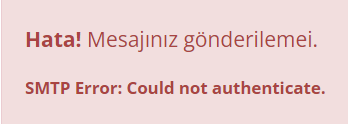
    @yasarkemaldag; ilginize çok teşekkür ederim aşağıdaki düzenleme yaptığımda şuan sadece
    aşağıdaki hatayı alıyorum SMTP de oturum açamıyorum ama gmail üzerinden imap bağlantıyı etkinleştirdim
    sizce şuan problem nedir acaba ?


    <?php
    /*
    Name:             Contact Form
    Written by:     Okler Themes - (http://www.okler.net)
    Version:         4.9.2
    */
      
    session_cache_limiter('nocache');
    header('Expires: ' . gmdate('r', 0));
      
    header('Content-type: application/json');
      
    require_once('php-mailer/PHPMailerAutoload.php');
      
    // Step 1 - Enter your email address below.
    $email = 'xxxxxxxxxxxx@gmail.com';
      
     // If the e-mail is not working, change the debug option to 2 | $debug = 2;
    $debug = 0;
      
    $subject = $_POST['subject'];
      
    $fields = array(
        0 => array(
            'text' => 'Name',
            'val' => $_POST['name']
        ),
        1 => array(
            'text' => 'Email address',
            'val' => $_POST['email']
        ),
        2 => array(
            'text' => 'Message',
            'val' => $_POST['message']
        )
    );
      
    $message = '';
      
    foreach($fields as $field) {
        $message .= $field['text'].": " . htmlspecialchars($field['val'], ENT_QUOTES) . "<br>\n";
    }
      
    $mail = new PHPMailer(true);
      
    try {
      
        $mail->SMTPDebug = $debug;                                 // Debug Mode
      
        // Step 2 (Optional) - If you don't receive the email, try to configure the parameters below:
      
        $mail->IsSMTP();                                         // Set mailer to use SMTP
        $mail->Host = 'smtp.gmail.com';                        // Specify main and backup server
        $mail->SMTPAuth = true;                                  // Enable SMTP authentication
        $mail->Username = 'xxxxxxxxx@gmail.com';                    // SMTP username
        $mail->Password = 'xxxxxxx';                              // SMTP password
        $mail->SMTPSecure = 'tls';                               // Enable encryption, 'ssl' also accepted
        $mail->Port = 587;                                          // TCP port to connect to
      
        $mail->AddAddress($email);                                    // Add another recipient
      
        $mail->AddAddress('info@xxxxxx', 'noreply');     // Add a secondary recipient
        //$mail->AddCC('person3@domain.com', 'Person 3');          // Add a "Cc" address.
        //$mail->AddBCC('person4@domain.com', 'Person 4');         // Add a "Bcc" address.
      
        $mail->SetFrom($email, $_POST['name']);
        $mail->AddReplyTo($_POST['email'], $_POST['name']);
      
        $mail->IsHTML(true);                                  // Set email format to HTML
      
        $mail->CharSet = 'UTF-8';
      
        $mail->Subject = $subject;
        $mail->Body    = $message;
      
        $mail->Send();
        $arrResult = array ('response'=>'success');
      
    } catch (phpmailerException $e) {
        $arrResult = array ('response'=>'error','errorMessage'=>$e->errorMessage());
    } catch (Exception $e) {
        $arrResult = array ('response'=>'error','errorMessage'=>$e->getMessage());
    }
      
    if ($debug == 0) {
        echo json_encode($arrResult);
    }
  • 21-05-2022, 01:29:22
    #7
    LordMayros adlı üyeden alıntı: mesajı görüntüle
    @yasarkemaldag; ilginize çok teşekkür ederim aşağıdaki düzenleme yaptığımda şuan sadece
    aşağıdaki hatayı alıyorum SMTP de oturum açamıyorum ama gmail üzerinden imap bağlantıyı etkinleştirdim
    sizce şuan problem nedir acaba ?


    <?php
    /*
    Name:             Contact Form
    Written by:     Okler Themes - (http://www.okler.net)
    Version:         4.9.2
    */
      
    session_cache_limiter('nocache');
    header('Expires: ' . gmdate('r', 0));
      
    header('Content-type: application/json');
      
    require_once('php-mailer/PHPMailerAutoload.php');
      
    // Step 1 - Enter your email address below.
    $email = 'xxxxxxxxxxxx@gmail.com';
      
     // If the e-mail is not working, change the debug option to 2 | $debug = 2;
    $debug = 0;
      
    $subject = $_POST['subject'];
      
    $fields = array(
        0 => array(
            'text' => 'Name',
            'val' => $_POST['name']
        ),
        1 => array(
            'text' => 'Email address',
            'val' => $_POST['email']
        ),
        2 => array(
            'text' => 'Message',
            'val' => $_POST['message']
        )
    );
      
    $message = '';
      
    foreach($fields as $field) {
        $message .= $field['text'].": " . htmlspecialchars($field['val'], ENT_QUOTES) . "<br>\n";
    }
      
    $mail = new PHPMailer(true);
      
    try {
      
        $mail->SMTPDebug = $debug;                                 // Debug Mode
      
        // Step 2 (Optional) - If you don't receive the email, try to configure the parameters below:
      
        $mail->IsSMTP();                                         // Set mailer to use SMTP
        $mail->Host = 'smtp.gmail.com';                        // Specify main and backup server
        $mail->SMTPAuth = true;                                  // Enable SMTP authentication
        $mail->Username = 'xxxxxxxxx@gmail.com';                    // SMTP username
        $mail->Password = 'xxxxxxx';                              // SMTP password
        $mail->SMTPSecure = 'tls';                               // Enable encryption, 'ssl' also accepted
        $mail->Port = 587;                                          // TCP port to connect to
      
        $mail->AddAddress($email);                                    // Add another recipient
      
        $mail->AddAddress('info@xxxxxx', 'noreply');     // Add a secondary recipient
        //$mail->AddCC('person3@domain.com', 'Person 3');          // Add a "Cc" address.
        //$mail->AddBCC('person4@domain.com', 'Person 4');         // Add a "Bcc" address.
      
        $mail->SetFrom($email, $_POST['name']);
        $mail->AddReplyTo($_POST['email'], $_POST['name']);
      
        $mail->IsHTML(true);                                  // Set email format to HTML
      
        $mail->CharSet = 'UTF-8';
      
        $mail->Subject = $subject;
        $mail->Body    = $message;
      
        $mail->Send();
        $arrResult = array ('response'=>'success');
      
    } catch (phpmailerException $e) {
        $arrResult = array ('response'=>'error','errorMessage'=>$e->errorMessage());
    } catch (Exception $e) {
        $arrResult = array ('response'=>'error','errorMessage'=>$e->getMessage());
    }
      
    if ($debug == 0) {
        echo json_encode($arrResult);
    }

    gmail için SMTPSecure ssl ve port 465 olmalı aşağıdaki şekilde deneyebilirsiniz. eğer aşağıdaki kodla yine olmazsa daha detaylı bilgi için $debug değişkeninizin değerini 1 veya 2 yaparak deneyin ekrana daha ayrıntılı döküm düşecektir. örn: $debug = 2;

    <?php
    /*
    Name:             Contact Form
    Written by:     Okler Themes - (http://www.okler.net)
    Version:         4.9.2
    */
      
    session_cache_limiter('nocache');
    header('Expires: ' . gmdate('r', 0));
      
    header('Content-type: application/json');
      
    require_once('php-mailer/PHPMailerAutoload.php');
      
    // Step 1 - Enter your email address below.
    $email = 'xxxxxxxxxxxx@gmail.com';
      
     // If the e-mail is not working, change the debug option to 2 | $debug = 2;
    $debug = 0;
      
    $subject = $_POST['subject'];
      
    $fields = array(
        0 => array(
            'text' => 'Name',
            'val' => $_POST['name']
        ),
        1 => array(
            'text' => 'Email address',
            'val' => $_POST['email']
        ),
        2 => array(
            'text' => 'Message',
            'val' => $_POST['message']
        )
    );
      
    $message = '';
      
    foreach($fields as $field) {
        $message .= $field['text'].": " . htmlspecialchars($field['val'], ENT_QUOTES) . "<br>\n";
    }
      
    $mail = new PHPMailer(true);
      
    try {
      
        $mail->SMTPDebug = $debug;                                 // Debug Mode
      
        // Step 2 (Optional) - If you don't receive the email, try to configure the parameters below:
      
        $mail->IsSMTP();                                         // Set mailer to use SMTP
        $mail->Host = 'smtp.gmail.com';                        // Specify main and backup server
        $mail->SMTPAuth = true;                                  // Enable SMTP authentication
        $mail->Username = 'xxxxxxxxx@gmail.com';                    // SMTP username
        $mail->Password = 'xxxxxxx';                              // SMTP password
        $mail->SMTPSecure = 'ssl';                               // Enable encryption, 'ssl' also accepted
        $mail->Port = 465;                                          // TCP port to connect to
      
        $mail->AddAddress($email);                                    // Add another recipient
      
        $mail->AddAddress('info@xxxxxx', 'noreply');     // Add a secondary recipient
        //$mail->AddCC('person3@domain.com', 'Person 3');          // Add a "Cc" address.
        //$mail->AddBCC('person4@domain.com', 'Person 4');         // Add a "Bcc" address.
      
        $mail->SetFrom($email, $_POST['name']);
        $mail->AddReplyTo($_POST['email'], $_POST['name']);
      
        $mail->IsHTML(true);                                  // Set email format to HTML
      
        $mail->CharSet = 'UTF-8';
      
        $mail->Subject = $subject;
        $mail->Body    = $message;
      
        $mail->Send();
        $arrResult = array ('response'=>'success');
      
    } catch (phpmailerException $e) {
        $arrResult = array ('response'=>'error','errorMessage'=>$e->errorMessage());
    } catch (Exception $e) {
        $arrResult = array ('response'=>'error','errorMessage'=>$e->getMessage());
    }
      
    if ($debug == 0) {
        echo json_encode($arrResult);
    }
  • 21-05-2022, 22:00:56
    #8
    valla PHPMailler ne denediysem çalıştıramadım, https://formspree.io/ ile 10sn de çözüldü
    tavsiye ederim
    yardım eden herkese teşekkürler