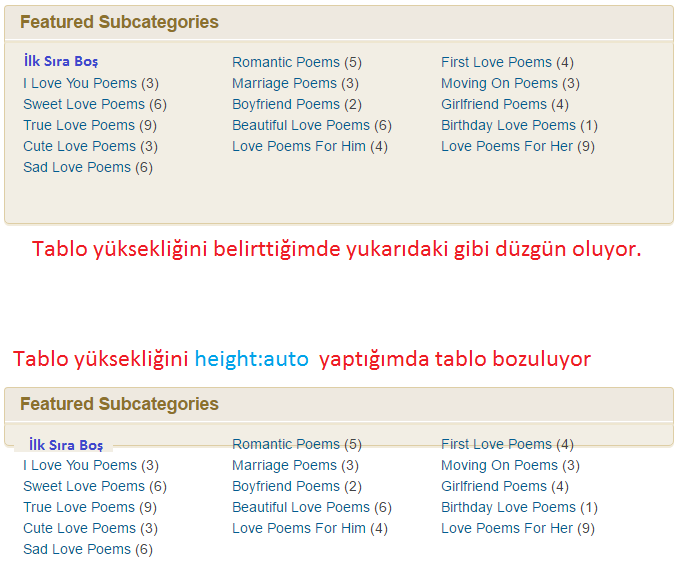
Aşağıdaki kodlarla alt kategorileri listeletiyorum. Ancak listenin ilk sırası boş oluyor. Bu nasıl düzeltilebilir. Aşağıdaki görselde gösterdim boşluğu.
<div class="subcategory"><div class="box topbrown poems-subcategory"><div class="header">
<div class="title">Featured Subcategories</div>
</div>
<div class="contentsub">
<ul class="poems-subcategorylist">
<?php
    if (is_category()) {
    $this_category = get_category($cat);
    }
    ?>
    <?php
    if($this_category->category_parent)
    $this_category = wp_list_categories('orderby=id&show_count=0
    &title_li=&use_desc_for_title=1&child_of='.$this_category->category_parent.
    "&echo=0"); else
    $this_category = wp_list_categories('orderby=id&depth=1&show_count=0
    &title_li=&use_desc_for_title=1&child_of='.$this_category->cat_ID.
    "&echo=0");
    if ($this_category) { ?>

<li><?php echo $this_category; ?></li></ul>
<?php } ?>
</div>
</div> </div>
.subcategory{width:670px;margin:0 auto}
.poems-subcategorylist li{float:left;margin:0 0 0 2px;padding:0 0 2px 2px;width:205px}
.box.topbrown .contentsub{background:#f2eee4;border-color:#decea5;box-shadow:0 2px 0 #f1ebdc;height:160px}.box.topbrown .contentsub a{color:#005d92;font-weight:normal}
.box .contentsub{background:#e5f3f5;border:1px solid #88c9d6;border-radius:5px;box-shadow:0 2px 0 #d8edf2;padding:12px 14px 10px;zoom:1}Birde tablo yüksekliğini otomatik yapınca görüntü bozuluyor. Aşağıda anlattım. Bunu düzeltmek için de yardımcı olabilirseniz sevinirim.