Normal Hostingede Laravel FW?
16
●4.776
- 20-10-2014, 01:34:37
 Merhaba, Laravel FW. Kullanmayı Düşünüyorum. Yeni Başlıyacağım İçin Biraz Araştırdım. İlk Başta Getcomposer Kurulum Yapmak Gerekiyormuş. Peki Localde Sistemi Bitirdikten Sonra Paylaşımlı Bir Hosta Taşıdığımız Zaman Sorun Oluşuyor Mu veya Firmanın Sunucuya Eklenti vs. Kurmuş Olması Gerekiyor Mu ?
 - 20-10-2014, 18:05:19 Üyeliği durduruldulocalhost'a kurulum yaptığında büyük ihtimal composer (https://getcomposer.org/installer) bir dizine dosyalarını indirecek. yine composer aracılığı ile laravel kurulumu yapmasını isteyeceksin, laravel dosyalarınıda kendi dizinine indirip, kendi yapısıyla erişilebilir hale getirecek. laravel framework, composer aracı uygulama. sadece laravel kullanmak için aracı bana gereksiz geldi.Meftun adlı üyeden alıntı: mesajı görüntüle
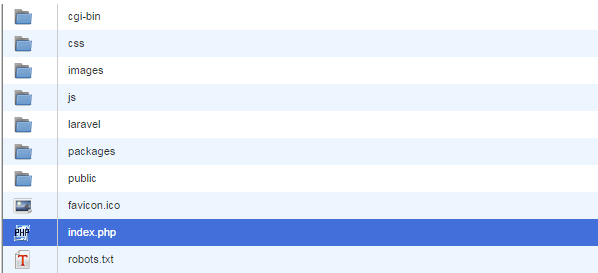
localhost da php dizinlerini kontrol edin, dosyaları ya sizin site dizinine (public_html vs) yüklüyordur ya da include path dizinine, PEAR kütüphane dizinide denebilir. ordan o dosyaları alıp direk hostunuza atın. %99 çalışacaktır. - 20-10-2014, 21:00:03 Kimlik doğrulama veya yönetimden onay bekliyor.Local'de kurun composer ile sonra public icinde index.php ve .htaccess mevcut ve laravel adli klasör olusturun icine tüm dosyalari atiniz (index.php, .htaccess) haric.Meftun adlı üyeden alıntı: mesajı görüntüle
Ve Index.php'yi su sekilde yapin
<?php
/**
 * Laravel - A PHP Framework For Web Artisans
 *
 * @package  Laravel
 * @author   Taylor Otwell <taylorotwell@gmail.com>
 */

/*
|--------------------------------------------------------------------------
| Register The Auto Loader
|--------------------------------------------------------------------------
|
| Composer provides a convenient, automatically generated class loader
| for our application. We just need to utilize it! We'll require it
| into the script here so that we do not have to worry about the
| loading of any our classes "manually". Feels great to relax.
|
*/

require __DIR__.'/laravel/bootstrap/autoload.php';

/*
|--------------------------------------------------------------------------
| Turn On The Lights
|--------------------------------------------------------------------------
|
| We need to illuminate PHP development, so let's turn on the lights.
| This bootstraps the framework and gets it ready for use, then it
| will load up this application so that we can run it and send
| the responses back to the browser and delight these users.
|
*/

$app = require_once __DIR__.'/laravel/bootstrap/start.php';

/*
|--------------------------------------------------------------------------
| Run The Application
|--------------------------------------------------------------------------
|
| Once we have the application, we can simply call the run method,
| which will execute the request and send the response back to
| the client's browser allowing them to enjoy the creative
| and wonderful application we have whipped up for them.
|
*/

$app->run();
ve artik basari bir sekilde kurulumu halletiniz benim bulmus oldugum en kolay yöntem budur hemde direk vhost vs ugrasmadan. - 25-10-2014, 21:59:54 3 Gündür Localde Çalışıyordum. Bu Gün Hosta Taşıdım Siteyikingofseo adlı üyeden alıntı: mesajı görüntüle
Dosyaları Şu Şekile Upload EttimAlıntı