• 27-11-2022, 08:10:35
    #1
    merhabalar;
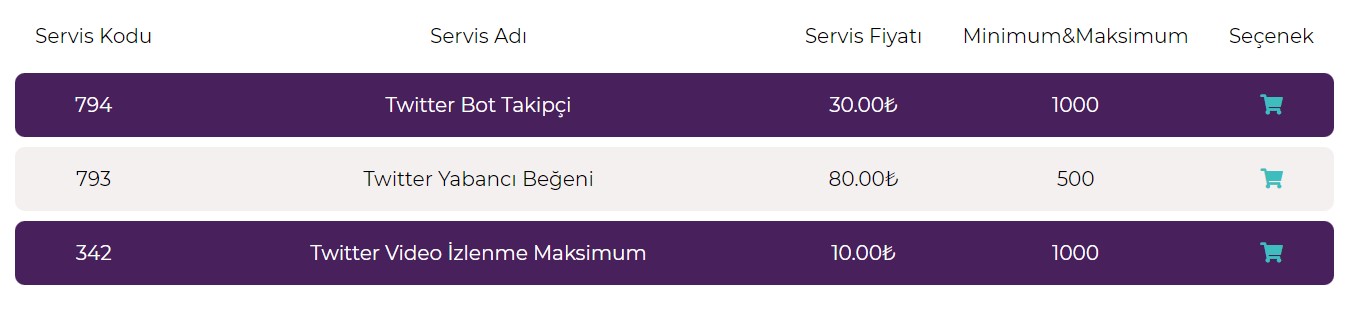
    resimde belirttiğim gibi bir listeyi sadece html ile yazılabilir mi yazılıyor ise yardımcı olabilecek olan var mıdır ?
  • 27-11-2022, 08:34:01
    #2
    @muhammed649; Tâbi yazılabilinir. İster table ile yazarsın. İster flexbox ile yazarsın. Ama CSS bilgisinin olması şart. Mesaj atın isterseniz yapalım
  • 27-11-2022, 08:54:28
    #3
    mustafasatirogl adlı üyeden alıntı: mesajı görüntüle
    @muhammed649; Tâbi yazılabilinir. İster table ile yazarsın. İster flexbox ile yazarsın. Ama CSS bilgisinin olması şart. Mesaj atın isterseniz yapalım
    pm atıldı
  • 27-11-2022, 09:56:49
    #4
    <table>
    <tr>
    <th>Company</th>
    <th>Contact</th>
    <th>Country</th>
    </tr>
    <tr>
    <td>Alfreds Futterkiste</td>
    <td>Maria Anders</td>
    <td>Germany</td>
    </tr>
    <tr>
    <td>Centro comercial Moctezuma</td>
    <td>Francisco Chang</td>
    <td>Mexico</td>
    </tr>
    </table>
  • 27-11-2022, 09:58:38
    #5
    firat131 adlı üyeden alıntı: mesajı görüntüle
    <table>
    <tr>
    <th>Company</th>
    <th>Contact</th>
    <th>Country</th>
    </tr>
    <tr>
    <td>Alfreds Futterkiste</td>
    <td>Maria Anders</td>
    <td>Germany</td>
    </tr>
    <tr>
    <td>Centro comercial Moctezuma</td>
    <td>Francisco Chang</td>
    <td>Mexico</td>
    </tr>
    </table>
    teşekkürler hocam ama istediğim bu değil buraya kadar yapıyorum . css i de bu kodun içine yazmak istiyorum tek bir dosya olarak öyle bir şey yapılabilir mi
  • 27-11-2022, 10:08:35
    #6
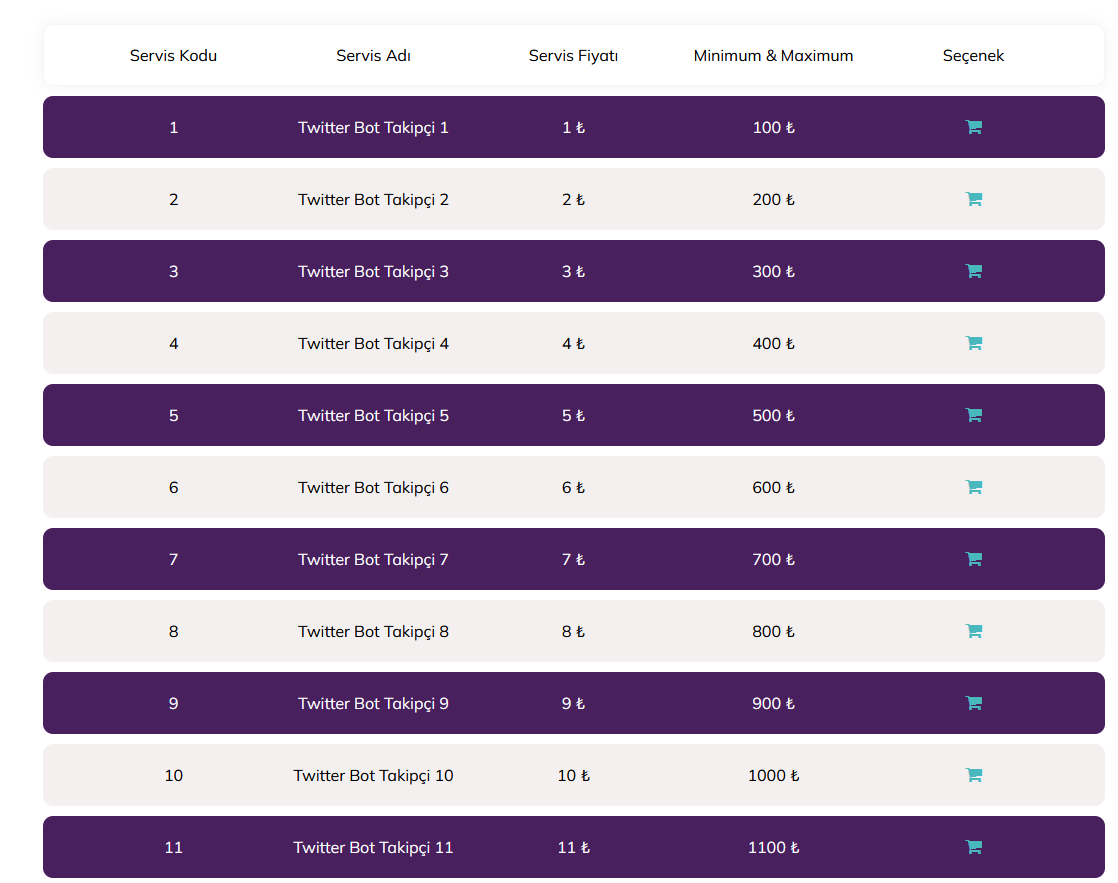
    Edit: ilgili css kodunu divin başına style etiketi ile ekleyebilirsiniz:
    Tek dosya hali:

    <style>
    @import url('https://cdnjs.cloudflare.com/ajax/libs/font-awesome/4.7.0/css/font-awesome.min.css');
    @import url('https://fonts.googleapis.com/css2?family=Mulish:wght@300;400;500;600&display=swap');
    
    * {
    padding: 0;
    margin: 0;
    list-style: none;
    border: 0;
    text-decoration: none;
    box-sizing: border-box;
    -webkit-overflow-scrolling: touch;
    font-family: 'Mulish', sans-serif;
    transition:200ms all;
    }
    
    .container {
    display:flex;
    justify-content:center;
    align-items:center;
    }
    
    ul {
    list-style: none;
    margin: 30px;
    padding: 0;
    }
    
    li {
    border-radius: 10px;
    padding: 5px;
    display: flex;
    justify-content: space-between;
    height:62px;
    align-items: center;
    padding-left: 30px;
    padding-right: 30px;
    background-color:#F4F0EF;
    margin-top:10px;
    margin-bottom:10px;
    min-width: 700px;
    cursor:pointer;
    border:solid 1px transparent;
    }
    
    li span {
    display: flex;
    min-width: 200px;
    justify-content: center;
    align-items: center;
    }
    
    li i {
    font-size: 18px !important;
    color:#49B8BE;
    }
    
    li:nth-child(even) {
    background-color: #48205E;
    color:#fff;
    }
    li:hover {
    background-color:#D7D7D7;
    border: solid 1px #ddd;
    box-shadow: 0px 0px 15px 0px rgba(0, 0, 0, 0.05);
    
    }
    li:hover:nth-child(even) {
    background-color: #48205E;
    opacity:0.8;
    border: solid 1px #ddd;
    box-shadow: 0px 0px 15px 0px rgba(0, 0, 0, 0.05);
    }
    
    ul li:first-child {
    background-color: transparent;
    border: solid 1px #f5f5f5;
    box-shadow: 0px 0px 15px 0px rgba(0, 0, 0, 0.05);
    }
    </style>
    
    <div class="container">
    <ul>
    <li>
    <span>
    Servis Kodu
    </span>
    <span>
    Servis Adı
    </span>
    <span>
    Servis Fiyatı
    </span>
    <span>
    Minimum & Maximum
    </span>
    <span>
    Seçenek
    </span>
    </li>
    <?php for ( $i = 1; $i <= 30; $i++ ) { ?>
    <li>
    <span>
    <?=$i?>
    </span>
    <span>
    Twitter Bot Takipçi <?=$i?>
    </span>
    <span>
    <?=$i?> ₺
    </span>
    <span>
    <?=$i?>00 ₺
    </span>
    <span>
    <i class="fa fa-shopping-cart"></i>
    </span>
    </li>
    <? } ?>
    
    </ul>
    </div>


    https://codepen.io/trwpcom/pen/RwJJjPj
  • 27-11-2022, 10:12:54
    #7
    Scorpion2763 adlı üyeden alıntı: mesajı görüntüle
    Edit: ilgili css kodunu divin başına style etiketi ile ekleyebilirsiniz:
    Tek dosya hali:

    <style>
    @import url('https://cdnjs.cloudflare.com/ajax/libs/font-awesome/4.7.0/css/font-awesome.min.css');
    @import url('https://fonts.googleapis.com/css2?family=Mulish:wght@300;400;500;600&display=swap');
    
    * {
    padding: 0;
    margin: 0;
    list-style: none;
    border: 0;
    text-decoration: none;
    box-sizing: border-box;
    -webkit-overflow-scrolling: touch;
    font-family: 'Mulish', sans-serif;
    transition:200ms all;
    }
    
    .container {
    display:flex;
    justify-content:center;
    align-items:center;
    }
    
    ul {
    list-style: none;
    margin: 30px;
    padding: 0;
    }
    
    li {
    border-radius: 10px;
    padding: 5px;
    display: flex;
    justify-content: space-between;
    height:62px;
    align-items: center;
    padding-left: 30px;
    padding-right: 30px;
    background-color:#F4F0EF;
    margin-top:10px;
    margin-bottom:10px;
    min-width: 700px;
    cursor:pointer;
    border:solid 1px transparent;
    }
    
    li span {
    display: flex;
    min-width: 200px;
    justify-content: center;
    align-items: center;
    }
    
    li i {
    font-size: 18px !important;
    color:#49B8BE;
    }
    
    li:nth-child(even) {
    background-color: #48205E;
    color:#fff;
    }
    li:hover {
    background-color:#D7D7D7;
    border: solid 1px #ddd;
    box-shadow: 0px 0px 15px 0px rgba(0, 0, 0, 0.05);
    
    }
    li:hover:nth-child(even) {
    background-color: #48205E;
    opacity:0.8;
    border: solid 1px #ddd;
    box-shadow: 0px 0px 15px 0px rgba(0, 0, 0, 0.05);
    }
    
    ul li:first-child {
    background-color: transparent;
    border: solid 1px #f5f5f5;
    box-shadow: 0px 0px 15px 0px rgba(0, 0, 0, 0.05);
    }
    </style>
    
    <div class="container">
    <ul>
    <li>
    <span>
    Servis Kodu
    </span>
    <span>
    Servis Adı
    </span>
    <span>
    Servis Fiyatı
    </span>
    <span>
    Minimum & Maximum
    </span>
    <span>
    Seçenek
    </span>
    </li>
    <?php for ( $i = 1; $i <= 30; $i++ ) { ?>
    <li>
    <span>
    <?=$i?>
    </span>
    <span>
    Twitter Bot Takipçi <?=$i?>
    </span>
    <span>
    <?=$i?> ₺
    </span>
    <span>
    <?=$i?>00 ₺
    </span>
    <span>
    <i class="fa fa-shopping-cart"></i>
    </span>
    </li>
    <? } ?>
    
    </ul>
    </div>

    https://codepen.io/trwpcom/pen/RwJJjPj
    Teşekkürler hocam
  • 29-11-2022, 18:22:22
    #8
    Scorpion2763 adlı üyeden alıntı: mesajı görüntüle
    Edit: ilgili css kodunu divin başına style etiketi ile ekleyebilirsiniz:
    Tek dosya hali:

    <style>
    @import url('https://cdnjs.cloudflare.com/ajax/libs/font-awesome/4.7.0/css/font-awesome.min.css');
    @import url('https://fonts.googleapis.com/css2?family=Mulish:wght@300;400;500;600&display=swap');
    
    * {
    padding: 0;
    margin: 0;
    list-style: none;
    border: 0;
    text-decoration: none;
    box-sizing: border-box;
    -webkit-overflow-scrolling: touch;
    font-family: 'Mulish', sans-serif;
    transition:200ms all;
    }
    
    .container {
    display:flex;
    justify-content:center;
    align-items:center;
    }
    
    ul {
    list-style: none;
    margin: 30px;
    padding: 0;
    }
    
    li {
    border-radius: 10px;
    padding: 5px;
    display: flex;
    justify-content: space-between;
    height:62px;
    align-items: center;
    padding-left: 30px;
    padding-right: 30px;
    background-color:#F4F0EF;
    margin-top:10px;
    margin-bottom:10px;
    min-width: 700px;
    cursor:pointer;
    border:solid 1px transparent;
    }
    
    li span {
    display: flex;
    min-width: 200px;
    justify-content: center;
    align-items: center;
    }
    
    li i {
    font-size: 18px !important;
    color:#49B8BE;
    }
    
    li:nth-child(even) {
    background-color: #48205E;
    color:#fff;
    }
    li:hover {
    background-color:#D7D7D7;
    border: solid 1px #ddd;
    box-shadow: 0px 0px 15px 0px rgba(0, 0, 0, 0.05);
    
    }
    li:hover:nth-child(even) {
    background-color: #48205E;
    opacity:0.8;
    border: solid 1px #ddd;
    box-shadow: 0px 0px 15px 0px rgba(0, 0, 0, 0.05);
    }
    
    ul li:first-child {
    background-color: transparent;
    border: solid 1px #f5f5f5;
    box-shadow: 0px 0px 15px 0px rgba(0, 0, 0, 0.05);
    }
    </style>
    
    <div class="container">
    <ul>
    <li>
    <span>
    Servis Kodu
    </span>
    <span>
    Servis Adı
    </span>
    <span>
    Servis Fiyatı
    </span>
    <span>
    Minimum & Maximum
    </span>
    <span>
    Seçenek
    </span>
    </li>
    <?php for ( $i = 1; $i <= 30; $i++ ) { ?>
    <li>
    <span>
    <?=$i?>
    </span>
    <span>
    Twitter Bot Takipçi <?=$i?>
    </span>
    <span>
    <?=$i?> ₺
    </span>
    <span>
    <?=$i?>00 ₺
    </span>
    <span>
    <i class="fa fa-shopping-cart"></i>
    </span>
    </li>
    <? } ?>
    
    </ul>
    </div>

    https://codepen.io/trwpcom/pen/RwJJjPj
    Selamünaleyküm hocam tekrardan yazıyorum bu kodu nasıl dinamik bir şekilde yazarız
  • 29-11-2022, 19:22:45
    #9
    muhammed649 adlı üyeden alıntı: mesajı görüntüle
    Selamünaleyküm hocam tekrardan yazıyorum bu kodu nasıl dinamik bir şekilde yazarız
    Merhaba, sorunuzun ucu çok açık olmakla beraber, zaten css ve html tarafını sizin için hazırladım.
    Bu kodlarla istediğiniz yapıyı elde edemeyecek kadar temel düzeydeyseniz bu işi ücretli olarak yaptırmanızı öneririm.
    Zira bunu dinamik bir yapıya geçirmek oldukça zaman alacak bir iş.
    *Bizim bu işi ücretli olarak dahi yapacak müsaitliğimiz bulunmamakta.