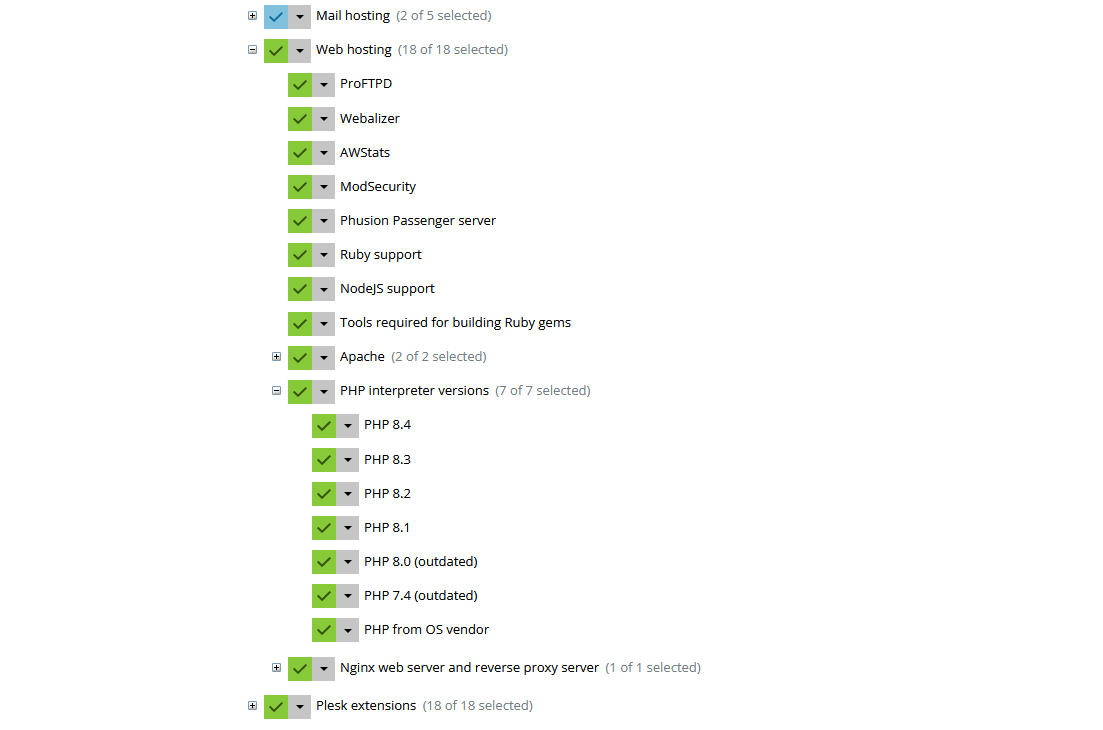
Merhaba yeni servere geçtiğim için pleskte kurulumu sıfırdan yaptım ve şu anda aktif Plesk Obsidian Version 18.0.72 sahibim ama 2 yıl önceki versiyonda PHP 7.0 mevcuttu. Mevcut olan duruma şimdi geri dönmeye çalışsamda yapamıyorum ubuntu 20.04 LTS kurulum bu konuda yardımcı olabilecek arkadaş var mı?
Kurulum sıfırdan itemiyorum var olan sisteme 7.0-7.1-7.2-7.3 eklenmesi gerekli
Acil Plesk Yardım
9
●234
- 04-09-2025, 21:26:14Repolar artık bu paketleri barındırmıyor, ya internetten bulmak ya varolan bir kurulumdan dışarı çıkartmak gerek.Subpower adlı üyeden alıntı: mesajı görüntüle
Not: Her sürüm, kaynağından derlenip Plesk'e handler eklenebilir ama daha teknik bir işlem ve uyumluluk sorunu yaşanması ihtimali var yeni paketlerden dolayı. - 04-09-2025, 21:38:16İşlem öncesi yedek alarak deneyebilirsiniz. Ancak bu işlemi bir bilene yaptırmanızı öneririm.
Php 5.6 dahil hepsi kurulabilir; https://support.plesk.com/hc/en-us/a...-Ubuntu-Debian - 04-09-2025, 21:49:27CliaWeb adlı üyeden alıntı: mesajı görüntüle
root@thirsty-wing:~# apt-get install software-properties-common
Reading package lists... Done
Building dependency tree... Done
Reading state information... Done
software-properties-common is already the newest version (0.99.49.3).
0 upgraded, 0 newly installed, 0 to remove and 34 not upgraded.
N: Ignoring file 'imunify360-testing.list.example' in directory '/etc/apt/sources.list.d/' as it has an invalid filename extension
root@thirsty-wing:~#
root@thirsty-wing:~# add-apt-repository ppa:ondrej/php
add-apt-repository ppa:ondrej/php

PPA publishes dbgsym, you may need to include 'main/debug' component
Repository: 'Types: deb
URIs: https://ppa.launchpadcontent.net/ondrej/php/ubuntu/
Suites: noble
Components: main
'
Description:
Co-installable PHP versions: PHP 5.6, PHP 7.x, PHP 8.x and most requested extensions are included. Packages are provided for *Current* Ubuntu *LTS* releases (https://wiki.ubuntu.com/Releases).  Expanded Security Maintenance releases ARE NOT supported.

Debian stable, oldstable and Debian LTS packages are provided from a separate repository: https://deb.sury.org/#debian-dpa

You can get more information about the packages at https://deb.sury.org

BUGS&FEATURES: This PPA has a issue tracker:
https://deb.sury.org/#bug-reporting

Issues reported in a private email don't scale and most likely will be ignored.  I simply don't have capacity to answer questions privately.

CAVEATS:
1. If you are using apache2, you are advised to add ppa:ondrej/apache2
2. If you are using nginx, you are advised to add ppa:ondrej/nginx

DONATION: If you like my work and you want to show appreciation, please consider donating regularly: https://donate.sury.org/

COMMERCIAL SUPPORT: Support for PHP packages for older Debian and Ubuntu release can be bought from https://www.freexian.com/lts/php/
More info: https://launchpad.net/~ondrej/+archive/ubuntu/php
Adding repository.
Press [ENTER] to continue or Ctrl-c to cancel.Found existing deb entry in /etc/apt/sources.list.d/ondrej-ubuntu-php-noble.sources
Hit:1 http://autoinstall.plesk.com/WATCHDOG_3.1.0 noble InRelease
Hit:2 http://autoinstall.plesk.com/pool/PSA_18.0.72_17523 noble InRelease
Hit:3 http://autoinstall.plesk.com/PHP74_17 noble InRelease
Hit:4 http://autoinstall.plesk.com/PHP80_17 noble InRelease
Hit:5 http://autoinstall.plesk.com/PHP81_17 noble InRelease
Hit:6 https://autoinstall.plesk.com/RUBY_1.5.0 noble InRelease
Hit:7 http://archive.ubuntu.com/ubuntu noble InRelease
Hit:8 http://security.ubuntu.com/ubuntu noble-security InRelease
Hit:9 http://autoinstall.plesk.com/PHP82_17 noble InRelease
Hit:10 https://repo.imunify360.cloudlinux.com/imunify360/ubuntu/24.04 noble InRelease
Hit:11 http://autoinstall.plesk.com/PHP83_17 noble InRelease
Hit:12 http://autoinstall.plesk.com/PHP84_17 noble InRelease
Hit:13 https://repo.alt.tuxcare.com/alt-common/deb/ubuntu/24.04/stable noble InRelease
Hit:14 https://download.imunify360.com/ubuntu/24.04/slot-1 noble InRelease
Hit:15 http://archive.ubuntu.com/ubuntu noble-updates InRelease
Hit:16 https://download.imunify360.com/ubuntu/24.04/slot-2 noble InRelease
Hit:17 http://archive.ubuntu.com/ubuntu noble-backports InRelease
Hit:18 https://download.imunify360.com/ubuntu/24.04/slot-3 noble InRelease
Hit:19 https://download.imunify360.com/ubuntu/24.04/slot-4 noble InRelease
Hit:20 https://download.imunify360.com/ubuntu/24.04/slot-5 noble InRelease
Hit:21 https://download.imunify360.com/ubuntu/24.04/slot-6 noble InRelease
Hit:22 https://download.imunify360.com/ubuntu/24.04/slot-7 noble InRelease
Hit:23 https://download.imunify360.com/ubuntu/24.04/slot-8 noble InRelease
Hit:24 https://ppa.launchpadcontent.net/ondrej/php/ubuntu noble InRelease
Reading package lists... Done
N: Ignoring file 'imunify360-testing.list.example' in directory '/etc/apt/sources.list.d/' as it has an invalid filename extension
root@thirsty-wing:~#
root@thirsty-wing:~# apt -y install php7.2
Reading package lists... Done
Building dependency tree... Done
Reading state information... Done
php7.2 is already the newest version (7.2.34-54+ubuntu24.04.1+deb.sury.org+1).
0 upgraded, 0 newly installed, 0 to remove and 34 not upgraded.
N: Ignoring file 'imunify360-testing.list.example' in directory '/etc/apt/sources.list.d/' as it has an invalid filename extension
root@thirsty-wing:~#
- 04-09-2025, 21:52:03gneral adlı üyeden alıntı: mesajı görüntüle
Hit:22 https://download.imunify360.com/ubuntu/24.04/slot-4 noble InRelease
Hit:23 https://download.imunify360.com/ubuntu/24.04/slot-5 noble InRelease
Hit:24 https://download.imunify360.com/ubuntu/24.04/slot-6 noble InRelease
Hit:25 https://download.imunify360.com/ubuntu/24.04/slot-7 noble InRelease
Hit:26 https://download.imunify360.com/ubuntu/24.04/slot-8 noble InRelease
Get:27 http://autoinstall.plesk.com/pool/WPB_18.0.69_87 all/all all Packages [3478 B]
Fetched 36.8 kB in 8s (4635 B/s)
Reading package lists...
Detecting installed product components.

ERROR: The following component(s) were not found in the product 'plesk': php7.2. Use the 'list' command to check the names of available components.

exit status 1
- 04-09-2025, 21:58:57sorumluluk almadan nette bulduğum çözümü söylüyorum, @CliaWeb; de belirtmiş zaten. şunları deneyebilirsin:
- php7.2 modüllerini kur (bazıları eksik olabilir):
apt install -y php7.2-bcmath php7.2-bz2 php7.2-cli php7.2-common php7.2-curl php7.2-dev php7.2-fpm php7.2-gd php7.2-gmp php7.2-imagick php7.2-imap php7.2-intl php7.2-json php7.2-mbstring php7.2-mysql php7.2-opcache php7.2-soap php7.2-xml php7.2-xmlrpc php7.2-zip
eğer ssh2 modülü hata verirse (genelde verir):
apt install -y php-ssh2
- plesk'e php7.2'yi tanıt (en kritik adım bu):
plesk bin php_handler --add -displayname "PHP 7.2 FPM" -path /usr/sbin/php-fpm7.2 -phpini /etc/php/7.2/fpm/php.ini -type fpm -id php72-fpm-custom -clipath /usr/bin/php7.2 -service php7.2-fpm -poold /etc/php/7.2/fpm/pool.d
- servisi başlat:
systemctl start php7.2-fpm
systemctl enable php7.2-fpm
- kontrol et:
plesk bin php_handler --list
listede "PHP 7.2 FPM" görmüş olman lazım.
bundan sonra plesk panelinden domain'e girip php ayarlarından php7.2'yi seçebilirsin. - 04-09-2025, 22:03:50Hatalı repository dosyalarını farklı bir yere taşıyın / yedekleyin. /etc/apt/sources.list.d/ altında olmasın. Hatalı olanı söylemiş zaten.Subpower adlı üyeden alıntı: mesajı görüntüle
- 04-09-2025, 22:19:38gneral adlı üyeden alıntı: mesajı görüntüle

root@thirsty-wing:~# systemctl start php7.2-fpm
root@thirsty-wing:~# systemctl enable php7.2-fpm
Synchronizing state of php7.2-fpm.service with SysV service script with /usr/lib/systemd/systemd-sysv-install.
Executing: /usr/lib/systemd/systemd-sysv-install enable php7.2-fpm
root@thirsty-wing:~# plesk bin php_handler --list
                        id:       display name:  full version:  version:    type:                         cgi-bin:                    php-cli:                        php.ini:  custom:  status:
           php72-fpm-custom         PHP 7.2 FPM         7.2.34       7.2      fpm             /usr/sbin/php-fpm7.2             /usr/bin/php7.2        /etc/php/7.2/fpm/php.ini     true  enabled
                        cgi  8.3.6 by OS vendor         8.4.12       8.4      cgi                 /usr/bin/php-cgi                /usr/bin/php        /etc/php/8.3/cgi/php.ini    false disabled
        plesk-php80-fastcgi              8.0.30         8.0.30       8.0  fastcgi   /opt/plesk/php/8.0/bin/php-cgi  /opt/plesk/php/8.0/bin/php  /opt/plesk/php/8.0/etc/php.ini     true  enabled
            plesk-php83-fpm              8.3.25         8.3.25       8.3      fpm  /opt/plesk/php/8.3/sbin/php-fpm  /opt/plesk/php/8.3/bin/php  /opt/plesk/php/8.3/etc/php.ini     true  enabled
  plesk-php83-fpm-dedicated              8.3.25         8.3.25       8.3      fpm  /opt/plesk/php/8.3/sbin/php-fpm  /opt/plesk/php/8.3/bin/php  /opt/plesk/php/8.3/etc/php.ini     true  enabled
            plesk-php84-fpm              8.4.12         8.4.12       8.4      fpm  /opt/plesk/php/8.4/sbin/php-fpm  /opt/plesk/php/8.4/bin/php  /opt/plesk/php/8.4/etc/php.ini     true  enabled
  plesk-php84-fpm-dedicated              8.4.12         8.4.12       8.4      fpm  /opt/plesk/php/8.4/sbin/php-fpm  /opt/plesk/php/8.4/bin/php  /opt/plesk/php/8.4/etc/php.ini     true  enabled
                    fastcgi  8.3.6 by OS vendor         8.4.12       8.4  fastcgi                 /usr/bin/php-cgi                /usr/bin/php        /etc/php/8.3/cgi/php.ini    false  enabled
            plesk-php81-cgi              8.1.33         8.1.33       8.1      cgi   /opt/plesk/php/8.1/bin/php-cgi  /opt/plesk/php/8.1/bin/php  /opt/plesk/php/8.1/etc/php.ini     true disabled
        plesk-php83-fastcgi              8.3.25         8.3.25       8.3  fastcgi   /opt/plesk/php/8.3/bin/php-cgi  /opt/plesk/php/8.3/bin/php  /opt/plesk/php/8.3/etc/php.ini     true  enabled
            plesk-php84-cgi              8.4.12         8.4.12       8.4      cgi   /opt/plesk/php/8.4/bin/php-cgi  /opt/plesk/php/8.4/bin/php  /opt/plesk/php/8.4/etc/php.ini     true disabled
        plesk-php74-fastcgi              7.4.33         7.4.33       7.4  fastcgi   /opt/plesk/php/7.4/bin/php-cgi  /opt/plesk/php/7.4/bin/php  /opt/plesk/php/7.4/etc/php.ini     true  enabled
                        fpm  8.3.6 by OS vendor         8.3.25       8.3      fpm             /usr/sbin/php-fpm8.3                /usr/bin/php        /etc/php/8.3/fpm/php.ini    false  enabled
              fpm-dedicated  8.3.6 by OS vendor         8.3.25       8.3      fpm             /usr/sbin/php-fpm8.3                /usr/bin/php        /etc/php/8.3/fpm/php.ini    false  enabled
        plesk-php81-fastcgi              8.1.33         8.1.33       8.1  fastcgi   /opt/plesk/php/8.1/bin/php-cgi  /opt/plesk/php/8.1/bin/php  /opt/plesk/php/8.1/etc/php.ini     true  enabled
            plesk-php81-fpm              8.1.33         8.1.33       8.1      fpm  /opt/plesk/php/8.1/sbin/php-fpm  /opt/plesk/php/8.1/bin/php  /opt/plesk/php/8.1/etc/php.ini     true  enabled
  plesk-php81-fpm-dedicated              8.1.33         8.1.33       8.1      fpm  /opt/plesk/php/8.1/sbin/php-fpm  /opt/plesk/php/8.1/bin/php  /opt/plesk/php/8.1/etc/php.ini     true  enabled
                     module  8.3.6 by OS vendor         8.4.12       8.4   module                 /usr/bin/php-cgi                /usr/bin/php    /etc/php/8.3/apache2/php.ini    false disabled
            plesk-php82-cgi              8.2.29         8.2.29       8.2      cgi   /opt/plesk/php/8.2/bin/php-cgi  /opt/plesk/php/8.2/bin/php  /opt/plesk/php/8.2/etc/php.ini     true disabled
            plesk-php83-cgi              8.3.25         8.3.25       8.3      cgi   /opt/plesk/php/8.3/bin/php-cgi  /opt/plesk/php/8.3/bin/php  /opt/plesk/php/8.3/etc/php.ini     true disabled
            plesk-php80-fpm              8.0.30         8.0.30       8.0      fpm  /opt/plesk/php/8.0/sbin/php-fpm  /opt/plesk/php/8.0/bin/php  /opt/plesk/php/8.0/etc/php.ini     true  enabled
  plesk-php80-fpm-dedicated              8.0.30         8.0.30       8.0      fpm  /opt/plesk/php/8.0/sbin/php-fpm  /opt/plesk/php/8.0/bin/php  /opt/plesk/php/8.0/etc/php.ini     true  enabled
            plesk-php80-cgi              8.0.30         8.0.30       8.0      cgi   /opt/plesk/php/8.0/bin/php-cgi  /opt/plesk/php/8.0/bin/php  /opt/plesk/php/8.0/etc/php.ini     true disabled
        plesk-php82-fastcgi              8.2.29         8.2.29       8.2  fastcgi   /opt/plesk/php/8.2/bin/php-cgi  /opt/plesk/php/8.2/bin/php  /opt/plesk/php/8.2/etc/php.ini     true  enabled
        plesk-php84-fastcgi              8.4.12         8.4.12       8.4  fastcgi   /opt/plesk/php/8.4/bin/php-cgi  /opt/plesk/php/8.4/bin/php  /opt/plesk/php/8.4/etc/php.ini     true  enabled
            plesk-php82-fpm              8.2.29         8.2.29       8.2      fpm  /opt/plesk/php/8.2/sbin/php-fpm  /opt/plesk/php/8.2/bin/php  /opt/plesk/php/8.2/etc/php.ini     true  enabled
  plesk-php82-fpm-dedicated              8.2.29         8.2.29       8.2      fpm  /opt/plesk/php/8.2/sbin/php-fpm  /opt/plesk/php/8.2/bin/php  /opt/plesk/php/8.2/etc/php.ini     true  enabled
            plesk-php74-fpm              7.4.33         7.4.33       7.4      fpm  /opt/plesk/php/7.4/sbin/php-fpm  /opt/plesk/php/7.4/bin/php  /opt/plesk/php/7.4/etc/php.ini     true  enabled
  plesk-php74-fpm-dedicated              7.4.33         7.4.33       7.4      fpm  /opt/plesk/php/7.4/sbin/php-fpm  /opt/plesk/php/7.4/bin/php  /opt/plesk/php/7.4/etc/php.ini     true  enabled
            plesk-php74-cgi              7.4.33         7.4.33       7.4      cgi   /opt/plesk/php/7.4/bin/php-cgi  /opt/plesk/php/7.4/bin/php  /opt/plesk/php/7.4/etc/php.ini     true disabled
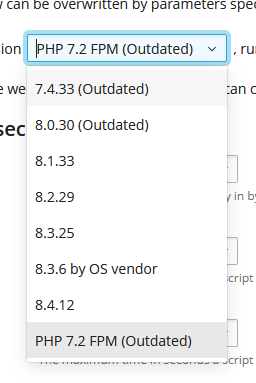
hocam listede görünse de malesef pleskte gelmiyor.
Ücretine mukabil destek verecek ve sorunumu çözecek arkadaşımız varsa çok memnun olacağım. :/
Saygılar
GNERAL HOCAM BU ŞEKİLDE ÇIKTI SADECE BU DA İŞİMİ GÖRÜR. TEŞEKKÜRLER!