
Eğer bir deneme (trial) lisansı kullanıyorsanız ve sürekli olarak "Şu kadar gün kaldı" uyarısı alıyorsanız, bu uyarıyı nasıl kaldırabileceğinizi aşağıda açıklıyorum.
1. PHP Dosyası Oluşturun:
- Root dizininde PleskTrialFix.php adında PHP dosyası oluşturun ve aşağıdaki kodları ekleyin:
<?php
if (is_file('/usr/local/psa/bin/license')) {
    $system = 'Linux';
    $licenseDir = '/etc/sw/keys';
    $licenseFile = '/usr/local/psa/bin/license';
    $licenseXMLPath = '/usr/local/psa/bin/license.xml';
    $pleskHtmlPath = '/usr/local/psa/admin/application/default/layouts/layout.phtml';
    $pleskCSSPath = '/usr/local/psa/admin/cp/public/theme/css/main.css';
    $pleskCmd = '/usr/sbin/plesk';
    $execEnd = ' 2>&1';
    $hostsFile = '/etc/hosts';
} elseif (is_file('C:\Program Files (x86)\Parallels\Plesk\bin\license.exe')) {
    $system = 'Windows';
    $licenseDir = 'C:\\Program Files (x86)\\Parallels\\Plesk\\admin\\repository';
    $licenseFile = 'C:\\Program Files (x86)\\Parallels\\Plesk\\bin\\license.exe';
    $licenseXMLPath = 'C:\\Program Files (x86)\\Parallels\\Plesk\\bin\\license.xml';
    $pleskHtmlPath = 'C:\\Program Files (x86)\\Parallels\\Plesk\\admin\\application\\default\\layouts\\layout.phtml';
    $pleskCSSPath = 'C:\\Program Files (x86)\\Parallels\\Plesk\\admin\\cp\\public\\theme\\css\\main.css';
    $pleskCmd = 'C:\\Program Files (x86)\\Parallels\\Plesk\\bin\\plesk.exe';
    $execEnd = '';
    $hostsFile = 'C:\Windows\System32\drivers\etc\hosts';
} elseif (is_file('C:\Program Files (x86)\Plesk\bin\license.exe')) {
    $system = 'Windows';
    $licenseDir = 'C:\\Program Files (x86)\\Plesk\\admin\\repository';
    $licenseFile = 'C:\\Program Files (x86)\\Plesk\\bin\\license.exe';
    $licenseXMLPath = 'C:\\Program Files (x86)\\Plesk\\bin\\license.xml';
    $pleskHtmlPath = 'C:\\Program Files (x86)\\Plesk\\admin\\application\\default\\layouts\\layout.phtml';
    $pleskCSSPath = 'C:\\Program Files (x86)\\Plesk\\admin\\cp\\public\\theme\\css\\main.css';
    $pleskCmd = 'C:\\Program Files (x86)\\Plesk\\bin\\plesk.exe';
    $execEnd = '';
    $hostsFile = 'C:\Windows\System32\drivers\etc\hosts';
} elseif (is_file('D:\Program Files (x86)\Plesk\bin\license.exe')) {
    $system = 'Windows';
    $licenseDir = 'D:\\Program Files (x86)\\Plesk\\admin\\repository';
    $licenseFile = 'D:\\Program Files (x86)\\Plesk\\bin\\license.exe';
    $licenseXMLPath = 'D:\\Program Files (x86)\\Plesk\\bin\\license.xml';
    $pleskHtmlPath = 'D:\\Program Files (x86)\\Plesk\\admin\\application\\default\\layouts\\layout.phtml';
    $pleskCSSPath = 'D:\\Program Files (x86)\\Plesk\\admin\\cp\\public\\theme\\css\\main.css';
    $pleskCmd = 'D:\\Program Files (x86)\\Plesk\\bin\\plesk.exe';
    $execEnd = '';
    $hostsFile = 'D:\Windows\System32\drivers\etc\hosts';
} else {
    echo " \33[91mPlesk Not Found!\33[0m\n";
    exit;
}
if (is_file($licenseDir . DIRECTORY_SEPARATOR . 'registry.xml') && filesize($licenseDir . DIRECTORY_SEPARATOR . 'registry.xml') < 2) {
    if (is_file('/usr/bin/chattr')) {
        shell_exec('/usr/bin/chattr -ia ' . $licenseDir . DIRECTORY_SEPARATOR . 'registry.xml');
    }
    unlink($licenseDir . DIRECTORY_SEPARATOR . 'registry.xml');
}
if (is_file($licenseFile)) {
    if (is_file($pleskHtmlPath)) {
        $source = file_get_contents($pleskHtmlPath);
        if (!strstr($source, '.license-status { display: none; }')) {
            $source.= '
<script>
window.onload = function() {
    window.setInterval(function() {
        try {
            document.head.appendChild(document.createElement("style")).textContent = ".license-status { display: none; }";
            const licenseElement = document.querySelector(".license-status");
            if (licenseElement) {
                licenseElement.remove();
            }
            const warningMsg = document.querySelector(\'div.msg-box.msg-warning[data-rendered-by-react="true"]\');
            if (warningMsg) {
                const licenseLink = warningMsg.querySelector(\'a[href="/cp/license/"][onclick=";lon();"]\');
                if (licenseLink) {
                    warningMsg.parentNode.removeChild(warningMsg);
                }
            }
        } catch (error) {}
    }, 1000);
};
</script>';
            $source = file_put_contents($pleskHtmlPath, $source);
        }
    }
    if (is_file($pleskCSSPath)) {
        $source = file_get_contents($pleskCSSPath);
        if (!strstr($source, '.license-status { display: none; }')) {
            $source.= "\n.license-status { display: none; }";
            $source = file_put_contents($pleskCSSPath, $source);
        }
    }
}
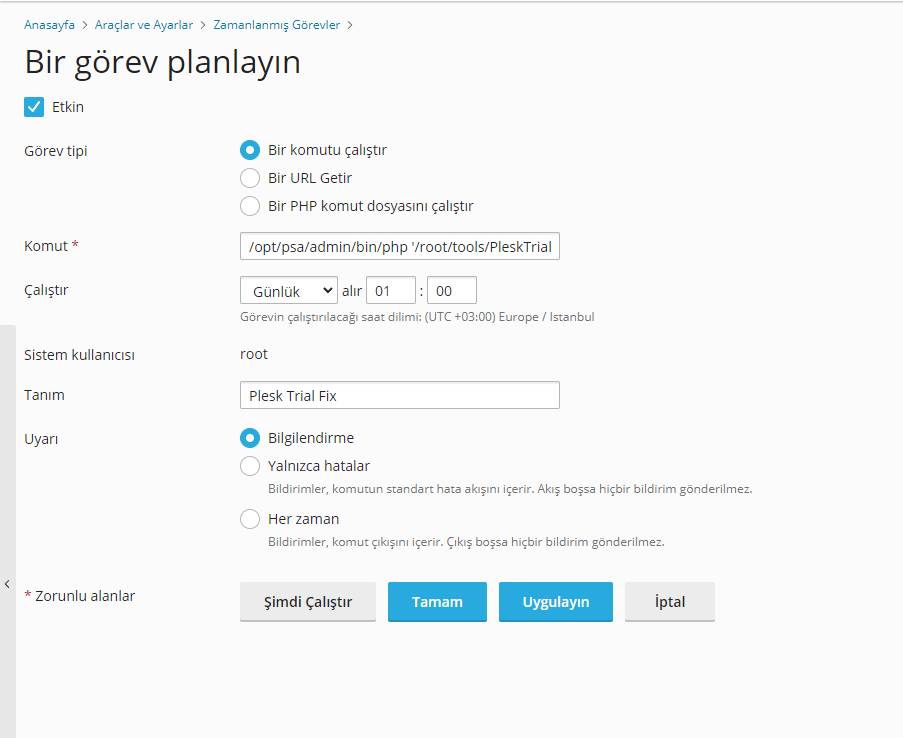
2. Cron Görevi Oluşturun:- Plesk üzerinde günlük çalışan bir cron görevi oluşturun:
- Kod: /opt/psa/admin/bin/php '/root/PleskTrialFix.php'
-
3. Cron'u Çalıştırın:
Artık bu yazıyı görmeyeceksiniz. Eğer Plesk güncellenirse, uyarı geri gelebilir fakat cron sayesinde bu uyarı geri gidecektir.
