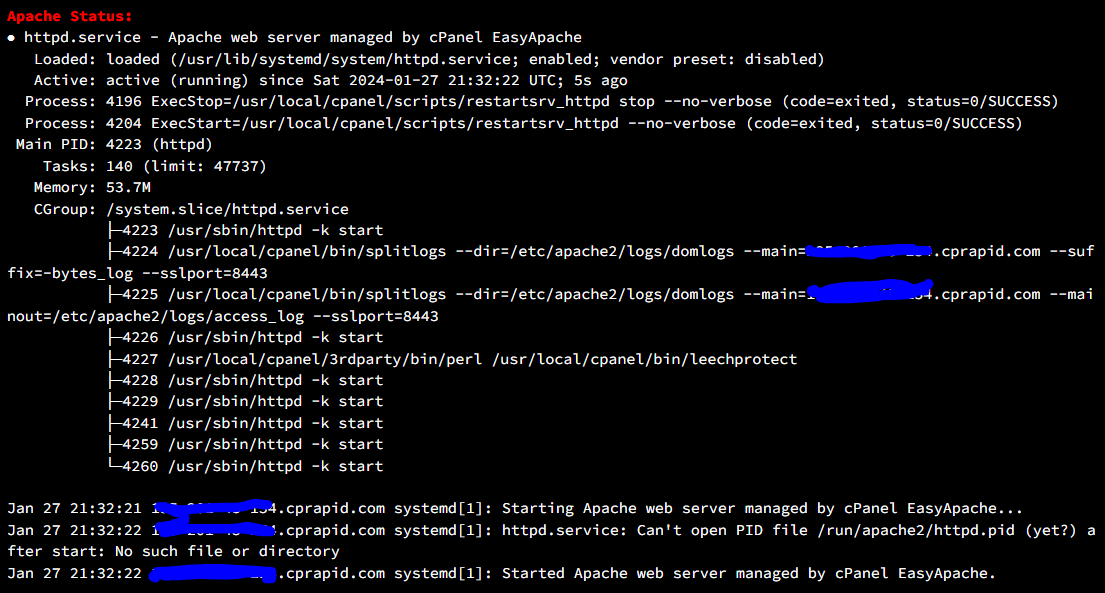
selamlar log dosyalarını temizledikten sonra apache yi bir daha restart atamadım.
Aşaağıdaki uyarıyı alıyorum.
Ssh ile apache'yi nasıl update edebilirim veya sorun nasıl düzeltilebilir ?
Jan 27 21:14:10 .cprapid.com systemd[1]: Starting Apache web server managed by cPanel EasyApache...
Jan 27 21:14:10 prapid.com systemd[1]: httpd.service: Can't open PID file /run/apache2/httpd.pid (yet?) after start: No such file or directory
Jan 27 21:14:10 cprapid.com systemd[1]: Started Apache web server managed by cPanel EasyApache.
Edit.
Sorunu hallettim.
Apache pid alıyor fakat ngnix başlamıyordu onunda error logları silinmiş.
cd /var/log/nginx/
sudo touch error.log
sudo touch access.log
sudo chmod 750 *.log
sudo systemctl daemon-relod
sudo service nginx restart
yukardaki kodlar ile çözüme kavuşturabilirsiniz
@Elazığlı168;
Whm apache restart almıyor sorun nedir?
12
●254
- 28-01-2024, 00:23:09Hatayı Öğrenmek İçin
journalctl -xe | grep httpd
Bu komutu girebilirsiniz
Hata mesajında belirtildiği gibi, /run/apache2/httpd.pid dosyasının olup olmadığını kontrol edin.
touch /run/apache2/httpd.pid
Bu komutla dosyayı el ile oluşturabilirsiniz dosya yok ise eğer veya klasör dosya yolu şeklinde de oluşturabilirsiniz
En son olarak servisi baştan baslatabilirsiniz
service httpd start
systemctl start httpd
sistem logları ve Apache hata loglarıni detaylı inceleyip tekrar kontrol yapabilirsiniz sorun çözülmez ise eğer bu komutlar işinizi görecektir iyi forumlar
- 28-01-2024, 00:24:09-- Subject: Unit httpd.service has begun start-upTheMept adlı üyeden alıntı: mesajı görüntüle
-- Unit httpd.service has begun starting up.
Jan 27 21:21:28 .cprapid.com systemd[1]: httpd.service: Can't open PID file /run/apache2/httpd.pid (yet?) after start: No such file or directory
-- Subject: Unit httpd.service has finished start-up
-- Unit httpd.service has finished starting up. - 28-01-2024, 00:26:41Hocam servislerde sorun yok dosyayı bulamıyor dosyayı oluşturmanız lazim
Slash adlı üyeden alıntı: mesajı görüntüle - 28-01-2024, 00:27:40touch /run/apache2/httpd.pid
Bu komut ile bash komut satırına girip deneyin
Yada el ile oluşturun
Slash adlı üyeden alıntı: mesajı görüntüle - 28-01-2024, 00:27:47Dosyayı nasıl oluşturabilirim ?TheMept adlı üyeden alıntı: mesajı görüntüle
Bir kaç kod denedim ama yemedi - 28-01-2024, 00:30:38echo -n > /run/apache2/httpd.pid
Veya
printf "" > /run/apache2/httpd.pid
Slash adlı üyeden alıntı: mesajı görüntüle - 28-01-2024, 00:31:49Merhaba,
httpd.pid i de silmişsiniz sanırım. Apache in log dosyasının silinmesi ile soruna yol açabilirken bu şekilde silinme risklidir. Teknik olarak EA4 den apache i derlemeyi deneyebilirsiniz veya var olmayan httpd.pid i oluşturup systemd nin apache servisini bulacağı şekilde bir manuel eklemeyi bir sistem uzmanına veya sunucu hizmet sağlayıcınıza oluşturtabilirsiniz.
İyi çalışmalar. - 28-01-2024, 00:33:43yanıtlarından dolayı teşekkür ederimTheMept adlı üyeden alıntı: mesajı görüntüle
sorun devam ediyor