
onrz adlı üyeden alıntı:
mesajı görüntüle
Sunucunuza bağlı olarak biraz zaman alabilir. Çok sıkıntı olacağını düşünüyorsanız, rm komutları arasına sleep atabilirsiniz. Bence tek seferde yapmak sorun olmayacak.
#!/bin/bash
rm dosya-yolu
echo "silindi: dosya-yolu/n"
sleep 0.1
rm dosya-yolu
echo "silindi: dosya-yolu/n"
sleep 0.1
....
şeklinde sh dosyası oluşturup çalıştırabilirsiniz.
Çok uzun süren işlemlerde ssh ile bağlanınca Putty gibi yazılımlar timeout olabiliyor. Bunun için screen komutunu kullanabilirsin. Bağlantıyı kapatsan bile o sunucuda çalışmaya devam eder, tekrar bağlanıp screen komutu ile devam eden süreci görebilirsin.
Putty nasıl timeout olmaz? Sitemde putty ile ilgili ayarı yazmıştım, (onrz.net)
When connecting to the server with Putty, I recommend setting the following setting to avoid timeout during extended operations. In the Connection tab.
We set Seconds between keepalives to 10.
The Disable Nagles Algorithm checkbox must be selected.
The Enable TCP Keepalives box must be selected.

Now we need to keep these settings as default. So this setting will take effect every time we open Putty.
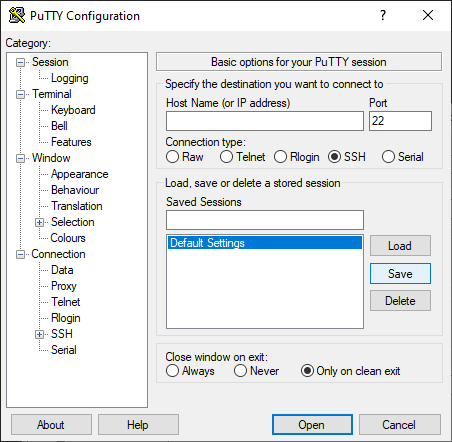
Make sure Default Settings is selected under Saved Sessions. We save the settings by clicking Save.
#!/bin/bash
rm dosya-yolu
echo "silindi: dosya-yolu/n"
sleep 0.1
rm dosya-yolu
echo "silindi: dosya-yolu/n"
sleep 0.1
....
şeklinde sh dosyası oluşturup çalıştırabilirsiniz.
Çok uzun süren işlemlerde ssh ile bağlanınca Putty gibi yazılımlar timeout olabiliyor. Bunun için screen komutunu kullanabilirsin. Bağlantıyı kapatsan bile o sunucuda çalışmaya devam eder, tekrar bağlanıp screen komutu ile devam eden süreci görebilirsin.
Putty nasıl timeout olmaz? Sitemde putty ile ilgili ayarı yazmıştım, (onrz.net)
When connecting to the server with Putty, I recommend setting the following setting to avoid timeout during extended operations. In the Connection tab.
We set Seconds between keepalives to 10.
The Disable Nagles Algorithm checkbox must be selected.
The Enable TCP Keepalives box must be selected.
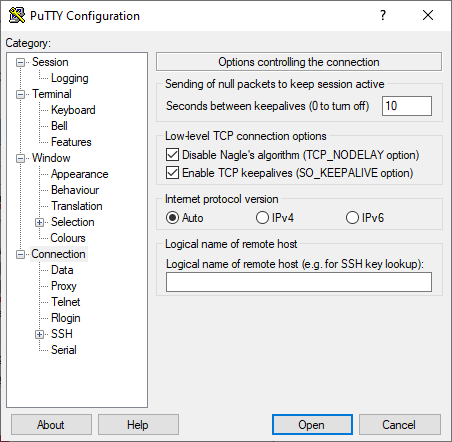
Now we need to keep these settings as default. So this setting will take effect every time we open Putty.
Make sure Default Settings is selected under Saved Sessions. We save the settings by clicking Save.
Skype var mı hocam.