
Visual Studio'yu açın.
Yeni bir proje oluşturun ve "Windows Forms App" seçin. (C# ile) +.NET Freamwork olan
Projenizi adlandırın (örneğin, YouTubeDownloader).
2. Windows Forms Arayüzünü Tasarlama
Form üzerinde aşağıdaki bileşenleri ekleyin:
TextBox: Kullanıcıdan video URLsini alacağımız alan.
ComboBox: Kullanıcıya video veya ses formatını seçme imkânı sunacak.
Button: İndirme işlemini başlatmak için.
ProgressBar: İndirme işleminin ilerlemesini gösterecek.
Label: Kullanıcıya bilgi vermek için.
Arayüzüne eklediklerimiz ve işlevleri
TextBox (txtUrl): Kullanıcıdan URL alacak.
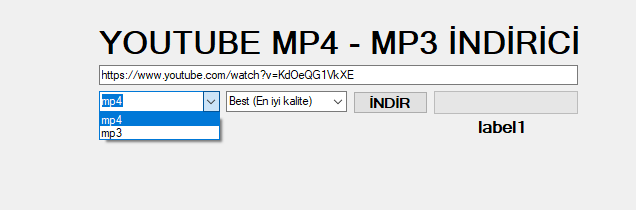
ComboBox (cmbFormat): Format seçimi yapacak (MP4/MP3).
Button (btnDownload): İndirme işlemi başlatacak.
ProgressBar (progressBar): İndirme ilerlemesini gösterecek.
Label (lblStatus): İndirme durumu veya hata mesajı gösterecek.
Eklediğimiz araçlara isim verelim : isim yeri sağ alt görselde işaretlediğim bölge
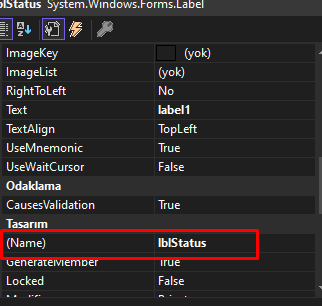
TextBox: txtUrl (Video URL'si için)
ComboBox: cmbFormat (Video formatı seçmek için, örneğin "mp4", "mp3")
Button: btnDownload (İndirme işlemini başlatmak için)
ProgressBar: progressBar (İlerleme göstergesi için)
Label: lblStatus (İndirme durumu veya hata mesajlarını göstermek için)
3. yt-dlp Aracını Entegre Etme
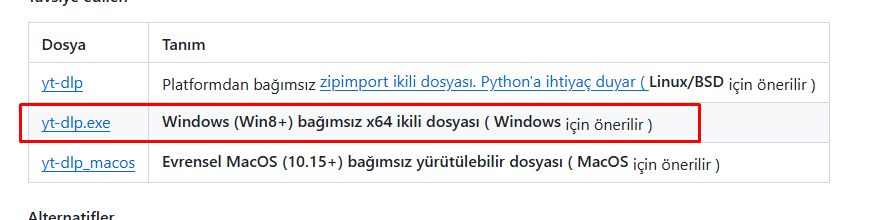
yt-dlp aracını https://github.com/yt-dlp/yt-dlp?tab=readme-ov-file bu linkten resimde gösterdiğimi indirip masaüstüne atıyorsunuz sadece başka işlemi yok
4. ffmpeg aracı entegre etme
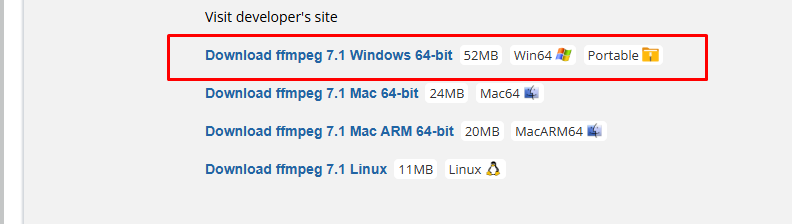
https://www.videohelp.com/software/ffmpeg bu siteden işaretlediğimi indiriyorsunuz rarı açıp bin klasörünün içindeki sadece ffmpeg.exe dosyasınıda masaüstüne atıyorsunuz
5.form alanına tıklayıp kod bölümüne geçiyoruz ve aşağıdaki kodları dikkatli şekilde ekliyoruz
using System;
using System.Diagnostics;
using System.IO;
using System.Windows.Forms;

namespace YouTubeDownloader
{
    public partial class Form1 : Form
    {
        public Form1()
        {
            InitializeComponent();

            // Format seçenekleri
            cmbFormat.Items.Add("mp4"); // Video formatı
            cmbFormat.Items.Add("mp3"); // Ses formatı
            cmbFormat.SelectedIndex = 0; // Varsayılan mp4

            // Kalite seçenekleri
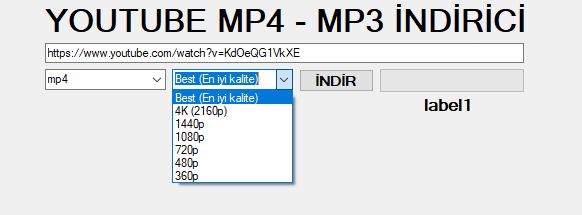
            cmbQuality.Items.Add("Best (En iyi kalite)"); // Varsayılan en yüksek kalite
            cmbQuality.Items.Add("4K (2160p)");
            cmbQuality.Items.Add("1440p");
            cmbQuality.Items.Add("1080p");
            cmbQuality.Items.Add("720p");
            cmbQuality.Items.Add("480p");
            cmbQuality.Items.Add("360p");
            cmbQuality.SelectedIndex = 0; // Varsayılan en yüksek kalite
        }

        private void Form1_Load(object sender, EventArgs e)
        {

        }

        private void btnDownload_Click(object sender, EventArgs e)
        {
            string videoUrl = txtUrl.Text.Trim();
            string format = cmbFormat.SelectedItem.ToString();
            string quality = cmbQuality.SelectedItem.ToString();
            string desktopPath = Environment.GetFolderPath(Environment.SpecialFolder.Desktop);

            if (string.IsNullOrEmpty(videoUrl))
            {
                MessageBox.Show("Lütfen geçerli bir YouTube URL'si girin!", "Hata", MessageBoxButtons.OK, MessageBoxIcon.Warning);
                return;
            }

            progressBar.Style = ProgressBarStyle.Marquee;
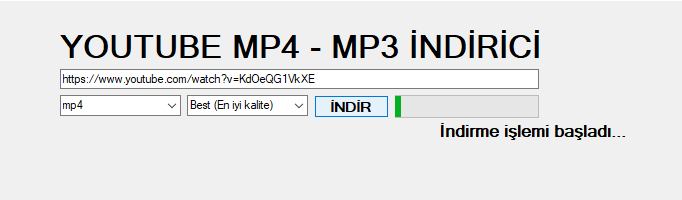
            lblStatus.Text = "İndirme işlemi başladı...";

            try
            {
                string ytdlpPath = Path.Combine(desktopPath, "yt-dlp.exe");
                string ffmpegPath = Path.Combine(desktopPath, "ffmpeg.exe");

                if (!File.Exists(ytdlpPath))
                {
                    MessageBox.Show("yt-dlp.exe bulunamadı! Lütfen dosyanın masaüstünde olduğundan emin olun.", "Hata", MessageBoxButtons.OK, MessageBoxIcon.Error);
                    return;
                }

                if (!File.Exists(ffmpegPath))
                {
                    MessageBox.Show("ffmpeg.exe bulunamadı! Lütfen dosyanın masaüstünde olduğundan emin olun.", "Hata", MessageBoxButtons.OK, MessageBoxIcon.Error);
                    return;
                }

                // Kaliteye göre `-f` parametresini belirleme
                string qualityArg = "bv*[ext=mp4]+ba[ext=m4a]/b[ext=mp4]";
                if (quality.Contains("2160p")) qualityArg = "bv[height=2160][ext=mp4]+ba[ext=m4a]/b[ext=mp4]";
                else if (quality.Contains("1440p")) qualityArg = "bv[height=1440][ext=mp4]+ba[ext=m4a]/b[ext=mp4]";
                else if (quality.Contains("1080p")) qualityArg = "bv[height=1080][ext=mp4]+ba[ext=m4a]/b[ext=mp4]";
                else if (quality.Contains("720p")) qualityArg = "bv[height=720][ext=mp4]+ba[ext=m4a]/b[ext=mp4]";
                else if (quality.Contains("480p")) qualityArg = "bv[height=480][ext=mp4]+ba[ext=m4a]/b[ext=mp4]";
                else if (quality.Contains("360p")) qualityArg = "bv[height=360][ext=mp4]+ba[ext=m4a]/b[ext=mp4]";

                string outputFileName = "%(title)s.%(ext)s";

                // Doğru indirme komutu
                string arguments = format == "mp3"
                    ? $"-f \"bestaudio[ext=m4a]\" -x --audio-format mp3 -o \"{desktopPath}\\{outputFileName}\" {videoUrl}"
                    : $"-f \"{qualityArg}\" --merge-output-format mp4 --ffmpeg-location \"{ffmpegPath}\" -o \"{desktopPath}\\{outputFileName}\" {videoUrl}";

                ProcessStartInfo startInfo = new ProcessStartInfo
                {
                    FileName = ytdlpPath,
                    Arguments = arguments,
                    UseShellExecute = false,
                    RedirectStandardOutput = true,
                    RedirectStandardError = true,
                    CreateNoWindow = true
                };

                Process process = new Process { StartInfo = startInfo };
                process.OutputDataReceived += (senderObj, outputEvent) => Console.WriteLine(outputEvent.Data);
                process.ErrorDataReceived += (senderObj, errorEvent) => Console.WriteLine(errorEvent.Data);
                process.Start();
                process.BeginOutputReadLine();
                process.BeginErrorReadLine();
                process.WaitForExit();

                progressBar.Style = ProgressBarStyle.Blocks;
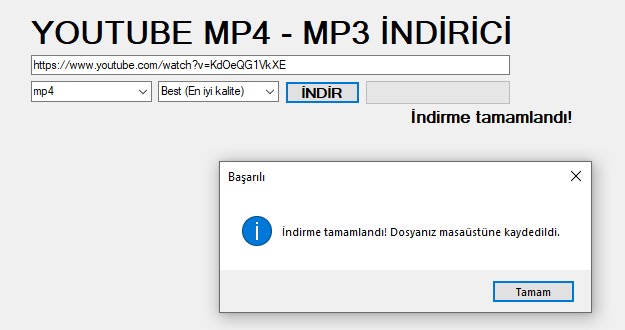
                lblStatus.Text = "İndirme tamamlandı!";
                MessageBox.Show("İndirme tamamlandı! Dosyanız masaüstüne kaydedildi.", "Başarılı", MessageBoxButtons.OK, MessageBoxIcon.Information);
            }
            catch (Exception ex)
            {
                MessageBox.Show($"Bir hata oluştu: {ex.Message}", "Hata", MessageBoxButtons.OK, MessageBoxIcon.Error);
                lblStatus.Text = "Hata oluştu!";
            }
        }
    }
}
ve sonuçlar program görüntüsü size kalmış boş alan url için ister mp4 ister mp3 formatı seçebilirsiniz kalite 4k ya kadar destekliyor indir deyip bekliyorsunuz ve masaüstüne iniyor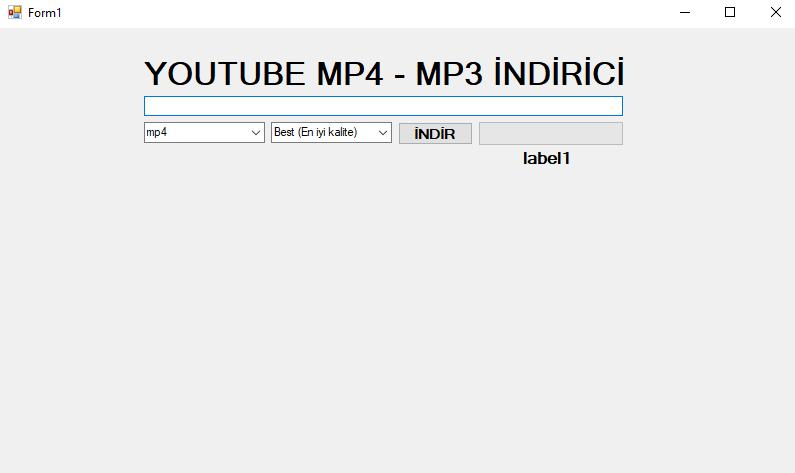
Selamlar bugün Youtube mp4 - mp3 indirme projesi ile geldim artık herkesin kendi youtube video indirme programı oldu kendiniz yapıp kendiniz kullanabiliyorsunuz herşeyi detaylıca anlattım diye düşünüyorum iyi forumlar dilerim..


