
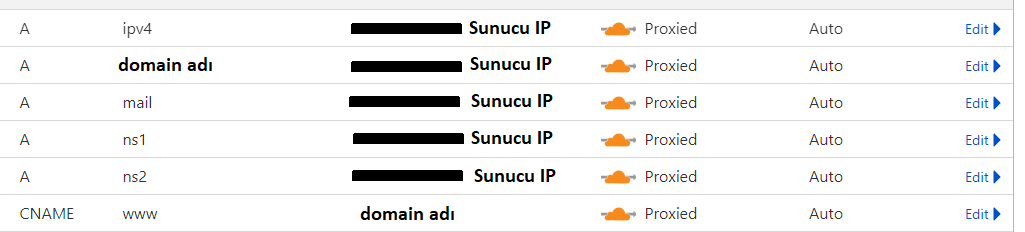
siteadi.com olan siteye,
www.siteadi.com diye girmeye çalışan olursa siteadi.com sürümüne yönlendirmek için kod ekliyorum.
Fakat htacess yönlendirmiyor bir türlü.
Eklediğim kod 1
RewriteEngine On
# 301 redirect www to non-www
RewriteCond %{HTTP_HOST} ^www\.(.*)$ [NC]
RewriteRule ^(.*)$ https://%1/$1 [R=301,L] #
301 redirect to https
RewriteCond %{HTTPS} off
RewriteRule ^(.*)$ https://%{HTTP_HOST}%{REQUEST_URI} [L,R=301]
Kod 2 olarak bunu denedim bir deRewriteEngine on
RewriteCond %{HTTP_HOST} ^www.websiteniz.com [NC]
RewriteRule ^(.*)$ http://websiteniz.com/$1 [L,R=301,NC]Htacess'in mevcut hali de bu# BEGIN WP Rocket v3.12.1.1
# Use UTF-8 encoding for anything served text/plain or text/html
AddDefaultCharset UTF-8
# Force UTF-8 for a number of file formats
<IfModule mod_mime.c>
AddCharset UTF-8 .atom .css .js .json .rss .vtt .xml
</IfModule>
# FileETag None is not enough for every server.
<IfModule mod_headers.c>
Header unset ETag
</IfModule>
# Since were sending far-future expires, we dont need ETags for static content.
# developer.yahoo.com/performance/rules.html#etags
FileETag None
# Send CORS headers if browsers request them; enabled by default for images.
<IfModule mod_setenvif.c>
<IfModule mod_headers.c>
# mod_headers, y u no match by Content-Type?!
<FilesMatch "\.(avifs?|cur|gif|png|jpe?g|svgz?|ico|webp)$">
SetEnvIf Origin ":" IS_CORS
Header set Access-Control-Allow-Origin "*" env=IS_CORS
</FilesMatch>
</IfModule>
</IfModule>
# Allow access to web fonts from all domains.
<FilesMatch "\.(eot|otf|tt[cf]|woff2?)$">
<IfModule mod_headers.c>
Header set Access-Control-Allow-Origin "*"
</IfModule>
</FilesMatch>
<IfModule mod_alias.c>
<FilesMatch "\.(html|htm|rtf|rtx|txt|xsd|xsl|xml)$">
<IfModule mod_headers.c>
Header set X-Powered-By "WP Rocket/3.12.1.1"
Header unset Pragma
Header append Cache-Control "public"
Header unset Last-Modified
</IfModule>
</FilesMatch>
<FilesMatch "\.(css|htc|js|asf|asx|wax|wmv|wmx|avi|bmp|class|divx|doc|docx|eot|exe|gif|gz|gzip|ico|jpg|jpeg|jpe|json|mdb|mid|midi|mov|qt|mp3|m4a|mp4|m4v|mpeg|mpg|mpe|mpp|otf|odb|odc|odf|odg|odp|ods|odt|ogg|pdf|png|pot|pps|ppt|pptx|ra|ram|svg|svgz|swf|tar|tif|tiff|ttf|ttc|wav|wma|wri|xla|xls|xlsx|xlt|xlw|zip)$">
<IfModule mod_headers.c>
Header unset Pragma
Header append Cache-Control "public"
</IfModule>
</FilesMatch>
</IfModule>
<IfModule mod_mime.c>
AddType image/avif avif
AddType image/avif-sequence avifs
</IfModule>
# Expires headers (for better cache control)
<IfModule mod_expires.c>
ExpiresActive on
ExpiresDefault "access plus 1 month"
# cache.appcache needs re-requests in FF 3.6 (thanks Remy ~Introducing HTML5)
ExpiresByType text/cache-manifest "access plus 0 seconds"
# Your document html
ExpiresByType text/html "access plus 0 seconds"
# Data
ExpiresByType text/xml "access plus 0 seconds"
ExpiresByType application/xml "access plus 0 seconds"
ExpiresByType application/json "access plus 0 seconds"
# Feed
ExpiresByType application/rss+xml "access plus 1 hour"
ExpiresByType application/atom+xml "access plus 1 hour"
# Favicon (cannot be renamed)
ExpiresByType image/x-icon "access plus 1 week"
# Media: images, video, audio
ExpiresByType image/gif "access plus 4 months"
ExpiresByType image/png "access plus 4 months"
ExpiresByType image/jpeg "access plus 4 months"
ExpiresByType image/webp "access plus 4 months"
ExpiresByType video/ogg "access plus 4 months"
ExpiresByType audio/ogg "access plus 4 months"
ExpiresByType video/mp4 "access plus 4 months"
ExpiresByType video/webm "access plus 4 months"
ExpiresByType image/avif "access plus 4 months"
ExpiresByType image/avif-sequence "access plus 4 months"
# HTC files (css3pie)
ExpiresByType text/x-component "access plus 1 month"
# Webfonts
ExpiresByType font/ttf "access plus 4 months"
ExpiresByType font/otf "access plus 4 months"
ExpiresByType font/woff "access plus 4 months"
ExpiresByType font/woff2 "access plus 4 months"
ExpiresByType image/svg+xml "access plus 4 months"
ExpiresByType application/vnd.ms-fontobject "access plus 1 month"
# CSS and JavaScript
ExpiresByType text/css "access plus 1 year"
ExpiresByType application/javascript "access plus 1 year"
</IfModule>
# Gzip compression
<IfModule mod_deflate.c>
# Active compression
SetOutputFilter DEFLATE
# Force deflate for mangled headers
<IfModule mod_setenvif.c>
<IfModule mod_headers.c>
SetEnvIfNoCase ^(Accept-EncodXng|X-cept-Encoding|X{15}|~{15}|-{15})$ ^((gzip|deflate)\s*,?\s*)+|[X~-]{4,13}$ HAVE_Accept-Encoding
RequestHeader append Accept-Encoding "gzip,deflate" env=HAVE_Accept-Encoding
# Dont compress images and other uncompressible content
SetEnvIfNoCase Request_URI \
\.(?:gif|jpe?g|png|rar|zip|exe|flv|mov|wma|mp3|avi|swf|mp?g|mp4|webm|webp|pdf)$ no-gzip dont-vary
</IfModule>
</IfModule>
# Compress all output labeled with one of the following MIME-types
<IfModule mod_filter.c>
AddOutputFilterByType DEFLATE application/atom+xml \
application/javascript \
application/json \
application/rss+xml \
application/vnd.ms-fontobject \
application/x-font-ttf \
application/xhtml+xml \
application/xml \
font/opentype \
image/svg+xml \
image/x-icon \
text/css \
text/html \
text/plain \
text/x-component \
text/xml
</IfModule>
<IfModule mod_headers.c>
Header append Vary: Accept-Encoding
</IfModule>
</IfModule>
<IfModule mod_mime.c>
AddType text/html .html_gzip
AddEncoding gzip .html_gzip
</IfModule>
<IfModule mod_setenvif.c>
SetEnvIfNoCase Request_URI \.html_gzip$ no-gzip
</IfModule>
<IfModule mod_rewrite.c>
RewriteEngine On
RewriteBase /
RewriteCond %{HTTPS} on [OR]
RewriteCond %{SERVER_PORT} ^443$ [OR]
RewriteCond %{HTTP:X-Forwarded-Proto} https
RewriteRule .* - [E=WPR_SSL:-https]
RewriteCond %{HTTP:Accept-Encoding} gzip
RewriteRule .* - [E=WPR_ENC:_gzip]
RewriteCond %{REQUEST_METHOD} GET
RewriteCond %{QUERY_STRING} =""
RewriteCond %{HTTP:Cookie} !(wordpress_logged_in_.+|wp-postpass_|wptouch_switch_toggle|comment_author_|comment_author_email_) [NC]
RewriteCond %{REQUEST_URI} !^(/hesabim|/odeme|/sepet|/ogrenci-kaydi|/egitmen-kaydi|/(?:.+/)?feed(?:/(?:.+/?)?)?$|/(?:.+/)?embed/|/odeme/(.*)|/sepet/|/hesabim/(.*)|/wc-api/v(.*)|/(index\.php/)?wp\-json(/.*|$))$ [NC]
RewriteCond %{HTTP_USER_AGENT} !^(facebookexternalhit|WhatsApp).* [NC]
RewriteCond "%{DOCUMENT_ROOT}/wp-content/cache/wp-rocket/%{HTTP_HOST}%{REQUEST_URI}/index%{ENV:WPR_SSL}%{ENV:WPR_WEBP}.html%{ENV:WPR_ENC}" -f
RewriteRule .* "/wp-content/cache/wp-rocket/%{HTTP_HOST}%{REQUEST_URI}/index%{ENV:WPR_SSL}%{ENV:WPR_WEBP}.html%{ENV:WPR_ENC}" [L]
</IfModule>
# END WP Rocket
# BEGIN WordPress
# "BEGIN WordPress" ve "END WordPress" arasındaki yönergeler (satırlar)
# dinamik olarak oluşturulmuştur ve sadece WordPress süzgeçleri ile düzenlenmelidir.
# Bu işaretler arasındaki yönergelerde yapılan değişiklikler üzerine yazılacaktır.
# BEGIN Redirects
RewriteEngine On
# 301 redirect www to non-www
RewriteCond %{HTTP_HOST} ^www\.(.*)$ [NC]
RewriteRule ^(.*)$ https://%1/$1 [R=301,L]
# 301 redirect to https
RewriteCond %{HTTPS} off
RewriteRule ^(.*)$ https://%{HTTP_HOST}%{REQUEST_URI} [L,R=301]
# END Redirects
# END WordPress 


 hızlı yazarken yanlış yazmışım
