• 12-01-2023, 15:55:35
    #10
    endmd adlı üyeden alıntı: mesajı görüntüle
    Dediğiniz üzere bu şekilde değişiklik yaptım. Ama sonuç yine aynı.
     const getDetails = async () => {
        setIsLoading(true);
        // setDetails([]);
        const options = {
          method: "GET",
          headers: {
            "X-RapidAPI-Key": process.env.REACT_APP_MEAL_RECIPE_API_KEY,
            "X-RapidAPI-Host": "food-recipe-api.p.rapidapi.com",
          },
        };
        await fetch(
          `https://${process.env.REACT_APP_MEAL_RECIPE_API_HOST}/recipe/${params.id}`,
          options,
          { signal: controller.signal }
        )
          .then(async (response) => await response.json())
          .then(async (response) => await setDetails(response[0])
          )
          
          const cleanUp = () => {
            controller.abort();
            setIsLoading(false);
          };
          return cleanUp();
      };
      useEffect(() => {
        getDetails();
      
      }, [params.id]);
    Böyle değil. Akşam müsait olursam ilgili kodu düzenleyip atarım size.
  • 12-01-2023, 16:53:04
    #11
    Developer adlı üyeden alıntı: mesajı görüntüle
    Böyle değil. Akşam müsait olursam ilgili kodu düzenleyip atarım size.
    Teşekkür ederim, tamamdır.
  • 13-01-2023, 20:18:57
    #12
    endmd adlı üyeden alıntı: mesajı görüntüle
    Merhaba,
    APİ ile bir yemek tarif sitesi üzerinde çalışıyorum. Tarife tıklandığında useparams ile tarif Id sini alıyorum ve fetch ile tarifi ekrana getiriyorum. Ama her tarife tıkladığımda bir önceki açılan tarifin bilgileri ekranda ama eğer url yi yenilersem doğru tarif geliyor ekrana.(çünkü navigate işlemi doğru ve url deki id de doğru)
    Hatayı nerede yapıyorum, yardımcı olur musunuz? Yani kodlarımdaki mantığa göre fetch te bir önceki params.id yi getiriyor her fonksiyon çalıştığında ama iyi de neden?
    23 ve 38. satırlar

    //bu en son ki
    import { useEffect, useState } from "react";
    import styled from "styled-components";
    import { useParams } from "react-router-dom";
    import React from "react";
    function Recipe() {
      const [details, setDetails] = useState([]);
      const [activeTabs, setActiveTabs] = useState("ingredients");
      const [isLoading, setIsLoading] = useState(null);
      const params = useParams();
      const controller = new AbortController();
      const getDetails = async () => {
        setIsLoading(true);
        // setDetails([]);
        const options = {
          method: "GET",
          headers: {
            "X-RapidAPI-Key": process.env.REACT_APP_MEAL_RECIPE_API_KEY,
            "X-RapidAPI-Host": "food-recipe-api.p.rapidapi.com",
          },
        };
        await fetch(
          `https://${process.env.REACT_APP_MEAL_RECIPE_API_HOST}/recipe/${params.id}`,
          options,
          { signal: controller.signal }
        )
          .then((response) => response.json())
          .then((response) => {
            setDetails(response[0]);
          })
          .then(() => {
            controller.abort();
            setIsLoading(false);
          });
      };
      useEffect(() => {
        getDetails();
      }, [params.id]);
      return (
        <DetailWrapper>
          {isLoading && <p>...Loading</p>}
          {!isLoading && (
            <div>
              <ul>
                {activeTabs === "ingredients" &&
                  details.ingredients &&
                  details.ingredients.map((ingredient, index) => (
                    <li key={index}>
                      {ingredient.amount} {ingredient.ingredientValue}{" "}
                      {ingredient.ingredientKey}
                    </li>
                  ))}
              </ul>
              <ul>
                {activeTabs === "instructions" &&
                  details.descriptionSteps &&
                  details?.descriptionSteps?.map((steps, index) => (
                    <li key={index}>{steps.description}</li>
                  ))}
              </ul>
              <div>
                <div>
                  <h2>{details.title}</h2>
                </div>
                <img src={details.img} alt={details.title} />
              </div>
              <Info>
                <div>
                  <Button
                    className={activeTabs === "instructions" ? "active" : ""}
                    onClick={() => setActiveTabs("instructions")}
                  >
                    Instructions
                  </Button>
                </div>
                <div>
                  <Button
                    className={activeTabs === "ingredients" ? "active" : ""}
                    onClick={() => setActiveTabs("ingredients")}
                  >
                    Ingredients
                  </Button>
                </div>
              </Info>
            </div>
          )}
        </DetailWrapper>
      );
    }
    
    export default Recipe;
    Merhaba,

    Kodunda Async-Await işlemlerinin hatalı olduğunu belirtmiştim. Bir fonksiyondan dışarıya cevap vermen gerekli async işlemini sağlayabilmek için. Yani bir return veya bir resolve dönmen gerekiyor. Örneğin:

    const abc = () => {
         return new Promise(resolve => {
              resolve(true)
         });
    }
    
    console.log(await abc()); // true
    
    // veya
    
    
    abc()
         .then(data => {
              console.log(data) // true
         })
    Sen eğer useEffect içerisinde getDetails()'den sonra bir fonksiyon çalıştırmak istersen, önce çalışabilir. Çünkü async işlemi başarılı değil. Burada şöyle bir düzeltme yapman gerekli:

      const getDetails = async () => {
        setIsLoading(true);
        // setDetails([]);
        const options = {
          method: "GET",
          headers: {
            "X-RapidAPI-Key": process.env.REACT_APP_MEAL_RECIPE_API_KEY,
            "X-RapidAPI-Host": "food-recipe-api.p.rapidapi.com",
          },
        };
        return fetch(
          `https://${process.env.REACT_APP_MEAL_RECIPE_API_HOST}/recipe/${params.id}`,
          options,
          { signal: controller.signal }
        )
          .then((response) => response.json())
          .then((response) => {
            setDetails(response[0]);
            return response;
          })
          .then(response => {
            controller.abort();
            setIsLoading(false);
            return response;
          });
      };
    Bu şekilde useEffect içerisinde getDetails'i await hale getirebilirsin veya then-catch yapabilirsin. Veya:

      const getDetails = async () => {
        return new Promise((resolve, reject) => {
            
    setIsLoading(true);
        // setDetails([]);
        const options = {
          method: "GET",
          headers: {
            "X-RapidAPI-Key": process.env.REACT_APP_MEAL_RECIPE_API_KEY,
            "X-RapidAPI-Host": "food-recipe-api.p.rapidapi.com",
          },
        };
        return fetch(
          `https://${process.env.REACT_APP_MEAL_RECIPE_API_HOST}/recipe/${params.id}`,
          options,
          { signal: controller.signal }
        )
          .then((response) => response.json())
          .then((response) => {
            setDetails(response[0]);
            return response;
          })
          .then(response => {
            controller.abort();
            setIsLoading(false);
            resolve(response)
          })
          .catct(err => {
               reject(err)
          )
        )
      };
    Bu iki şekilden birini kullanabilirsin. useEffect içerisinde ise:

    useEffect(() => {
         (async () => {
              await getDetails();
         })();
    }, [params.id])
    
    // veya
    useEffect(() => {
         getDetails()
         .then(data => {
              console.log(data)
         })
    }, [params.id])
    Bu şekilde çağırabilirsin. Bu aşamalardan sonra da useEffect içerisinde URL değiştiğinde params değişiyor mu bunu kontrol et. Eğer params değişiyorsa problem yok. Eğer params değişmiyorsa bir şeyler yanlış gidiyor olabilir. params.id değilde params olarakta deneyebilirsin. Umarım açıklayıcı olabilmişimdir.
  • 13-01-2023, 21:50:30
    #13
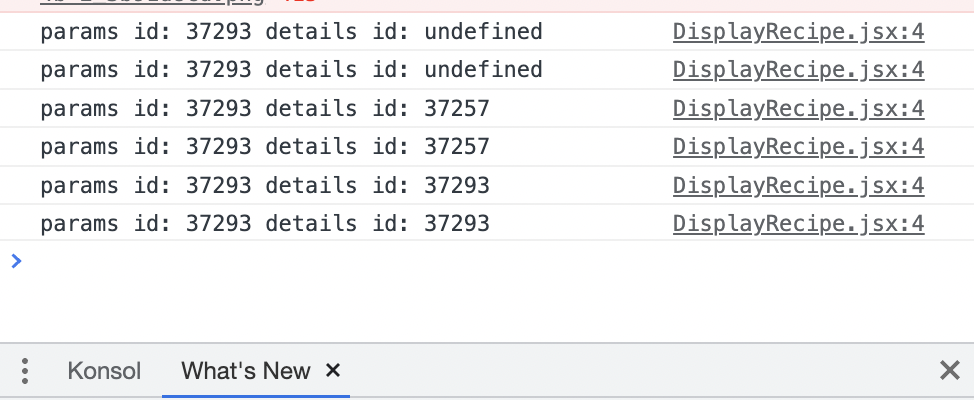
    @Developer; Detaylı cevabınız için teşekkür ederim, yine de kontrol ettiğimde ikinci then zincirinde setDetails(response[0]); hala geç set ediyor. params da sorun yok. Bakın konsolda details id son iki renderda doğru basıyor
  • 13-01-2023, 21:53:15
    #14
    endmd adlı üyeden alıntı: mesajı görüntüle
    @Developer; Detaylı cevabınız için teşekkür ederim, yine de kontrol ettiğimde ikinci then zincirinde setDetails(response[0]); hala geç set ediyor. params da sorun yok. Bakın konsolda details id son iki renderda doğru basıyor
    Birazdan Anydesk ile bağlanıp bakayım. Özelden gönderebilirsin.
  • 13-01-2023, 22:08:40
    #15
    const response = await fetch(..., options)
    if(response.status == 200){
    setDetails(response);
    }