ytscript adlı üyeden alıntı:
mesajı görüntüle
PHP preg_match Döngü Hatası
18
●312
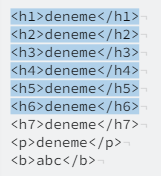
- 20-02-2023, 17:19:30Content'in içinden, h1 h2 h3 h4 h5 h6 ve " deneme text " gelmekte. tiny ileAndyCap adlı üyeden alıntı: mesajı görüntüle
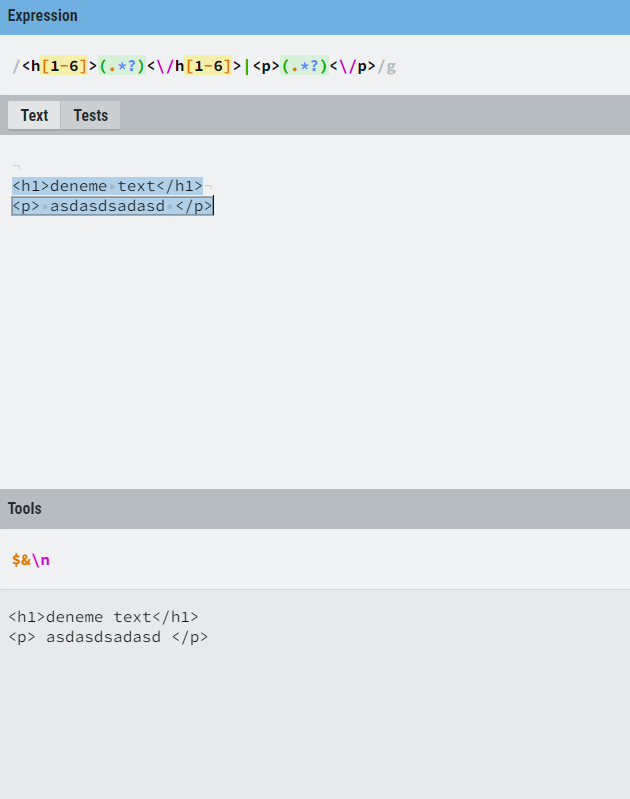
- 20-02-2023, 17:25:52Hocam regex'i ve contenti şu sitede deneyip sonucu bizimle paylaşır mısınız?
https://regexr.com/
adım adım gidelim
regexte hata olmadığını doğrulayalım.
Siteye girdikten sonra ilk kutuya regexi 2. kutuya da contenti yazın sağ altta list dedikten sonra sonuçlar çıkacaktır. No result dönerse regexte hata vardır.
örnek:

- 20-02-2023, 17:53:42 Kimlik doğrulama veya yönetimden onay bekliyor.
<?php preg_match_all('/<h[1-6]>(.*?)</h[1-6]>/', $content, $cikti); foreach($cikti[1] as $title) { echo '<a href="#' . seo($title) . '" onclick="goAnchor(' . seo($title) . ')">' . $title . '</a>' . "<br>"; } foreach ($cikti[0] as $key => $element) { $title = $cikti[1][$key]; $eski_tag = $element; $yeni_tag = "<h$key id='" . seo($title) . "'>"; $content = str_replace($eski_tag, $yeni_tag . $title . "</h$key>", $content); } - 20-02-2023, 17:56:34 Kimlik doğrulama veya yönetimden onay bekliyor.
preg_match_all('/<h[1-6]>(.*?)<\/h[1-6]>/', $content, $cikti); foreach($cikti[1] as $title) { echo '<a href="#' . seo($title) . '" onclick="goAnchor(' . seo($title) . ')">' . $title . '</a>' . "<br>"; } // muhtemel hata olan yer foreach ($cikti[0] as $key => $element) { $title = $cikti[1][$key]; $newElement = '<h1 id="' . seo($title) . '">' . $title . '</h1>'; $content = str_replace($element, $newElement, $content); $newElement = '<h2 id="' . seo($title) . '">' . $title . '</h2>'; $content = str_replace($element, $newElement, $content); $newElement = '<h3 id="' . seo($title) . '">' . $title . '</h3>'; $content = str_replace($element, $newElement, $content); $newElement = '<h4 id="' . seo($title) . '">' . $title . '</h4>'; $content = str_replace($element, $newElement, $content); $newElement = '<h5 id="' . seo($title) . '">' . $title . '</h5>'; $content = str_replace($element, $newElement, $content); $newElement = '<h6 id="' . seo($title) . '">' . $title . '</h6>'; $content = str_replace($element, $newElement, $content); } - 20-02-2023, 17:58:51@AndyCap;adwerd0z1 adlı üyeden alıntı: mesajı görüntüle
@adwerd0z1;
Cevapladığım işlemi direk olarak uyguladığımda, bütün h leri h1 olarak getiriyor. - 20-02-2023, 18:00:48Warning: preg_match_all(): Unknown modifier 'h' inAndyCap adlı üyeden alıntı: mesajı görüntüle
Notice: Trying to access array offset on value of type null in
Warning: Invalid argument supplied for foreach() in
Notice: Trying to access array offset on value of type null in
Warning: Invalid argument supplied for foreach() in
Hatalarını almaktayım. Veriyi getiriyor h leri doğru sıralıyor fakat ilk forwach yanlış dönüyor
@adwerd0z1; - 20-02-2023, 18:06:40iltu33 adlı üyeden alıntı: mesajı görüntüle
preg_match_all('/<h[1-6]>(.*?)<\/h[1-6]>/', $content, $cikti);

if (!empty($cikti[0])) {
    foreach ($cikti[1] as $title) {
        echo '<a href="#' . seo($title) . '" onclick="goAnchor(' . seo($title) . ')">' . $title . '</a>' . "<br>";
    }

    foreach ($cikti[0] as $key => $element) {
        $title = $cikti[1][$key];
        $newElement = '<h' . ($key + 1) . ' id="' . seo($title) . '">' . $title . '</h' . ($key + 1) . '>';
        $content = str_replace($element, $newElement, $content);
    }
}