• 21-12-2018, 14:11:22
    #1
    herkese selamlar kolay gelsin arkadaşlar
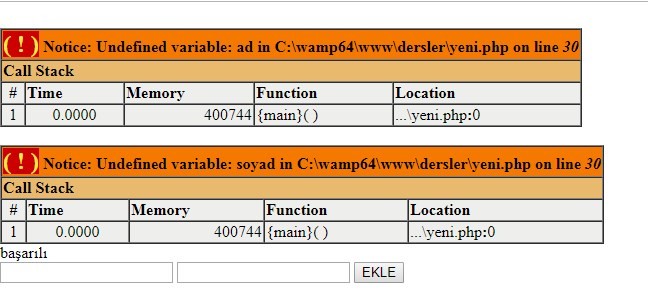
    bu hatayı anlayamadım ne yapmam gerek bilen var mı sorun nere de
    phpmyadminede boş olarak ekleme yapıyor ad soyad
    [url=https://hizliresim.com/zjYnM4][/url

    kodlar

    <?php     
    $baglanti= new PDO("mysql:host=localhost;dbname=kisiler;charset=utf8","root","123456");
    $baglanti->exec("SET NAMES utf8");
         
    
    ?>
    <?php  


    ?>


    <?php  
    
    
    if (@$_POST["buton"]):
    
    @$ad=htmlspecialchars($_POST["ad"]);
    @$soyad=htmlspecialchars($_POST["soyad"]);
    
    if (empty($ad) or empty($soyad));
    echo "boş olamaz ";
    else:
    $baglanti->query("insert into kisisel (ad,soyad) VALUES ('$ad','$soyad')");
    echo "başarılı";	
    endif;
    
    ?>


    <form action=" " method="post">
    
    <input type="text" name="ad" />
    
    <input type="text" name="soyad" />
    <input type="submit" name="buton" value="EKLE" />
    
    </form>

    ]

    if (empty($ad) or empty($soyad)); şurda noktalı virgul vardı onu düzelttim ama sorun aynı sorun su buton basılı geliyor phpmyadmine boş olarak sayfayı yeniledikçe kayıt yapıyor
  • 21-12-2018, 14:18:28
    #2
    if (isset($_POST["buton"])
    kullanırsanız sorununuz çözülecektir.Forum post edilmişse kodlarınız çalışsın demek.

    if (<span class="userTag">@$_POST[</span>"buton"]): Bu kodun yerine yazabilirsiniz
  • 21-12-2018, 14:19:02
    #3
    <?php
    if() {
    }
    ?>

    if koşulunda sıkıntı olabilir mi ? süslü parantezler gibi.

    Düzeltme iki noktaları görmedim.
  • 21-12-2018, 14:33:26
    #4
    Alkoz adlı üyeden alıntı: mesajı görüntüle
    if (isset($_POST["buton"])
    kullanırsanız sorununuz çözülecektir.Forum post edilmişse kodlarınız çalışsın demek.

    if (<span class="userTag">@$_POST[</span>"buton"]): Bu kodun yerine yazabilirsiniz
    hocam öncelikle ilgi gösterip zaman ayırıp cevap verdiğiniz için teşekürler

    hocam aşşağıdakini yaptım hata devam etti
    Alkoz adlı üyeden alıntı: mesajı görüntüle
    if (isset($_POST["buton"])
    -

    bunu yaptım söz dizim hatası aldım
    if (<span class="userTag">@$_POST[</span>"buton"]): Bu kodun yerine yazabilirsiniz


    Qarinqo adlı üyeden alıntı: mesajı görüntüle
    <?php
    if() {
    }
    ?>

    if koşulunda sıkıntı olabilir mi ? süslü parantezler gibi.

    Düzeltme iki noktaları görmedim.
    hocam öncelikle zaman ayırıp cevap yazdığınız için teşekkürler

    dediğiniz gibi bir sorun yok hocam : noktalar mevcut
  • 21-12-2018, 14:40:02
    #5
    Üyeliği durduruldu
    ozgun58 adlı üyeden alıntı: mesajı görüntüle
    herkese selamlar kolay gelsin arkadaşlar
    bu hatayı anlayamadım ne yapmam gerek bilen var mı sorun nere de

    [url=https://hizliresim.com/zjYnM4][/url

    kodlar

    <?php    
    $baglanti= new PDO("mysql:host=localhost;dbname=kisiler;charset=utf8","root","123456");
    $baglanti->exec("SET NAMES utf8");
     
    
    ?>
    <?php  


    ?>


    <?php  
    
    
    if (@$_POST["buton"]):
    
    @$ad=htmlspecialchars($_POST["ad"]);
    @$soyad=htmlspecialchars($_POST["soyad"]);
    
    if (empty($ad) or empty($soyad));
    echo "boş olamaz ";
    else:
    $baglanti->query("insert into kisisel (ad,soyad) VALUES ('$ad','$soyad')");
    echo "başarılı";    
    endif;
    
    ?>


    <form action=" " method="post">
    
    <input type="text" name="ad" />
    
    <input type="text" name="soyad" />
    <input type="submit" name="buton" value="EKLE" />
    
    </form>
    ]

    <?php
    if(isset($_POST['buton'], $_POST['ad'], $_POST['soyad']) && !empty($_POST['ad']) && !empty($_POST['soyad'])) {
    $ad = htmlspecialchars($_POST['ad']);
    $soyad = htmlspecialchars($_POST['soyad']);
    $baglanti->query('insert into kisisel(ad,soyad) VALUES ($ad, $soyad)');
    } else {
    echo 'boş olamaz';
    }
    ?>
    <form action="" method="post">
    <input type="text" name="ad" />
    <input type="text" name="soyad" />
    <input type="submit" name="buton" value="EKLE" />
    </form>
  • 21-12-2018, 14:40:50
    #6
    2. if kullanımda endif değilde normal parantezli if kullanmak daha sağlıklı.İç içe iflerde if:endif; önerilmez.
    <?php  
     
     
    if (isset($_POST["buton"])):
     
    $ad=htmlspecialchars($_POST["ad"]);
    $soyad=htmlspecialchars($_POST["soyad"]);
     
    if (empty($ad) or empty($soyad)){
    echo "boş olamaz ";
    }else{
    $baglanti->query("insert into kisisel (ad,soyad) VALUES ('$ad','$soyad')");
    echo "başarılı";
    }
    endif;


    ?>


    <form action=" " method="post">
     
    <input type="text" name="ad" />
     
    <input type="text" name="soyad" />
    <input type="submit" name="buton" value="EKLE" />
     
    </form>
  • 21-12-2018, 14:47:54
    #7
    hasyer adlı üyeden alıntı: mesajı görüntüle
    if(isset($_POST['buton'], $_POST['ad'], $_POST['soyad']) && !empty($_POST['ad']) && !empty($_POST['soyad'])) {
    $ad = htmlspecialchars($_POST['ad']);
    $soyad = htmlspecialchars($_POST['soyad']);
    $baglanti->query('insert into kisisel(ad,soyad) VALUES ($ad, $soyad)');
    } else {
    echo 'boş olamaz';
    }
    hocam öncelikle zaman ayırıp cevap verdiğiniz için teşekkürler
    dediğiniz gibi yaptım fakat hiç bir ekleme yapmadı phpmyadmine baktım
  • 21-12-2018, 14:52:02
    #8
    <?php
    
    $baglanti= new PDO("mysql:host=localhost;dbname=kisiler;charset=utf8","root","123456");
    $baglanti->exec("SET NAMES utf8");
     
    if ( isset($_POST["buton"]) ){
     
    $ad = htmlspecialchars( $_POST["ad"] );
    $soyad = htmlspecialchars($_POST["soyad"]);
     
    if ( empty($ad) || empty($soyad) ){
    echo "boş olamaz!";
    }else{
    $baglanti->query("insert into kisisel (ad,soyad) VALUES ({$ad}, {$soyad})");
    echo "başarılı";
    } }
     
    ?>
    
    <form action="" method="post">
    <input type="text" name="ad" />
    <input type="text" name="soyad" />
    <input type="submit" name="buton" value="EKLE" />
    </form>
    Bu kodu deneyin, eğer olmazsa yeni çıkan hatalarla birlikte yeniden ekran resmi gönderin tekrar bakayım.
  • 21-12-2018, 14:59:43
    #9
    şu şekilde çalışacaktır. https://paste.ofcode.org/wTzZHJpkcdH3swCmN9MNkz